
On this page
Start here
Quick answer
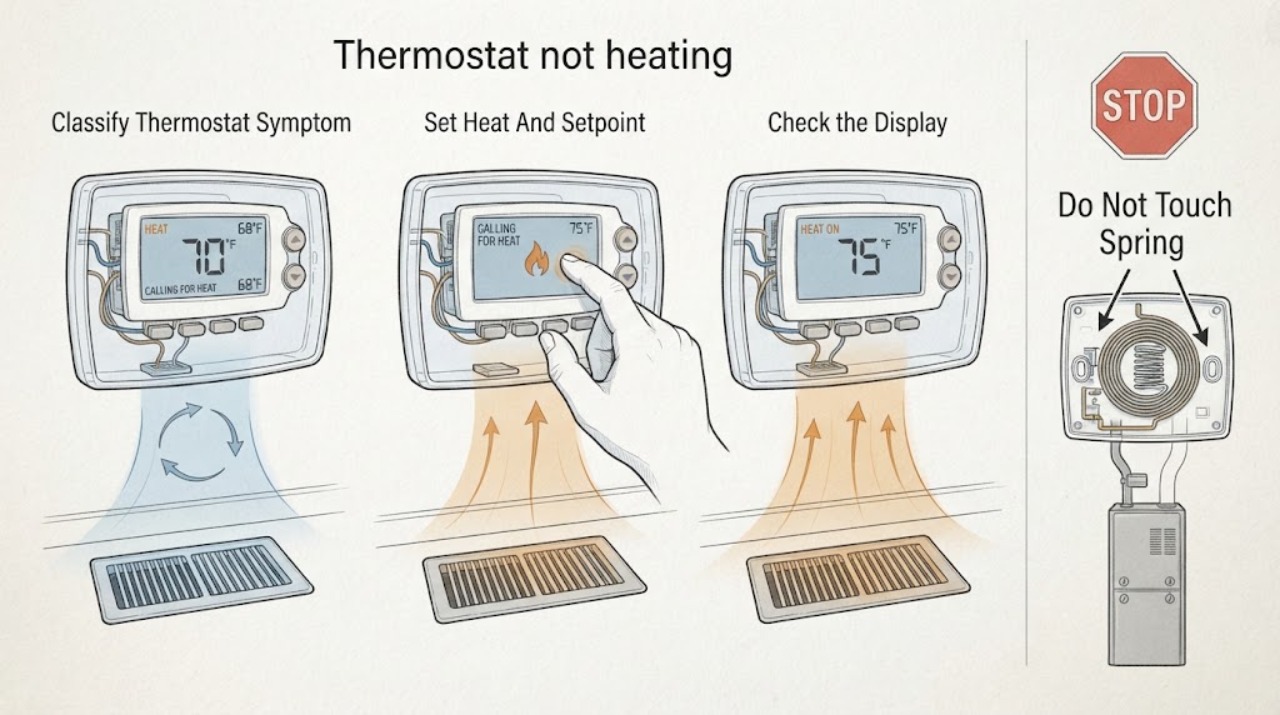
First separate a thermostat problem from a heating-equipment problem. Check that the display has power, the mode is Heat, and the set temperature is above the room reading; then allow the normal equipment delay shown by the thermostat or manual. Observe whether the thermostat shows a heat call and whether air comes from the vents. Replace batteries only when the model uses them, inspect the accessible filter and vents for blocked airflow, and check the HVAC power switch or breaker only from a safe position. Do not remove thermostat wires, open the furnace or air-handler cabinet, test live voltage, or repeatedly reset a tripping breaker. If the display calls for heat but the equipment does not respond, the system cycles abnormally, wiring is exposed or damaged, there is a burning or fuel smell, or basic checks do not restore heat, stop and arrange qualified HVAC service.
Before you begin
Safety first
- This article covers ordinary thermostat controls, batteries when applicable, safe power observation, accessible filter and vent checks, and symptom documentation only. A qualified HVAC professional must handle wiring, live voltage, furnace or heat-pump panels, combustion, refrigerant, blower, controls, and safety devices.
Work through in order
Diagnostic checks
Use only checks that match the exact appliance or system and its official guide.
-
Check 1
Record whether the thermostat display is blank, frozen, inaccurate, or active; note the selected mode, setpoint, room reading, heat indicator, and whether the complaint is no airflow, room-temperature airflow, weak heat, or a system that cycles off.
Expected result: The display is either unpowered or responsive; when Heat is selected it either shows a heat call, shows a delay or error, or shows no call because the setpoint is not requesting heat.
Next step: Use the matching branch and keep a photo or written record of the display and settings for the HVAC technician.
Stop if: Stop immediately for exposed or frayed wiring, smoke, burning or fuel smell, sparking, water near electrical equipment, or an unsafe equipment location.
Why this matters
Why: A blank display directs the first check toward batteries or system power. An active heat call with no warm air shifts attention toward airflow or the heating equipment. No heat call can be a mode, schedule, setpoint, configuration, or sensor issue rather than a failed furnace.
-
Check 2
Set the thermostat to Heat and raise the target above the displayed room temperature as directed by the thermostat manual; confirm the fan setting and schedule are not overriding the request, then allow the normal delay shown by the system.
Expected result: A heat-on, flame, sun, or equivalent indicator appears and becomes active after the normal delay; alternatively the indicator flashes continuously, an error appears, the mode will not stay on Heat, or nothing changes.
Next step: If the call is present, observe the vents and equipment without opening it; if the call cannot be made with the documented controls, stop and use the service branch.
Stop if: Do not repeatedly change settings to defeat a delay, alter system type or reversing-valve configuration without the exact manual, or remove wires from the thermostat.
Why this matters
Why: A missing heat call can be caused by mode, setpoint, schedule, or configuration. A stable heat call with no equipment response means the thermostat is requesting heat but does not identify whether the fault is wiring, a safety switch, the furnace, the heat pump, or another system component.
-
Check 3
If the screen is blank, check whether the thermostat uses replaceable batteries and install the manufacturer-specified replacements; for a wired thermostat, check only the labeled HVAC power switch and breaker from a dry, safe position, without opening equipment panels.
Expected result: The display returns after a battery change or safe power restoration, remains blank, or the breaker or switch trips or will not remain on.
Next step: Run one normal heat request only if power is stable and there are no warning signs; arrange service if the display stays blank, the breaker trips again, or the switch will not stay on.
Stop if: Do not bypass a fuse or breaker, open the furnace or air-handler cabinet, expose terminals, test live voltage, or use damaged wiring or a hot electrical component.
Why this matters
Why: A recovered display supports a power or battery cause. A blank display after safe checks may indicate thermostat wiring or internal failure. A breaker that trips again indicates an unresolved HVAC or electrical fault and should not be repeatedly reset.
-
Check 4
With the thermostat calling for heat, check from the room whether air is moving at the supply vents and whether it feels cold, room-temperature, weakly warm, or normally warm; do not reach into the equipment.
Expected result: There is no airflow, airflow is present but cold, airflow is weak, or airflow is warm but the room still does not reach the target.
Next step: Compare one or more accessible vents and continue to the airflow or thermostat-location check; arrange service when the equipment does not respond to a stable heat call.
Stop if: Stop if airflow carries smoke, a burning or fuel smell, unusual scorching heat, or debris from the equipment, or if any check requires opening a panel.
Why this matters
Why: No airflow points toward the furnace or air-handler power, blower, safety, or control path. Airflow that is cold or room temperature with an active heat call points toward the heating equipment or system configuration. Warm air with an inaccurate room reading points back toward sensor placement or calibration.
-
Check 5
Inspect the user-accessible air filter and supply or return grilles; replace a heavily loaded filter only with the size and direction specified by the system documentation, and clear furniture or loose debris from vents without dismantling ductwork.
Expected result: The filter is visibly loaded, airflow improves after the permitted filter change, grilles are blocked, or airflow remains unchanged and weak or absent.
Next step: Allow one normal heat cycle after the safe filter change; call an HVAC professional if the system still cycles rapidly, overheats, produces no airflow, or cannot maintain heat.
Stop if: Do not operate without a required filter, open the blower compartment, clean internal electrical parts, or keep resetting a system that shuts down for protection.
Why this matters
Why: A clogged filter or blocked grille can restrict airflow and cause protective cycling that resembles a thermostat failure. No improvement after a correct filter and vent check makes an equipment, duct, blower, or control issue more likely.
-
Check 6
From ordinary access, compare the thermostat reading with a separate room thermometer and observe whether the thermostat is in direct sun, beside a drafty door or window, near a cooking appliance, or directly above or below a supply register.
Expected result: The readings differ materially, the thermostat is exposed to a local heat or draft source, the display changes when the local condition changes, or the location appears representative and stable.
Next step: Keep nearby doors and windows closed during the comparison, document the readings and location, and ask a qualified technician about relocation or calibration rather than moving the wiring yourself.
Stop if: Do not relocate the thermostat, pull it from the base, remove wires, or open a wall unless a qualified professional is doing the work with power isolated.
Why this matters
Why: A local draft, radiant heat, or poor placement can make the thermostat stop the furnace early or call for heat at the wrong time. A stable, representative location with a persistent mismatch can indicate calibration, sensor, wiring, or system issues that need professional assessment.
-
Check 7
After the safe checks, make at most one normal heat request and document the thermostat indicator, delay or error, vent airflow, filter result, breaker behavior, and any sound or smell; do not disassemble the thermostat or heating equipment.
Expected result: The system heats normally, the thermostat calls but the equipment stays silent or blows cold air, the system short-cycles, or an electrical, combustion, or mechanical warning appears.
Next step: Stop and arrange qualified HVAC service with the exact thermostat and equipment details, settings, readings, and observations; use the emergency or gas-service procedure from a safe location for a suspected fuel leak.
Stop if: Stop immediately for smoke, fuel smell, burning smell, sparking, exposed wiring, repeated breaker trips, water near electrical equipment, carbon-monoxide alarm, or overheating.
Why this matters
Why: A successful cycle supports a setting, power, airflow, or local-sensor condition. Persistent no heat with a valid call cannot identify the failed internal component from ordinary observation. Any warning symptom makes continued testing unsafe.
Use your observations
Decision map
Find the observation that best matches what you see, then follow the next safe action.
-
PATH 01Safety boundary
What you see
The thermostat screen is blank or unresponsive.
Do this next
Replace batteries when applicable and check the labeled HVAC switch or breaker from a safe position; arrange service if the display remains blank or power will not stay on.
Why this path and its safety boundary
Why it matters: The thermostat may lack battery or system power, or may have an internal or wiring fault.
Safety stop: Do not remove wires, open panels, bypass protection, or repeatedly reset a breaker.
-
PATH 02Safety boundary
What you see
The display is active but Heat is not selected, the setpoint is not above room temperature, a schedule overrides the request, or no heat indicator appears.
Do this next
Use the exact thermostat instructions to select Heat, set a higher target, and wait through the normal delay; do not change wiring or system type by guesswork.
Why this path and its safety boundary
Why it matters: The thermostat is not currently asking the HVAC system to heat.
Safety stop: Stop if the mode will not remain selected, the display shows an error, or configuration changes would require wiring access.
-
PATH 03Safety boundary
What you see
The thermostat shows an active heat call but no air comes from accessible vents.
Do this next
Check the accessible filter and labeled power switch or breaker once when safe, then arrange HVAC service if airflow does not return.
Why this path and its safety boundary
Why it matters: The heating equipment, blower, power, door safety, duct, or control path may not be responding; the thermostat itself is not proven to be the cause.
Safety stop: Do not open the furnace or air-handler, defeat a door switch, test live circuits, or repeatedly reset power.
-
PATH 04Safety boundary
What you see
The thermostat shows a heat call and air flows, but it is cold or room temperature rather than expected heat.
Do this next
Confirm the filter and programme or system type from the manual without changing wiring; call a qualified technician if the result persists.
Why this path and its safety boundary
Why it matters: The furnace or heat-pump heating stage, system configuration, airflow protection, or another HVAC component may be at fault.
Safety stop: Stop for smoke, fuel or burning odour, an error that returns, a tripping breaker, abnormal cycling, or any need to open equipment.
-
PATH 05Safety boundary
What you see
Warm air is present but the thermostat reading is inaccurate, or the thermostat is exposed to sun, a draft, a kitchen heat source, or a nearby register.
Do this next
Document the comparison and ask a professional about placement or calibration; do not move the thermostat or wiring as a trial.
Why this path and its safety boundary
Why it matters: The thermostat may be sensing a local condition rather than representative room temperature, or its sensor may need calibration.
Safety stop: Do not pull the thermostat from its base, remove wires, or open a wall.
-
PATH 06Safety boundary
What you see
Correct mode and setpoint, stable power, acceptable airflow, and ordinary-access checks do not restore heat, or an error, short cycling, exposed wiring, burning smell, fuel smell, or repeated breaker trip is present.
Do this next
Stop operating the system and arrange qualified HVAC service; for suspected fuel leakage, leave immediately and contact the local emergency or gas service from a safe location.
Why this path and its safety boundary
Why it matters: The problem has crossed from user checks into HVAC, electrical, combustion, or safety diagnosis.
Safety stop: Do not reconnect, bypass a safety device, reset repeatedly, open equipment, or attempt thermostat rewiring.
Helpful context
Understand the symptom
A heat call does not prove the thermostat is the failed part
A thermostat is the control point that measures room conditions and signals a furnace, heat pump, or other heating system. A dark display may indicate lost thermostat power, while an illuminated display with a heat indicator and no warm air can point beyond the wall control. Start with the visible operating state: mode, setpoint, display, heat indicator, airflow, and the behavior of the heating equipment. System type matters, so use the thermostat and HVAC manuals for the exact configuration.
Use ordinary-access checks only
Battery replacement, a correct Heat setting, a safe check of the HVAC switch or breaker, a clean accessible filter, and clear supply returns are reasonable first checks when the equipment is dry and otherwise normal. A filter or airflow restriction can make a system cycle off for protection and mimic a thermostat fault. Do not infer a failed component from a cold vent alone, and do not move wires or open equipment panels to investigate.
Know when the boundary becomes professional work
Thermostat wiring, furnace controls, heat-pump configuration, high-voltage equipment, combustion systems, and safety switches require model-specific training and testing. If the basic checks pass but the heat call produces no equipment response, if a breaker trips again, or if an error returns, leave the system off and arrange qualified HVAC service. If fuel is suspected, leave the area and use the local emergency or gas-service procedure from a safe location.
Safety boundary
Stop conditions
- Do not remove thermostat wires, change terminals, alter heat-pump or system configuration by guesswork, test live voltage, or open the furnace, air-handler, boiler, or electrical cabinet.
- Stop immediately for smoke, burning or fuel smell, sparking, exposed or frayed wiring, a hot component, water near electrical equipment, a carbon-monoxide alarm, or repeated breaker trips.
- Do not repeatedly reset a breaker, bypass a fuse, door interlock, limit, or other safety device, or continue a cycle after protective shutdown or an error that returns.
- Replace batteries and inspect the accessible filter or vents only as the exact thermostat and HVAC manuals allow; do not operate without a required filter or reach into a blower or burner compartment.
- If gas or other fuel is suspected, leave the area immediately and follow the local emergency or gas-supplier procedure from a safe location; do not use switches, flames, or a mobile device in the suspected leak area.
Only after diagnosis
Potential parts
- thermostat battery
Consider this category only if the exact thermostat model uses replaceable batteries and the display or low-battery indication supports a depleted battery as the cause.
Confirm the exact thermostat manual and battery specification; a wired or rechargeable thermostat may not use replaceable batteries. - thermostat
Consider replacement only after a qualified technician confirms thermostat failure or an incompatible configuration rather than a power, equipment, airflow, or wiring fault.
Confirm the heating and cooling system type, stages, heat-pump or conventional configuration, wiring, power requirements, and manufacturer compatibility before ordering. - HVAC air filter
Consider this category only if the installed system requires a replaceable filter and inspection confirms it is loaded or due for replacement under the system instructions.
Confirm the size, airflow direction, filter type, and manufacturer or equipment requirements; a new filter does not repair an internal heating or control fault.
When checks do not resolve it
Need a professional?
Arrange qualified HVAC service when the thermostat remains blank after applicable battery and safe power checks, when a stable heat call produces no airflow or cold air, when the system short-cycles, when a temperature reading remains inaccurate, when an error returns, or when thermostat wiring, furnace, heat-pump, blower, control, or safety components may be involved. Stop immediately for smoke, burning or fuel smell, sparking, exposed wiring, carbon-monoxide alarm, water near electrical equipment, overheating, or repeated breaker trips.
Safety scope: This article covers ordinary thermostat controls, batteries when applicable, safe power observation, accessible filter and vent checks, and symptom documentation only. A qualified HVAC professional must handle wiring, live voltage, furnace or heat-pump panels, combustion, refrigerant, blower, controls, and safety devices.
Common questions
FAQ
Why does my thermostat say Heat On but the house is still cold?
A heat indicator means the thermostat is requesting heat, not that the furnace or heat pump has delivered it. Check accessible airflow and the filter, then arrange HVAC service if no air or cold air continues; do not open the equipment or thermostat wiring.
What should I check when my thermostat screen is blank?
If the model uses batteries, replace them with the specified type. Otherwise, check the labeled HVAC switch or breaker from a safe position. If the display stays blank or power trips again, leave the system off and call a qualified HVAC professional.
Can a dirty filter make the thermostat seem like it is not heating?
Yes. A heavily loaded filter can restrict airflow and cause protective cycling, which can resemble a thermostat fault. Replace the accessible filter only as the system manual specifies; persistent weak or absent airflow needs professional diagnosis.
Should I remove the thermostat wires to test the heat?
No. Do not remove or move thermostat wires, test live voltage, or change heat-pump or system configuration by guesswork. Incorrect wiring can damage equipment; use the exact manual or arrange qualified HVAC service.
Why is the thermostat temperature different from the room temperature?
Direct sunlight, drafts, nearby cooking heat, or a supply register can make the thermostat sense a local condition rather than the room. Compare with a separate thermometer and document the location; ask a professional about calibration or relocation rather than moving the wiring yourself.
When is a thermostat not heating problem an emergency?
Stop immediately for smoke, burning or fuel smell, sparking, exposed wiring, a hot component, water near electrical equipment, a carbon-monoxide alarm, or repeated breaker trips. For suspected gas leakage, leave immediately and follow the local emergency or gas-supplier procedure from a safe location.
Read the exact guide
Official sources
- Common Thermostat Issues and How to TroubleshootCarrier · Carrier residential thermostat guidance used for general symptom separation; exact thermostat and HVAC manuals govern another system's controls.
- gasU.S. Consumer Product Safety Commission · CPSC gas-safety handout used only for the fuel-odor emergency boundary; it does not diagnose a thermostat or HVAC fault.
- Thermostat Not Working: Causes and SolutionsTrane · Trane residential thermostat guidance used for general thermostat behavior; another brand's owner manual and qualified technician determine system-specific work.
- Why is my Heating not Working?Honeywell Home / Resideo · Honeywell Home guidance for forced-air heating and cooling systems, especially newly installed or previously non-heating thermostats; exact system type and manual control.
Community feedback
Share a repair observation
Share a plain-text repair observation. Accepted observations are published automatically; this page may take a moment to update.