
On this page
Start here
Quick answer
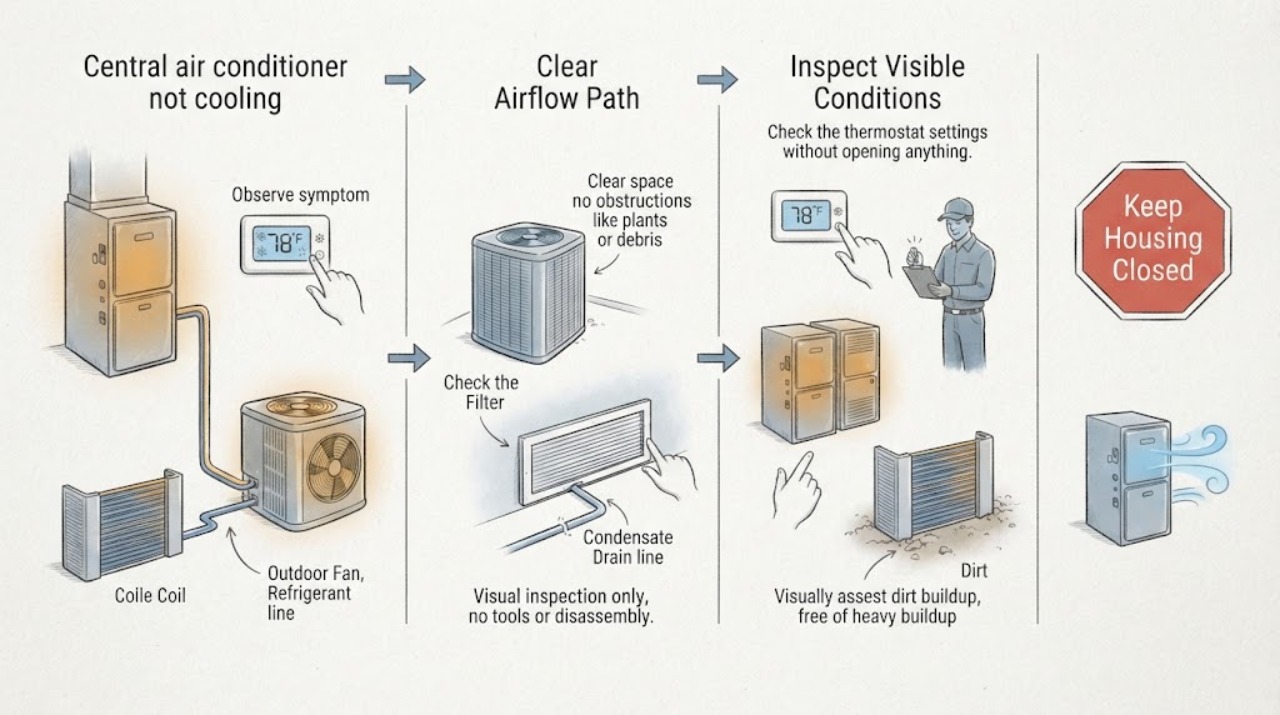
A York thermostat call does not prove that the indoor blower, outdoor condenser, compressor, or refrigerant circuit is producing cooling. Confirm Cool mode, a setpoint below room temperature, and Fan Auto; then note whether air is moving at several registers. Check only the user-accessible filter and unobstructed registers, and observe the outdoor unit from a safe distance for operation or visible debris. Ice, water near electrical equipment, a silent or repeatedly tripping system, burning odor, smoke, or a unit that runs while blowing warm air calls for qualified HVAC service. Do not open panels, test live electrical parts, handle refrigerant, scrape ice, bypass a drain safety switch, or repeatedly reset power.
Before you begin
Safety first
- This article supports checking thermostat settings, a user-serviceable filter, unobstructed registers, visible ice or water, and the outdoor unit's general operating state from a safe distance. It does not authorize panel or cabinet opening, refrigerant handling, live electrical testing, capacitor or compressor work, drain bypass, or wiring changes.
Work through in order
Diagnostic checks
Use only checks that match the exact appliance or system and its official guide.
-
Check 1
At the thermostat, confirm Mode is Cool, the set temperature is below the current room temperature, and Fan is Auto unless the installed York instructions specify otherwise. Allow the system's normal start delay, then feel airflow at several open registers without blocking them.
Expected result: Record whether the cooling call stays active, the indoor blower runs, airflow is normal or weak, and the air feels cool, neutral, or warm.
Next step: Correct only an accidentally changed mode, setpoint, schedule, or fan setting. If the call remains active but airflow is absent, weak, or warm, continue with the matching branch and arrange service when the user-level checks do not restore cooling.
Stop if: Do not bridge thermostat wires, remove the thermostat base to test voltage, or use continuous fan operation to conceal a cooling fault.
Why this matters
Why: A lower Cool setpoint and an active call establish the requested mode, not successful heat removal. Normal airflow with warm air points toward the outdoor or refrigeration side; absent airflow points toward indoor power, controls, blower, filter, or a safety shutdown. A Fan On setting can make air movement continue without proving that cooling is operating.
-
Check 2
Set the thermostat to Off before inspecting a filter that is clearly user-accessible. Compare it with the installed York documentation, replace a disposable filter or clean a reusable one only as that documentation permits, and confirm the airflow arrow follows the duct airflow. Check that return grilles and supply registers are open and not blocked by furniture or coverings.
Expected result: Record whether the filter is visibly loaded with dust, airflow is weak at several registers, only one area is affected, or airflow remains normal after the filter and registers are addressed.
Next step: Restore the filter and grille positions, return the thermostat to Cool, and observe without opening the air handler. If airflow stays weak, the filter location is inaccessible, or ice appears, turn cooling off and arrange HVAC service.
Stop if: Do not remove an evaporator coil, open the air-handler cabinet, clean wiring, probe the blower, or continue cooling while tubing or coil surfaces are frozen.
Why this matters
Why: York says clean filters support adequate air circulation, while DOE identifies the filter and blower as part of the central cooling path. A loaded filter or blocked return can reduce airflow and contribute to coil freezing; normal airflow after a correct filter change makes a severe filter restriction less likely but does not rule out an outdoor, coil, refrigerant, or compressor fault.
-
Check 3
With a valid cooling call, observe the York outdoor unit from a safe distance without touching it or removing a cover. Note whether the fan runs, the unit is silent, it starts and stops unusually quickly, or it makes a loud or abnormal sound. Look for leaves, grass clippings, paper, or other loose material visibly restricting the enclosure, and keep the discharge area clear without reaching through the grille.
Expected result: Record whether the outdoor unit operates, whether the indoor blower runs without it, whether only the fan appears to run while indoor air stays warm, and whether debris, ice, smoke, water, or physical damage is visible.
Next step: If the unit is off and debris is loose and safely outside the enclosure, clear only that loose material without contacting the fan or cabinet. If the unit is silent, noisy, short-cycling, or running without cooling, arrange qualified HVAC service rather than opening it.
Stop if: Do not reach through the grille, touch the fan or refrigerant tubing, spray the unit while energized, or attempt a capacitor, motor, contactor, compressor, or wiring test.
Why this matters
Why: York's manual expects the outdoor unit to operate during cooling and warns that foliage or debris can restrict airflow. A silent outdoor unit can involve power, controls, a fan, a capacitor, a compressor, or another fault; a running fan does not prove that the compressor and refrigerant circuit are cooling. Visible cleanliness also does not prove correct charge or coil condition.
-
Check 4
Look without touching for frost or ice on accessible tubing or around the indoor coil area, unusual water near the air handler, a visible condensate pan that is rising or overflowing, or water near electrical equipment. Do not remove a panel, scrape ice, or pour a cleaner into an unknown drain.
Expected result: Record no ice or water, ice on tubing or coil surfaces, a condensate leak or full pan, water near electrical equipment, or an area that cannot be safely viewed.
Next step: Turn cooling off when ice is visible or water is threatening equipment and arrange qualified HVAC service. Keep clear of wet electrical areas; protect nearby belongings only from a dry, stable location.
Stop if: Do not chip ice, apply heat, open the evaporator cabinet, bypass a condensate safety switch, handle refrigerant lines, or restart repeatedly to see whether the symptom returns.
Why this matters
Why: Ice can follow restricted airflow, a dirty coil, low refrigerant, or another refrigeration problem; continuing to run a frozen system can damage the compressor. A condensate blockage or safety switch can stop the indoor section, and water near electrical equipment creates a separate hazard. These observations identify a service branch but not the failed component or refrigerant charge.
-
Check 5
If both indoor and outdoor sections are silent and there is no smoke, burning odor, water, or other hazard, look from a safe position at the clearly labeled air-conditioner breaker or outdoor disconnect. Record its visible state and any recent outage or electrical work; follow the installed York instructions for any permitted reset rather than improvising.
Expected result: Record whether a labeled device is visibly off, whether it stays on, whether the system starts, or whether a breaker trips again or the outdoor unit remains silent.
Next step: If the device trips again, leave it off and arrange qualified HVAC or electrical service. Provide the thermostat call, indoor and outdoor states, filter condition, ice or water observations, and any outage or reset history.
Stop if: Do not remove a disconnect cover, replace a fuse, reset repeatedly, open an electrical panel, or work on capacitors, contactors, motors, compressors, or wiring.
Why this matters
Why: A power interruption or off device can explain no operation, but a repeat trip indicates an electrical or equipment fault. Power that appears available with no outdoor response, or a cooling call with an indoor blower but no condenser, requires qualified control and electrical diagnosis rather than more resets.
Use your observations
Decision map
Find the observation that best matches what you see, then follow the next safe action.
-
PATH 01Safety boundary
What you see
The thermostat remains in Cool with a lower setpoint, but the indoor blower does not run or airflow is absent from most registers.
Do this next
Check only the user-accessible filter and register or return obstructions. If airflow does not return or cabinet access would be required, leave the system off as appropriate and arrange HVAC service.
Why this path and its safety boundary
Why it matters: The fault is more likely in indoor power, the blower, a control signal, a blocked filter or return, or a condensate safety shutdown than in outdoor cooling performance alone.
Safety stop: Do not remove the blower cabinet, bypass a condensate switch, bridge thermostat wiring, or test live voltage.
-
PATH 02Safety boundary
What you see
Airflow is weak, the filter is loaded or returns are blocked, and frost or ice appears on accessible tubing or the indoor coil area.
Do this next
Turn cooling off, address only a clearly user-serviceable filter or obstruction, and arrange HVAC service to inspect airflow, coil, drain, and refrigerant operation before normal cooling resumes.
Why this path and its safety boundary
Why it matters: Restricted airflow, a dirty coil, low refrigerant, or another refrigeration issue can freeze the evaporator; the combination does not prove which cause is primary.
Safety stop: Do not scrape ice, use heat to thaw the coil, open the air handler, add refrigerant, or keep operating to test it.
-
PATH 03Safety boundary
What you see
The thermostat calls for cooling and the indoor blower may run, but the York outdoor unit is silent or will not start.
Do this next
Record the visible labeled breaker or disconnect state from a safe position. If it is on, trips again, or the unit remains silent, arrange qualified HVAC service.
Why this path and its safety boundary
Why it matters: A power, disconnect, control, fan, capacitor, motor, compressor, or related fault is possible; a thermostat call does not provide a homeowner-accessible diagnosis of those components.
Safety stop: Do not open the disconnect or service panel, reset repeatedly, reach into the fan grille, or attempt electrical component replacement.
-
PATH 04Safety boundary
What you see
The indoor blower and York outdoor unit run, but the registers remain warm or the home does not cool, with no obvious thermostat-setting error.
Do this next
Check the filter, registers, outdoor obstruction, and visible ice without opening equipment. If those observations do not explain the symptom, or abnormal operation appears, arrange professional diagnosis.
Why this path and its safety boundary
Why it matters: A dirty condenser, frozen indoor coil, low or leaking refrigerant, compressor or fan problem, duct or airflow loss, or another refrigeration fault remains possible. The outdoor fan running does not prove that the compressor is producing cooling.
Safety stop: Do not connect gauges, add refrigerant, open the cabinet, test the compressor or capacitor, or continue running a system with ice or unusual noise.
-
PATH 05Safety boundary
What you see
The cooling call coincides with water near electrical equipment, a rising or overflowing condensate pan, repeated breaker trips, burning odor, smoke, sparks, or loud electrical or mechanical noise.
Do this next
Turn the system off from the normal thermostat control if safe, keep away from wet or energized equipment, and arrange urgent HVAC or electrical service. Leave and contact emergency services for smoke or fire.
Why this path and its safety boundary
Why it matters: This is a safety or equipment-protection condition, not a normal cooling adjustment. A condensate safety condition, electrical fault, frozen coil, compressor problem, or water intrusion may be involved.
Safety stop: Do not touch wet electrical equipment, reset repeatedly, open panels, use water on an electrical fire, or continue operating the system to observe it.
Helpful context
Understand the symptom
Separate the cooling call from the cooling result
York's manual describes a cooling cycle in which the outdoor unit operates and the indoor fan circulates cooled, filtered air. A thermostat can still show a cooling request when airflow is restricted, a condensate safety condition stops the equipment, the outdoor section has lost power or control, or a coil, refrigerant, fan, or compressor fault is present. The useful first split is whether there is no indoor airflow, weak airflow, no outdoor operation, ice or water, or normal-looking operation with warm air.
Keep checks at the user-accessible boundary
The safe homeowner evidence is limited to thermostat settings, a filter that the installed system identifies as user-serviceable, open registers and returns, visible ice or water, and the outdoor unit's general state from a safe distance. York says to keep foliage and debris from restricting outdoor airflow and to contact a qualified technician for repairs or adjustments. Do not remove an equipment cover to turn a symptom into an electrical, refrigerant, or moving-part exposure.
Record the pattern before service
Write down the thermostat mode and setpoint, whether the indoor blower runs, whether airflow is weak or warm, whether the outdoor fan runs, and whether ice, water, unusual noise, or a repeat power trip appears. Those observations narrow the service conversation without guessing at a York part or refrigerant charge. If visible ice, water near electrical equipment, smoke, sparks, or a burning odor is present, turn the system off from the normal control if safe and keep clear.
Safety boundary
Stop conditions
- Do not open the outdoor disconnect, electrical panel, air-handler cabinet, or service cover; do not test live voltage or handle capacitors, contactors, motors, compressors, or wiring.
- Do not connect gauges, add or release refrigerant, repair a refrigerant leak, or alter the refrigeration circuit. York warns that the refrigerant operates at high pressure and directs repairs to a qualified dealer.
- Turn cooling off when ice is visible, airflow is severely restricted, water is rising or leaking near electrical equipment, the system makes unusual noise, or a breaker trips again.
- Do not scrape frozen coils, repeatedly reset a breaker, bypass a condensate safety switch, or use thermostat settings to conceal a mechanical fault.
- Arrange qualified HVAC service when the cooling call remains active but there is no airflow, the outdoor unit is silent, the unit runs without cooling, ice or recurring water appears, or diagnosis would require refrigerant, electrical, compressor, fan, coil, drain, or cabinet work.
Only after diagnosis
Potential parts
- user-serviceable central air-conditioner air filter
Consider this category only if the installed York system identifies a user-serviceable filter that is visibly loaded and the exact replacement dimensions and type are known.
Confirm the exact model documentation, dimensions, airflow direction, and filter requirements; a filter replacement is not a substitute for diagnosing weak airflow, ice, or a condensate fault. - York outdoor condenser electrical or fan component
Consider this category only after a qualified technician identifies a failed capacitor, contactor, fan motor, compressor component, or related outdoor-unit part.
The exact York model, electrical rating, component specification, and safe installation must be confirmed by a qualified professional; do not order from the symptom or open the unit. - condensate drain or float-switch component
Consider this category only when a qualified technician confirms a blocked drain, failed float switch, or damaged condensate component is causing water or a safety shutdown.
Drain routing, switch behavior, fittings, and equipment configuration vary; do not bypass the safety switch or pour chemicals into an unknown drain.
When checks do not resolve it
Need a professional?
Arrange qualified HVAC service when the York thermostat calls for cooling but airflow is absent or weak, the outdoor unit is silent or repeatedly stops, the system runs while blowing warm air, ice or recurring condensate appears, the breaker trips again, or diagnosis would require refrigerant, electrical, compressor, fan, coil, drain, or cabinet work. Turn cooling off for visible ice, water near electrical equipment, unusual noise, or repeated trips; treat smoke, sparks, or fire as an emergency.
Safety scope: This article supports checking thermostat settings, a user-serviceable filter, unobstructed registers, visible ice or water, and the outdoor unit's general operating state from a safe distance. It does not authorize panel or cabinet opening, refrigerant handling, live electrical testing, capacitor or compressor work, drain bypass, or wiring changes.
Common questions
FAQ
Why is my York central air conditioner not cooling when the thermostat calls for cooling?
The call confirms a request, not that the indoor blower, filter and airflow, outdoor condenser, compressor, or refrigerant circuit is working. Check the thermostat and airflow, inspect the accessible filter and registers, and observe the outdoor unit from a safe distance. Ice, water, a silent condenser, repeated trips, or warm air with normal operation requires qualified service.
What should I check first on a York central air conditioner?
Confirm Cool mode, a setpoint below room temperature, and the appropriate fan setting. Then note whether the indoor blower and registers have normal airflow, inspect only a user-accessible filter, and observe whether the outdoor unit operates. These observations separate settings and airflow issues from outdoor, refrigeration, condensate, and electrical branches.
What if the York outdoor unit runs but the air is still warm?
An outdoor fan running does not prove the compressor and refrigeration circuit are cooling. Check the filter, registers, outdoor obstruction, and visible ice without opening equipment. A dirty condenser, frozen coil, low or leaking refrigerant, compressor or fan problem, or duct issue may remain; refrigerant and electrical diagnosis belongs to a qualified HVAC professional.
Should I keep running the York AC if I see ice?
No. Turn cooling off and arrange professional service. Ice can be associated with restricted airflow, a dirty coil, low refrigerant, or another refrigeration issue, and continued operation can damage the compressor. Do not scrape the ice, add refrigerant, apply heat, or open the air handler.
Can I reset the York AC breaker if the thermostat calls for cooling?
Look at a clearly labeled breaker or disconnect only from a safe position and follow the installed YORK instructions. If it trips again, do not retry; leave the system off and arrange qualified HVAC or electrical service. Never open the disconnect or electrical panel to troubleshoot.
Read the exact guide
Official sources
- HomeCooling101U.S. Department of Energy · DOE consumer cooling overview; it is general guidance and does not replace the installed YORK manual or qualified HVAC diagnosis.
- YORK Air Conditioner/Electric Heat Owner's ManualJohnson Controls Unitary Products (YORK) · YORK/Johnson Controls residential owner manual for the covered equipment family; controls, filter access, operating limits, and service procedures vary by exact model and installation.
Community feedback
Share a repair observation
Share a plain-text repair observation. Accepted observations are published automatically; this page may take a moment to update.