
On this page
Start here
Quick answer
A visible or thermally confirmed hot spot together with a production drop should be treated as possible module damage, not as ordinary dirt or a normal cold-weather effect. First compare the affected panel or string with its own expected output and check for temporary shade, snow, or debris from the ground. Do not walk on the array, remove a module, open energized equipment, or probe connectors. If the drop stays localized or a hot spot, crack, burn mark, water entry, or loose wiring is suspected, have a qualified solar professional perform the electrical and thermal diagnosis and decide whether the affected module or another component needs repair.
Before you begin
Safety first
- Only trained personnel should perform thermal imaging interpretation, DC testing, roof access, safe isolation, wiring work, or module replacement.
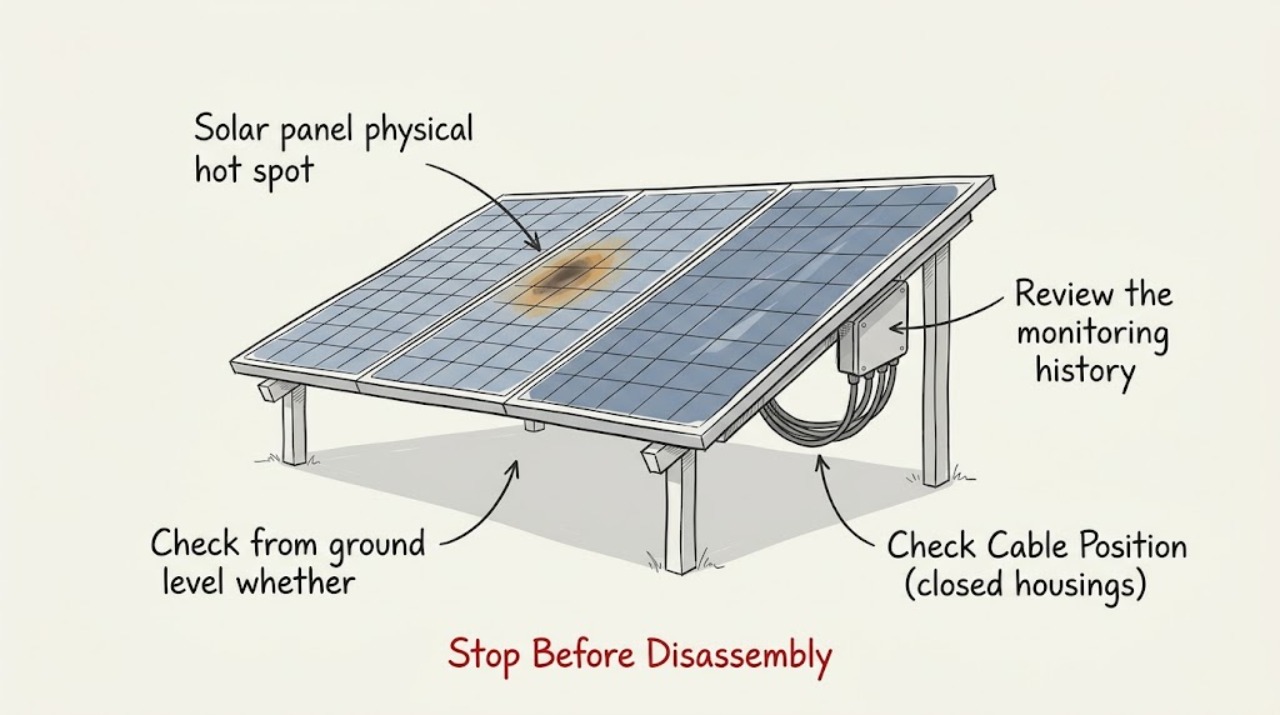
Work through in order
Diagnostic checks
Use only checks that match the exact appliance or system and its official guide.
-
Check 1
Review the monitoring history for the same panel, microinverter, or string and compare it with neighboring equipment over matching daylight periods, noting cloud cover, snow, shade, and recent storms.
Expected result: One panel or string shows a persistent new drop while neighbors track expected output, or the entire array drops together during the same weather or inverter event.
Next step: Save the monitoring alerts and production graph, then use the ground inspection and professional testing path for a localized issue. Do not label a module defective from one cloudy-day reading.
Why this matters
Why: A localized persistent change makes a module, connector, or string issue more likely. A whole-array change makes irradiance, snow, inverter availability, or another shared system condition more likely than one physical hot spot.
-
Check 2
From the ground or an approved safe viewpoint, visually scan the affected module and nearby modules for cracked glass, discoloration, bubbling, delamination, a warped or detached frame, unusual staining, or loose-looking cable routing.
Expected result: A defect or physical displacement is visible, or the modules appear intact from the available viewpoint.
Next step: Photograph the condition from a safe location and arrange a qualified PV inspection. Never walk, climb, or lean on modules to see an inaccessible area.
Why this matters
Why: Visible damage can explain both a localized production loss and abnormal heating and should be evaluated before the system is returned to normal operation. A clean appearance does not rule out cell, bypass-diode, junction-box, or connector damage.
-
Check 3
Check from ground level whether new shade, snow, ice, leaves, or other debris covers part of the affected panel or changes the light pattern across a row; do not scrape, shovel, or spray the modules.
Expected result: The production drop appears only while the obstruction or shade is present and begins to recover after natural clearing, or the panel remains affected with an unobstructed view.
Next step: Allow ordinary snow or ice to clear safely, document recurring shade, and compare production again under similar sunlight. Have a professional handle any removal or roof access that is not clearly safe and manufacturer-approved.
Why this matters
Why: A reversible environmental obstruction is more likely when output follows the changing light pattern. Persistent underperformance after unobstructed sunlight keeps physical module or electrical faults in consideration.
-
Check 4
Ask a qualified PV technician to perform an infrared scan and the electrical tests appropriate for the system, using the module layout and monitoring history to target the affected area.
Expected result: The scan shows a localized module, junction-box, connector, or cable hot spot, or no repeatable abnormal heating is found.
Next step: Keep the technician's report and module location with the system records. Follow the professional's safe shutdown and repair recommendation rather than opening energized equipment or swapping parts experimentally.
Why this matters
Why: Repeatable localized heating supports a physical or electrical fault that requires diagnosis; a normal scan shifts attention toward temporary shade, soiling, monitoring, inverter, or other non-hot-spot causes. Imaging must be interpreted by a trained professional.
-
Check 5
After a severe weather event, have the system owner or qualified inspector check accessible ground-level views for broken glass, detached frames, displaced racking, damaged cable routing, and production changes before the array is returned to normal operation.
Expected result: Storm-related damage or a new production drop is present, or no visible damage and no new localized change is found.
Next step: Keep people away from damaged or overhead components and arrange a trained inspection. If damage is confirmed, follow the qualified professional's isolation and repair plan before re-energizing the system.
Why this matters
Why: Wind, hail, snow, ice, and water entry can damage modules, racking, wiring, or enclosures even when a crack is not obvious. An unchanged system makes storm damage less likely but does not replace electrical testing after a serious event.
Use your observations
Decision map
Find the observation that best matches what you see, then follow the next safe action.
-
PATH 01Next step
What you see
One panel or string persistently underperforms in comparable sunlight, and a visible crack, discoloration, warped frame, or professional hot-spot finding is present.
Do this next
Have a qualified PV professional place the affected equipment in a safe state, identify the failed component, and determine whether repair or an exact replacement is warranted.
Why this path and its safety boundary
Why it matters: A physical module or immediate module-level electrical fault is more likely than a system-wide weather effect.
-
PATH 02Next step
What you see
The entire array drops together during snow, ice, clouds, a new shade pattern, or an inverter availability alert, and no localized hot spot is confirmed.
Do this next
Record weather and alerts, allow safe natural clearing where applicable, and have the installer or solar service professional check the inverter and system-level causes if output does not recover.
Why this path and its safety boundary
Why it matters: Shared irradiance, temporary coverage, inverter downtime, or monitoring conditions are more likely than a single physical module defect.
-
PATH 03Next step
What you see
A qualified technician confirms localized abnormal heating at a module, junction box, connector, or DC cable, or sees damage that could expose electrical parts.
Do this next
Keep people away from the affected area and follow the technician's safe shutdown, isolation, repair, and re-commissioning instructions before restoring operation.
Why this path and its safety boundary
Why it matters: The system has a physical or electrical safety concern that should not be treated as routine cleaning or a user-replaceable fuse problem.
-
PATH 04Next step
What you see
The monitoring drop persists but no module-level hot spot or visible damage is found.
Do this next
Have the professional trace the string and inverter measurements and compare them with the system design and monitoring data. Do not disconnect connectors or open electrical enclosures yourself.
Why this path and its safety boundary
Why it matters: An inverter, string wiring, connector, shade, soiling, sensor, or performance-model issue remains possible; absence of a thermal finding does not prove the module is healthy.
Helpful context
Understand the symptom
What a physical hot spot means
A hot spot is a localized area of a photovoltaic module that is heating more than the surrounding cells or hardware. It can be associated with module damage, cell cracks, electrical mismatch, a connection problem, or a shaded section under operating load. A hot-looking area in an infrared image is a diagnostic clue, not a complete diagnosis: trained imaging and electrical testing are needed to identify the failed part and the safe repair.
Why the production drop may not be the panel
Clouds, seasonal sun angle, snow or ice, new shade, soiling, inverter availability, and a string or wiring fault can all reduce production. A single-panel or single-string change is more useful than comparing today's total output with a clear summer day. Use the monitoring history and the system's expected-production view when available, and record the time and weather for the comparison.
Keep the inspection at ground level
PV modules and their wiring can remain electrically energized in daylight, and roof access adds fall and equipment-damage risk. Look from the ground or another approved safe viewpoint. Do not stand on modules, move across an array, disconnect connectors, open combiner boxes or inverters, or use a hose, shovel, or metal tool to test a panel.
Safety boundary
Stop conditions
- Do not walk, climb, or lean on modules, and do not open energized inverters, combiner boxes, junction boxes, or connectors.
- Stop and keep people away if glass is broken, a frame or rack is displaced, wiring is loose, water has entered an enclosure, smoke or burning is visible, or a hot spot is confirmed.
- Arrange a qualified PV professional for thermal imaging, electrical testing, safe shutdown, component replacement, or any roof access. Follow the professional's instructions before re-energizing damaged equipment.
Only after diagnosis
Potential parts
- replacement photovoltaic module
Only consider a replacement after a qualified inspection confirms that the module itself is damaged and that replacement is preferable to a repair or a fault elsewhere in the string.
Confirm the exact module model, electrical characteristics, dimensions, racking, connectors, warranty requirements, and local installation requirements before ordering or installing anything.
When checks do not resolve it
Need a professional?
Safety scope: Only trained personnel should perform thermal imaging interpretation, DC testing, roof access, safe isolation, wiring work, or module replacement.
Common questions
FAQ
Does a hot spot always mean the whole solar array needs replacement?
No. A hot spot is a localized diagnostic finding, and the affected module, connector, junction box, wiring, or another cause must be identified. A qualified professional can decide whether repair or exact component replacement is appropriate.
Can snow or shade look like a hot-spot-related production drop?
Yes. Snow, ice, new shade, clouds, and soiling can reduce light reaching modules and may affect an entire row or array. Compare like-for-like monitoring periods and never walk on modules or use aggressive tools to clear them.
Can I use an infrared camera to check the panel myself?
Treat infrared imaging as a professional diagnostic. The image needs correct operating conditions, electrical context, and trained interpretation to distinguish a module hot spot from a connector, junction box, shade, or other condition. Do not access the roof or energized equipment just to obtain an image.
What should I do if a panel is visibly cracked or has a burn mark?
Keep people away from the affected area and do not touch the panel, wiring, or connectors. Photograph it from a safe viewpoint and arrange a qualified PV inspection; damaged equipment should be isolated and repaired before it is returned to service.
Read the exact guide
Official sources
- Optimizing Solar Photovoltaic Performance for LongevityU.S. Department of Energy, Federal Energy Management Program · Solar photovoltaic systems with production loss or suspected module hot spots
- PV System Owner's Guide to Identifying, Assessing, and Addressing Weather Vulnerabilities, Risks, and ImpactsU.S. Department of Energy, Federal Energy Management Program · Solar photovoltaic systems with suspected physical damage or weather-related production loss
- Solar Photovoltaic Performance and Efficiency BasicsU.S. Department of Energy · Interpreting solar production changes alongside physical hot-spot symptoms
- Solar Photovoltaic Hardening for Resilience – Winter WeatherU.S. Department of Energy, Federal Energy Management Program · Production drops or physical hot-spot concerns after snow, ice, frost, or other winter weather
- Homeowner's Guide to SolarU.S. Department of Energy · Residential production changes caused by shade, roof conditions, or system context
- Life Cycle of Photovoltaic Systems: Operate and Maintain an Existing Photovoltaic SystemU.S. Department of Energy, Federal Energy Management Program · Solar systems requiring safe isolation or corrective work after physical damage
Community feedback
Share a repair observation
Share a plain-text repair observation. Accepted observations are published automatically; this page may take a moment to update.