
On this page
Start here
Quick answer
Treat a physical solar-panel hot spot as a professional inspection issue, not a cleaning or repair project. From a safe ground-level viewpoint or the monitoring interface, record the apparent panel or array location, visible dark or discolored areas, cracks or delamination, recent hail or storm exposure, and the time and pattern of any production change. Do not climb, use a ladder, touch the module or wiring, cover or shade a panel as a test, disconnect DC equipment, open enclosures, or perform your own thermal imaging. If you see smoke, flame, arcing, a burning odor, a loose or fallen module, or exposed wiring, keep people away and contact emergency responders; otherwise ask a qualified solar professional to make the system safe, inspect it, and decide whether a module or other component needs repair or replacement.
Before you begin
Safety first
- The professional must handle isolation, electrical testing, thermal or electroluminescence imaging, roof access, module handling, and any repair or replacement. The reader should not climb, touch panels or wiring, open enclosures, cover or shade a module, disconnect DC equipment, or perform thermal testing.
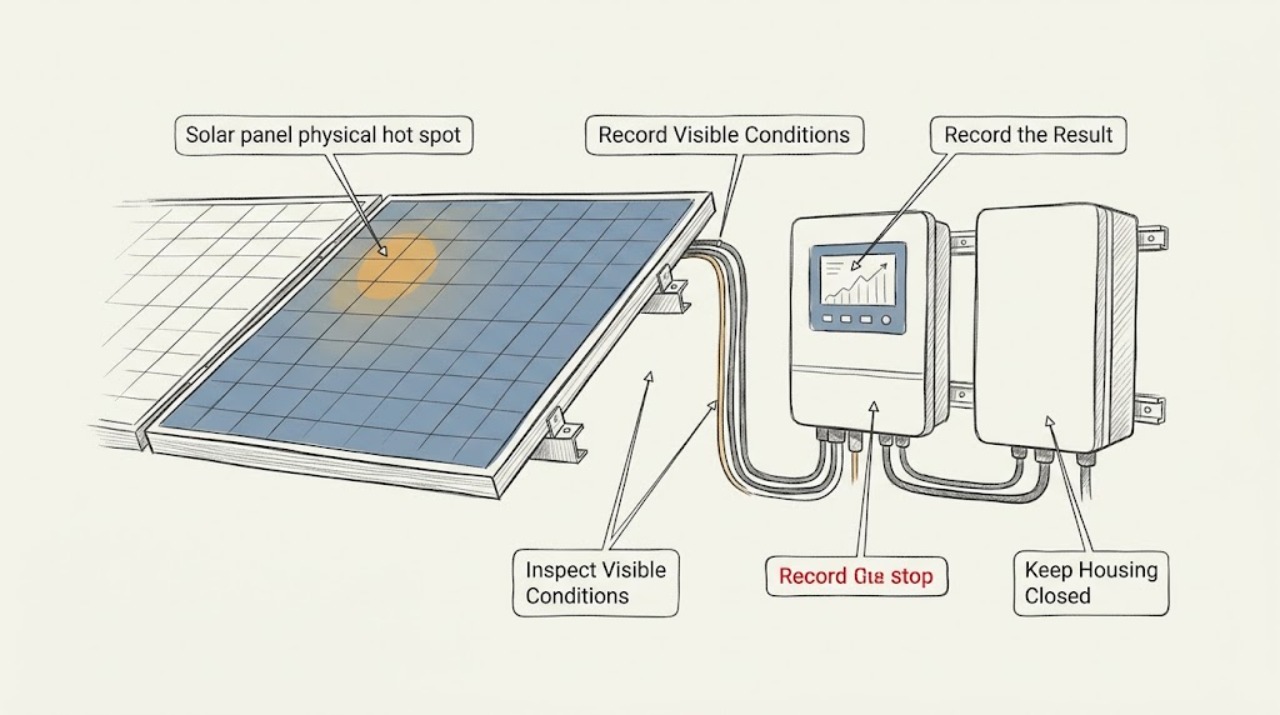
Work through in order
Diagnostic checks
Use only checks that match the exact appliance or system and its official guide.
-
Check 1
From a safe ground-level, window, or other non-roof viewpoint, visually compare the suspected module with nearby modules without touching or approaching the array.
Expected result: Record whether there is a localized dark or discolored patch, crack, delamination, burn-like mark, warped appearance, heavy debris, or a visibly displaced module; also record if no surface change can be seen.
Next step: Photograph or describe the location from the safe viewpoint and give it to a qualified solar technician; do not clean, scrape, press, or cover the module.
Stop if: Stop observing and keep everyone away if there is smoke, flame, arcing, a burning odor, a loose or fallen module, exposed wiring, or a hazard overhead; use emergency services for fire or immediate danger.
Why this matters
Why: A visible change supports an urgent professional inspection but does not identify the failed cell, diode, connector, or cause. No visible change does not rule out a subsurface or electrical hot spot.
-
Check 2
Open only the normal owner-facing solar monitoring view and record the displayed array, inverter, string, or panel identifier, alarm text, production trend, and timestamp without resetting or cycling equipment.
Expected result: Note whether the alert is localized or system-wide, whether output is lower than comparable clear-weather periods, and whether the interface is offline or simply reporting reduced production; retain screenshots instead of inferring an exact physical panel when the system does not identify one.
Next step: Send the screenshots, dates, and normal-versus-abnormal comparison to the qualified solar service provider and ask for inspection and safe isolation guidance.
Stop if: Do not continue to reset, reconnect, or reproduce the event. Escalate immediately if the interface reports a fire, arc, ground-fault, or other safety alarm, or if smoke or burning odor is present.
Why this matters
Why: A repeated localized or time-linked anomaly gives the technician useful scope, but weather, irradiance, communications, age, and other faults can also change production. Monitoring data alone is not a thermal diagnosis.
-
Check 3
From a safe location, review recent weather and visible surroundings and record any hail, high wind, fallen branch, persistent shadow, bird or leaf debris, or recent maintenance near the affected area without removing or adding anything.
Expected result: Note whether the change began after a storm or debris event, follows a recurring shadow pattern, or has no known timing; do not perform a deliberate shading, covering, spraying, or cleaning experiment.
Next step: Provide the timeline and safe-view photographs to a qualified technician, who can determine whether a professional inspection or specialized imaging is appropriate.
Stop if: Stop near the array if storm damage, unstable material, downed conductors, water near electrical equipment, or an overhead hazard is visible; keep the area clear and request professional or emergency assistance.
Why this matters
Why: Weather or shading history can help explain a production change and guide the inspection, while a recurring shadow is not proof of a module hot spot and hidden storm damage may not be visible from the ground.
-
Check 4
From a safe distance, look only at externally visible inverter, conduit, cable, and equipment surfaces that are already accessible without opening, touching, or moving anything.
Expected result: Record visible scorching or discoloration, a hanging or damaged cable, a damaged enclosure, unusual noise, an alarm indicator, or no external abnormality; do not probe, open, or electrically test the equipment.
Next step: Keep people away and tell the qualified solar professional exactly what was visible so they can isolate and inspect it using the appropriate procedure.
Stop if: Stop immediately for smoke, flame, arcing, burning odor, liquid entering equipment, exposed conductors, or a loose component; do not touch the system and contact emergency responders when fire or immediate danger exists.
Why this matters
Why: Scorching, damaged conductors, noise, or an alarm can indicate an electrical or fire hazard and raises the urgency. A normal exterior does not clear the module or internal connections.
-
Check 5
Review the owner-facing status screen and the system labels from a safe location, and write down whether the system is producing, offline, derated, or showing a safety or rapid-shutdown indication without operating disconnects or attempting another test cycle.
Expected result: The status may show a normal communication outage, a production fault, a shutdown state, or no alert; record the exact wording and time rather than assuming that a displayed shutdown proves the array is electrically safe.
Next step: Request a high-priority solar inspection and provide the status wording, module location, monitoring history, weather context, and visible observations; leave operation or isolation decisions to the qualified provider unless emergency responders direct otherwise.
Stop if: Stop all user troubleshooting if a fire, arc, smoke, burning odor, exposed wiring, or unstable module is present, and keep clear until emergency responders or qualified personnel declare the area safe.
Why this matters
Why: The status separates a monitoring problem from a reported performance or safety problem, but only a qualified professional can establish the physical and electrical condition after a suspected hot spot.
Use your observations
Decision map
Find the observation that best matches what you see, then follow the next safe action.
-
PATH 01Safety boundary
What you see
Smoke, flame, arcing, burning odor, exposed wiring, or a loose or fallen module is present.
Do this next
Leave the hazard area, keep others away, and contact emergency responders for fire or immediate danger.
Why this path and its safety boundary
Safety stop: Stop all inspection and wait for emergency responders or qualified personnel.
-
PATH 02Safety boundary
What you see
A visible module change or recent hail, wind, debris, or other storm event is present without an active fire emergency.
Do this next
Keep the area clear and request a qualified solar inspection; provide safe-view images and the event timeline.
Why this path and its safety boundary
Safety stop: Do not climb, handle modules or wiring, remove debris, cover the module, or try to restore production.
-
PATH 03Safety boundary
What you see
The monitoring interface shows a recurring or localized production anomaly but no visible damage or emergency sign is observable from a safe location.
Do this next
Preserve the trend, timestamps, identifiers, and alarm text and schedule a qualified inspection.
Why this path and its safety boundary
Safety stop: Escalate immediately if a safety alarm, smoke, burning odor, or new physical damage appears.
-
PATH 04Safety boundary
What you see
No visible change and no monitoring anomaly can be confirmed.
Do this next
Do not invent a diagnosis; keep normal records and ask the reporting party or installer for the original evidence.
Why this path and its safety boundary
Safety stop: Stop if investigating would require roof access, contact with the array, electrical access, or intentional stress testing.
Helpful context
Understand the symptom
Why the indication matters
A hot spot can be associated with a module failure mode, a connection problem, physical damage, or an installation and shading condition. A dark mark or lower output alone cannot identify the cause or prove that one panel is overheating. DOE guidance describes thermal inspection as trained professional work because the image must be collected and interpreted in context.
Keep the observation safe
Use only a stable, safe location at ground level, through a window, or in the owner-facing monitoring interface. Do not approach a damaged array, lean on modules, handle conductors, open electrical equipment, or create a shade or cover test. A PV system can remain electrically hazardous in daylight, so a technician should handle isolation and testing.
What to give the technician
Save the monitoring screenshot or alarm text, the approximate array or panel location, the time and weather, any visible change, and whether the issue began after hail, wind, debris, or a service event. That record helps the technician scope a safe inspection without asking you to reproduce the fault.
When checks do not resolve it
Need a professional?
Request a qualified solar professional for any credible physical hot-spot report, recurring localized anomaly, visible module damage, or unexplained alarm. Use emergency services for smoke, flame, arcing, burning odor, exposed wiring, or an unstable module.
Safety scope: The professional must handle isolation, electrical testing, thermal or electroluminescence imaging, roof access, module handling, and any repair or replacement. The reader should not climb, touch panels or wiring, open enclosures, cover or shade a module, disconnect DC equipment, or perform thermal testing.
Common questions
FAQ
Can I confirm a hot spot with a phone camera or by touching the panel?
No. Do not touch the module or perform your own thermal test. Preserve the monitoring and safe-view observations and ask a trained professional to inspect and interpret the appropriate imaging.
Does a dark mark prove that the panel has a hot spot?
No. A dark or changed area is a reason to request inspection, but it cannot by itself identify the failure mode or show whether the cause is physical, electrical, shading-related, or environmental.
Should I cover the panel to see whether the temperature or output changes?
No. Do not cover, shade, spray, clean, or otherwise stress-test the module. Give the technician the observation and monitoring timeline instead.
What should I do after hail or wind damage?
Stay off the array and keep people clear of loose or damaged equipment. Record what can be seen safely, then ask a qualified provider about isolation and inspection before the system is returned to service.
Read the exact guide
Official sources
- PV System Owner’s Guide to Identifying, Assessing, and Addressing Weather Vulnerabilities, Risks, and ImpactsU.S. Department of Energy · Supports trained-professional interpretation of IR imaging for module hot spots, specialized imaging scope, and the instruction never to walk, climb, or lean on modules.
- A Guide to Fire Safety with Solar SystemsU.S. Department of Energy · Supports the statement that design, component, or installation problems can create arcs and hot spots, and that PV fire response requires qualified safety procedures.
- Life Cycle of Photovoltaic Systems: Operate and Maintain an Existing Photovoltaic SystemU.S. Department of Energy · Supports monitoring performance over time, using qualified O&M personnel, rendering damaged systems safe, inspection before recommissioning, and professional thermal or infrared imaging.
Community feedback
Share a repair observation
Share a plain-text repair observation. Accepted observations are published automatically; this page may take a moment to update.