
On this page
Start here
Quick answer
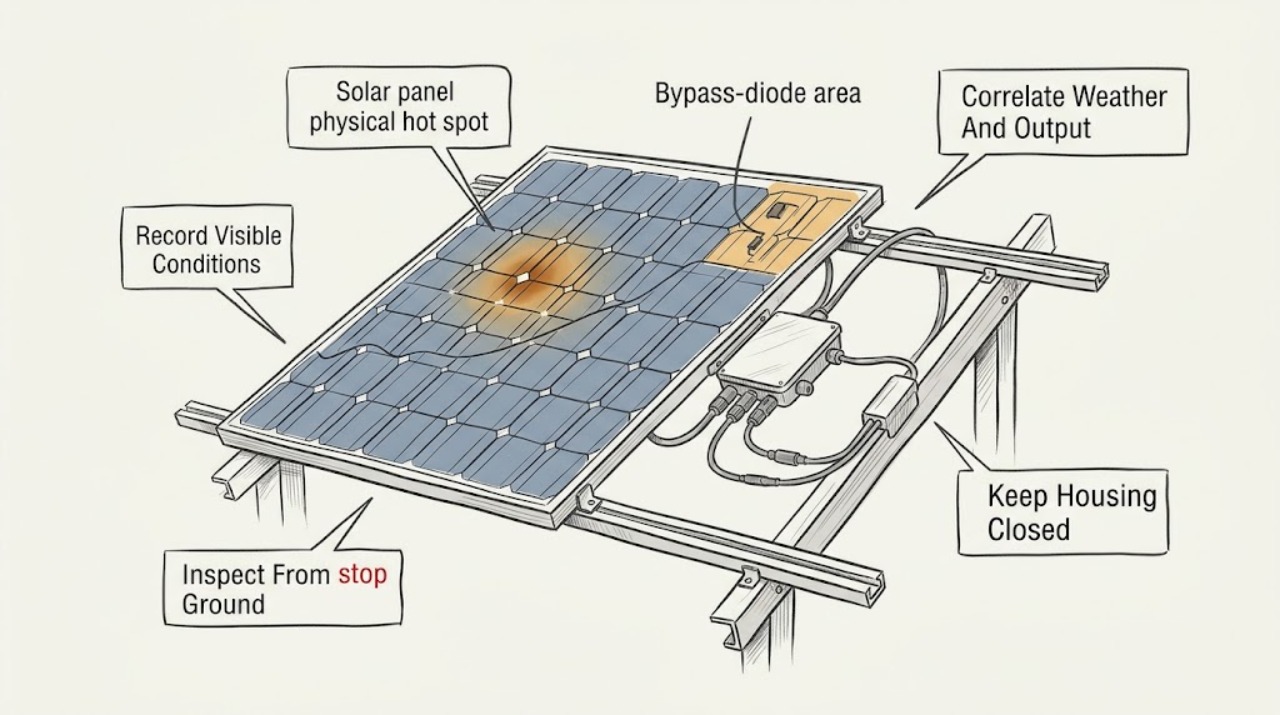
Treat a solar-panel hot-spot or thermal warning as a diagnostic and electrical-safety issue, not as a cue to touch, wash, shade, or open the panel. From ordinary safe access, save the inverter or monitoring warning, time, weather, output change, and ground-visible damage; keep people away from a damaged array. A localized hot area can be associated with cell or module damage, shading or soiling, a junction box or bypass-diode problem, or a high-resistance connector or wire, and the warning alone does not identify which one. DOE guidance places IR interpretation and electrical inspection with trained professionals; after visible storm damage, the system should remain shut down until visual and electrical inspection are complete. Smoke, burning odor, arcing, fire, water intrusion into electrical equipment, exposed conductors, or a loose or falling module is an emergency boundary: move away and contact emergency responders and a qualified PV professional.
Before you begin
Safety first
- This article supports monitoring review and ordinary safe-access observation only. Do not touch electrical components, climb or lean on modules, open enclosures, disconnect connectors, perform live measurements, or repower after visible damage.
Work through in order
Diagnostic checks
Use only checks that match the exact appliance or system and its official guide.
-
Check 1
From the monitoring app or inverter display, save the exact warning text, affected module, optimizer, string, or area if identified, the first and latest time, and the system output trend; do not open the inverter or reset electrical equipment merely to clear the message.
Expected result: Record whether the warning is persistent, repeats at similar daylight periods, began after a storm or heat event, appears with an inverter trip, or is accompanied by a sudden string or system output change.
Next step: Keep screenshots and the timestamped output record for the installer or qualified PV technician, then continue only with the safe ground-level checks below.
Stop if: Stop using the system and keep clear if the display reports an electrical fault together with smoke, burning odor, arcing, exposed conductors, water intrusion, or a visibly loose or falling component; call emergency responders for fire or immediate danger.
Why this matters
Why: A repeated warning or output change makes an active fault more likely; a single event without an output change may still need follow-up because a thermal image or alarm does not identify the root cause. A warning that returns after a reset is not resolved by resetting again.
-
Check 2
From the ground or another ordinary safe position, photograph the array and the suspected module without touching it or moving debris; use binoculars or a camera zoom if needed.
Expected result: Look for cracked or shattered glass, browning, blistering or bubbles, delamination, discoloration, a burn mark, detached framing, displaced hardware, visible cable damage, standing water near equipment, or new debris or shade.
Next step: Label the photo with the array location and send it with the warning record to a qualified PV technician; do not remove the panel, cover the hot area, wash it, or enter a roof area to see more.
Stop if: Do not walk, climb, or lean on modules, handle storm debris, or approach a loose panel, exposed conductor, broken glass, wet electrical enclosure, or unstable roof area.
Why this matters
Why: A cell or backsheet pattern can indicate physical module damage, while a damaged cable, connector, junction-box area, or mounting part can point to a balance-of-system issue. No visible defect does not exclude microcracks, an internal connection problem, or a fault hidden below the module.
-
Check 3
Compare the warning time with recent hail, wind, impact, wildfire smoke or heat exposure, shading changes, and the system's normal production history; use only the monitoring data already available to you.
Expected result: Note whether the warning followed a damaging event, whether production or one string changed abruptly, and whether the pattern occurs only when an object shades part of a module or when debris is visible.
Next step: Give the technician the event date, weather description, production screenshots, and array map so they can choose visual, electrical, IR, UV, or EL testing; keep the system out of service after visible damage until that assessment is complete.
Stop if: Do not remove permanent shade, cut vegetation near energized equipment, place a cover on the panel, or repower repeatedly to test whether the warning goes away.
Why this matters
Why: Post-event output loss with a thermal warning raises concern for hidden module or wiring damage; a recurring pattern under a shade condition may require a technician to evaluate cell and bypass-diode behavior. Neither pattern proves that cleaning, trimming, or bypassing a component will fix the system.
-
Check 4
Ask a qualified PV technician or trained imaging professional for a documented inspection of the affected module and the relevant string, wiring, connectors, and junction boxes; request IR imaging and, when physical cell damage is suspected, the additional electrical or EL testing they judge appropriate.
Expected result: Have the report identify whether the thermal pattern is cell-shaped, at a busbar or connection, at a junction box or connector, across several modules, or absent under valid test conditions, and whether electrical performance is affected.
Next step: Use the technician's documented cause and the exact module/system identity to decide whether to repair, retest, isolate, or replace a component; retain the report for warranty and insurance records.
Stop if: Do not perform thermal imaging on a roof as a substitute for electrical qualification, open a junction box, disconnect connectors, measure live DC circuits, or authorize replacement from an unverified image alone.
Why this matters
Why: A thermal image can locate an abnormal area but cannot by itself establish a safe repair. DOE says trained personnel are needed to perform and interpret professional imaging, and that IR can be used on modules, DC wiring, connectors, and junction boxes; EL may help evaluate the extent of cell cracking.
-
Check 5
Collect the module, inverter, optimizer, and system documentation that can be read without touching equipment, including manufacturer, model, serial or part marking, array location, installation date, prior service, and warranty or inspection records.
Expected result: Check whether the suspected item is a module, connector, junction-box or bypass-diode assembly, cable, optimizer, inverter, or mounting part, and whether the technician has confirmed that classification.
Next step: Give the records and the imaging/electrical report to the installer or manufacturer and request a model-specific repair, retest, or replacement recommendation that follows the installation instructions and local requirements.
Stop if: Do not order or install a module, connector, diode, cable, optimizer, or racking part until a qualified person confirms the exact electrical, mechanical, and system compatibility.
Why this matters
Why: The physical location of a hot spot determines the possible repair path; an exact model and record set is needed to verify an approved replacement and avoid mixing electrical or mechanical parts. A generic panel or connector match is not established by appearance alone.
Use your observations
Decision map
Find the observation that best matches what you see, then follow the next safe action.
-
PATH 01Safety boundary
What you see
The warning coincides with cracked glass, a burned or blistered area, exposed or damaged wiring, a loose module, water entering electrical equipment, smoke, burning odor, or arcing.
Do this next
Move people away, keep clear of the roof and equipment, contact emergency responders for fire or immediate danger, and arrange qualified PV inspection. If the system has a clearly labeled emergency shutdown procedure, responders or qualified personnel should use it according to the installed system instructions.
Why this path and its safety boundary
Why it matters: Physical damage or an active electrical/fire hazard is more likely than a harmless monitoring anomaly, and the array may remain energized in daylight.
Safety stop: Do not touch the array, pull connectors, spray water, cover modules, or enter the area to investigate.
-
PATH 02Safety boundary
What you see
The hot-spot warning began after hail, wind, impact, flooding, wildfire heat, or another event and production or one string also changed.
Do this next
Keep the system shut down when visible damage is present and obtain a visual and electrical inspection, with IR, UV, or EL testing selected by a qualified technician; test the whole relevant system before repowering.
Why this path and its safety boundary
Why it matters: Hidden cell cracking, a damaged module, or wiring damage is plausible even when the front glass looks intact; post-event damage can develop further and increase hot-spot risk.
Safety stop: Do not repower repeatedly, climb to inspect the array, or assume that an unchanged exterior means the array is safe.
-
PATH 03Safety boundary
What you see
The thermal pattern is concentrated at a connector, junction box, busbar, cable, optimizer, inverter, or mounting area rather than forming a cell-shaped area on the module.
Do this next
Request qualified electrical and thermal inspection of the complete path, including adjacent connectors and the affected string, then use the report to select a manufacturer-approved repair or replacement.
Why this path and its safety boundary
Why it matters: A high-resistance connection, wiring, enclosure, or component issue is more likely than a simple surface-cleaning problem, but an image alone does not identify the failed part.
Safety stop: Do not open enclosures, torque fasteners, disconnect DC connectors, or touch cable and racking components yourself.
-
PATH 04Safety boundary
What you see
The warning appears only during a repeatable partial-shade or debris condition, with no visible damage and no emergency symptom.
Do this next
Document the time, shade/debris pattern, and production behavior, then ask a qualified PV technician to verify the module and bypass-diode behavior before any physical intervention.
Why this path and its safety boundary
Why it matters: The operating pattern may involve uneven cell conditions, but it does not prove that cleaning, trimming, or bypass-diode work is safe or sufficient.
Safety stop: Do not climb, wash a hot module, remove a shade source near electrical equipment, or alter a bypass diode or module wiring.
-
PATH 05Safety boundary
What you see
The warning is isolated, there is no visible damage or emergency symptom, and output appears normal, but the warning recurs or remains unexplained.
Do this next
Keep the event log and ask the installer or O&M provider to review the monitoring record and perform targeted inspection; do not clear the warning by repeated resets.
Why this path and its safety boundary
Why it matters: A transient monitoring issue is possible, but recurrence means the warning should not be dismissed; a qualified inspection can distinguish a sensor or communication issue from a developing module or electrical fault.
Safety stop: Escalate immediately if output changes, the inverter trips, heat spreads, or any smell, noise, smoke, exposed conductor, or water intrusion appears.
Helpful context
Understand the symptom
What a hot spot warning can and cannot tell you
A hot spot is a localized temperature difference, not a confirmed failed part. DOE's PV owner guide describes electrical hot spots as locations of high resistance that can involve loose connections, dirt, corrosion, or damaged wires, and notes that module failure modes can also show a hot spot. A cell-shaped pattern, a hot junction-box or connector pattern, and an area under partial shade are different clues, but a monitoring alarm or a thermal image should not be used alone to name the cause or select a replacement. Record the evidence first and let a trained PV technician decide which inspection is appropriate.
Keep the inspection at ordinary safe access
Use the monitoring app or inverter display without opening equipment, and inspect only what is visible from the ground or another ordinary safe position. Do not touch modules, frames, connectors, junction boxes, conduit, or racking, and do not climb on a roof or lean on a module. PV modules can remain electrically energized in daylight, and storm-damaged systems can put current onto unexpected paths.
Testing comes before repowering after damage
If the warning followed hail, wind, fire exposure, impact, flooding, or another damaging event, a clean-looking glass surface does not rule out hidden cell damage. DOE recommends visual and electrical inspection before repowering a visibly damaged system and describes IR, UV, and EL imaging as ways to find different kinds of damage. The comparison with a pre-event baseline is useful, but missing a baseline does not make a do-it-yourself thermal diagnosis safe.
Safety boundary
Stop conditions
- Do not touch modules, frames, connectors, junction boxes, wiring, inverters, or racking to investigate a thermal warning; daylight PV equipment can remain energized.
- Do not climb, walk, or lean on modules or enter an unstable, wet, storm-damaged, or fire-exposed roof area.
- Do not open enclosures, disconnect DC connectors, measure live circuits, alter bypass diodes, reset repeatedly, or improvise a repair.
- If smoke, burning odor, arcing, fire, exposed conductors, water in electrical equipment, broken glass, or a loose or falling module is present, move away and contact emergency responders and qualified PV service.
- After visible storm or impact damage, leave the system out of service until qualified visual and electrical inspection is complete; do not repower from a clean-looking exterior alone.
Only after diagnosis
Potential parts
- replacement PV module
Consider this only when qualified visual, electrical, thermal, or EL testing confirms that a specific module is damaged, unsafe, or underperforming and replacement is the approved remedy.
Match exact electrical ratings, dimensions, connector arrangement, mounting details, system design, manufacturer instructions, and local requirements; appearance alone is not a compatibility check. - module junction box or bypass-diode assembly
Consider this category only if a qualified technician identifies the junction-box or bypass-diode assembly as the thermal source and the module manufacturer permits that repair.
Use only a manufacturer-approved assembly and qualified installation procedure; do not open, bypass, or substitute a diode based on a thermal image alone. - PV connector or cable assembly
Consider this only when inspection confirms a damaged or overheated connector or cable and the exact system connector family and repair method are documented.
Confirm connector family, conductor size, ratings, crimp or termination method, enclosure and routing requirements, and manufacturer approval before ordering or fitting.
When checks do not resolve it
Need a professional?
Arrange qualified PV service for any recurring thermal warning, output or string change, post-storm or impact event, visible module or wiring damage, suspected connector or junction-box hot spot, inverter trip, or unexplained thermal image. Call emergency responders for fire, smoke, arcing, burning odor, exposed conductors, or immediate structural danger. Thermal imaging and electrical testing should be performed and interpreted by trained personnel before a repair or repowering decision.
Safety scope: This article supports monitoring review and ordinary safe-access observation only. Do not touch electrical components, climb or lean on modules, open enclosures, disconnect connectors, perform live measurements, or repower after visible damage.
Common questions
FAQ
Is a hot spot on a solar panel always a failed panel?
No. A hot spot is a thermal finding, not a root-cause diagnosis. The source may be a cell or module defect, shading or soiling, a junction box or bypass-diode area, a connector or wire, or another system component. Have a trained PV professional interpret thermal and electrical test results before selecting a repair or replacement.
Can I clean or cover a solar panel that shows a thermal warning?
Do not wash, cover, touch, or climb onto the panel to test a theory. Record the warning and inspect only from ordinary safe access. A qualified technician should first determine whether the pattern is physical damage, uneven operating conditions, or an electrical connection fault.
What should I do if the warning started after hail or wind?
Save the event date, monitoring data, and ground-level photos. If visible damage is present, keep the system out of service until qualified visual and electrical inspection is complete. Hidden cell cracks may not be obvious at ground level, so the technician may select IR, UV, or EL imaging and test the relevant system before repowering.
Can I use a handheld infrared camera to diagnose the panel myself?
A camera image alone is not a safe diagnosis. DOE guidance says professional imaging should be performed and interpreted by trained personnel, and PV electrical components must not be touched by untrained people. Arrange a qualified inspection rather than climbing onto the roof or opening equipment.
When is a solar-panel hot-spot warning an emergency?
Treat smoke, a burning odor, arcing, fire, exposed conductors, water in electrical equipment, broken glass with instability, or a loose or falling module as an emergency. Move away, keep others clear, and contact emergency responders; tell them a PV system is present. For other recurring warnings or output changes, arrange qualified PV service promptly.
Read the exact guide
Official sources
- IEC 61730-2:2023 Photovoltaic (PV) module safety qualification - Part 2: Requirements for testingInternational Electrotechnical Commission · IEC safety-qualification standard information; it does not replace the installed module manual, local code, or a qualified field diagnosis.
- Hail Damage Mitigation for PV SystemsU.S. Department of Energy, Federal Energy Management Program · DOE/FEMP recommendations focused on hail events; the same hidden-damage and pre-repower logic is relevant to other impact events but should be confirmed by a qualified technician.
- Life Cycle of Photovoltaic Systems: Operate and Maintain an Existing Photovoltaic SystemU.S. Department of Energy, Federal Energy Management Program · DOE/FEMP operations and maintenance guidance for existing PV systems; trained O&M and electrical personnel must adapt the sequence to the actual installation.
- A Guide to Fire Safety with Solar SystemsU.S. Department of Energy, Solar Energy Technologies Office · DOE consumer and responder fire-safety guidance; emergency responders and qualified PV professionals determine actions at a particular site.
- PV System Owner's Guide to Identifying, Assessing, and Addressing Weather Vulnerabilities, Risks, and ImpactsU.S. Department of Energy, Federal Energy Management Program · DOE/FEMP guidance for PV system owners and operators; the installed system instructions, qualified personnel, and applicable local requirements control a particular system.
Community feedback
Share a repair observation
Share a plain-text repair observation. Accepted observations are published automatically; this page may take a moment to update.