
On this page
Start here
Quick answer
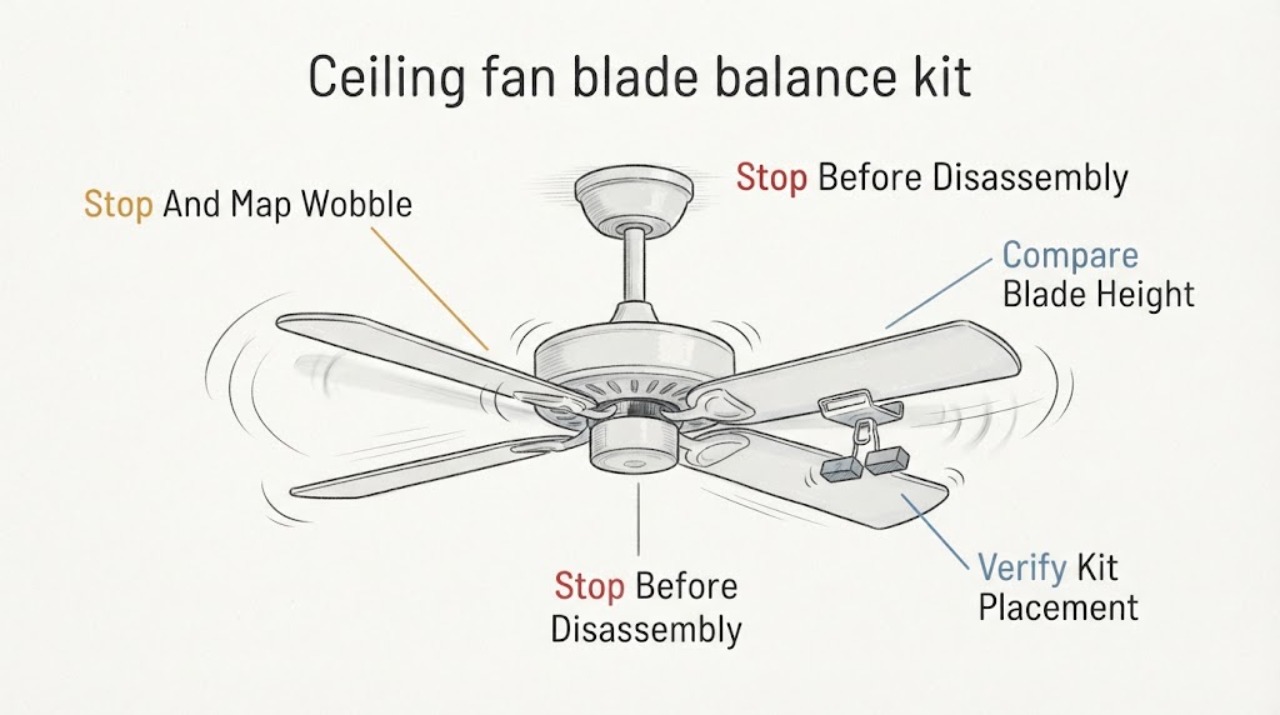
A Casablanca ceiling fan can still wobble after a balance kit is fitted if a blade, blade holder, kit weight, or mounting connection is loose or if the fan is not level. Turn the fan OFF, wait for the blades to stop, and use a stable floor-level view to compare blade height and hardware; never reach toward a moving fan or stand on the fan. Check that the balancing clip or weight is attached exactly as the Casablanca instructions show and that no blade has been swapped, warped, cracked, or mounted at a different pitch. If the wobble changes when the kit moves, persists after the kit is secured, or the canopy, downrod, outlet box, or ceiling moves, leave the fan off and arrange qualified service. A balance kit can correct a blade-weight mismatch, but it cannot repair a loose mounting box or a bent support.
Work through in order
Diagnostic checks
Use only checks that match the exact appliance or system and its official guide.
-
Check 1
Turn the Casablanca fan OFF, wait for every blade to stop, and observe from the floor whether the wobble appears to come from one blade, the blade set, the motor housing, or the ceiling attachment; do not restart it to inspect from close range.
Expected result: Record whether the blade tips move unevenly while the ceiling attachment stays still, the motor housing sways with the blades, or the canopy/downrod/ceiling moves as a unit.
Next step: Keep the fan off while checking the blade and kit hardware; arrange qualified service immediately for movement at the ceiling, canopy, downrod, or outlet-box area.
Stop if: Stop for a cracked blade, loose hanging part, exposed wiring, a swinging canopy, ceiling movement, scraping, clicking, or any need to climb or reach toward the fan.
Why this matters
Why: Tip-height or blade-set movement makes blade alignment, blade holder, or balance-kit placement more likely. Movement of the fan body or ceiling attachment makes mounting or support problems more likely than a simple weight mismatch.
-
Check 2
With power OFF and the blades stopped, compare each blade tip and blade holder from the same floor-level viewpoint; use the model instructions for any permitted manual rotation and do not bend blades or holders.
Expected result: Note whether one blade sits visibly higher or lower, a holder is angled differently, a blade is reversed or in the wrong position, or all blades appear aligned.
Next step: Photograph the blade positions and check only accessible hardware identified by the manual; do not continue operating the fan if a blade, holder, or fastener is damaged or loose.
Stop if: Do not stand on furniture, push the fan body, remove the canopy, or handle a blade with a crack, split, delamination, or loose attachment.
Why this matters
Why: One outlying blade or holder supports an alignment, hardware, or blade-specific issue. A consistent set with the whole fan tilted points toward the mounting surface or support. Similar-looking blades are not proof that they are interchangeable or correctly positioned.
-
Check 3
Inspect the installed balance clip and weight from the floor with the fan stopped, comparing their position and attachment with the exact Casablanca balancing instructions; do not add a second weight or improvise adhesive placement.
Expected result: Record whether the clip is on the indicated blade area, the weight is fully attached, the kit has shifted, or the kit is missing, loose, or visibly damaged.
Next step: If the manual permits repositioning, use only its balancing sequence and keep the fan stopped during each change; otherwise leave the kit untouched and arrange service.
Stop if: Stop if the weight can fall, the clip will not stay secure, a blade is damaged, or accessing the kit requires a ladder or contact with the rotating assembly.
Why this matters
Why: A shifted or loose kit can leave the original imbalance unresolved or create a new one. A correctly placed kit with unchanged wobble makes a blade, holder, motor, or mounting issue more likely; the kit alone cannot diagnose the source.
-
Check 4
With the fan OFF and power isolated according to the model manual, inspect only visible blade-to-holder hardware for an obvious gap or missing fastener; do not remove covers, disturb wiring, or work overhead from an unstable position.
Expected result: Separate a blade and holder that appear firmly seated from a visible gap, missing or backed-out fastener, cracked holder, or movement that is not present on the other blades.
Next step: Leave the fan off and arrange qualified service for loose, damaged, missing, or inaccessible hardware; do not tighten unknown fasteners or substitute hardware without the exact manual.
Stop if: Do not open the canopy, touch conductors, remove the motor housing, or work from a ladder unless qualified service is performing the work.
Why this matters
Why: A blade-specific gap or damaged holder can create wobble regardless of the balance weight. If all accessible blade hardware is sound but the fan body moves, mounting hardware or the ceiling support remains a professional concern.
-
Check 5
Record whether wobble changes with the fan's normal speed settings only if the fan can be operated without any visible looseness, noise, ceiling movement, or other hazard; otherwise keep it off and do not reproduce the symptom.
Expected result: Note whether wobble appears only at one speed, increases with speed, remains similar at all speeds, or is accompanied by a hum, scrape, click, or movement at the mount.
Next step: Stop testing as soon as the wobble is obvious or changes abruptly; provide the pattern to service and leave the fan off when the cause is not clearly limited to the kit.
Stop if: Do not operate a fan with a loose part, cracked blade, visible mount movement, electrical noise, burning odor, or any object that could fall.
Why this matters
Why: A speed-specific wobble can reveal a blade-balance or resonance pattern, but worsening movement, noise, or mount motion indicates a hardware or support issue. Speed behavior cannot confirm that the balance kit or motor is safe.
-
Check 6
Prepare the Casablanca model marking, blade count and style, balance-kit location, photos of each blade and the canopy from the floor, speed-specific behavior, and any noise or ceiling movement; do not remove the fan or kit to gather more information.
Expected result: The note should distinguish a kit that shifted, one blade or holder that differs, a wobble tied to speed, and movement that originates at the mounting point.
Next step: Arrange qualified ceiling-fan service for a persistent wobble, any damaged or loose part, or any movement at the mount; keep the fan off until the cause is corrected.
Stop if: There is no safe user path through exposed wiring, canopy removal, structural attachment work, live electrical testing, or overhead work from an unsafe position.
Why this matters
Why: These patterns help a technician decide whether to inspect blade alignment and balance, blade-holder hardware, motor assembly, downrod, outlet-box support, or ceiling structure. They do not justify adding weights or replacing parts without diagnosis.
Use your observations
Decision map
Find the observation that best matches what you see, then follow the next safe action.
-
PATH 01Next step
What you see
One blade or holder sits differently, and the balance clip or weight has shifted, is loose, or is missing while the ceiling attachment stays still.
Do this next
Keep the fan stopped and use only the documented balancing sequence if it can be performed safely from the floor; arrange service if the kit or hardware will not stay secure.
-
PATH 02Next step
What you see
The kit is correctly placed and all visible blade positions appear aligned, but the wobble remains or changes abruptly with speed.
Do this next
Leave the fan off and arrange qualified service; do not add weights, bend components, or run it at a different speed as a workaround.
-
PATH 03Next step
What you see
The canopy, downrod, motor body, outlet-box area, or ceiling moves with the wobble, or there is a gap or looseness above the visible blade hardware.
Do this next
Keep the fan off and have a qualified electrician or installer inspect the attachment and support; do not remove the canopy or attempt structural tightening.
-
PATH 04Next step
What you see
A blade, holder, balance weight, fastener, canopy, or ceiling is cracked, loose, falling, sparking, hot, or accompanied by scraping, burning odor, or exposed wiring.
Do this next
Do not touch or operate the fan. Keep people clear and arrange urgent qualified service; use emergency help for active fire, shock, or immediate danger.
Helpful context
Understand the symptom
What a balance kit can and cannot correct
A balance kit changes the distribution of weight around the blade set. It is useful when one blade or blade position is out of balance, but it does not make a loose blade screw, bent blade holder, tilted motor housing, loose downrod, weak mounting box, or moving ceiling safe. If the wobble is accompanied by clicking, scraping, a visible gap, a swinging canopy, or movement at the ceiling, stop using the fan instead of adding more weight.
Balance only from a safe position
Use the balancing clip and weight only as the exact Casablanca instructions direct. Make observations from the floor with the fan stopped; do not tape weights to a blade, drill a blade, bend a holder, or reach into a rotating fan. If a blade or kit part is damaged or will not stay attached, the kit is not a substitute for a replacement or professional inspection.
Why the mounting point matters
A fan can appear to have a blade-balance problem when the fan body or its ceiling attachment moves. Check for movement at the canopy or ceiling only with the fan stopped and without removing the canopy. A wobble that follows the fan body, rather than one blade position, points away from the kit and toward mounting or support work that should be handled by a qualified installer or electrician.
Safety boundary
Stop conditions
- Stop the fan and keep it off for a cracked or loose blade, loose balance weight, falling part, canopy or ceiling movement, scraping, sparking, burning odor, exposed wiring, or any shock sensation.
- Do not balance a running fan by reaching toward it, add improvised weights, bend blades or holders, remove the canopy, disturb wiring, or work overhead from an unstable position.
- Do not assume that a balance kit can correct a loose mounting box, downrod, ceiling attachment, bent holder, or damaged blade.
Only after diagnosis
Potential parts
- ceiling fan blade balance kit
Only consider a balance kit when the exact model instructions and inspection indicate a blade-weight mismatch and the existing kit is missing, damaged, or unusable.
Confirm the exact Casablanca model and manufacturer-approved kit; do not combine unrelated weights or use an improvised attachment. - ceiling fan blade
Only relevant when a qualified inspection identifies a warped, cracked, mismatched, or otherwise damaged blade as the source of the wobble.
Match the exact model, blade geometry, pitch, finish, and manufacturer fit; visual similarity is not proof of compatibility. - blade holder or blade hardware
Only consider this after service finds a bent, cracked, loose, or missing blade-holder component or approved fastener.
Use the exact model's approved hardware and fastening requirements; do not substitute generic fasteners. - ceiling fan mounting support
Only relevant when the fan body, canopy, downrod, outlet-box area, or ceiling moves and a qualified installer identifies inadequate or damaged support.
Support and attachment must be evaluated for the exact fan and building structure by a qualified installer or electrician.
When checks do not resolve it
Need a professional?
Arrange qualified ceiling-fan service for a persistent wobble, a balance kit that shifts or cannot stay attached, a warped or cracked blade, loose blade-holder hardware, unusual noise, or any movement at the canopy, downrod, outlet-box area, or ceiling. Do not operate the fan while the cause is uncertain. Obtain urgent help for exposed wiring, sparks, smoke, burning odor, shock, or a falling component.
Common questions
FAQ
Can a Casablanca balance kit fix every ceiling fan wobble?
No. A kit addresses a blade-weight mismatch. It cannot repair a loose blade holder, damaged blade, bent support, loose downrod, moving canopy, weak outlet-box attachment, or ceiling movement. If the fan body or ceiling moves, leave it off and arrange service.
Should I add more weights when the fan still wobbles?
No. Use only the exact Casablanca balancing instructions and the supplied or approved kit. Adding improvised weights can create a new imbalance or a falling part; persistent wobble needs a broader blade and mounting inspection.
What if the wobble changes with fan speed?
A speed-specific pattern can point toward a blade-balance or resonance issue, but worsening movement, clicking, scraping, or canopy motion raises concern about hardware or support. Stop operating the fan if any part is loose or the mounting point moves.
Can I tighten the fan canopy or mounting box myself?
Do not remove the canopy or disturb wiring or structural attachment as a homeowner troubleshooting step. Movement at the canopy, downrod, outlet-box area, or ceiling should be inspected by a qualified installer or electrician.
When should I stop using a wobbling Casablanca fan?
Keep it off for any cracked or loose blade, loose kit weight, unusual noise, falling part, exposed wiring, sparks, burning odor, or movement at the mount or ceiling. A persistent wobble with no obvious safe kit correction also deserves qualified service.
Read the exact guide
Official sources
- Why is my fan wobbling?Hunter Fan Company · Hunter/Casablanca family ceiling-fan wobble causes and troubleshooting
- Wisp Owner’s Guide and Installation ManualHunter Fan Company · Casablanca model-specific installation, operation, balancing, and safety manuals
- Hunter Ceiling Fan Balancing Kit – Hunter FanHunter Fan Company · Hunter/Casablanca family ceiling-fan balancing kit procedure and blade-specific balancing guidance
Community feedback
Share a repair observation
Share a plain-text repair observation. Accepted observations are published automatically; this page may take a moment to update.