
On this page
Start here
Quick answer
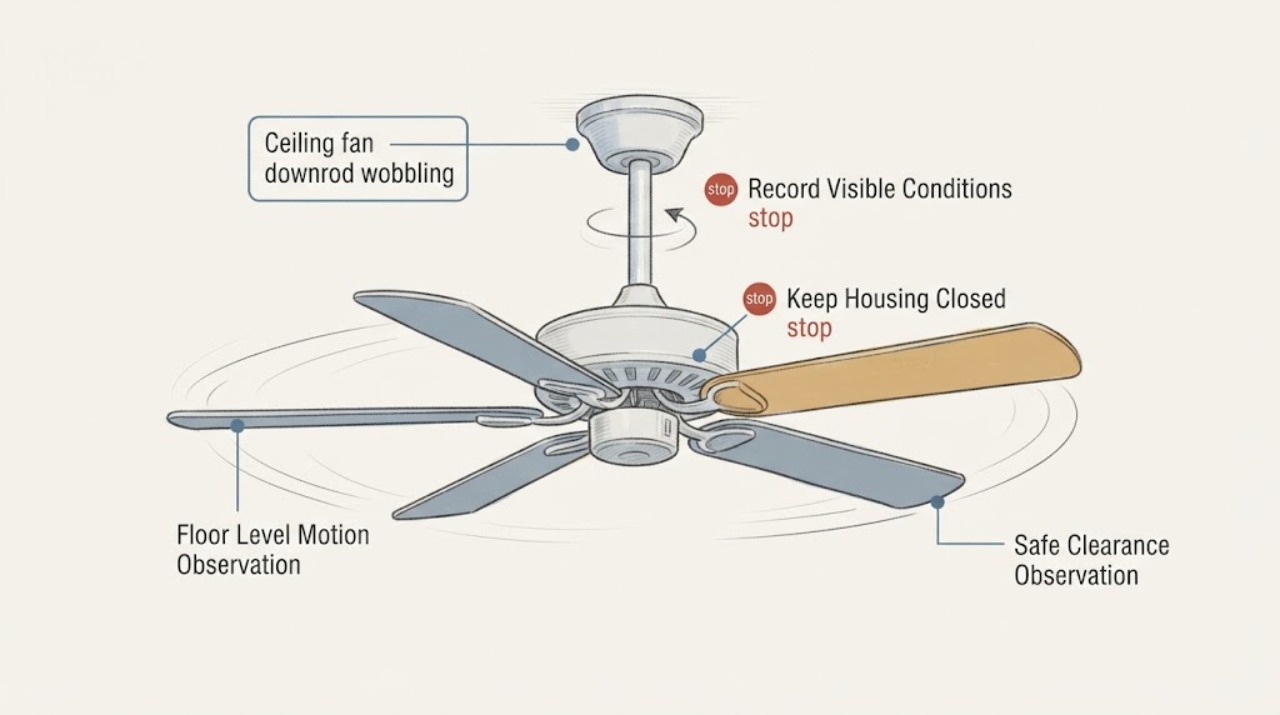
A wobbling ceiling fan with a downrod may have ordinary blade imbalance, but movement at the downrod, ceiling plate, or mounting point can indicate a loose or unsuitable support. From the floor, turn the fan off and observe whether the wobble is only at the blades or whether the downrod, canopy, or ceiling mount shifts. Do not climb, reach into the canopy, touch wiring, or tighten hardware overhead. If the mount moves, the fan drops, makes a scraping or electrical noise, or has visible damage, leave it off and arrange a qualified electrician or fan installer to inspect the fan-rated box, bracket, downrod, and fasteners.
Work through in order
Diagnostic checks
Use only checks that match the exact appliance or system and its official guide.
-
Check 1
From the floor and outside the blade path, operate the fan only long enough to observe it at a normal low setting, then turn it off with the remote or wall control; do not reach toward the fan.
Expected result: Note whether only the blade tips oscillate, the motor housing and downrod move together, the canopy or ceiling plate shifts, or the fan makes scraping, clicking, buzzing, or electrical sounds.
Next step: Leave the fan off and request professional inspection if any support movement, sudden worsening, contact with an object, unusual sound, smell, smoke, or spark is present. A stable mount with mild blade-only wobble can be documented for a scheduled balance assessment.
Stop if: Stop observing immediately if the fan drops, strikes anything, sparks, smells hot, or appears to be separating from the ceiling.
Why this matters
Why: Blade-only oscillation can be a balance or alignment issue, while downrod, canopy, or ceiling-mount movement points to support or connection risk. Noise, a sudden change, or visible descent makes continued operation unsafe.
-
Check 2
From a normal standing position, look around the fan for visible contact with a wall, beam, light fixture, cabinet, pull chain, or other object without moving the object or reaching into the blade path.
Expected result: Record whether the fan has clear space, a blade or light kit comes close to an object only at one point, or the wobble increases when a specific accessory or nearby obstruction is present.
Next step: Keep the fan off if any blade, light kit, or housing contacts an object. Photograph the clearance and give the measurement or room context to the installer; do not bend blades or reposition the fan yourself.
Stop if: Do not stand on furniture, use a ladder, or place a hand near moving blades to measure clearance.
Why this matters
Why: An obstruction can make a small oscillation look severe or cause repeated impacts, but clearance does not prove the downrod or support is sound. A contact mark or damaged blade/accessory needs inspection before further operation.
-
Check 3
Locate the owner's manual, installation record, carton, or model label that can be read from a safe position, and record the fan model, approximate installation date, downrod length if documented, and any prior repair.
Expected result: Note whether the record identifies a manufacturer-approved downrod, a fan-rated mounting box/bracket, a balancing kit, or a prior symptom such as a loose set screw or recurring wobble.
Next step: Send the model and records with the floor-level video or photos to the electrician or fan installer. Do not remove the canopy, expose wiring, or substitute generic hardware to test the theory.
Stop if: Stop if the label can only be reached by climbing, removing a cover, or touching electrical parts.
Why this matters
Why: Downrods and mounting brackets are model- and system-dependent. The record helps a professional distinguish a balance problem from an incompatible or deteriorated support and prevents guessing at replacement hardware.
-
Check 4
Compare the current floor-level observation with any prior photos or notes and record whether the wobble began after installation, cleaning, a light-kit or blade change, a storm, or a ceiling/renovation event.
Expected result: Record whether the change is new and sudden, slowly worsening, present since installation, or unchanged but recently noticed; note whether the fan has ever struck a nearby object.
Next step: Keep the fan off for a sudden, worsening, or impact-related change and request professional inspection. Include the timeline and any replaced accessories so the provider can inspect the whole support path.
Stop if: Do not restart the fan repeatedly to reproduce a worsening wobble.
Why this matters
Why: A sudden or post-impact change raises concern for a shifted support, damaged blade, or loosened connection. A symptom present from installation can point to alignment, balance, model-specific assembly, or mounting compatibility, but cannot be safely diagnosed from below.
-
Check 5
When contacting a qualified electrician or fan installer, provide the floor-level observation, clearance notes, model/installation records, change history, and any photo or video captured from a safe position.
Expected result: A suitable service scope should distinguish blade balancing from inspection of the downrod, set screw, canopy, mounting bracket, fan-rated box, and any damaged accessory, with power isolation handled by the professional.
Next step: Keep the fan switched off until the provider confirms the support and electrical installation are safe. Ask for model-compatible parts and a final run check after the repair.
Stop if: Do not accept a plan that requires you to climb, open the canopy, handle wiring, or hold the fan while someone else tightens overhead hardware.
Why this matters
Why: A balance-only adjustment is not enough if the ceiling support moves. A support-focused scope prevents continued operation of a fan that could fall and avoids a model-incompatible downrod or bracket replacement.
Use your observations
Decision map
Find the observation that best matches what you see, then follow the next safe action.
-
PATH 01Next step
What you see
The downrod, canopy, ceiling plate, or mounting point moves, drops, twists, or separates from the ceiling.
Do this next
Turn the fan off, keep people out of the area, and arrange qualified electrical/fan service to inspect the support and fan-rated box.
-
PATH 02Next step
What you see
A blade, light kit, housing, or pull chain has struck an object, or there is visible cracking, bending, looseness, smoke, spark, hot odor, or scraping.
Do this next
Leave the fan off and request prompt professional inspection; do not attempt to straighten or replace overhead parts yourself.
-
PATH 03Next step
What you see
The model or installation record identifies a manufacturer-approved downrod, bracket, or balancing kit.
Do this next
Give those records to the professional and require compatible parts and instructions for the exact fan.
-
PATH 04Next step
What you see
The wobble started suddenly, is getting worse, or appeared after an impact, accessory change, or ceiling work.
Do this next
Keep the fan off pending a support and hardware inspection.
Helpful context
Understand the symptom
Blade wobble versus mount movement
A small blade oscillation can come from alignment or balance, while a downrod or ceiling-mount movement is a support concern. ENERGY STAR notes that ceiling fans can be heavy and depend on a fan-rated electrical box and secure mounting. The distinction cannot be confirmed safely by reaching overhead from a ladder; use floor-level observation and stop using the fan if the support itself appears to move.
Why the downrod matters
The downrod connects the fan motor to the ceiling mounting hardware. Manufacturer guidance treats the ceiling plate, downrod, set screw, mounting bracket, and other hardware as a connected support system, and compatibility depends on the fan model. A generic downrod or bracket can be the wrong fit even when the fan still runs, so identify the model and have the support checked before replacing parts.
Keep this check at floor level
Do not use a ladder, chair, canopy access, long tool, or exposed-wire inspection to diagnose a moving fan. A fan that is visibly dropping, shifting at the ceiling, scraping, sparking, smelling hot, or striking an object should remain off. A qualified person can isolate the circuit and inspect the support with the correct access and electrical controls.
Only after diagnosis
Potential parts
- ceiling fan balancing kit
Only consider a balancing kit after floor-level observation shows the mount and downrod remain stable and a professional or manufacturer confirms that blade balance is the likely issue.
Confirm the exact fan model, blade set, instructions, and safe access method; a balance kit cannot correct a moving bracket, fan-rated box, downrod, or ceiling support. - ceiling fan mounting bracket
Only consider a replacement bracket if inspection finds the existing support damaged, incompatible, or unable to hold the fan securely.
Match the fan model, fan-rated outlet box or structural support, ceiling type, and manufacturer instructions; installation and wiring work belong to a qualified person. - fan downrod
Only consider a downrod after a professional confirms that the rod, ball, set screw, or model-specific hanging system is the cause and identifies the required replacement.
Confirm diameter, length, threading, finish, hanger-ball system, safety hardware, and exact model compatibility; do not substitute a generic rod for a support component.
Common questions
FAQ
Is a wobbling ceiling fan always a downrod problem?
No. Blade alignment or balance can cause blade-only oscillation, while movement at the downrod, canopy, ceiling plate, bracket, or ceiling points to a support concern. Observe from the floor and stop using the fan if the mount itself moves.
Can I tighten the downrod or canopy myself?
Do not climb or open the canopy as a first response. The downrod and mount connect to the fan's support and electrical system, and the correct hardware depends on the model. Leave the fan off and have a qualified person inspect and secure it.
Will a balancing kit fix a moving fan mount?
A balancing kit is intended for a stable mount with blade imbalance. It cannot correct a loose or damaged fan-rated box, bracket, downrod, set screw, or ceiling support. Confirm that the mount is stable before considering balance work.
What should I do if the fan is scraping or dropping?
Turn it off immediately, keep people out of the area, and arrange prompt professional inspection. Do not restart it to reproduce the symptom, reach up, use a ladder, or try to catch or steady the fan.
How do I choose a replacement downrod?
Do not choose by appearance or length alone. Provide the exact fan model and installation records to a qualified installer, who can confirm the diameter, threading, hanger-ball system, safety hardware, length, and manufacturer compatibility.
Read the exact guide
Official sources
- Why is my fan wobbling?Hunter Fan · Manufacturer troubleshooting context for downrod, set screw, ceiling plate, hardware, and balancing
- Ceiling Fan BasicsENERGY STAR · Downrod function, mounting-system context, and fan placement
- Ceiling Fan Installation and Usage TipsENERGY STAR · Ceiling-fan mounting, fan-rated electrical boxes, weight, and wobble context
- Official Hunter Ceiling Fan Mounting BracketHunter Fan · Ceiling-fan bracket/downrod fit, fan-rated outlet box, and model-specific support
Community feedback
Share a repair observation
Share a plain-text repair observation. Accepted observations are published automatically; this page may take a moment to update.