
On this page
Start here
Quick answer
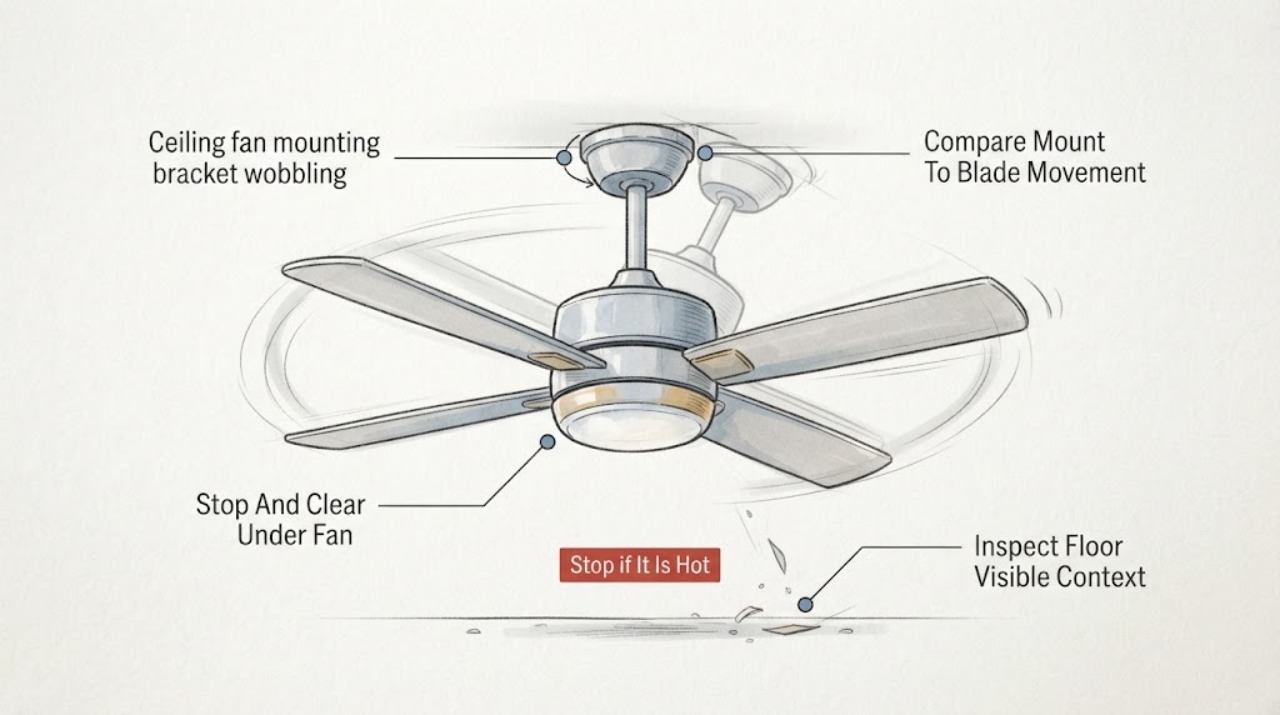
If a ceiling fan's mounting bracket or canopy moves with the fan, stop using the fan and keep everyone out from underneath it. From the floor, switch the fan off and look for a growing ceiling gap, a tilted or hanging canopy, movement where the fan meets the ceiling, exposed wiring, or a fan that has shifted. If the bracket itself appears to move, turn off the circuit at a safely accessible breaker without approaching the fan and call an electrician. If the ceiling mount stays fixed but the blades wobble, document whether the movement is blade-only and have the fan checked; do not use a ladder, remove the canopy, reach toward the bracket, tighten overhead hardware, or install a balancing kit on a questionable mount. A model number and safe photos help a professional distinguish bracket, fan-rated box, downrod, blade, or balance issues.
Work through in order
Diagnostic checks
Use only checks that match the exact appliance or system and its official guide.
-
Check 1
From a safe position, switch the fan and light off at the wall control and clear people, pets, and movable objects from directly beneath it. Look without touching for a tilted canopy, a growing ceiling gap, a fan that hangs lower than before, exposed wiring, or a mount that visibly shifts.
Expected result: The ceiling connection may appear fixed, or the canopy, bracket area, fan body, or wiring may move, separate, hang, or look damaged.
Next step: If the mount moves, keep everyone out from underneath it and turn off the circuit at a safely accessible breaker if you can do so without approaching the fan; call an electrician. If only the blades appear uneven and the support is fixed, continue only with floor-level documentation.
Stop if: Stop immediately for any mount movement, hanging fan, exposed wiring, crack or separation at the ceiling, falling material, burning smell, sparking, or any need to approach the fan.
Why this matters
Why: A moving or separating mount is a fall and electrical hazard, not an ordinary balancing problem. A fixed mount with blade-only movement may be a different, lower-risk diagnostic path, but the fan should remain off until the cause is known.
-
Check 2
With the fan switched off and untouched, view the fan from several floor positions and compare the canopy and downrod area with the ceiling while looking at the blade tips and light kit separately. Use a phone camera from the floor if helpful; do not restart the fan to reproduce wobble.
Expected result: The canopy and downrod may remain centered while blade tips vary, or the whole fan, canopy, downrod, or light kit may be tilted or displaced.
Next step: Photograph the full fan, ceiling interface, downrod, blade tips, and light kit from the floor and give the distinction to an electrician. Do not touch a blade, canopy, downrod, or bracket to check for play.
Stop if: Stop for a visible ceiling gap, displaced canopy, fan tilt, loose-looking support, exposed conductors, or any temptation to steady the fan by hand.
Why this matters
Why: Blade-only variation is consistent with balance, blade, or accessory issues; movement of the whole hanging assembly is more consistent with bracket, outlet-box support, downrod, or installation failure. A stationary view cannot verify hidden fasteners or the box behind the canopy.
-
Check 3
From the floor, inspect the ceiling around the fan for cracks, water staining, sagging drywall, a damaged junction-box area, or a ceiling surface that may not support the fixture. Also note whether the wobble began after installation, a light-kit or blade change, impact, or water event.
Expected result: The ceiling may be sound and dry, show cracks or staining, or have an uncertain support condition that cannot be judged from below.
Next step: Keep the fan off and report ceiling damage, moisture, and the event history to an electrician or qualified fan installer. Do not cut the ceiling, remove the fan, or probe the junction-box area.
Stop if: Stop for sagging or wet ceiling material, visible cracking around the support, active water, exposed wiring, or any need to open the ceiling or remove the fixture.
Why this matters
Why: A damaged or wet ceiling can compromise the fan support independently of the bracket. A recent accessory or installation change can help a technician identify the affected assembly, but it does not make overhead tightening safe for the homeowner.
-
Check 4
Record any model or brand marking that is readable from the floor, the fan type and downrod appearance, the number of blades, and whether a light kit is attached. Photograph the wall control, canopy, ceiling interface, and any label without climbing or removing covers.
Expected result: The model and installation details may be clear, partially readable, or unknown.
Next step: Give the model information and photos to the electrician or manufacturer support channel and ask them to identify the correct support and replacement path. Do not order a generic bracket or downrod before the support and model are confirmed.
Stop if: Stop if identification requires a ladder, touching the fan, removing the canopy, exposing wiring, or disturbing the ceiling support.
Why this matters
Why: Mounting brackets, outlet-box requirements, downrods, blades, and balancing guidance are not universal. Hunter specifically directs owners to model-specific manuals and compatible mounting hardware, so appearance alone is not a fit or safety check.
-
Check 5
Decide whether the fan can remain safely out of service while help is arranged. Leave the wall control unused, keep the area below clear, and if the mount moved or wiring is exposed, leave the circuit isolated from a safely accessible location rather than returning to inspect the fan.
Expected result: The fan can remain off and the area can stay clear, or the fan is needed immediately, blocks a walkway, has fallen, or cannot be isolated safely.
Next step: For a stable fan, schedule an electrician or qualified fan technician. For a fallen, hanging, sparking, or urgently hazardous fan, keep clear and request prompt electrical or emergency assistance from a safe location.
Stop if: Stop all further inspection if the fan is unstable, has fallen, exposes wiring, cannot be isolated safely, or would require someone to stand beneath it.
Why this matters
Why: A stable pause preserves safety and prevents vibration from worsening a support problem. A fallen or unstable fan may leave energized conductors and requires professional or emergency handling rather than temporary bracing.
Use your observations
Decision map
Find the observation that best matches what you see, then follow the next safe action.
-
PATH 01Next step
What you see
The canopy, bracket area, downrod, or entire fan shifts relative to the ceiling, or a ceiling gap is growing.
Do this next
Stop use, keep everyone out from underneath, isolate the circuit from a safely accessible location if possible, and call an electrician or qualified fan technician. Do not steady, tighten, remove, or brace the fan yourself.
-
PATH 02Next step
What you see
The fan has fallen or is hanging, or conductors, terminals, or other electrical parts are exposed.
Do this next
Do not touch the fan or wiring. Keep clear, turn off power only from a safe accessible point if possible, and request prompt electrical or emergency assistance.
-
PATH 03Next step
What you see
Cracks, sagging, water staining, active moisture, or damaged ceiling material surrounds the fan support.
Do this next
Leave the fan off and arrange electrician and, if needed, building or water-service assessment. Do not open the ceiling, remove the fan, or investigate above the surface.
-
PATH 04Next step
What you see
The ceiling interface and hanging assembly appear fixed from the floor, while blade tips or a light kit appear uneven.
Do this next
Keep the fan off and provide photos and model information to a qualified technician. A balancing kit or accessory may be considered only after the support is confirmed sound and the exact fan instructions are known.
-
PATH 05Next step
What you see
The fan model, outlet-box support, bracket, or source of movement cannot be identified without overhead access.
Do this next
Do not guess at a generic bracket, downrod, or blade kit. Keep the fan off and have an electrician or qualified fan installer identify the support and compatible parts.
Helpful context
Understand the symptom
Bracket movement is different from blade wobble
A blade can appear to wobble because of dust, blade shape, loose blade hardware, or balance, while the fan's hanger and ceiling connection remain fixed. Movement at the canopy, mounting bracket, outlet-box area, or downrod is a support problem and can progress to a falling fixture. Hunter describes the mounting bracket as the connection to the ceiling box and emphasizes the need for a fan-rated box and model-compatible hardware; the correct first decision is therefore where the movement occurs, not which balancing weight to buy.
Make a moving mount a stop-use condition
The U.S. Consumer Product Safety Commission has documented recalled ceiling fans where a hanger bracket could spread and the fan could fall. That recall is specific to identified products and does not diagnose this fan, but it supports a conservative boundary: do not stand under or handle a fan whose mount is shifting. Keep the area clear and have an electrician or qualified fan technician verify the support and wiring.
Safety boundary
Stop conditions
- Stop using the fan if the mounting bracket, canopy, downrod, ceiling interface, or entire fan moves, tilts, separates, hangs, or shows a growing gap.
- Do not use a ladder or step stool, remove the canopy or fan, reach overhead, touch the bracket or wiring, tighten elevated hardware, or steady the fan by hand.
- Do not install a generic bracket, downrod, blade, light kit, or balancing kit before the fan model, fan-rated box, support, and cause of wobble are confirmed.
- Keep people and pets clear. If the fan has fallen, is hanging, exposes wiring, sparks, smells burned, or cannot be isolated safely, stay clear and call an electrician or emergency service.
Only after diagnosis
Potential parts
- ceiling fan balancing kit
Consider this category only after an electrician or qualified technician confirms that the fan-rated support and mounting bracket are fixed and the wobble is blade imbalance rather than mount movement.
Match the exact fan model and follow its instructions; do not apply weights or clips to a fan with a moving, damaged, or unverified mount. - ceiling fan mounting bracket
Consider this category only when the exact fan model and support diagnosis confirm a worn, damaged, or incorrect bracket and a qualified person verifies the fan-rated outlet-box connection.
Use the manufacturer-specified bracket and hardware for the fan and box; generic appearance is not evidence of fit or load suitability. - fan downrod
Consider this category only if a qualified technician identifies the downrod or its model-specific connection as the cause after the ceiling support is confirmed sound.
Confirm length, diameter, wiring path, finish, attachment method, and model compatibility before any replacement; downrod work is overhead and should not be performed on an unstable fan.
When checks do not resolve it
Need a professional?
Call an electrician or qualified ceiling-fan technician for any movement at the mounting bracket, canopy, downrod, ceiling box, or entire fan; a growing ceiling gap; exposed wiring; ceiling cracking or water damage; a fan that has fallen or hangs; or a blade-only wobble that persists after the support is confirmed fixed. Provide the model, photos from the floor, whether the mount or only the blades move, recent installation or accessory changes, and whether power was isolated. Keep the fan off while waiting.
Common questions
FAQ
Is a wobbling ceiling fan always a balancing problem?
No. Blade imbalance can cause visible blade movement, but a moving canopy, bracket, downrod, or ceiling interface indicates a support problem. Keep the fan off and distinguish the movement from the floor before considering any balance kit.
Can I tighten the ceiling fan mounting bracket myself?
Do not use a ladder, remove the canopy, reach overhead, or steady a moving fan to tighten the bracket. Photograph the ceiling interface from the floor and have an electrician or qualified fan technician verify the fan-rated box, support, and wiring.
What should I do if the fan moves at the ceiling?
Stop using it, keep everyone out from underneath, and isolate the circuit from a safely accessible breaker if possible without approaching the fan. Call an electrician or qualified fan technician; do not brace, remove, or handle the fan.
Can I install a generic ceiling-fan bracket?
Do not assume a generic bracket is compatible. Bracket design, fan-rated box, downrod connection, fasteners, and model requirements must agree. Have the exact fan and support identified before selecting a replacement.
What if only the blade tips wobble but the mount looks fixed?
Leave the fan off and document the blade-only movement and model. A technician can determine whether balance, blade, light-kit, or installation issues are involved. Do not attach weights or touch the blades until the support is confirmed sound.
Read the exact guide
Official sources
- Ceiling Fan Mounting Bracket | Secure Ceiling Fan HangerHunter Fan · Supports the need for the correct bracket and fan-rated box; it is not evidence that an unidentified fan uses a Hunter bracket or that the reader should perform overhead work.
- Ceiling Fans Recalled by Emerson Air Comfort Products Due to Injury HazardU.S. Consumer Product Safety Commission · The recall applies to specific Emerson Corsair fans and does not diagnose other fans; it supports the stop-use response when a bracket or mount appears to move.
- How to Balance a Ceiling Fan | Fix a Wobbly Fan with Simple StepsHunter Fan · Supports distinguishing blade imbalance from mounting concerns and using model-specific guidance; the article's floor-only boundary intentionally does not reproduce Hunter's ladder or overhead repair steps.
Community feedback
Share a repair observation
Share a plain-text repair observation. Accepted observations are published automatically; this page may take a moment to update.