
On this page
Start here
Quick answer
A buzzing Casablanca ceiling fan is most often narrowed by where the sound comes from and what changes it: a light-only buzz can point to a bulb, light kit, or dimmer; a buzz tied to a control can involve an incompatible control or receiver; and a buzz that follows fan speed can involve the motor or mounting hardware. From the floor, listen briefly with the light off and on and at different fan settings, but stop immediately for crackling, sizzling, a burning or popcorn-like odor, heat, smoke, visible damage, or a loose fan. With power off and the fixture cool, inspect only accessible screws, blade holders, shade, and bulbs using the model manual. Do not remove the canopy, open the switch housing, touch wiring, use an incompatible dimmer, or climb to the fan unless a qualified person can make it safe. Casablanca support and model-specific manuals should guide any part or wiring decision.
Before you begin
Safety first
- The electrician or manufacturer should determine whether the source is a bulb, light kit, dimmer or wall control, receiver, motor, blade or mounting hardware, house wiring, or circuit before selecting parts or changing wiring.
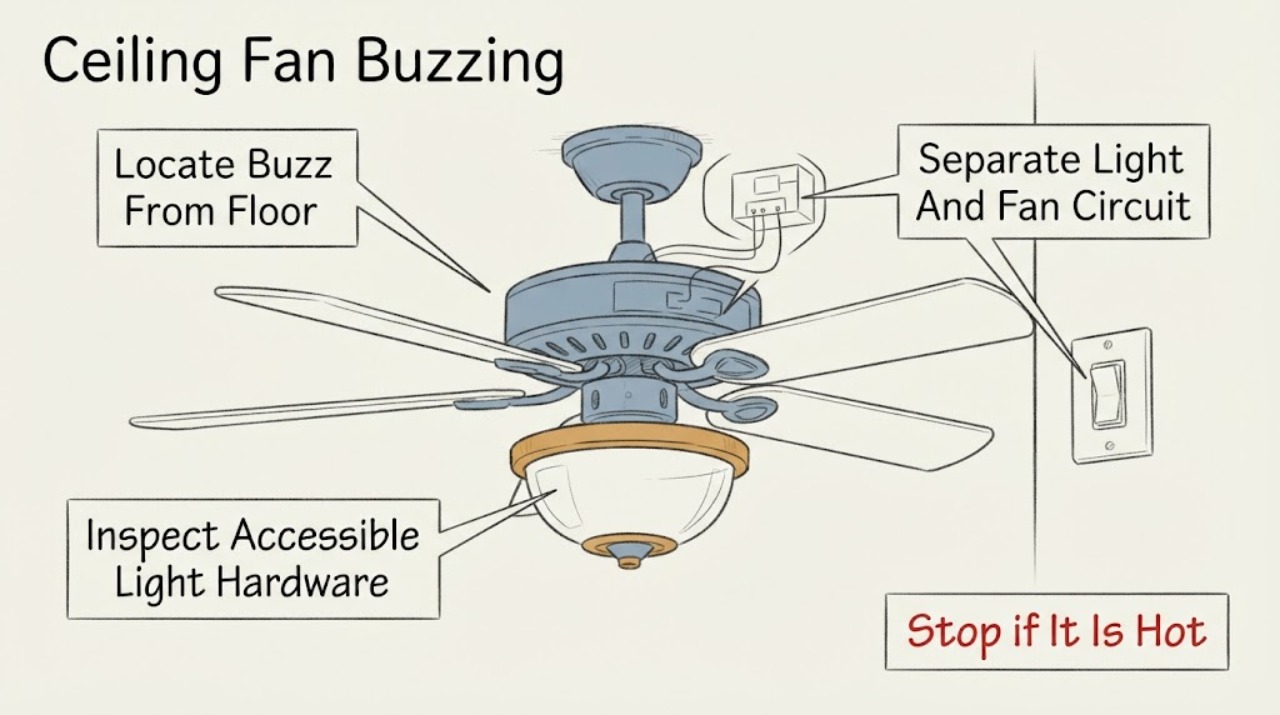
Work through in order
Diagnostic checks
Use only checks that match the exact appliance or system and its official guide.
-
Check 1
From a normal standing position, listen briefly with the Casablanca fan off, then at one normal fan setting and with the light separately off or on if the area is safe; do not touch the fixture or climb.
Expected result: The sound comes from the light kit, wall control, motor housing, blades or mounting area, or the source cannot be localized safely.
Next step: Record the sound location and which setting changes it. Turn the fan off and arrange electrical or manufacturer service for an unclear source, unsafe fixture, or any abnormal odor, heat, or damage.
Stop if: Stop immediately for crackling, sizzling, smoke, burning or popcorn-like odor, heat, sparks, a loose fan, or a sound that worsens with operation.
Why this matters
Why: A light or control location keeps the bulb, light kit, dimmer, or receiver in focus; a motor, blade, or mount location keeps hardware, installation, or motor issues in focus. An unsafe or unclear location requires service rather than repeated operation.
-
Check 2
With the fan stationary and the area safe, compare whether the buzz is present only when the light is on, only when the fan runs, or in both conditions; use normal controls only and do not repeatedly cycle a noisy fixture.
Expected result: The buzz appears only with the light, only with fan motion, changes with fan speed, or remains with both controls off.
Next step: Leave the fan off when the buzz is electrical or unexplained. Continue only with a cool, power-off visual check of accessible light hardware; arrange service for controls, receivers, wiring, or motor symptoms.
Stop if: Do not open the control, receiver, canopy, or switch housing, and do not use a wall dimmer or control whose compatibility is unknown.
Why this matters
Why: Light-only buzzing keeps a bulb, socket, light kit, or dimmer in focus. Fan-speed-related buzzing keeps the motor, receiver, control, blade, or mount in focus. A sound with controls off may come from a powered receiver or wiring and needs professional assessment.
-
Check 3
After switching the fan and light off, isolating power according to the model instructions, and waiting for the fixture to cool, inspect only accessible bulbs, glass shade, light-kit retaining screws, and visible fasteners; use normal hand-tightening only where the manual permits.
Expected result: A bulb is loose or visibly damaged, the shade or light kit is loose, hardware is intact, or the inspection would require a ladder, disassembly, or contact with wiring.
Next step: Replace a visibly damaged bulb only with the exact model-approved type after the fixture is safe, or leave the light unused and arrange service for loose, inaccessible, or electrical components.
Stop if: Do not use pliers or excessive force, remove the light kit, reach into the housing, or work from an unstable ladder or while power status is uncertain.
Why this matters
Why: A loose bulb, shade, or light-kit fastener can create a vibration or electrical buzz, while intact accessible hardware keeps the control, receiver, motor, or hidden wiring in focus. Unsafe access is not evidence that a part has failed.
-
Check 4
Identify whether the Casablanca uses a pull chain, remote receiver, wall control, or dimmer and compare that setup with the exact model manual; do not change wiring or substitute a control to test the buzz.
Expected result: The buzz changes with a wall dimmer, remote or receiver response, fan speed control, or the control type is unknown.
Next step: Stop using the buzzing control and provide the model and control details to Casablanca support or a qualified electrician; use only model-confirmed control parts.
Stop if: Do not bypass a receiver, replace a wall control, alter wiring, or operate a ceiling fan from a standard dimmer when compatibility is not confirmed.
Why this matters
Why: A dimmer or incompatible control can create electrical hum, and a receiver or speed-control issue can make the noise change with operation. Unknown control compatibility cannot be resolved by appearance or by trying a random replacement.
-
Check 5
With power isolated and from the floor, look for a cracked blade, visible blade misalignment, wobble, loose canopy or downrod movement, or anything rubbing the motor housing; do not support or move the fan overhead.
Expected result: A blade is cracked, the fan wobbles or shifts at the mount, something rubs, all visible parts look stable, or the cause cannot be viewed without climbing or disassembly.
Next step: Leave a damaged, wobbling, rubbing, or inaccessible fan off and arrange qualified service. Do not balance, tighten, or support overhead components unless the exact manual and safe access permit it.
Stop if: Do not climb an unstable ladder, catch a moving blade, remove the canopy, or continue operating a fan that wobbles, shifts, rubs, or has a cracked blade.
Why this matters
Why: A cracked blade, rubbing part, or moving mount can produce vibration and may be a structural hazard. Stable visible parts make a hidden control, receiver, motor, or wiring issue more likely but do not clear the fan.
-
Check 6
Photograph the Casablanca model marking, control and dimmer type, light kit and bulb label, blade and mount condition, and where the buzz changes or stops; do not photograph by opening the fixture.
Expected result: The exact model is known, only the Casablanca style is known, the buzz persists after safe hardware checks, or electrical or structural symptoms are present.
Next step: Leave the fan off for persistent or electrical buzzing and contact Casablanca support or a qualified electrician with the model and record; seek urgent help for smoke, heat, odor, sparks, or exposed wiring.
Stop if: Do not order a generic receiver, motor, light kit, bulb, or control by appearance alone and do not perform live electrical testing.
Why this matters
Why: The model determines the correct manual, control compatibility, and replacement parts. Persistent buzzing after accessible checks keeps a receiver, motor, wiring, circuit, or installation issue in focus.
Use your observations
Decision map
Find the observation that best matches what you see, then follow the next safe action.
-
PATH 01Next step
What you see
The buzz occurs only when the Casablanca light is on and changes with the bulb, shade, or light control, while the fan itself is stationary.
Do this next
Leave the light off, inspect accessible cool hardware only with power isolated, and arrange service for a persistent, hot, crackling, or control-related buzz.
Why this path and its safety boundary
Why it matters: A bulb, light-kit fastener, socket, or dimmer-related electrical hum is more likely than a blade or motor fault; the exact bulb and control must match the model.
-
PATH 02Next step
What you see
The buzz follows fan operation or changes with speed, while the light remains off or quiet and no visible blade or mount problem is present.
Do this next
Stop using the fan if the buzz persists or worsens and provide the model and control details to Casablanca support or a qualified electrician.
Why this path and its safety boundary
Why it matters: A receiver, speed control, motor, installation, or hidden electrical issue is more likely than a light-only problem; operating-speed correlation does not identify the failed part.
-
PATH 03Next step
What you see
The sound changes when a wall dimmer, remote receiver, or variable speed control is used, or the control is not confirmed for the Casablanca model.
Do this next
Do not bypass or rewire the control. Leave the noisy function off and arrange manufacturer or qualified electrician diagnosis.
Why this path and its safety boundary
Why it matters: An incompatible or defective control or receiver is more likely than a loose blade; a control swap or wiring change requires model-specific and electrical expertise.
-
PATH 04Next step
What you see
The fan wobbles, rubs, shifts at the mount, has a cracked blade, or the buzz is accompanied by visible vibration or movement.
Do this next
Turn the fan off, keep people clear, and arrange qualified service; do not continue operation or reach overhead to stabilize it.
Why this path and its safety boundary
Why it matters: A blade, holder, mounting, downrod, or motor-housing issue may be creating vibration and can become a falling-object or contact hazard.
-
PATH 05Next step
What you see
The buzz is accompanied by crackling, sizzling, a burning or popcorn-like odor, heat, smoke, sparks, exposed wiring, or remains unexplained after safe visual checks.
Do this next
Stop using the fan and, if safe without touching the fixture, isolate power at the appropriate control or breaker; arrange urgent qualified electrical service.
Why this path and its safety boundary
Why it matters: A wiring, receiver, circuit, or component fault may be energized and cannot be distinguished by listening or by replacing a visible part.
Helpful context
Understand the symptom
The sound's location matters more than the brand name
Listen from a normal standing position without touching the fan. A sound at the light kit or wall control does not have the same next step as a sound at the motor housing, blades, or ceiling mount. A buzz that changes with the light or fan setting is a useful pattern, not proof of a failed part. If the sound is crackling or sizzling, or there is an odor or heat, stop using the fan and arrange electrical service.
Use low-risk checks for hardware and controls
When the fan is off, power is isolated at the appropriate switch or breaker, and the fixture is cool, inspect accessible blade screws, blade holders, light-kit hardware, glass shade, and bulbs. A dimmer or control that was not designed for the fan can create electrical hum. Do not open the canopy or switch housing to chase the buzz; wiring, receiver, and motor diagnosis belongs to a qualified electrician or the manufacturer.
Record the model before choosing a part
Photograph the Casablanca model marking, control type, light kit, bulb information, and where the sound is heard. Casablanca support asks for the model number, and manufacturer guidance warns that control compatibility and replacement decisions depend on the specific fan. A generic bulb, dimmer, receiver, or motor part is not a safe substitute for model confirmation.
Safety boundary
Stop conditions
- Stop immediately for crackling, sizzling, smoke, a burning or popcorn-like odor, heat, sparks, exposed wiring, a loose mount, a cracked blade, or worsening vibration.
- Do not remove the canopy, switch housing, light kit, receiver, or wiring cover; do not touch wiring or perform live electrical tests.
- Do not use a standard dimmer or an unconfirmed control, bypass a receiver, or alter wiring to make the buzz stop.
- Do not climb an unstable ladder, reach around moving blades, support a loose fan, or continue operating a fan that wobbles, rubs, shifts, or has damaged parts.
- Arrange qualified electrical or manufacturer service for persistent buzzing, control or receiver symptoms, inaccessible hardware, model uncertainty, or any electrical or structural warning sign.
Only after diagnosis
Potential parts
- Casablanca model-specific control receiver or light-kit component
Consider this category only after the exact model and a qualified diagnosis identify a defective receiver, control, socket, or light-kit component as the source of the buzz.
Confirm the Casablanca model, control system, light configuration, and manufacturer fit information; receivers, controls, sockets, and light kits are not universal.
When checks do not resolve it
Need a professional?
Use prompt service for unexplained or persistent buzzing, a light kit or control that hums, a receiver or motor concern, or a fan that cannot be accessed safely. Treat crackling, sizzling, heat, smoke, burning odor, sparks, exposed wiring, loose mounting, or severe wobble as urgent.
Safety scope: The electrician or manufacturer should determine whether the source is a bulb, light kit, dimmer or wall control, receiver, motor, blade or mounting hardware, house wiring, or circuit before selecting parts or changing wiring.
Have this ready
- Photos of the Casablanca model marking, control type, dimmer if present, light kit, bulb label, blades, and mount from a safe position
- Where the sound is loudest and whether it changes with the light, fan speed, remote, wall control, or power state
- Whether any visible bulb, shade, light-kit fastener, blade, mount, or downrod is loose, cracked, rubbing, hot, or discolored
- The safe visual checks performed with power isolated and the result of each check
- Any crackling, sizzling, smoke, odor, sparks, exposed wiring, recent installation, control change, or prior repair
Common questions
FAQ
Why is my Casablanca ceiling fan buzzing?
The source may be a bulb or light kit, dimmer or wall control, receiver, loose hardware, motor, wiring, or circuit. Note whether the sound changes with the light or fan speed, inspect only cool accessible hardware with power isolated, and stop for electrical or structural warning signs.
Can a dimmer switch make a ceiling fan buzz?
Yes. Manufacturer guidance says dimmers and incompatible controls can create electrical hum or cause inconsistent fan operation. Do not substitute or rewire a control as a test; confirm the Casablanca model and have a qualified electrician handle wiring.
What can I safely tighten on a buzzing fan?
Only after power is isolated and the fixture is cool should you inspect accessible bulb, shade, light-kit, blade, or holder hardware, following the exact manual and using normal gentle hand-tightening where allowed. Stop if access requires unsafe climbing, disassembly, or contact with wiring.
Is a buzzing sound from the Casablanca motor dangerous?
A motor-related buzz cannot be cleared by sound alone. Leave the fan off if the buzz persists, changes with speed, or is accompanied by heat, odor, crackling, smoke, wobble, or rubbing, and arrange manufacturer or qualified electrical service.
Should I replace the receiver or light kit?
Only after the exact Casablanca model and a qualified diagnosis identify that component as the source. Receivers, controls, sockets, and light kits are model-dependent; do not order a generic replacement by appearance.
When should I call an electrician for a buzzing ceiling fan?
Call for persistent or unexplained buzzing, a control or receiver issue, wiring or motor symptoms, inaccessible hardware, wobble, a loose mount, or any crackling, sizzling, heat, smoke, odor, sparks, or exposed wiring. Keep the fan off until it is assessed.
Read the exact guide
Official sources
- What can I do if my fan is making a noise?Hunter Fan Team · The opened Hunter support article distinguishes loose hardware, light bulbs and kits, receivers, dimmers, wiring, circuit breakers, and motors as possible sound sources and calls for qualified electrical repairs.
- Casablanca Fans Consumer SupportHunter Fan Team · The opened manufacturer support page is specifically for Casablanca fans and directs owners to have the model number ready and use installation and troubleshooting resources.
- How to Fix a Noisy Ceiling FanHunter Fan Company · The opened Hunter manufacturer guide explains electrical buzzing paths, recommends model-manual confirmation for control compatibility, and gives escalation boundaries for wiring, motors, and crackling.
- Wiring Your Fan On a Single or Dual Wall SwitchHunter Fan Team · The opened Hunter wiring article distinguishes wall-switch and control systems, warns that a wall dimmer cannot operate the fan, and directs users who are uncomfortable with wiring to a certified electrician.
Community feedback
Share a repair observation
Share a plain-text repair observation. Accepted observations are published automatically; this page may take a moment to update.