
On this page
Start here
Quick answer
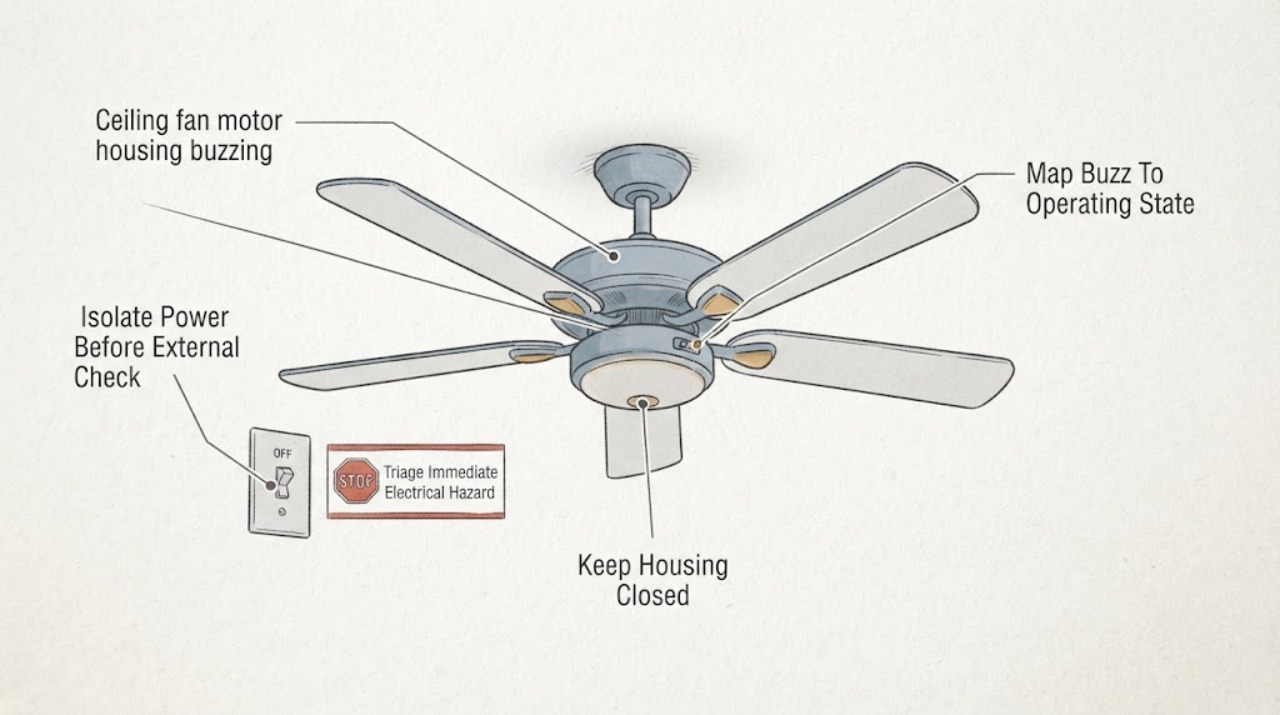
A Casablanca fan that buzzes from the motor housing may have a loose external part, a control that is not compatible with the fan, a wire or connector resonating inside a housing, or an internal motor fault. First observe the sound, speed, light, and control pattern from a safe position. If there is a burning smell, smoke, sparking, unusual heat, a loose ceiling mount, or a worsening sound, turn the fan off, keep clear, and arrange prompt qualified electrical or fan service. With power safely isolated and only if the model manual identifies accessible fasteners, an owner may check for snug external blade, blade-iron, or housing screws; do not open the motor housing or work on wiring.
Before you begin
Safety first
- Owner checks are limited to safe observation, reading the model information, and—only when the exact manual permits it—checking accessible external fasteners after confirmed power isolation and stable access. A qualified professional must handle electrical isolation when uncertain, energized measurements, wall-box or canopy wiring, receiver and control compatibility, housing access, bearing assessment, and motor or component replacement.
Work through in order
Diagnostic checks
Use only checks that match the exact appliance or system and its official guide.
-
Check 1
From the floor and without touching the fan, observe whether the buzz is accompanied by smoke, a burning odor, sparks, crackling, visible arcing, a hot-looking housing, a cracked part, or movement of the ceiling mount.
Expected result: There is no visible hazard; or there is odor, smoke, sparking, crackling, heat, damage, or a loose or shifting mount.
Next step: If a hazard is present, keep people away, use the normal wall control only if it can be reached without approaching the hazard, and leave the area for smoke, fire, or active arcing before contacting emergency help. Otherwise continue with safe observation only.
Stop if: Stop immediately for smoke, fire, sparks, crackling, a strong burning smell, a hot or discolored housing, exposed conductors, or a fan that appears to be pulling away from the ceiling.
Why this matters
Why: A clean mechanical buzz can be investigated cautiously, but any sign of overheating, arcing, structural looseness, or fire changes this from a noise diagnosis to an immediate safety issue.
-
Check 2
From a safe position, note when the buzz starts and stops: power supplied but fan not running, fan running, each speed, light on or off, remote or wall control use, and whether the sound changes as speed changes. Do not repeatedly cycle a suspicious fan just to reproduce the noise.
Expected result: The buzz follows one speed, occurs only with the light, is present whenever the control supplies power, or changes when the fan runs.
Next step: Record the pattern and stop testing if the sound worsens. Use the matching branch below: a mechanical pattern can justify a power-isolated external check, while a power- or light-dependent pattern needs model-specific control or electrical service.
Stop if: Stop if the fan stalls, accelerates unexpectedly, the buzz becomes crackling, the light flickers with heat or odor, or observing the control would require removing a wall plate or touching wiring.
Why this matters
Why: A speed- or vibration-dependent sound makes mechanical resonance or a loose external part more likely. A sound that begins with power, follows the light, or is unchanged by blade speed makes a control, receiver, light circuit, or electrical fault more likely.
-
Check 3
If the exact manual permits an external inspection and you can work from a stable position without reaching beyond your balance, turn the fan off at its normal control and isolate its circuit at the breaker before touching any fastener. Use an appropriate tester only if you are trained; otherwise have an electrician perform isolation.
Expected result: Power isolation cannot be confirmed, the fan is above an unsafe ladder position, or the model manual does not identify the intended external fasteners; alternatively, safe isolation and access are available.
Next step: If isolation or access is uncertain, stop and call qualified service. If both are safe and the manual supports it, continue only with an external visual and fastener check; do not remove a cover or enter the motor housing.
Stop if: Stop if you would need to stand on an unstable ladder, support the fan, remove a canopy or housing cover, disconnect a wire, or rely on a wall switch alone to prove the circuit is dead.
Why this matters
Why: Without confirmed isolation and stable access, even a simple screw check can expose the owner to shock, a falling fan, or a dropped part. The model manual controls what may be safely accessed.
-
Check 4
With the circuit isolated and the fan supported by its normal mount, inspect only the model-identified external blade screws, blade-iron screws, accessible motor-housing fasteners, and visible mounting hardware for looseness, cracked blades, or contact with another part. Snug an accessible fastener only as the manual directs; do not overtighten or disassemble.
Expected result: A loose fastener, cracked blade, rubbing part, or visibly shifting mount is found; or all accessible parts appear secure and clear.
Next step: If a loose fastener is safely corrected and the fan is structurally sound, restore power only when the area is clear and test briefly while observing from the floor. Do not run a fan with a cracked blade or shifting mount; arrange service. If nothing external is found, continue to control and service evaluation rather than opening the housing.
Stop if: Stop for a cracked or bent blade, loose outlet box or hanger, fan movement at the ceiling, missing fasteners, any need to hold the fan while tightening, or any fastener that will not snug normally.
Why this matters
Why: Loose or damaged external parts can transmit vibration into the motor housing and create a buzz or rattle. A secure exterior does not rule out a rattling connector, receiver, bearing, or internal motor problem.
-
Check 5
Without opening the wall control or canopy, identify whether the fan uses its original Casablanca control, a listed compatible receiver, a standard on-off switch, a dimmer, or a recently changed third-party control. Compare the control type with the exact model manual and manufacturer compatibility information.
Expected result: A dimmer or unlisted speed control is present; a receiver or control was recently changed; the control is the specified one; or the control type cannot be identified.
Next step: Do not install, bypass, or rewire a control based on appearance. Stop using the affected fan and have a qualified electrician or Casablanca service verify the control, receiver, wiring, and model fit; use only the control specified for that fan.
Stop if: Stop if the control is warm, scorched, loose in the box, buzzing itself, or requires opening a wall box, handling conductors, or substituting a dimmer or receiver.
Why this matters
Why: Manufacturer guidance warns that an incompatible dimmer can interfere with fan controls and that control compatibility depends on the fan. A buzz that appears with a new control is more consistent with control or receiver incompatibility than with a loose blade alone.
-
Check 6
Record the safely visible model and serial information, where the buzz seems loudest, operating-state pattern, fan speed, light state, control type, wobble, recent installation or control work, and any external check already made. Give that record to Casablanca support, a qualified fan technician, or a licensed electrician.
Expected result: The buzz stopped after a safe external correction; it remains with a secure exterior; it tracks a control or light state; it is accompanied by wobble or heat; or the cause is uncertain.
Next step: Keep the fan off when the symptom is unsafe or persistent and schedule qualified service. Tell the technician not to infer part fit from the brand alone; provide the exact model and the observed pattern so the control and motor assembly can be checked correctly.
Stop if: End owner troubleshooting when diagnosis would require energized measurements, housing or canopy access, wiring work, receiver testing, bearing assessment, or motor replacement.
Why this matters
Why: A temporary change after a fastener correction supports an external resonance, but recurrence needs inspection. A persistent, power-dependent, control-dependent, hot, or uncertain buzz requires model-specific diagnosis of the receiver, wiring, motor, bearings, or housing.
Use your observations
Decision map
Find the observation that best matches what you see, then follow the next safe action.
-
PATH 01Next step
What you see
The buzz occurs only while the blades run, changes with speed, and there is no heat, odor, or electrical symptom.
Do this next
After safe power isolation and only when the manual supports it, check accessible external fasteners and visible rubbing or damage. Do not run the fan with a cracked blade or loose ceiling mount; escalate if the buzz remains.
Why this path and its safety boundary
Why it matters: A loose blade or blade iron, an unbalanced blade set, a mounting resonance, or an accessible housing fastener is more likely than a control fault.
-
PATH 02Next step
What you see
The buzz starts as soon as power is supplied, remains when the blades are stopped, or is largely unchanged by speed.
Do this next
Stop repeated testing and arrange qualified electrical or fan service. Do not open the canopy or housing, probe wiring, or substitute a control.
Why this path and its safety boundary
Why it matters: A wall control, receiver, light circuit, connector resonance, or electrical/motor issue is more likely than blade balance.
-
PATH 03Next step
What you see
The noise appears after a wall control, dimmer, receiver, bulb, or light-kit change, or occurs only when the fan light is used.
Do this next
Keep the fan or light off if it is warm, flickering, or odorous. Have the exact model, control, receiver, and light-kit combination checked by qualified service; do not add a dimmer or bypass a receiver.
Why this path and its safety boundary
Why it matters: Control or light-kit compatibility, a loose connection, or a component resonating under that load is more likely.
-
PATH 04Next step
What you see
The buzz is accompanied by visible wobble, a shifting downrod or canopy, ceiling movement, or a fan that appears loose at its support.
Do this next
Turn the fan off, keep people below it away, and do not climb up to support or retighten a moving fan. Request prompt qualified fan or electrical service.
Why this path and its safety boundary
Why it matters: A mounting, hanger, outlet-box, downrod, or blade-balance problem may be creating a dangerous mechanical resonance; the fan could loosen further.
-
PATH 05Next step
What you see
The housing is hot or discolored, there is smoke, burning odor, sparking, crackling, exposed wiring, a damaged blade, or the buzz persists after safe external checks.
Do this next
Stop using the fan and keep clear. Leave for smoke, fire, or active arcing and contact emergency help from a safe location; otherwise arrange prompt qualified service and do not re-energize the fan to reproduce the noise.
Why this path and its safety boundary
Why it matters: An overheating, arcing, internal motor, receiver, wiring, or structural problem cannot be safely separated by owner observation.
Helpful context
Understand the symptom
A housing buzz does not prove that the motor itself has failed
A sound that seems to come from the motor housing can be transmitted from a loose blade, blade iron, canopy, mounting point, light kit, or a connector that is vibrating against an enclosure. The sound can also be caused by a control that chops or otherwise changes the power waveform. The useful first distinction is whether the buzz follows fan speed, appears only when the light is used, or is present as soon as the control supplies power.
Use the exact Casablanca manual for any access or control question
Casablanca support recommends having the model number ready and using its troubleshooting and installation material. Fan generations differ in motor type, receiver, wall control, and housing construction, so a generic replacement control or a procedure from another model is not enough to establish compatibility. If the model label is not safely visible, let the technician identify it rather than moving the fan or removing trim.
Do not open a buzzing motor housing as an experiment
A ceiling fan combines line voltage, a motor, and often a receiver or light circuit above head height. Owner checks should stay at safe observation and model-approved external fasteners after power isolation. Do not probe live wiring, bypass a receiver, substitute a dimmer, or dismantle the housing to look for a loose connector; those are service tasks.
Safety boundary
Stop conditions
- Stop and leave the area for smoke, fire, active sparking, crackling, a strong burning odor, or rapidly increasing heat; contact emergency help from a safe location.
- Turn the fan off and keep people clear if the ceiling mount, downrod, canopy, or fan body moves, sags, or appears loose. Do not climb up to support or repair a moving fan.
- Do not open the motor housing, canopy, switch box, receiver, or light kit; do not probe energized conductors, bypass a receiver, or substitute a dimmer or speed control.
- Do not run the fan with a cracked or bent blade, exposed wiring, a hot or discolored housing, a loose outlet box, or a fastener that will not hold normally.
- Call qualified electrical or fan service for persistent buzzing, power- or light-dependent buzzing, suspected bearing or motor noise, uncertain control compatibility, or any diagnosis requiring wiring, energized measurements, housing access, or part replacement.
Only after diagnosis
Potential parts
- Casablanca-compatible wall control or receiver
Consider this only if the buzz follows a control or power state and a qualified technician confirms that the installed control or receiver is incompatible or defective.
Verify the exact Casablanca model, motor type, receiver family, wiring arrangement, and manufacturer fit information; do not choose a control or receiver by appearance. - ceiling fan motor housing or external mounting hardware
Consider this only if a technician confirms a damaged or missing model-specific external fastener or mounting component after ruling out a loose installation.
Confirm the exact model, fastener dimensions, mount design, and load requirements; hardware that merely fits the thread may not provide a safe fan support. - Casablanca fan blade or blade iron set
Consider this only when a technician confirms a cracked, bent, or model-specific damaged blade or blade iron is transmitting vibration into the housing.
Use the exact model and complete compatible set where required; do not mix blades based on size, finish, or hole pattern alone. - ceiling fan motor assembly
Consider this only after qualified diagnosis confirms an internal motor, bearing, or motor-control fault and determines that the model is serviceable.
Confirm exact model, motor type, electrical ratings, mounting configuration, and manufacturer service guidance; do not open or replace a motor assembly as a noise experiment.
When checks do not resolve it
Need a professional?
Call a qualified electrician or fan technician when the buzz persists after a safe external check, begins with power, follows a control or light change, is accompanied by wobble or a loose mount, or comes with heat, odor, discoloration, crackling, sparking, or visible damage. Leave for smoke, fire, or active arcing and contact emergency help. Do not open the motor housing or attempt wiring, receiver, control, bearing, or motor work.
Safety scope: Owner checks are limited to safe observation, reading the model information, and—only when the exact manual permits it—checking accessible external fasteners after confirmed power isolation and stable access. A qualified professional must handle electrical isolation when uncertain, energized measurements, wall-box or canopy wiring, receiver and control compatibility, housing access, bearing assessment, and motor or component replacement.
Common questions
FAQ
Why is my Casablanca ceiling fan buzzing from the motor housing?
The sound may be a loose external part, mounting resonance, an incompatible control or dimmer, a rattling connector or receiver, or an internal motor issue. Map when the sound occurs and stop for heat, odor, sparks, smoke, wobble, or visible damage.
Can loose motor-housing screws cause a buzz?
Yes, a manufacturer manual lists loose motor-housing screws as one possible source of noisy operation. Only check accessible fasteners after confirmed power isolation and according to the exact manual; do not open the housing or overtighten.
Is a buzz that changes with fan speed more likely mechanical?
A speed-dependent buzz makes blade, balance, mounting, rubbing, or external fasteners more likely, but it does not prove the motor is good. Check only safe external items and arrange service if the sound persists.
Why does the fan buzz even when the blades are not moving?
A buzz present whenever power is supplied can point toward a wall control, receiver, light circuit, connector resonance, or electrical issue. Stop repeated testing and have qualified service check the exact control and fan model.
Can a dimmer switch make a Casablanca fan buzz?
An incompatible dimmer can interfere with fan controls. Do not substitute a dimmer or rewire the wall box yourself; have a qualified electrician verify the control against the exact Casablanca model.
What if the buzz started after installing a wall control or receiver?
The timing makes compatibility, wiring, or a defective control or receiver more likely. Keep the fan off if it is warm, flickering, or odorous, and give the installer or technician the exact model and control details.
Should I open the motor housing to find the buzzing part?
No. The housing can contain line-voltage wiring, a receiver, and motor components above head height. Keep owner checks to safe observation and model-approved external fasteners after power isolation; a professional should access the housing.
What does buzzing with wobble or a loose canopy mean?
It can indicate a mounting, hanger, downrod, outlet-box, or blade-balance problem, and the fan may loosen further. Turn it off, keep people clear, do not climb to support it, and request prompt qualified service.
Can I keep running the fan if it only makes a quiet buzz?
Do not rely on loudness alone. A quiet buzz that is new, persistent, power-dependent, or accompanied by wobble, heat, odor, or control changes should be left off until qualified service identifies the cause.
What information does Casablanca support need?
Have the model number, the operating state when the buzz occurs, speed and light settings, control or receiver type, recent installation or repair, and any wobble or hazard observations. Do not remove trim or re-energize a hazardous fan to find the label.
Read the exact guide
Official sources
- FP3075 Influencer (ENG-SPA) OM_02_01_21Hunter Fan · Official fan manual example supporting power-off troubleshooting, snug motor-housing screws, non-rattling connectors, and use of the supplied control; exact Casablanca model manual controls applicability.
- Can I use controls with an existing wall switch?Hunter Fan Support · Manufacturer guidance that a wall dimmer can interfere with fan controls and may require an electrician; verify exact Casablanca model compatibility.
- How to Fix a Ceiling Fan That Won't Turn On, Wobbles, or Makes NoiseHunter Fan · Manufacturer supplemental guidance for ceiling-fan buzz causes, safe power-off inspection, loose parts, controls, and escalation; confirm steps against the Casablanca model manual.
- Casablanca Fans Consumer SupportHunter Fan Support · Official Casablanca support route; recommends having the model number and using installation/troubleshooting material.
Community feedback
Share a repair observation
Share a plain-text repair observation. Accepted observations are published automatically; this page may take a moment to update.