
On this page
Start here
Quick answer
A ceiling fan light that works while the blades do not spin proves only that some power is reaching the fixture; it does not prove that the fan motor circuit, controller, receiver, capacitor, or motor is healthy. From standing level, identify whether the light and fan use separate wall controls, a pull chain, or a remote, then note whether a normal fan command produces no sound, a hum, a click, or a brief attempt to start. Record whether every speed and direction command fails or only one does. A control or receiver path is more likely when the light responds but fan commands do not; a hum or one-speed symptom can move the professional diagnosis toward the capacitor or motor circuit. Do not climb, spin the blades by hand, remove the canopy, open the light kit, probe a switch, or perform a live test.
Before you begin
Safety first
- Keep the fan off for damage, water, heat, smoke, wobble, or unexpected operation. Do not reach the fixture or access wiring.
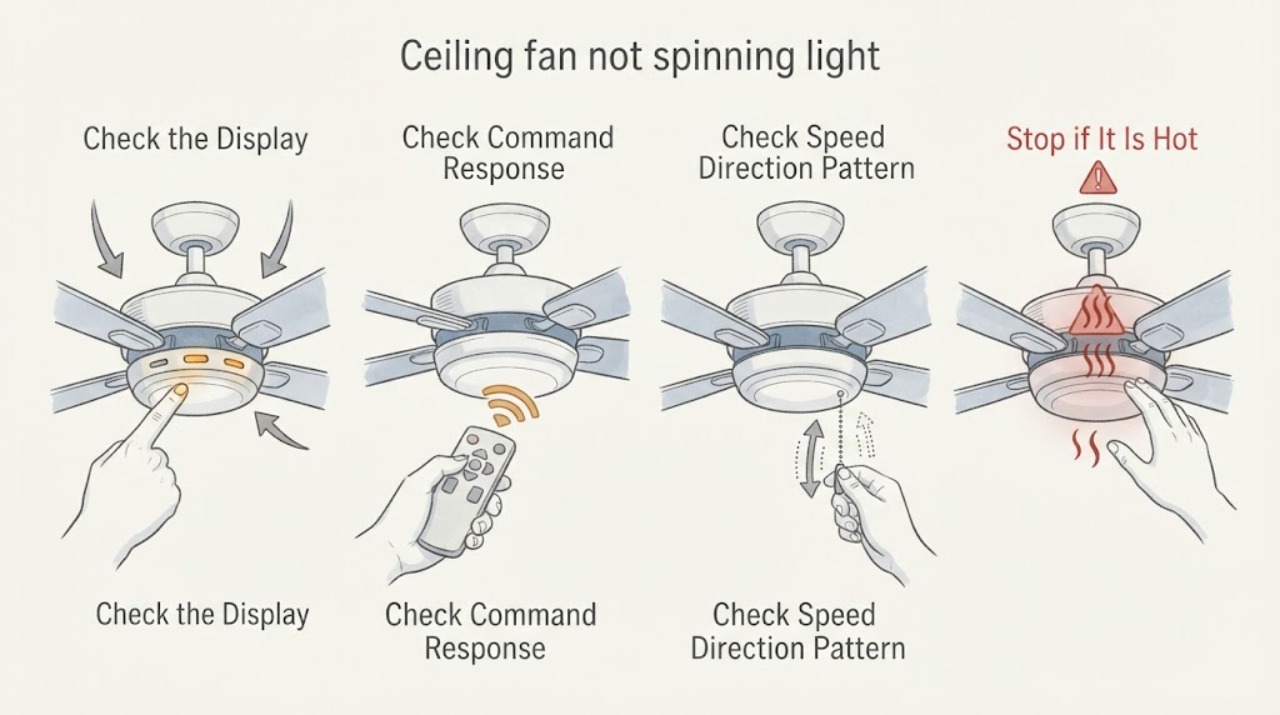
Work through in order
Diagnostic checks
Use only checks that match the exact appliance or system and its official guide.
-
Check 1
From standing level, map how the fixture is controlled. Note whether there are separate wall controls for light and fan, a single switch plus pull chain, a handheld remote, or more than one control. Use only the normal controls and do not remove a wall plate or repeatedly toggle controls to force a response.
Expected result: Record whether the light responds, whether the fan control has a visible power or speed setting, whether a pull chain changes the fan state, and whether the light and fan stop responding together or separately.
Next step: Photograph the wall controls or remote and continue with the safe sound, speed, and direction observation. Keep the exact control arrangement for the service request.
Stop if: Stop for a hot switch, burning odor, smoke, sparks, water at the fixture, loose ceiling material, or any need to open a control or energized enclosure.
Why this matters
Why: A working light shows only a partial powered path. Separate controls or a remote can leave the light circuit working while the fan control, receiver, or motor path is unavailable; a shared loss of both functions points to a broader supply or switch issue.
-
Check 2
With people clear of the blades, issue one ordinary fan command from the wall control, pull chain, or remote while standing on the floor. Observe the fixture without touching it; do not reach up, use a ladder, or hand-spin the blades.
Expected result: Record whether the fan is silent, clicks, hums, briefly twitches, starts slowly, or runs normally at one setting. Note whether the light remains stable while the fan command is issued.
Next step: Stop repeated commands and save the observation. Give the sound and light response to a qualified electrician or fan service provider rather than opening the housing.
Stop if: Stop immediately for humming that becomes hot or smoky, arcing, a burning smell, wobbling, falling material, or unexpected rotation.
Why this matters
Why: Silence with a working light points toward the fan control, receiver, wiring path, or motor circuit. A hum or brief attempt without rotation can point toward a starting or mechanical issue such as a capacitor or motor, but sound alone cannot identify the failed part.
-
Check 3
If the normal control offers speed or direction, make one orderly observation at the available settings from the floor; let the blades stop on their own before using a reverse command. Do not touch the direction switch on the fan housing or climb to reach it.
Expected result: Record whether all speeds fail, only low or medium fails, high works, the fan will not reverse, or the control changes the light but not the fan. Note any change in hum, click, or brief movement between settings.
Next step: Include the setting-by-setting pattern and exact control type in the service request. Do not buy a capacitor or receiver until the provider confirms the diagnosis and compatibility.
Stop if: Stop if the fan wobbles, changes direction unexpectedly, scrapes, sheds material, or would require elevated access to inspect a switch or blade.
Why this matters
Why: A single-speed or direction-specific failure can narrow the professional check toward the control, reverse switch, capacitor, receiver, or wiring harness. Failure at every speed is a broader fan-path symptom and should not be reduced to a capacitor guess.
-
Check 4
From the floor and other ordinary viewpoints, inspect only visible exterior conditions: blade obstruction, cracked housing, loose-looking trim, heavy wobble, water staining, or a remote battery compartment that can be opened without approaching the fan. Do not remove a light globe, canopy, blade, receiver cover, or wall plate.
Expected result: Record whether the blades appear unobstructed, the housing or mount looks damaged, the fan is visibly tilted or wobbling, and whether the remote has a depleted or corroded battery indication.
Next step: Leave the fan off if there is damage, wobble, water, or debris. Provide photos and the visible condition to qualified service; replace only a remote battery if its compartment is safely accessible and dry, without treating that as proof of a fan fault.
Stop if: Do not approach or touch the fan for water, loose parts, exposed wiring, sharp fragments, ceiling movement, or any condition requiring a ladder.
Why this matters
Why: A visible obstruction or structural concern changes the job to safe fixture inspection. A clean exterior with a working light and no fan response keeps the likely causes inside the control, receiver, capacitor, motor, or wiring path, all of which require model-appropriate electrical diagnosis.
-
Check 5
Gather the fan model label or purchase information only if it is visible from a safe position, along with the wall-control and remote types, the light response, fan sound, speed pattern, and recent electrical or installation work. Do not remove the fan to find a label.
Expected result: Record whether the model and control identity are clear, whether the symptom began after a control, bulb, router, breaker, or room renovation change, and whether any other fixture on the same wall or circuit is affected without opening electrical equipment.
Next step: Send the provider the identity, control map, light and fan response, setting pattern, visible safety concerns, and photos. Request diagnosis with power isolated by the professional before any housing or wiring access.
Stop if: Stop the user path if identity requires climbing, disassembly, live testing, or access to a ceiling box, canopy, switch housing, or wiring.
Why this matters
Why: Exact model and control identity determine whether a receiver, capacitor, wall control, or motor is even compatible. A symptom without those details is not enough to order a service part or conclude that the motor has failed.
Use your observations
Decision map
Find the observation that best matches what you see, then follow the next safe action.
-
PATH 01Safety boundary
What you see
The light responds normally, but the fan is silent from every wall, pull-chain, or remote command.
Do this next
Keep the fan off and request qualified diagnosis of the controls and fan circuit before any part is selected.
Why this path and its safety boundary
Why it matters: The light result proves only part of the fixture is powered. A fan-control, receiver, wiring, or motor path remains possible.
Safety stop: Do not assume the breaker, capacitor, or motor is the cause and do not open the canopy or switch housing.
-
PATH 02Safety boundary
What you see
A pull chain or wall control behaves differently from the remote, or the remote changes the light but not the fan.
Do this next
Record the control behavior and model information. A professional can verify compatibility and receiver operation with power isolated; do not pair, replace, or wire a control by guesswork.
Why this path and its safety boundary
Why it matters: The control pairing, receiver, incompatible wall control, or separate control circuit deserves attention before a motor diagnosis.
Safety stop: Do not remove a wall plate, install a dimmer, access the receiver, or perform a live control test.
-
PATH 03Safety boundary
What you see
The fan starts only on one speed, hums at a setting, or runs but will not change speed or direction.
Do this next
Provide the exact setting pattern to service and keep the fan off if it hums, overheats, wobbles, or changes direction unexpectedly.
Why this path and its safety boundary
Why it matters: A control, reverse switch, capacitor, receiver, or wiring-harness issue is possible; this pattern is more specific than a total no-response but does not prove a capacitor failure.
Safety stop: Do not touch the direction switch on the housing or replace a capacitor without model-specific diagnosis and electrical isolation.
-
PATH 04Safety boundary
What you see
The fan hums or briefly twitches when commanded but the blades do not continue rotating, while the light remains on.
Do this next
Turn the fan off at its normal control and request qualified inspection of the fan circuit and motor assembly.
Why this path and its safety boundary
Why it matters: The starting path, capacitor, motor, mechanical obstruction, or internal control may be involved. A hum is not a safe reason to keep cycling power.
Safety stop: Stop for heat, smoke, burning odor, arcing, or any wobble and keep people clear of the fixture.
-
PATH 05Safety boundary
What you see
The fan wobbles severely, has cracked or loose-looking parts, shows water staining, or has an obstruction visible from the floor.
Do this next
Leave the fan off, keep people below it clear, and arrange qualified electrical or fixture service with photos.
Why this path and its safety boundary
Why it matters: This is a fixture or mounting safety concern as well as a no-spin symptom; operation could worsen physical damage.
Safety stop: Do not use a ladder, steady the fan by hand, remove blades, or operate it to see whether the damage improves.
-
PATH 06Safety boundary
What you see
The model, control arrangement, or safe visible response cannot be established without elevated access or opening an enclosure.
Do this next
Stop at ordinary user controls and give the provider the light result, control type, sound, speed pattern, and access limit.
Why this path and its safety boundary
Why it matters: The available evidence cannot safely distinguish receiver, capacitor, motor, wiring, or circuit causes.
Safety stop: Do not climb, remove covers, probe wiring, or perform a live voltage test.
Helpful context
Understand the symptom
A working light proves only partial power
The light and fan can be controlled through different portions of the fixture and control system. A working light does not prove that the fan control, receiver, capacitor, motor, or fan wiring is powered and healthy. Begin by mapping the wall controls, pull chain, and remote rather than replacing the light or motor.
Sound and setting pattern narrow the professional check
Silence, a hum, a brief twitch, one working speed, and a failed reverse command are different observations. Hunter's official troubleshooting guidance lists the remote, wall control, reverse switch, capacitor, wiring harness, and motor as different possible paths and says to use the model-specific manual. These observations narrow service scope but do not identify a universal replacement part.
Keep the ceiling and electrical boundary intact
Do not use a ladder, hand-spin the blades, remove a canopy or light kit, open a receiver, remove a wall plate, or probe wiring. If the fan is damaged, wet, hot, smoky, or wobbling, leave it off and keep people clear. A qualified electrician can isolate power before inspecting controls and internal components.
Choose parts only after the control path is known
A capacitor, receiver, remote, or wall control is conditional on the exact fan model and control architecture. The same light symptom can accompany different failures, and a generic control can be incompatible. Give service the model label, control map, sound, speed and direction result, and light response before ordering anything.
Safety boundary
Stop conditions
- Do not use a ladder, reach the fan, hand-spin blades, remove the light kit or canopy, or open a receiver or motor housing.
- Do not remove a wall plate, probe wiring, perform live testing, or substitute a light dimmer for a fan-rated control.
- Do not keep cycling a humming, hot, smoking, wet, wobbling, or unexpectedly moving fan.
- Leave the area and seek qualified or emergency help for smoke, fire, arcing, exposed energy, falling parts, severe wobble, or water near electrical equipment.
Only after diagnosis
Potential parts
- ceiling fan capacitorMatch the exact fan model, capacitance and voltage markings, lead arrangement, enclosure, and manufacturer instructions. Do not open the fan or handle a capacitor as a user step.
- ceiling fan remoteA remote may control the light and fan through a receiver-specific pairing system. Match the fan model, receiver, frequency or protocol, and pairing instructions; a generic remote can leave the fan inoperative.
- fan wall controlMatch fan-rated load, wiring arrangement, receiver requirements, speed method, and manufacturer compatibility. Do not substitute a light dimmer or remove the wall plate in the user path.
When checks do not resolve it
Need a professional?
Arrange qualified electrical or ceiling-fan service when the fan remains stopped, only one speed responds, it hums or twitches, the remote and wall controls disagree, or diagnosis would require a ceiling, canopy, receiver, motor, capacitor, or wiring inspection. Use urgent help for heat, smoke, arcing, water, severe wobble, falling parts, or other immediate danger.
Safety scope: Keep the fan off for damage, water, heat, smoke, wobble, or unexpected operation. Do not reach the fixture or access wiring.
Have this ready
- Whether the light works and whether it shares or has separate wall controls
- Control type: wall control, pull chain, remote, or combination
- Fan response: silent, click, hum, twitch, one speed, or no direction change
- Visible damage, wobble, water, obstruction, and safe-position photographs
- Exact model information if visible and what was not opened, reached, or electrically tested
Common questions
FAQ
Does a working ceiling-fan light mean the fan has power?
It proves only that part of the fixture is powered. The fan control, receiver, wiring path, capacitor, and motor can still have a separate problem.
What should I check when the light works but the fan is silent?
From standing level, identify the wall-control, pull-chain, or remote arrangement and record whether any fan command produces silence, a click, a hum, or a brief twitch. Do not open the fixture or perform a live test.
Does a fan that hums need a new capacitor?
Not necessarily. A hum can involve the starting path, capacitor, motor, obstruction, or internal control. Stop repeated testing and have the exact model and control system diagnosed before ordering a part.
Can I test the blades by spinning them by hand or using a ladder?
No. Keep the user path at standing level and use normal controls only. Do not reach the fan, use a ladder, remove a cover, or hand-spin blades.
When should I call an electrician?
Call when the fan remains stopped, the light result and control behavior do not identify the path, a receiver, capacitor, motor, wiring, or wall control may need inspection, or any access would involve the ceiling, enclosure, or energized wiring. Stop immediately for heat, smoke, arcing, burning odor, water, severe wobble, or falling material.
Read the exact guide
Official sources
- How to Fix a Ceiling Fan That Won't Turn On, Wobbles, or Makes NoiseHunter Fan · Official Hunter guidance used for general control and diagnostic distinctions; non-Hunter fans must be checked against their own model-specific manual and compatible parts.
Community feedback
Share a repair observation
Share a plain-text repair observation. Accepted observations are published automatically; this page may take a moment to update.