
On this page
Start here
Quick answer
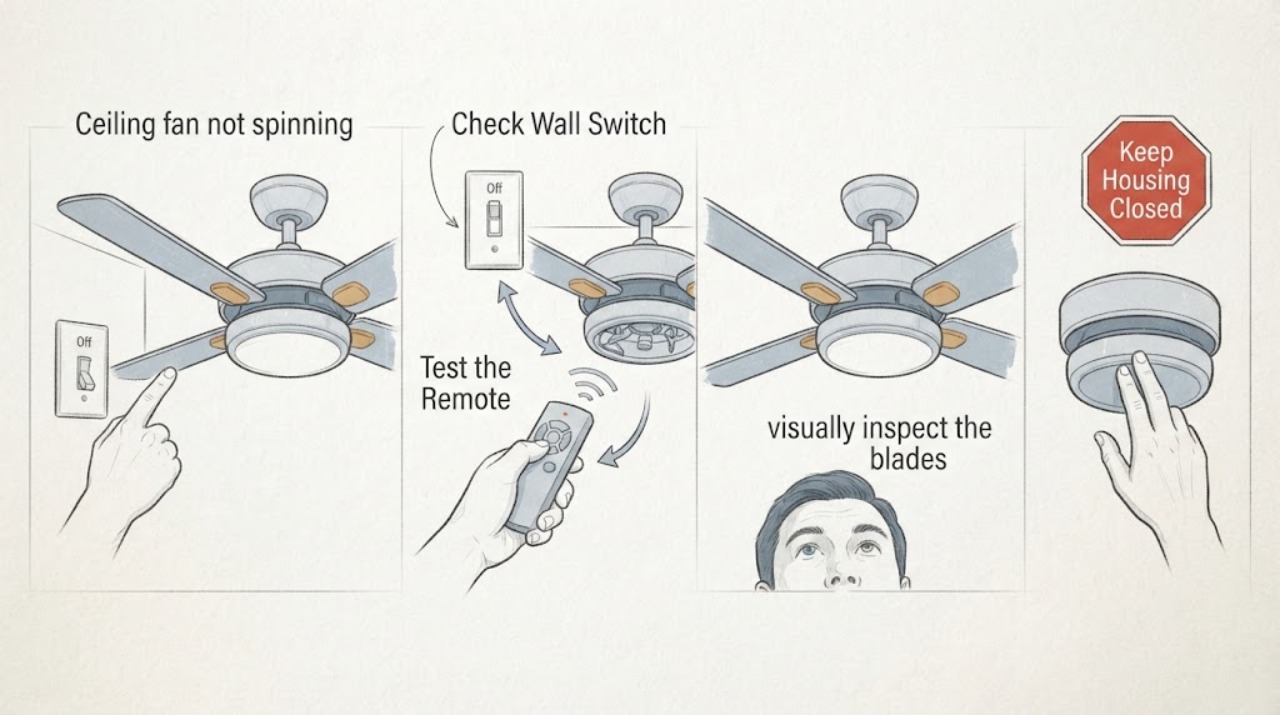
Start with safe, floor-level checks: confirm the fan control is on, check whether the light and fan respond differently, inspect the remote or wall control, and note any visible obstruction, noise, heat, or burning smell. Do not climb, push the blades by hand, open the canopy or motor housing, test live wiring, or bypass a control. If the fan is hot, smells burned, crackles, or the blades are damaged or loose, switch off power at the breaker and arrange a qualified electrician or manufacturer service assessment.
Before you begin
Safety first
- Do not climb, push the blades by hand, open the canopy or motor, touch wiring, perform live tests, repeatedly energize a faulty fan, or bypass the control system.
Work through in order
Diagnostic checks
Use only checks that match the exact appliance or system and its official guide.
-
Check 1
From the floor, use the normal wall switch, pull chain, or remote fan control once according to its labels; do not stand on furniture or reach toward the fan.
Expected result: Record whether the light turns on, whether the fan makes any sound or starts, whether one speed behaves differently, and whether the wall control or remote indicator responds.
Next step: Keep the fan off and provide the exact split behavior, control type, and model or date information to an electrician or manufacturer support channel.
Stop if: Stop immediately if the switch sparks, buzzes unusually, feels hot, or the fan produces crackling, sizzling, smoke, or a burning odor; turn off the circuit at the breaker if safe and leave it off.
Why this matters
Why: A working light with a stationary fan points to a fan-control, receiver, motor, or mechanical branch rather than proving a whole-room power loss. No response from both light and fan makes the wall switch or circuit status more relevant.
-
Check 2
Inspect the remote or wall control from standing height: check visible button response, battery compartment condition if it opens without tools, and whether the control is clearly labeled for this fan; do not remove a wall plate, receiver, canopy, or motor cover.
Expected result: Record whether the remote has a weak or absent indicator, a damaged button, corrosion, an unknown pairing state, or no visible response while the wall switch still supplies the room.
Next step: If the model and control instructions are known, follow only the manufacturer’s low-risk battery or pairing guidance; otherwise stop and provide the control and model details for compatibility checking.
Stop if: Stop if the control is wet, swollen, scorched, cracked, or requires opening electrical parts or repeatedly cycling power.
Why this matters
Why: A control-only symptom may be addressed by the correct battery or model-specific pairing guidance, while a normal control with no fan response points toward an electrician or manufacturer diagnosis. A generic replacement remote may not be compatible.
-
Check 3
From a safe position on the floor, visually inspect the blades and the space around them without touching, pushing, spinning, balancing, or trying to free the assembly.
Expected result: Record whether a blade is visibly cracked, hanging, displaced, rubbing, obstructed by an object, or apparently clear; also note any new wobble or change in the fan’s position.
Next step: Keep people away from the fan and arrange service for any damage, loose-looking part, wobble, or obstruction that cannot be removed without reaching the fan.
Stop if: Stop and leave power off if a blade is cracked, detached, sagging, contacting another part, or an object is caught in the assembly.
Why this matters
Why: A visible obstruction or damaged blade can make operation unsafe and needs professional correction. A clear, intact-looking assembly does not rule out a motor, capacitor, receiver, or wiring fault.
-
Check 4
With the fan not running, listen from the floor during one normal control attempt for a hum, click, repeated ticking, rubbing, crackle, or silence; do not repeat the attempt to force a start.
Expected result: Record the exact sound, when it occurs, whether it comes from the wall control or the fan area, and whether the light changes at the same moment.
Next step: Give the sound description and timing to the electrician or manufacturer service provider and leave the fan off if the sound is abnormal or unexplained.
Stop if: For crackling, sizzling, popping, smoke, or a burning smell, switch off the breaker if safe, do not re-energize, and request urgent electrical assessment.
Why this matters
Why: A hum or click can implicate a control or motor branch, while rubbing or ticking can accompany a visible mechanical issue. Crackling or sizzling is an electrical hazard; silence does not make internal access safe.
-
Check 5
Without climbing or touching the ceiling assembly, observe from the room whether the fan housing appears unusually hot after the failed start, whether there is an electrical or burning odor, or whether the breaker has tripped.
Expected result: Record odor, visible smoke or discoloration, unusual heat noticed from a safe distance, repeated breaker trips, and whether any nearby light or outlet is also affected.
Next step: Turn off the fan circuit at the breaker and keep it off for heat, odor, smoke, damage, or repeated trips; have a qualified electrician investigate before any further test.
Stop if: Stop all troubleshooting for smoke, fire signs, exposed conductors, a hot control, or an unsafe electrical condition; leave the area and use emergency help when appropriate.
Why this matters
Why: Warmth can be normal for some running fan motors, but unusual heat while stopped, burning odor, smoke, discoloration, or repeated trips indicate that continued energizing could worsen a fault. A shared loss of power may be a circuit issue rather than a fan-only issue.
Use your observations
Decision map
Find the observation that best matches what you see, then follow the next safe action.
-
PATH 01Safety boundary
What you see
The wall control or remote responds, the light works, and there is no heat, odor, unusual sound, damage, or obstruction.
Do this next
Document the model, control type, and exact response, then request model-specific manufacturer or electrician diagnosis for the fan motor/control path.
Why this path and its safety boundary
Safety stop: Do not open the canopy, test live wiring, or manually push the blades.
-
PATH 02Safety boundary
What you see
The remote or wall control shows no response but the room still has normal power.
Do this next
Check only the accessible battery or labeled control state, then use model-specific pairing guidance or arrange service if the model is unknown.
Why this path and its safety boundary
Safety stop: Do not remove a wall plate or receiver or repeatedly cycle power.
-
PATH 03Safety boundary
What you see
A blade is visibly damaged, obstructed, rubbing, loose-looking, or the fan has developed a severe wobble.
Do this next
Keep the circuit off and request a fan service or electrician visit; provide photos from the floor and the model information.
Why this path and its safety boundary
Safety stop: Do not reach, climb, spin, balance, or reattach any overhead component.
-
PATH 04Safety boundary
What you see
There is crackling, sizzling, smoke, burning odor, unusual stopped-fan heat, a hot control, or repeated breaker tripping.
Do this next
Turn off power at the breaker if safe, leave it off, keep clear, and request qualified electrical assessment.
Why this path and its safety boundary
Safety stop: Do not re-energize, bypass, or continue testing an overheated or sparking fan.
-
PATH 05Safety boundary
What you see
The fan remains stationary with normal controls, no visible obstruction, and no emergency signs.
Do this next
Treat the motor, capacitor, receiver, or internal wiring as professional-service possibilities and provide a symptom log rather than buying a generic part first.
Why this path and its safety boundary
Safety stop: Do not access the canopy, motor, capacitor, or wiring as a homeowner diagnostic step.
Helpful context
Understand the symptom
A ceiling fan that does not spin can have a control problem, a lost remote connection, a stopped motor, or a mechanical or electrical fault. The light working does not prove that the fan motor circuit is healthy, and a quiet stationary fan does not prove that the blades or motor are safe to touch. The checks below collect useful observations without reaching the fan.
Use the installed wall switch, pull chain, or remote only as intended for the fan. Manufacturer guidance commonly starts with the wall switch, pull chain or remote, circuit status, and a visual check that the blades can move freely; this article deliberately stops before any ceiling access, wiring inspection, or live electrical test.
If the light works while the fan does not, record that split behavior for the service call. It narrows the control or motor branch but does not identify a capacitor, receiver, or wiring fault by itself. Model-specific control and pairing behavior varies, so do not order a control or reset a receiver based only on a generic symptom.
A faint warm housing can be normal on some operating fans, but unusual heat when the fan is stopped, a burning or electrical smell, crackling, sizzling, smoke, or repeated tripping is a stop condition. Turn the fan circuit off at the breaker if it can be done safely, keep clear, and call a qualified electrician.
Only after diagnosis
Potential parts
- ceiling fan capacitor
Consider this only if a qualified diagnosis identifies a capacitor-related speed or starting fault and the fan’s exact model and motor system are known.
Confirm the fan model, motor type, capacitance and voltage requirements, and manufacturer fit information; do not open the motor housing to identify it. - ceiling fan remote
Consider this only when the fan model and receiver system are confirmed and the accessible control checks point to a failed or lost remote rather than a fan or circuit fault.
Match the exact fan and receiver family and follow the manufacturer’s pairing method; a generic remote can be incompatible. - fan wall control
Consider this only after a professional or model-specific guide confirms that the installed fan supports that control and the existing wall control is the failed component.
Confirm the fan’s control architecture and electrical compatibility; do not substitute a dimmer or change wiring without a qualified electrician.
When checks do not resolve it
Need a professional?
Call a qualified electrician or the fan manufacturer when the fan remains stationary after safe control checks, the model or receiver is uncertain, the fan is damaged or wobbling, or any electrical warning sign appears.
Safety scope: Do not climb, push the blades by hand, open the canopy or motor, touch wiring, perform live tests, repeatedly energize a faulty fan, or bypass the control system.
Have this ready
- Provide the model or date information if visible from the floor, control type, whether the light works, remote or wall-control response, sound and odor description, breaker behavior, and photographs taken without climbing.
Common questions
FAQ
Why can the ceiling fan light work while the fan does not spin?
The light and fan can use different control paths or components, so a working light does not prove that the fan motor, receiver, capacitor, or fan control is healthy. Record the split behavior and arrange model-specific diagnosis rather than opening the fan.
Should I push the blades to start a ceiling fan that hums?
No. Do not manually push or spin the blades. A hum can have several causes, and reaching an overhead assembly adds injury and electrical risk. Leave it off and have a qualified professional evaluate it.
Is a warm ceiling-fan housing always dangerous?
Not always; some operating AC fan motors transfer heat to the housing. But unusual heat when the fan is stopped, a burning smell, crackling, smoke, or repeated breaker trips is a stop condition: switch off the breaker if safe and request electrical assessment.
Read the exact guide
Official sources
- Why is my fan humming?Hunter Fan · Used for documenting sound type and escalating crackling, sizzling, odor, or wiring-related noise without opening the fan.
- My fan stopped working. What do I do?Hunter Fan · Used for the low-risk sequence of checking accessible controls and visible blade condition while excluding internal electrical work.
- Why does my Hunter fan feel warm or hot?Hunter Fan · Used to distinguish ordinary warmth on some running AC fan motors from unusual heat observed with a stopped or malfunctioning fan; it is not a diagnosis for this unspecified model.
- Remote Controls & Wall SwitchesHunter Fan · Used to explain why control type and model compatibility must be confirmed before considering a replacement remote or wall control.
Community feedback
Share a repair observation
Share a plain-text repair observation. Accepted observations are published automatically; this page may take a moment to update.