
On this page
Start here
Quick answer
A ceiling fan's buzz can come from a compatible-control problem, light kit or bulb, a receiver, resonance against the ceiling, a loose visible part, or an internal motor or wiring fault. Turn the fan and light off. If the sound is crackling or sizzling, or there is a burning or popcorn-like odor, smoke, heat, sparking, a buzzing outlet or breaker, or damaged wiring, turn off power from a safe location and do not use the fan. For a quiet, dry fan, listen from the floor to decide whether the sound follows the light, motor, wall control, outlet, breaker, or canopy. With power off at the breaker, inspect only visible screws, blades, glass, and the gap around the housing; do not open the canopy or touch wiring unless you are a qualified electrician. A standard light dimmer or incompatible variable-speed control can make a fan hum, while a defective receiver or motor needs model-specific service. If the safe external checks do not isolate the cause, arrange qualified electrical or fan service.
Before you begin
Safety first
- This article is limited to sound localization and visible, power-off observations. A qualified professional determines whether control compatibility, mounting, light kit, receiver, motor, capacitor, wiring, or the household circuit requires repair.
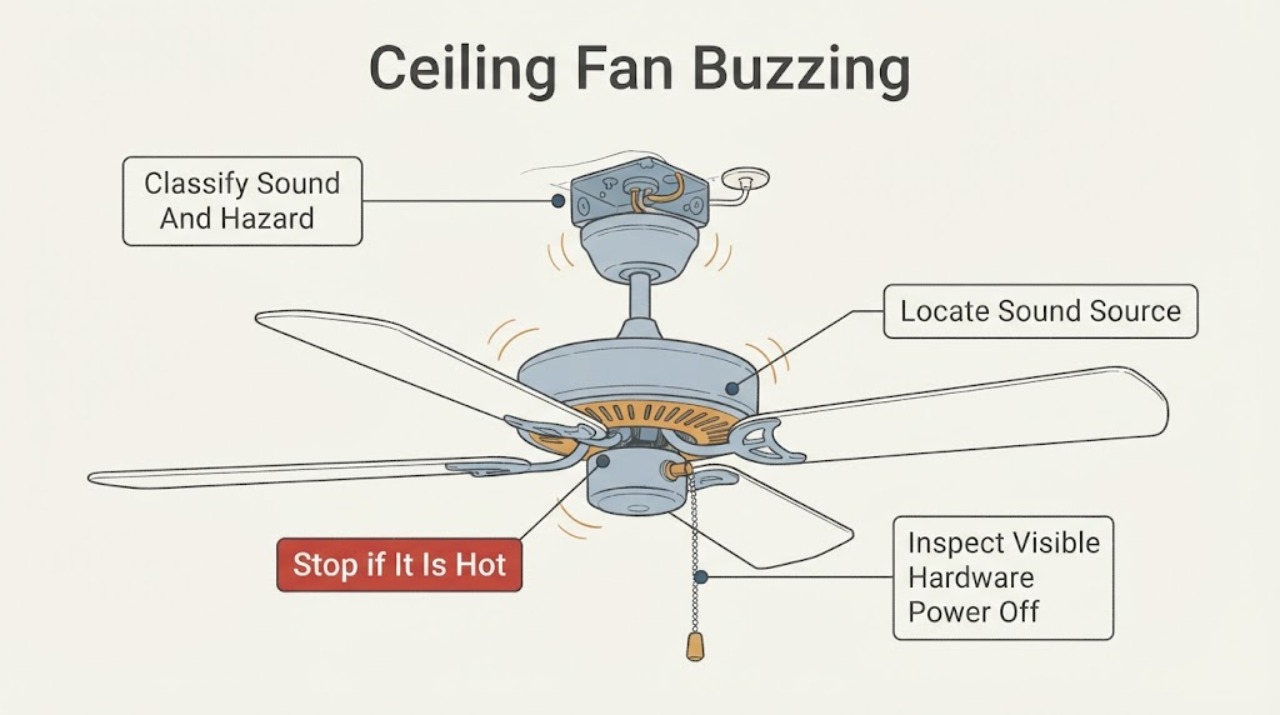
Work through in order
Diagnostic checks
Use only checks that match the exact appliance or system and its official guide.
-
Check 1
Turn the fan and light OFF and listen from the floor without touching the fan, outlet, switch, or breaker; note whether the sound is a low hum, vibration-like buzz, clicking, crackling, or sizzling.
Expected result: The sound is accompanied by an odor, smoke, heat, sparks, visible damage, or a buzzing outlet or breaker; or it is a steady hum or vibration with no hazardous sign.
Next step: For a hazard, isolate power from a safe location and arrange qualified electrical service; for a non-hazardous sound, record when it starts and whether the fan or light is operating.
Stop if: Do not touch, open, spray, or climb to inspect any energized or hot part; do not keep operating a fan with crackling, sizzling, smoke, odor, sparks, or damaged wiring.
Why this matters
Why: Crackling, sizzling, odor, heat, smoke, sparking, or noise at an electrical connection is a stop condition. A steady hum or vibration can still need repair, but it permits only a safe location and visible observation from the floor.
-
Check 2
From several positions on the floor, compare the sound with the fan stopped, the light off, the light on at its normal setting, and the fan running at its normal control setting only when no hazard is present; do not use a ladder for this comparison.
Expected result: The buzz follows the light, changes with fan speed, remains when the blades stop, is loudest at the wall control or outlet, is loudest at the ceiling canopy or motor, or cannot be localized.
Next step: Write the control state and sound location in the service record and switch the fan and light OFF while continuing the safe inspection.
Stop if: Do not operate the fan to reproduce a sound that includes a hazard, and do not touch an outlet, wall control, breaker, or canopy to feel vibration.
Why this matters
Why: A light-linked sound suggests bulb, light-kit, or dimmer interaction; a speed-linked sound suggests motor, receiver, control, or resonance; a sound that remains with the fan stopped points away from blade balance and toward light or electrical components. Noise at an outlet or breaker needs an electrician.
-
Check 3
Turn power off at the breaker before any inspection above shoulder height, confirm the fan has stopped, and from a stable floor position or properly supported access inspect only visible blade-holder, canopy, motor-housing, and light-shade screws for looseness, contact, or obvious movement; follow the exact manual.
Expected result: A visible blade, holder, canopy, housing, or glass part is loose; the housing touches the ceiling; the fan is visibly shifting at its mount; or all visible hardware appears secure.
Next step: If the manual clearly permits tightening an accessible external screw, document the original condition and correct it with power isolated; otherwise leave the fan off and arrange qualified service.
Stop if: Do not remove the canopy, junction-box cover, light-kit wiring, blades, receiver, or motor housing; do not work from an unstable chair or ladder.
Why this matters
Why: Loose visible hardware or housing-to-ceiling contact can transmit vibration and create a buzz or resonance. Movement at the mounting box or bracket is a structural and electrical boundary, while secure visible hardware shifts attention to controls, receiver, wiring, or motor.
-
Check 4
Identify the wall switch, dimmer, variable-speed control, remote, and receiver arrangement without opening the canopy, and compare it with the fan's exact manual; leave an ordinary light dimmer or incompatible speed control unused until compatibility is confirmed.
Expected result: The buzz began after a control change, changes with a slide or dial position, occurs only when the light is dimmed, or remains with the specified compatible control arrangement.
Next step: Photograph the control labels and record the model number for a qualified electrician or manufacturer support; have the control replaced or rewired only by qualified service.
Stop if: Do not bypass a receiver, substitute a dimmer, alter wire connections, open the switch box, or test a control by exposing live terminals.
Why this matters
Why: Control interference can create a hum and can make a fan behave abnormally; a light dimmer is not automatically a fan-speed control. A buzz with the correct arrangement keeps receiver, motor, lamp, wiring, or resonance in consideration.
-
Check 5
With power isolated for inspection, note the light-bulb type and marked wattage, visible light-kit condition, fan model, speed pattern, and whether the buzz changes with the light or fan; do not remove internal parts or use a replacement bulb as a continued operating test if the sound is hazardous.
Expected result: The bulb is wrong for the fixture, the light kit or glass vibrates, the motor buzzes at one or more speeds, the sound persists with the light off, or the source remains uncertain.
Next step: Record the exact bulb marking, model, speed, and control state; leave the fan off and arrange model-specific service when the sound persists or the part identity is uncertain.
Stop if: Do not exceed the fixture marking, open the light kit or motor, replace a receiver or capacitor by appearance, or operate with cracked glass, exposed wiring, odor, smoke, or heat.
Why this matters
Why: A bulb or light-kit issue can create a light-linked buzz, while a speed-linked or light-independent buzz can involve receiver, motor, capacitor, control, mounting, or wiring. The observation narrows service scope but cannot confirm an internal component.
-
Check 6
Review the sound character, source location, control arrangement, visible hardware, light pattern, and hazard signs, then choose qualified electrical or fan service without opening energized equipment.
Expected result: Choose urgent electrical help for crackling, sizzling, odor, smoke, sparking, heat, noise at an outlet or breaker, damaged wiring, a loose mounting box, or a repeat protective-device trip. Choose prompt fan service for a persistent hum, defective receiver or motor suspicion, resonance that cannot be corrected safely, or an unresolved control mismatch.
Next step: Provide the model number, sound recording if safely captured from the floor, source location, control and bulb details, power-isolation history, visible hardware notes, and any odor or trip event to the service provider.
Stop if: Do not bypass a breaker, keep resetting a tripped device, make live measurements, open the canopy or switch box, or continue using the fan while the source remains unresolved.
Why this matters
Why: The route distinguishes a safety hazard from a contained noise complaint; it does not prove a capacitor, motor, receiver, switch, lamp, or wiring failure. A professional must confirm compatibility and internal condition.
Use your observations
Decision map
Find the observation that best matches what you see, then follow the next safe action.
-
PATH 01Safety boundary
What you see
The buzz is crackling or sizzling, or there is a burning or popcorn-like odor, smoke, heat, or visible sparking.
Do this next
Turn power off from a safe location, keep clear, and arrange urgent qualified electrical service; do not operate the fan or light again.
Why this path and its safety boundary
Safety stop: No wet-hand operation, switch-box access, canopy access, or repeated power restoration.
-
PATH 02Safety boundary
What you see
The sound is loudest at the wall outlet, switch box, circuit breaker, or another fixed electrical connection rather than the fan body.
Do this next
Stop using the circuit if safe, leave the protective device off when it is tripping or visibly abnormal, and arrange qualified electrician assessment.
Why this path and its safety boundary
Safety stop: Do not open an outlet, switch, junction box, or breaker panel or make a live check.
-
PATH 03Safety boundary
What you see
The buzz began after a dimmer or variable-speed control was installed or changes with a slide, dial, or dimming position.
Do this next
Stop using the incompatible or uncertain control and have a qualified electrician confirm the fan-specific control arrangement.
Why this path and its safety boundary
Safety stop: Do not substitute controls, bypass a receiver, or alter wiring as a trial.
-
PATH 04Safety boundary
What you see
The buzz is speed-linked and visible blade, canopy, housing, glass, or ceiling contact or looseness is present.
Do this next
Keep power off, correct only an explicitly manual-approved accessible external screw from a stable position, and request service for mount or box movement.
Why this path and its safety boundary
Safety stop: Do not remove blades, canopy, bracket, junction-box hardware, or motor parts.
-
PATH 05Safety boundary
What you see
The control arrangement and visible hardware appear correct, but the buzz persists at the receiver or motor or changes with fan speed.
Do this next
Leave the fan off and arrange model-specific qualified fan or electrical service for receiver, motor, control, or internal wiring diagnosis.
Why this path and its safety boundary
Safety stop: No internal receiver, capacitor, motor, or wiring replacement by sound diagnosis alone.
Helpful context
Understand the symptom
The location and character of the buzz matter
A low hum that changes with fan speed is not the same symptom as a buzz that continues with the blades stopped, follows a light dimmer, or comes from the wall outlet or breaker. Listen from the floor with the fan and light controls in their normal OFF positions, then note whether the sound is at the motor, light kit, wall control, outlet, ceiling box, or electrical panel. Do not put an ear or hand against energized equipment and do not climb while the fan is running.
Separate resonance and loose hardware from electrical noise
Large ceiling surfaces can amplify a small motor sound when the housing or mounting arrangement contacts the ceiling. Loose blade-holder, canopy, motor-housing, or glass-shade screws can also create vibration or rattling that is heard as a buzz. With the circuit isolated and the fan stopped, check only hardware you can reach safely from a stable position and only as the model manual allows. A loose ceiling box, bracket, or wiring connection is not a DIY tightening target.
A control mismatch can make the fan hum without proving the motor is bad
Variable-speed controls and ordinary light dimmers do not all work with ceiling-fan motors or receivers. If the buzz begins when a wall control or dimmer is installed, or changes with the control position, stop using that combination and have the control arrangement checked. A compatible receiver can still fail, and a motor can buzz after other causes are excluded. Avoid guessing at a capacitor, receiver, switch, or motor replacement from sound alone.
Only after diagnosis
Potential parts
- ceiling-fan wall control
Consider this only when the exact fan manual and a qualified inspection identify an incompatible or defective control as the source of the buzz.
A fan-specific control is not interchangeable with a light dimmer or generic variable-speed device; confirm model compatibility and have wiring changed by a qualified electrician. - ceiling-fan receiver
Consider this only after qualified service rules out the control, lamp, mounting, and supply causes and identifies the receiver as defective.
Match the exact fan and remote system; receiver access involves internal wiring and is not a user repair in this article. - ceiling-fan motor or capacitor
Consider this only after qualified diagnosis of a persistent speed-linked buzz; motor noise alone does not prove a capacitor or motor failure.
Confirm the exact model, electrical characteristics, and mounting arrangement through qualified service; do not open the motor housing or substitute a component by appearance.
When checks do not resolve it
Need a professional?
Arrange qualified electrical or fan service when buzzing persists after safe external observations, follows a dimmer or variable-speed control, comes from the fan receiver or motor, involves a loose mount or junction box, or cannot be localized. Treat crackling, sizzling, burning odor, smoke, sparking, heat, damaged wiring, a buzzing outlet or breaker, and repeated protective-device trips as urgent.
Safety scope: This article is limited to sound localization and visible, power-off observations. A qualified professional determines whether control compatibility, mounting, light kit, receiver, motor, capacitor, wiring, or the household circuit requires repair.
Have this ready
- Fan model and control or remote model if available
- Whether the sound occurs with the fan off, light off, light on, or at a particular speed
- The location heard from the floor: fan, light kit, canopy, wall control, outlet, or breaker
- Bulb marking, control type, recent installation or control change, and visible hardware observations
- Any odor, smoke, heat, sparking, damaged wiring, or protective-device trip and when it occurred
Common questions
FAQ
Is a slight ceiling-fan hum normal?
A slight operating hum can occur, but a new, loud, worsening, speed-linked, or light-linked buzz should be localized. Resonance, control interference, loose hardware, a receiver, motor, or wiring can sound similar; use only safe floor-level and power-off observations.
Can a dimmer switch make a ceiling fan buzz?
Yes. Manufacturer guidance warns that an ordinary light dimmer or incompatible variable-speed control can interfere with a fan control and create a hum. Stop using an uncertain control arrangement and have a qualified electrician confirm compatibility.
What does crackling or sizzling from a ceiling fan mean?
Treat crackling or sizzling, especially with a burning odor, smoke, heat, or sparks, as an electrical stop condition. Turn power off from a safe location, do not operate the fan or light, and arrange urgent qualified electrical service.
Should I open the ceiling-fan canopy to find the buzz?
No. After power is isolated, limit yourself to visible external hardware and documentation unless the exact manual and your qualifications permit more. Canopy, receiver, motor, capacitor, junction-box, and wiring work should be handled by qualified service.
Read the exact guide
Official sources
- How to Fix a Ceiling Fan That Won't Turn On, Wobbles, or Makes NoiseHunter Fan · Supports checking the correct bulb, control compatibility, remote or receiver context, and model-specific service for motor or internal components.
- What can I do if my fan is making a noise?Hunter Fan · Supports generic sound-source distinctions for buzzing, loose hardware, light bulbs, receivers, dimmers, house wiring, breakers, motors, and the electrician boundary; model-specific instructions control.
- Ceiling Fan Troubleshooting GuideWestinghouse Lighting · Used for general safety and troubleshooting principles only; do not generalize its model-specific assembly, wiring, or dimensions to another fan.
- Can I use controls with an existing wall switch?Hunter Fan · Supports the warning that a standard wall dimmer can interfere with fan controls and that control replacement or wiring should use an electrician; exact fan and control manuals govern.
- Ceiling Fans Support FAQWestinghouse Lighting · Supports separating ordinary slight hum from loud resonance or control interference and checking visible mounting or blade hardware; internal wiring remains professional work.
Community feedback
Share a repair observation
Share a plain-text repair observation. Accepted observations are published automatically; this page may take a moment to update.