
On this page
Start here
Quick answer
A ceiling-fan buzz that seems to come from the wall switch can be caused by an incompatible dimmer or fan-speed control, a control receiver, the fan light load, or a wiring or circuit problem. Turn the fan and light off, identify whether the sound is at the switch or at the fan, and use only ordinary visual checks and the exact fan manual. Do not remove a switch cover, expose wiring, or keep operating a control that crackles, smells hot, shows discoloration, trips the breaker, or feels warm; leave the circuit off as appropriate and have a qualified electrician investigate. If the control is a dimmer or replacement fan control, compatibility must be confirmed for the exact fan and light before any change.
Before you begin
Safety first
- This article supports safe listening, exterior observation, documentation, and model identification only. Do not open electrical enclosures, expose terminals, handle wiring, repeatedly reset breakers, or continue operating a control with warning signs.
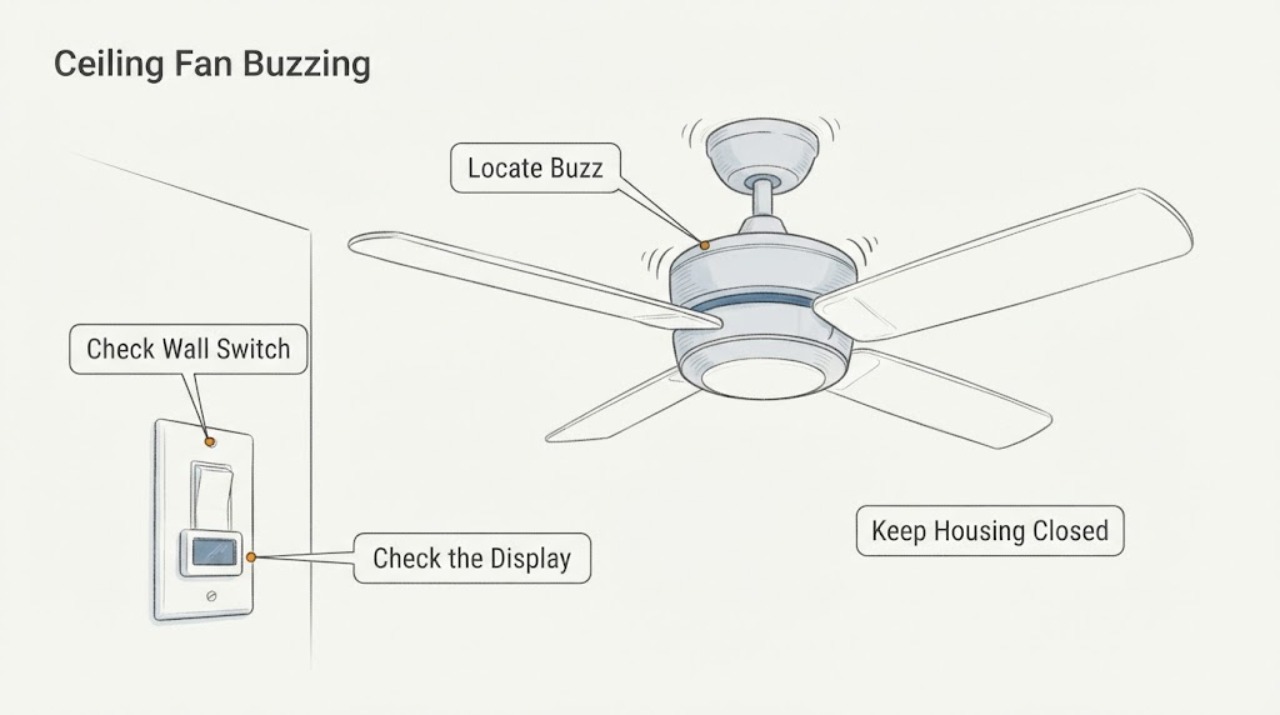
Work through in order
Diagnostic checks
Use only checks that match the exact appliance or system and its official guide.
-
Check 1
Turn the ceiling fan and its light off using the normal control, then listen from a safe standing position without touching the switch, fan, canopy, or light kit.
Expected result: Record whether the sound is loudest at the wall switch, at the fan canopy or motor, at the light kit, or cannot be localized; note whether it occurs only with the fan running, only with the light on, at one speed, or while everything is off.
Next step: Leave the fan off while recording the control type, fan model, and exact conditions that reproduce the buzz; use the relevant branch below to decide whether a qualified electrician is needed.
Stop if: Stop immediately if the sound is crackling or sizzling, the switch or fan is hot, there is an overheating smell, smoke, visible arcing, or any sign of burning.
Why this matters
Why: A sound that follows a particular control state points toward that control, receiver, light load, or fan operating condition, but location alone does not prove which component is defective. A sound that remains with the fan and light off needs an electrical safety assessment rather than repeated switching.
-
Check 2
With the fan and light off, look only at the accessible face and surrounding wall of the switch or control; do not remove the cover plate, insert anything, or expose terminals.
Expected result: Classify the control as visibly normal, loose in the wall, cracked, discolored, showing burn marks, or warm to the touch without repeatedly operating it; note any smell or breaker event.
Next step: If the face is normal, identify whether the control is a dimmer, fan-speed control, electronic control, or ordinary switch from its label or documentation; if not, arrange an electrician instead of opening it.
Stop if: Do not continue if the control is hot, damaged, discolored, buzzing loudly, smells burnt, has visible arcing, or causes a breaker to trip; stop using it and arrange qualified service.
Why this matters
Why: Discoloration, heat, damage, smell, or a loose control is evidence for an electrical stop and service call. A normal-looking face does not clear hidden terminals or wiring, so it only supports the next low-risk identification step.
-
Check 3
Read the control's visible label and the fan's model documentation from a safe position, and note whether a dimming function, fan-speed function, remote, or receiver is part of the system.
Expected result: Record the exact fan model if available, the control category, whether the buzz changes with dimming or speed selection, and whether the documentation names a compatible control system or receiver.
Next step: Use the model-specific manual or give the recorded details to the manufacturer or electrician; do not replace, bypass, or rewire the control based on a generic switch description.
Stop if: Stop if identification would require removing the switch plate, opening the canopy, handling wires, or operating a control that is hot, damaged, crackling, or producing an overheating smell.
Why this matters
Why: A dimmer or variable-speed electronic control can hum by design, but an incompatible control or defective receiver can also create a buzz. Without the exact model and instructions, compatibility remains unproven.
-
Check 4
Only if there are no warning signs and the controls operate normally, make one brief observation of whether the fan and light produce the buzz separately; do not repeatedly cycle the control or leave the fan running unattended.
Expected result: Note whether the buzz appears only with the light, only at a particular fan speed, with both loads, or with neither load; record any flicker, slowing, or breaker response.
Next step: Stop using the affected combination and provide the condition log and control/fan identity to the manufacturer or qualified electrician for a compatibility and circuit assessment.
Stop if: Do not continue this observation if the switch or fan heats, crackles, smells, flickers, trips the breaker, or behaves erratically; turn it off and leave the circuit for qualified service.
Why this matters
Why: Light-only buzzing makes the light control, bulb/load, or dimmer compatibility more relevant; speed-specific buzzing makes the fan-speed control or receiver more relevant. Buzzing with both loads or with abnormal electrical symptoms keeps wiring or circuit faults in scope.
-
Check 5
Review the recent history without opening the electrical box: note any breaker trips, loss of power at the switch, flickering, other affected fixtures, recent fan or control installation, or a new bulb or load.
Expected result: Classify the issue as an isolated steady hum with no other symptom, a buzz with flicker or loss of operation, repeated breaker trips, a buzz from an outlet or wiring area, or a symptom that began after installation or a control change.
Next step: Keep the fan off when the symptom is abnormal, preserve the control and fan model information, and arrange a qualified electrician when the circuit or installation is implicated.
Stop if: Do not repeatedly reset a tripped breaker, continue using a buzzing circuit, or attempt to diagnose wiring by removing covers or making electrical measurements.
Why this matters
Why: A steady hum may be a control or compatibility issue, but flicker, breaker activity, a wiring-area buzz, or a post-installation symptom raises the priority of professional electrical inspection. A recent control change is useful evidence but does not establish that the new part is safe or compatible.
-
Check 6
Prepare a service record while the fan remains off: photograph the outside of the control and fan, record the fan model and control labels, and write down when the buzz occurs and any safety symptoms.
Expected result: Confirm whether the record includes the sound location, fan/light/speed condition, control type, model information, recent installation or bulb change, breaker behavior, heat, smell, discoloration, or flicker.
Next step: Give the record to a qualified electrician or the fan manufacturer; ask for a control and wiring diagnosis before ordering a replacement part.
Stop if: Do not remove parts, open the switch box or canopy, or restore power merely to gather more information when any heat, burn mark, arcing, smoke, smell, or breaker trip is present.
Why this matters
Why: A complete condition record lets the electrician or manufacturer focus on the control, receiver, light load, fan, wiring, or circuit without requiring the homeowner to expose energized parts. Missing model or control information means compatibility cannot yet be confirmed.
Use your observations
Decision map
Find the observation that best matches what you see, then follow the next safe action.
-
PATH 01Safety boundary
What you see
The switch or fan is hot, discolored, damaged, smells overheated, crackles, shows arcing, or the breaker trips.
Do this next
Turn the fan and light off, keep people away from the equipment, and arrange qualified electrical service; leave the circuit off at the breaker when safe to do so and do not open the box.
Why this path and its safety boundary
Why it matters: These are electrical safety symptoms, not a normal fan-control hum to tune out.
Safety stop: Do not operate the fan, repeatedly reset the breaker, or touch exposed or damaged components. If there is smoke or fire, follow local emergency procedures.
-
PATH 02Safety boundary
What you see
The sound is a steady hum associated with a dimmer or electronic fan-speed control, with no heat, burning, arcing, flicker, or breaker activity.
Do this next
Check the exact fan manual and control documentation, then ask the manufacturer or electrician to confirm a compatible fan/light control before replacement.
Why this path and its safety boundary
Why it matters: The control electronics or an incompatibility may be producing the hum; the absence of warning signs does not establish compatibility.
Safety stop: Do not bypass, rewire, or substitute the control, and stop using it if the sound changes to crackling or any warning symptom appears.
-
PATH 03Safety boundary
What you see
The buzz occurs only when the ceiling-fan light is on or dimmed, while the fan itself is quiet and the control has no warning signs.
Do this next
Record the bulb type and rated wattage from the bulb or manual without exceeding the fixture's instructions; have the control and light load checked if the buzz persists.
Why this path and its safety boundary
Why it matters: The light bulb/load or dimmer compatibility becomes more relevant than the motor, but the installed fan and light manual still controls the decision.
Safety stop: Do not continue if the socket or control is hot, discolored, flickering, or smells burnt, and do not improvise a bulb or dimmer substitution.
-
PATH 04Safety boundary
What you see
The buzz appears only at one fan speed or when changing speed, with no heat, crackling, smell, flicker, or breaker response.
Do this next
Stop using the affected setting and provide the speed condition, fan model, control type, and receiver or remote information to the manufacturer or electrician.
Why this path and its safety boundary
Why it matters: A variable-speed control, receiver, or motor-related issue is possible; a normal-sounding speed at another setting does not clear the system.
Safety stop: Do not open the canopy, manipulate internal controls, or continue operation if the fan becomes hot, erratic, noisy in a new way, or electrically unsafe.
-
PATH 05Safety boundary
What you see
The buzz is loudest at an outlet, wiring area, or breaker, or it is accompanied by flicker, loss of power, repeated trips, or a recent installation change.
Do this next
Stop using the fan and arrange a qualified electrician to inspect the circuit and installation; provide the symptom history and do not remove covers.
Why this path and its safety boundary
Why it matters: The symptom is outside a safe user-level control adjustment and may involve wiring, a circuit, a breaker, or an installation fault.
Safety stop: Do not reset a breaker repeatedly, expose terminals, or operate the circuit to reproduce the buzz.
-
PATH 06Safety boundary
What you see
The buzz cannot be localized safely, remains after the fan and light are off, or the sound changes unpredictably.
Do this next
Leave the fan off and ask a qualified electrician or the manufacturer to diagnose it using the exact model and control information.
Why this path and its safety boundary
Why it matters: The available observations do not identify a safe control-level cause, so continued operation could conceal a wiring, circuit, receiver, or motor problem.
Safety stop: Do not keep cycling controls, open the switch or canopy, or make electrical measurements as a homeowner troubleshooting step.
Helpful context
Understand the symptom
Treat a switch-side buzz as an electrical symptom
A steady hum can come from an electronic fan-speed control or another control/load interaction, while a buzz that is actually crackling or accompanied by heat is a safety warning. The sound may also travel through the canopy or light kit and seem to be at the switch. Start by turning the fan and light off, locating the loudest point from a safe position, and noting whether the sound changes with fan speed or the light. Do not open the switch box or fan canopy as an ordinary troubleshooting step.
Check the control type against the exact fan manual
A standard light dimmer is not automatically a suitable ceiling-fan control. Hunter notes that dimmer switches often hum and that receiver or variable-speed controls need to be compatible with the particular fan model. Record the switch or control type, fan model if known, whether the light is dimmable, and whether a receiver or remote is installed. Do not substitute or rewire a control based only on its appearance; use the manufacturer's manual or a qualified electrician to establish compatibility.
Know when to stop and hand off the circuit
Burn marks, a hot switch, a smell of overheating, visible arcing, repeated breaker trips, or a buzz that is getting louder is not a normal adjustment opportunity. Stop using the fan and light, keep people away from the area, and arrange qualified electrical service. Hunter also advises turning power off at the breaker before wiring is inspected and calling a licensed electrician for loose wiring, burn marks, no power at the switch, or discomfort with electrical components. Keep the original control and fan details for the technician instead of opening the box yourself.
Safety boundary
Stop conditions
- Stop using the ceiling fan and light for crackling, sizzling, visible arcing, smoke, an overheating smell, burn marks, heat at the switch or fan, flicker, or a tripped breaker.
- Do not remove a switch cover or fan canopy, expose terminals, handle wiring, or make electrical measurements as an ordinary user troubleshooting step.
- Do not repeatedly reset a tripped breaker or repeatedly cycle a buzzing control to reproduce the sound.
- Do not bypass, rewire, or substitute a dimmer, fan-speed control, receiver, bulb, or other electrical part without exact model compatibility and qualified guidance.
- Leave wiring, breaker, outlet, and concealed fan-control repairs to a qualified electrician; use the model-specific manual for any manufacturer-approved procedure.
Only after diagnosis
Potential parts
- compatible ceiling-fan wall control
Consider this category only when the exact fan documentation or a qualified diagnosis identifies an incompatible or failed wall control as the source of a safe, non-emergency hum.
Confirm the exact fan, light, control method, load, and manufacturer compatibility before ordering; installation belongs to a qualified person when wiring is involved. - ceiling-fan control receiver
Consider this category only when the fan's documentation or manufacturer identifies a defective receiver after control and wiring causes have been assessed.
Confirm the exact fan model, remote/control family, and installation instructions; do not substitute a generic receiver or open the canopy as a user repair. - ceiling-fan light bulb
Consider this category only when the buzz is light-only and the installed manual or fixture marking identifies an incorrect, failed, or incompatible bulb/load.
Match the exact fixture's permitted bulb type and wattage; a bulb change does not address a hot, discolored, arcing, or damaged control.
When checks do not resolve it
Need a professional?
Arrange qualified electrical service when the buzz is accompanied by heat, burn marks, a smell, crackling or arcing, flicker, breaker trips, loss of power, a wiring-area or breaker sound, an installation change, or uncertainty about the control. Also ask the fan manufacturer for model-specific help when a dimmer, speed control, receiver, light load, or motor may be involved. Do not order or install a replacement control until compatibility with the exact fan and light system is confirmed.
Safety scope: This article supports safe listening, exterior observation, documentation, and model identification only. Do not open electrical enclosures, expose terminals, handle wiring, repeatedly reset breakers, or continue operating a control with warning signs.
Common questions
FAQ
Is a ceiling-fan buzz at the wall switch always dangerous?
No, a steady hum can come from electronic fan-speed controls or dimmer interactions, but it is not safe to assume that without checking for heat, burn marks, smell, crackling, flicker, or breaker activity. Stop and arrange qualified service for any warning sign.
Can a dimmer switch make a ceiling fan buzz?
Yes. Hunter says light dimmer switches often create electrical hum, and an incompatible wall control can also contribute to fan noise. Confirm the exact fan and light control requirements before changing anything.
Should I remove the switch cover to find the buzz?
Not as an ordinary user check. Look at the exterior only. Wiring inspection, terminal work, and any enclosure access should be done by a qualified electrician with the circuit made safe.
What if the ceiling fan buzzes only at one speed?
Record the affected speed and whether the light is on, then stop using that setting. A variable-speed control, receiver, or motor issue is possible, so provide the fan model and control information to the manufacturer or electrician.
When should I turn off the ceiling-fan circuit at the breaker?
If there is heat, burning smell, crackling, visible arcing, smoke, a breaker trip, or another electrical warning, stop operating the fan and arrange qualified service; leave the circuit off at the breaker when safe to do so. Do not open the switch or fan enclosure yourself.
Read the exact guide
Official sources
- How to Fix a Ceiling Fan That Won't Turn On, Wobbles, or Makes NoiseHunter Fan · Manufacturer troubleshooting guide; the exact product manual and a qualified electrician control any installation or wiring work.
- How to Fix a Noisy Ceiling FanHunter Fan · Manufacturer troubleshooting guidance that should be confirmed against the exact fan's manual; it can also help identify the source of a similar ceiling-fan noise from another manufacturer.
- Electrical Safety Advice for Electric FansElectrical Safety First · Consumer electrical-safety guidance for electric fans; it is a safety boundary rather than model-specific repair instructions.
Community feedback
Share a repair observation
Share a plain-text repair observation. Accepted observations are published automatically; this page may take a moment to update.