
On this page
Start here
Quick answer
If a ceiling fan has no power at its wall switch, first determine whether the problem is limited to the switch/fan control or affects the circuit. Check only the accessible wall switch position, pull chain or remote, fan light, nearby same-circuit devices, and the known breaker or GFCI state. A single, normal reset is reasonable only when the area is dry and there is no spark, smoke, burning smell, hot switch, exposed wire, or water. Do not remove the switch plate, open the fan canopy, touch wiring, use a voltage tester, bypass protection, or repeatedly reclose a breaker. If the switch is hot, discolored, buzzing, sparking, the breaker trips again, or the fan has smoke or a burning odor, leave it off and call a licensed electrician.
Before you begin
Safety first
- Keep the fan off for any spark, arc, smoke, burning odor, hot switch, shock, exposed conductor, water exposure, loose fixture, or repeat trip. Do not open electrical boxes, perform live testing, bypass protection, or run another test until qualified service clears the installation.
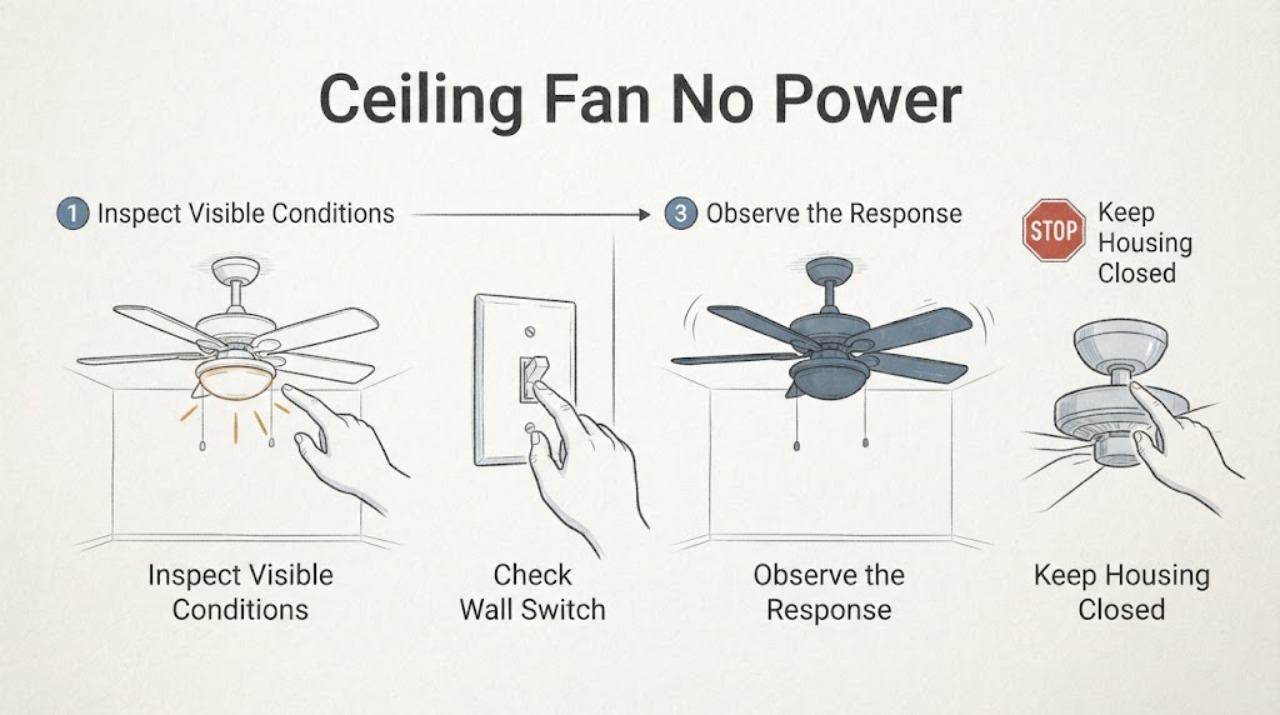
Work through in order
Diagnostic checks
Use only checks that match the exact appliance or system and its official guide.
-
Check 1
Leave the fan off and observe from a safe position. Note any visible spark or arc, smoke, burning smell, buzzing, hot or discolored switch, shock or tingling, exposed wire, loose fan mount, or water near the switch or ceiling fan.
Expected result: Any arc, smoke, burning odor, hot switch, shock, exposed wire, loose fixture, water, or continuing abnormal sound is present.
Next step: Keep people away. Isolate power only from a dry safe location if reaching the breaker does not bring you near water or the hazard; otherwise leave the area and call a licensed electrician or emergency service as appropriate.
Stop if: Do not touch the switch, fan, wiring, canopy, or breaker again to reproduce the event.
Why this matters
Why: This is an electrical, fire, shock, falling-fixture, or wet-equipment hazard rather than a routine no-power symptom.
-
Check 2
With no warning sign, check only the accessible controls: put the wall switch fully on, try the pull chain if fitted, and press the remote's power or speed control once if the fan uses a remote. Do not remove the switch plate or fan canopy.
Expected result: The fan starts, the light works but the motor does not, the remote works but the wall switch does not, or neither the fan nor light responds.
Next step: Record the result and stop at the accessible control boundary. Use the exact fan manual for control pairing or switch compatibility, and arrange electrician service for a persistent no-power or switch-path problem.
Why this matters
Why: A response difference helps separate a control or receiver path from a broader supply issue; no response does not prove that wiring is safe to inspect.
-
Check 3
Check the fan light separately if one is fitted, and look at nearby devices that are normally powered by the same room or circuit. Do not unplug or move the ceiling fan and do not use a different circuit or extension cord as a test.
Expected result: The fan light works while the motor does not, the light and motor are both dead, nearby devices are also out, or nearby devices work normally.
Next step: Keep the fan off and provide these observations to the electrician. Do not infer a failed motor or switch part from the light result alone.
Why this matters
Why: A light-only result can indicate a fan control, receiver, or motor branch; multiple devices out suggests a circuit interruption; nearby power does not clear the fan switch or ceiling wiring.
-
Check 4
From outside the electrical equipment and only when the area is dry, check the known breaker or GFCI status once. Do not repeatedly cycle the breaker, stand in water, or open the service panel beyond the normal user control available in your home.
Expected result: The breaker or GFCI is tripped and stays set after one reset, trips again immediately, will not stay set, or was already on while the fan remained dead.
Next step: If it trips again or will not stay set, leave it off and call a licensed electrician. If it stays set but the fan remains dead, do not open the switch or canopy; arrange service for the switch, circuit, receiver, or fan wiring.
Stop if: Do not keep resetting protection or substitute a larger breaker, fuse, adapter, or extension cord.
Why this matters
Why: A one-time interruption may explain loss of power; a repeat trip or persistent no-power condition requires circuit or fan diagnosis.
-
Check 5
Record whether the wall switch feels normal and whether the fan or light was recently installed, moved, exposed to water, or changed from a dimmer or other control. Do not remove the switch cover or attempt to tighten a terminal.
Expected result: The switch is loose, hot, discolored, noisy, recently replaced, paired with an incompatible control, or the fan stopped after installation or water exposure.
Next step: Leave the fan isolated and tell the electrician the installation or exposure history. Use only the exact model manual for control compatibility; do not modify wiring yourself.
Why this matters
Why: The switch/control installation, connection, or water damage may be involved, but the fault cannot be cleared without qualified inspection.
-
Check 6
If the fan is controlled by a remote, note whether the remote display or indicator responds, whether its batteries are installed correctly, and whether the fan has any local pull-chain or switch control. Do not open the receiver housing or ceiling canopy.
Expected result: The remote has no response, the remote responds but the fan does not, the light responds separately, or local and remote controls conflict.
Next step: Follow only the model-specific pairing or control instructions once, if they are clearly documented and no hazard exists. If the fan remains dead, call an electrician or qualified fan technician.
Why this matters
Why: The result may point to a remote/control state or a fan-side supply/receiver path, but a dead fan cannot be diagnosed by opening the ceiling assembly.
-
Check 7
Prepare the service handoff with the fan model if known, switch type, light and motor response, pull-chain or remote behavior, breaker/GFCI result, nearby circuit result, spark/odor/heat/water observations, and whether the fan was recently installed or altered. Do not select a replacement part from the symptom alone.
Expected result: The fan remains without power after the accessible control and one safe reset check, or any hazardous symptom was observed.
Next step: Keep the fan off and request a licensed electrician. Ask the technician to verify the switch/control path, circuit protection, grounding, ceiling-box and fan connections, and model-specific receiver or motor condition.
Stop if: Do not open the switch box or canopy, make electrical measurements, bypass protection, or energize the fan for another test.
Why this matters
Why: The remaining possibilities include the switch, circuit, connection, receiver, motor, or fan-rated box; identifying the failed component requires qualified inspection.
Use your observations
Decision map
Find the observation that best matches what you see, then follow the next safe action.
-
PATH 01Next step
What you see
A visible spark or arc, burning odor, smoke, hot/discolored switch, shock, exposed wire, or water near the fan or switch is present.
Do this next
Keep the fan off and isolate power only from a dry safe location; arrange licensed electrician service and do not repeat the test.
Why this path and its safety boundary
Why it matters: Treat the condition as an electrical or wet-equipment hazard regardless of whether the fan still runs.
-
PATH 02Next step
What you see
The fan light works but the motor does not, or a remote works while the wall switch does not.
Do this next
Record the control difference, consult the exact fan manual for normal operation, and arrange electrician or qualified fan service without opening the ceiling assembly.
Why this path and its safety boundary
Why it matters: A control, receiver, motor, or separate switched leg may be involved rather than total loss of the circuit.
-
PATH 03Next step
What you see
The fan and light are both dead, and nearby devices are also without power.
Do this next
Check the known breaker or GFCI once from a dry safe position. If it trips again or the circuit remains out, call a licensed electrician.
Why this path and its safety boundary
Why it matters: A circuit, breaker, GFCI, or upstream supply interruption is possible.
-
PATH 04Next step
What you see
The fan and light are both dead, but nearby devices work and the breaker/GFCI stays set.
Do this next
Keep the fan off and arrange electrician service; do not remove the switch plate or fan canopy to inspect it yourself.
Why this path and its safety boundary
Why it matters: The switch path, ceiling connection, receiver, fan wiring, or motor may be isolated from the rest of the circuit.
-
PATH 05Next step
What you see
The breaker or GFCI trips again, will not stay set, or the no-power symptom began after water exposure or installation work.
Do this next
Leave the circuit off and call a licensed electrician. Do not bypass protection or energize the fan to see whether it runs.
Why this path and its safety boundary
Why it matters: A protection response, wiring fault, damaged connection, or wet equipment may be present.
-
PATH 06Next step
What you see
The accessible checks are normal but the fan remains dead, or the source of the power loss is uncertain.
Do this next
Stop troubleshooting at the user-accessible boundary and request a licensed electrician or qualified fan technician with the recorded observations.
Why this path and its safety boundary
Why it matters: An internal control, receiver, motor, switch, or wiring fault remains possible and cannot be safely identified from outside.
Helpful context
Understand the symptom
Keep the check at the switch and controls
With a ceiling fan that appears dead, begin with what can be seen without opening anything: wall-switch position, pull chain, remote batteries and on control, whether the light works, whether another device on the same circuit works, and the known breaker or GFCI state. These observations separate a control issue from a circuit issue. They do not authorize opening a switch box or fan canopy.
A single safe reset is the limit
If the room and equipment are dry and there are no warning signs, one normal breaker or GFCI reset can show whether the protection device was interrupted. If it trips again, will not stay set, or the fan remains dead, leave it off. Repeated resets can conceal a wiring or equipment fault and are not a repair.
Do not confuse control failure with a dead circuit
A working fan light with a non-running motor, or a fan that responds to a remote but not a wall switch, points to a control path rather than total loss of supply. No light, no motor, and no response from the controls can indicate a circuit or connection problem. A known-good nearby device does not prove that the fan switch box or ceiling wiring is safe to open.
Sparks, heat, odor, and exposed wiring stop the process
Any arc, flash, buzzing, hot or discolored switch, burning odor, smoke, shock or tingling, exposed conductor, loose hanging fan, or water near the electrical parts is a stop condition. Keep clear, isolate power only if it is safe to reach the control point without approaching the hazard, and call a licensed electrician.
Safety boundary
Stop conditions
- Stop immediately for any visible spark or arc, smoke, burning smell, hot or discolored switch, buzzing, shock or tingling, exposed wire, loose hanging fan, or water near electrical parts.
- Do not remove a switch plate, open a fan canopy, touch wiring, make electrical measurements, bypass protection, or use a temporary adapter or extension cord.
- Do not repeatedly reset a breaker or GFCI. If it trips again or will not stay set, leave the circuit off and call a licensed electrician.
- Do not touch or isolate a wet electrical installation while standing in water or approaching an arc. Keep clear and obtain qualified or emergency help.
Only after diagnosis
Potential parts
- wall switch or fan control
Consider only after a qualified electrician confirms that the switch or control is the failed point and that it is compatible with the fan and circuit.
Verify the exact fan/control system and local electrical requirements; do not install or replace a switch as a live DIY test. - remote receiver or control module
Relevant only when the exact fan manual and qualified diagnosis identify the receiver or control module as the cause after safe supply checks.
Confirm the exact model and approved control pairing; do not open the canopy or bypass the receiver. - fan motor or internal wiring
Consider only after a licensed electrician or qualified fan technician confirms an internal motor or wiring fault.
Internal components are model-specific and require qualified service; a no-power symptom alone does not prove part failure.
When checks do not resolve it
Need a professional?
Call a licensed electrician for any visible spark or arc, hot or noisy switch, burning odor, smoke, shock or tingling, exposed wiring, loose fan, water exposure, repeated breaker/GFCI trip, or a fan that remains dead after accessible control and one safe reset check.
Safety scope: Keep the fan off for any spark, arc, smoke, burning odor, hot switch, shock, exposed conductor, water exposure, loose fixture, or repeat trip. Do not open electrical boxes, perform live testing, bypass protection, or run another test until qualified service clears the installation.
Common questions
FAQ
What should I check first when a ceiling fan has no power?
Check only the accessible wall switch, pull chain or remote, fan light, nearby same-circuit devices, and known breaker or GFCI state. A single safe reset is the limit. Do not remove the switch plate or fan canopy; call an electrician if the fan remains dead or any hazard sign appears.
Why does the fan light work but the ceiling fan motor does not?
The light and motor may use different control or switched paths, or the remote/receiver or motor may have a fault. Record the difference and use the exact fan manual for normal controls. Do not open the canopy or choose a motor part without qualified diagnosis.
Can I reset the breaker when my ceiling fan has no power?
Only one normal reset is reasonable when the area is dry and there is no spark, smoke, burning smell, hot switch, exposed wire, or water. If the breaker or GFCI trips again or will not stay set, leave it off and call a licensed electrician. Do not keep resetting it.
Should I remove the wall-switch plate to find why the fan is dead?
No. A switch box can contain live wiring even when the fan does not run. Do not remove the plate, touch terminals, or make electrical measurements as a troubleshooting step. Arrange licensed electrician service, especially if the switch is hot, loose, noisy, discolored, or recently altered.
When is a ceiling-fan no-power problem an emergency?
Treat sparks or arcs, smoke, burning odor, hot or discolored switches, buzzing, shock or tingling, exposed wires, a loose hanging fan, water near electrical parts, or repeat breaker trips as stop conditions. Keep clear, isolate power only from a dry safe location, and obtain qualified or emergency help.
Read the exact guide
Official sources
- Home Wiring HazardsU.S. Consumer Product Safety Commission · General electrical safety guidance for household wiring and controls; follow local code and licensed electrician advice.
- CPSC, Emerson Electric Co. Announce Recall to Repair Ceiling FansU.S. Consumer Product Safety Commission · Recall-specific safety notice, not a diagnosis for every ceiling fan; used only to support caution around exposed wires and unstable fixtures.
- My fan stopped working. What do I do?Hunter Fan Company · Official Hunter guidance for Hunter fans; use the exact fan's manual and electrician for another brand or installation.
- Wiring Your Fan On a Single or Dual Wall SwitchHunter Fan Company · Official Hunter wiring guidance for Hunter fan/control systems; do not generalize wiring colors or compatibility to another model.
Community feedback
Share a repair observation
Share a plain-text repair observation. Accepted observations are published automatically; this page may take a moment to update.