
On this page
Start here
Quick answer
A ceiling fan that buzzes may have a loose blade, light kit, canopy, or mounting part, an incompatible wall control or dimmer, or an electrical or motor-control problem. First note whether the sound changes with speed and whether it starts only when the light or a wall control is used. Turn the fan off and isolate power before any inspection. If the buzz is accompanied by crackling, arcing, a burning smell, heat, a wobble, loose wiring, or a fan that is dropping or slowing, stop using it and call a licensed electrician or qualified fan technician.
Work through in order
Diagnostic checks
Use only checks that match the exact appliance or system and its official guide.
-
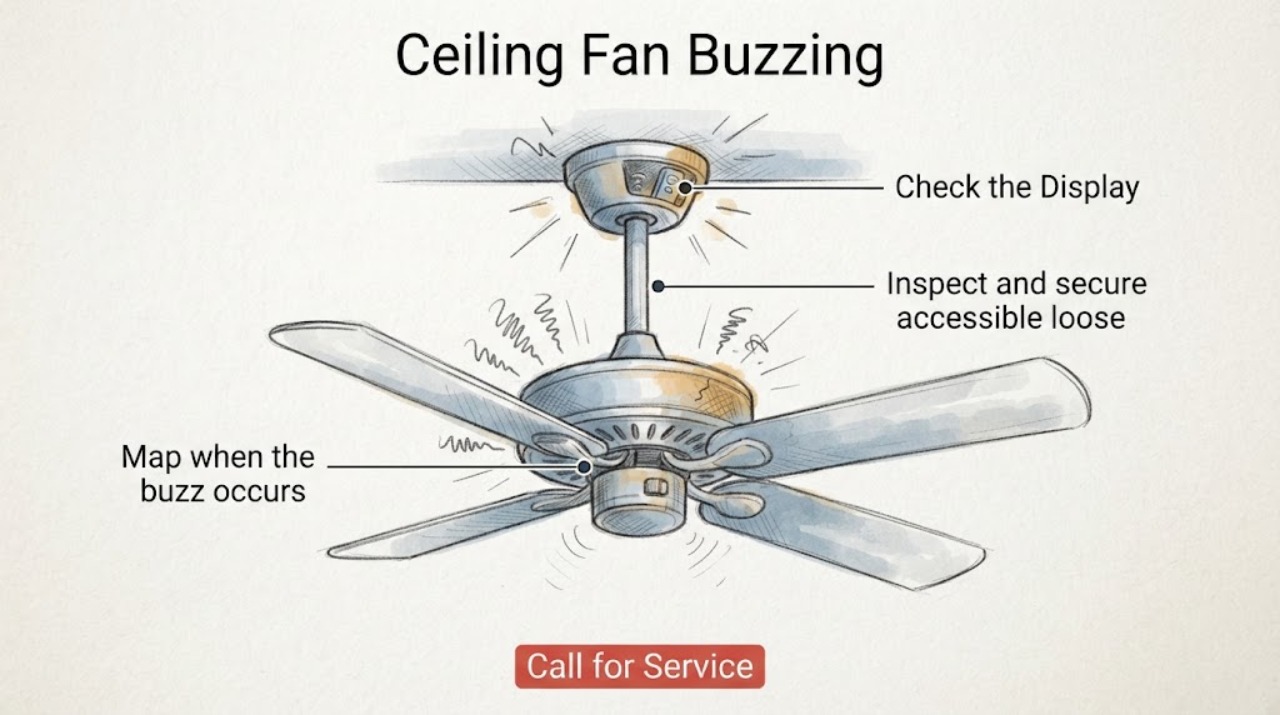
Map when the buzz occurs
From a safe position, run the fan only long enough to note whether the buzz is present at every speed, only one speed, only with the light on, or when a wall control or remote is used. Turn it off if the sound is harsh, the fan wobbles, or any heat or odor appears.
Expected result: A buzz that follows a speed control or appears only with a light or wall control points toward the control system or compatibility. A rattle that follows blade rotation points more toward loose or unbalanced hardware; crackling or sizzling is an electrical warning.
Next step: If the buzz is mild and speed-specific, continue to the control check. If the sound is accompanied by arcing, heat, smoke, or burning odor, stop immediately and arrange electrical service.
Why this matters
Why: The timing of the sound separates mechanical vibration from control-induced hum and from an unsafe electrical symptom.
-
Inspect and secure accessible loose parts
With the fan stopped and power isolated, inspect from a stable ladder only if safe. Check blade screws, blade brackets, the light kit and shade fasteners, and the canopy or mounting cover for visible looseness or damage. Tighten only accessible manufacturer-provided fasteners gently; do not alter wiring or the ceiling box.
Expected result: If the buzz changes or disappears after a loose blade, light, or canopy fastener is secured, that part was vibrating. If the canopy or ceiling mount moves, or a screw will not hold, the support may be unsafe even if the noise is reduced.
Next step: Leave the fan off and call an electrician for a moving ceiling box, damaged mount, cracked housing, or any fastener that cannot be secured without disassembly.
Why this matters
Why: Hunter lists loose parts, the light kit, and installation-related hardware among common causes of buzzing, humming, or clicking.
-
Check wall-control and dimmer compatibility
Identify whether the fan is connected to a wall dimmer, a variable-speed control, a standard switch, or its original fan control. With power off, compare the control type with the fan manual; do not substitute a light dimmer or rewire the switch as a test.
Expected result: If the buzz appears only through one wall control or disappears when the control is replaced with a manufacturer-approved fan control, the control compatibility is a likely cause. Hunter notes that an incompatible dimmer or wall control can make a fan hum or buzz.
Next step: Use the exact fan and control manuals to choose a compatible replacement. If the switch box contains loose, scorched, or unfamiliar wiring, stop and have a licensed electrician inspect it.
Why this matters
Why: A speed-control circuit shapes the motor's electrical input, so a mechanical fan may sound different with an unsuitable control even when the blades and mount are tight.
-
Check blade balance and wobble without powering the fan
With power isolated, rotate the blades by hand and compare their height and visible alignment from the floor. Look for a warped blade, a loose bracket, or a blade that sits differently from the others; do not bend blades or run the fan to compensate for a structural problem.
Expected result: If a blade is visibly loose, warped, or out of alignment and the fan wobbles while running, vibration can create a buzz and may stress the mounting. If the blades are secure and balanced but the buzz remains at a particular speed, the control or motor path is more likely.
Next step: Replace or rebalance only with model-approved parts and instructions. Stop using the fan and request service if wobble is pronounced, the fan shifts at the ceiling, or the blade or housing is cracked.
Why this matters
Why: Hunter attributes fan noise and wobble to blade screws, uneven alignment, balance, and installation as well as electrical controls.
-
Separate a motor-control hum from a loose-part buzz
After external hardware and control compatibility have been checked, compare the sound at the fan's allowed speed settings without opening the motor housing. Note whether the fan runs normally, runs only at one speed, starts slowly, or hums while the blades fail to turn.
Expected result: A speed-dependent hum can be associated with the wall-control or capacitor system; a motor that has power but will not turn can involve a capacitor, receiver, wiring harness, or internal control. A loose-part fix will not correct those symptoms.
Next step: Do not open the motor housing or discharge a capacitor unless trained and equipped to do so. Keep the fan off and arrange qualified service for a persistent hum, slow start, no-spin condition, or speed loss.
Why this matters
Why: Hunter describes capacitors and variable-speed electronics as part of fan speed control and recommends model-specific support for internal control or motor symptoms.
-
Stop at electrical or structural warning signs
Turn the fan off at the wall control and isolate the breaker if safe when the buzz includes crackling, sizzling, visible arcing, a hot switch or canopy, a burning smell, a frayed wire, or a loose ceiling mount. Do not touch exposed wiring or restore power to see whether the sound returns.
Expected result: These signs indicate a possible wiring, switch, motor, or support fault rather than ordinary operating noise. A fan that is loose, overheating, or electrically damaged can create shock, fire, or falling-object risk.
Next step: Leave the circuit isolated and call a licensed electrician or qualified fan technician. Do not use electrical tape as a permanent repair, bypass a control, or continue operating the fan unattended.
Why this matters
Why: Electrical safety guidance says not to ignore arcing or buzzing sounds, burn marks, heat, blown fuses, or tripped breakers; Hunter directs owners to a certified electrician for wiring concerns.
Use your observations
Decision map
Find the observation that best matches what you see, then follow the next safe action.
-
PATH 01Next step
What you see
The buzz is a light hum at one speed, with no wobble, heat, odor, or visible damage.
Do this next
Check the wall-control or dimmer compatibility against the fan manual. Use an approved fan control and arrange service if the hum persists.
-
PATH 02Next step
What you see
The sound changes when the blades turn and a blade, light kit, canopy, or bracket is loose.
Do this next
Isolate power and secure only accessible manufacturer hardware. A moving mount, cracked part, or persistent wobble requires an electrician or fan technician.
-
PATH 03Next step
What you see
The fan hums but starts slowly, runs on one speed, or does not spin.
Do this next
Leave it off and arrange qualified service for the capacitor, receiver, wiring harness, motor, or internal control. Do not open the housing or test a capacitor casually.
-
PATH 04Next step
What you see
The buzz is crackling or sizzling, or there are burn marks, heat, smoke, odor, exposed wiring, or repeated trips.
Do this next
Isolate power if safe, leave the fan off, and contact a licensed electrician. Do not restore power to retest.
Helpful context
Understand the symptom
Classify the buzz before touching the fan
Listen from the floor and note whether the sound occurs only while the blades turn, only at one speed, when the light is switched on, or even when the blades are stopped. A low hum that follows a control setting is different from a rattle at the canopy or a crackling sound at the switch. Do not stand on furniture or reach toward moving blades.
Electrical and fall-hazard boundary
Turn the fan off and switch off its circuit at the breaker before inspecting wiring or opening a cover. Do not work on a loose or wobbling fan from an unstable ladder. Stop for burn marks, arcing, a hot switch or canopy, a frayed wire, a burning smell, or a fan that shifts at the ceiling; a licensed electrician should make the circuit safe.
Only after diagnosis
Potential parts
- compatible wall fan control
Only consider this when the buzz changes with the existing wall control and the fan manual confirms that a compatible control is appropriate.
Control type, wiring, speed range, and light function must match the exact fan model; never substitute a general light dimmer. - fan capacitor
Only consider this after a qualified diagnosis confirms speed-dependent hum, slow start, or lost speeds are caused by the capacitor rather than the control or motor.
Capacitance, wiring, and discharge requirements are model-specific; use the manufacturer's documentation and qualified installation. - blade or mounting hardware
Only consider this when inspection confirms a damaged blade, bracket, or fastener and the ceiling support remains secure.
Blade geometry and mounting hardware must match the exact fan model; a replacement does not correct an unsafe ceiling box.
When checks do not resolve it
Need a professional?
Call a licensed electrician or qualified ceiling-fan technician when a buzzing fan has crackling, arcing, burn marks, heat, smoke, a burning smell, exposed or loose wiring, repeated breaker trips, a loose ceiling mount, pronounced wobble, or a cracked housing. Arrange service for a persistent hum after compatible control and external hardware checks, or for a motor that starts slowly, loses speeds, or will not spin. Do not open the motor housing or bypass a wall control or safety connection.
Common questions
FAQ
Why is my ceiling fan buzzing at one speed?
A speed-specific hum can come from an incompatible wall control or the fan's speed-control electronics. Check compatibility with the model manual and arrange service if the hum persists.
Can loose screws make a ceiling fan buzz?
Yes. Blade, light-kit, canopy, and mounting hardware can vibrate. Isolate power before securing accessible manufacturer fasteners, and stop if the mount moves or a part is damaged.
Is a ceiling-fan buzz dangerous?
A mild hum without other symptoms may be control-related, but crackling, arcing, heat, burning odor, wobble, or exposed wiring is a stop-use warning. Isolate power if safe and call an electrician.
Should I replace the capacitor when my fan buzzes?
Not automatically. A capacitor is only one possible cause and should be considered after qualified diagnosis separates it from the wall control, receiver, wiring, motor, and loose hardware.
Read the exact guide
Official sources
- Why is my fan humming?Hunter Fan Support · Capacitor and variable-speed control explanations for fan hum
- Electrical Safety Advice for Electric FansElectrical Safety First · Unusual noise, burning odor, arcing, heat, damaged cable, and qualified repair boundary
- How to Fix a Ceiling Fan That Won't Turn On, Wobbles, or Makes NoiseHunter Fan Company · Hunter fans and supplemental guidance for similar ceiling fans
Community feedback
Share a repair observation
Share a plain-text repair observation. Accepted observations are published automatically; this page may take a moment to update.