
On this page
Start here
Quick answer
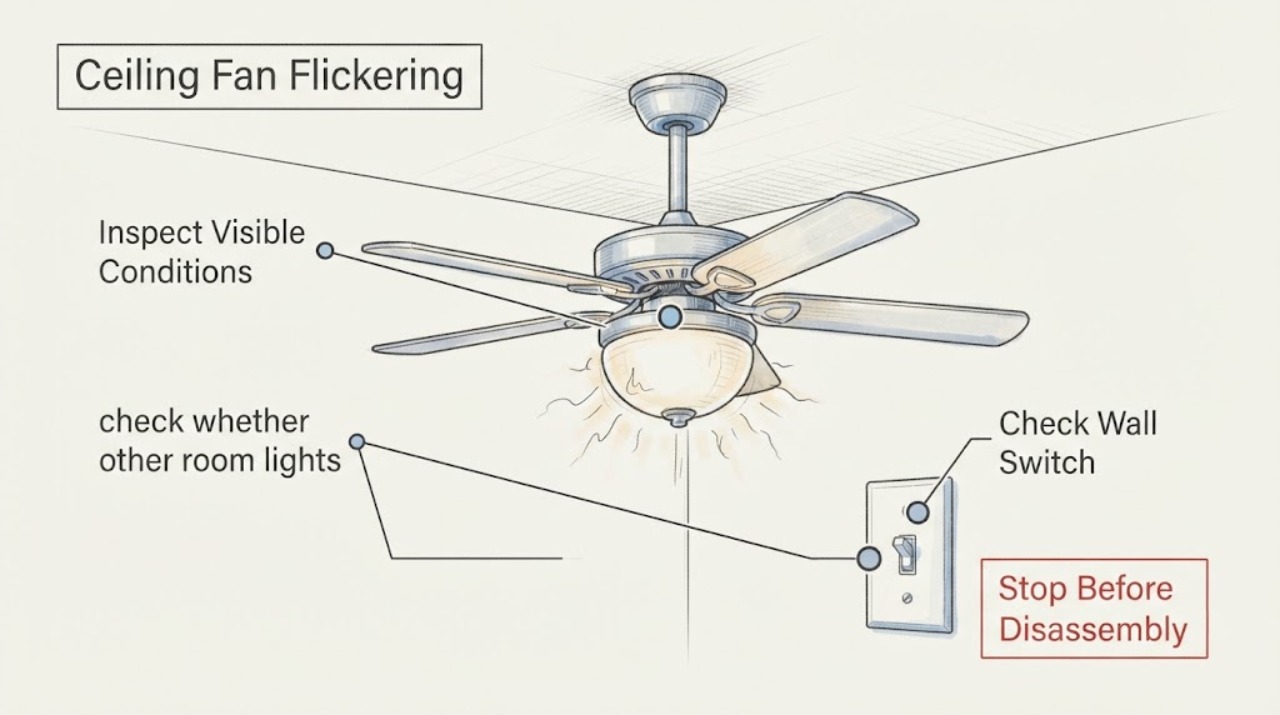
A ceiling fan that flickers when its wall switch is used can have an incompatible control, a loose connection, a failing switch, or a fault elsewhere on the circuit. Turn the fan off, note whether only this fixture or other lights flicker, and inspect the switch plate without opening energized wiring. Stop immediately for heat, discoloration, buzzing, burning odor, sparks, shock, or a breaker that trips again; switch off the circuit if you can do so safely and have a licensed electrician inspect it.
Work through in order
Diagnostic checks
Use only checks that match the exact appliance or system and its official guide.
-
Check 1
Turn the fan and its light off at the wall control, then observe when the flicker occurs. Note whether it happens only when this switch is moved, only at one speed or light setting, or also when other loads in the room are used.
Expected result: Only the ceiling fan light flickers and the timing follows this control.
Next step: Leave the control off if the flicker is repeatable and continue with the external switch and compatibility checks below; do not remove the switch plate while energized.
Why this matters
Why: The symptom is localized to the fan control, switch, light kit, or its connections, but the observation does not prove which part has failed.
-
Check 2
With the fan switched off, check whether other room lights dim or flicker and whether the panel shows a breaker that has tripped. Do not remove the panel cover or touch terminals.
Expected result: Other lights flicker, the breaker trips repeatedly, or power changes coincide with several devices.
Next step: Stop using the affected circuit and arrange a licensed electrician. Do not keep cycling the breaker to see whether the fan recovers.
Why this matters
Why: The problem may be on the branch circuit or in the home's wiring rather than an isolated ceiling-fan switch; flickering and repeated trips are recognized electrical hazard signs.
-
Check 3
From outside the wall, look and listen for a loose-feeling switch, crackling or buzzing, a hot or discolored wall plate, a burning odor, smoke, or a spark. Do not press a switch that is hot, damaged, or arcing.
Expected result: Any heat, discoloration, odor, crackling, visible arc, smoke, shock, or damaged insulation is present.
Next step: Turn off the circuit at the breaker if you can do so without approaching a fire or exposed live part; leave the fan off and call a licensed electrician or emergency services for smoke or fire.
Why this matters
Why: These are stop signs for a possible overheating, arcing, or shock hazard, not evidence that tightening the switch while live is safe.
-
Check 4
Identify the wall control from its face and the fan's manual: standard toggle, dimmer, electronic speed control, remote receiver, or a fan-rated control. Compare the control with the manufacturer's wiring and compatibility instructions without opening the canopy.
Expected result: The fan is connected to a standard light dimmer or an unverified control, or the control does not match the installation instructions.
Next step: Stop using the questionable control and have the correct model-compatible control installed or checked by a qualified electrician; do not substitute a control by wire color alone.
Why this matters
Why: An incompatible wall control can create abnormal operation and may be the reason the fan or light flickers; a generic dimmer is not automatically a fan control.
-
Check 5
If there is no electrical warning sign and only the fan light flickers, turn the circuit off before visually checking the bulb, socket, and light-kit area for a loose bulb, burn mark, or damaged socket. Use only the bulb type and wattage specified by the fixture manual.
Expected result: The bulb is loose or incorrect, or the socket has a burn mark or visible damage.
Next step: Replace only an incorrect or failed bulb with the specified type after power is off. Leave a damaged or marked socket disconnected and arrange professional service.
Why this matters
Why: The fault may be in the lamp or light kit rather than the wall switch, while a burn mark or damaged socket can indicate a wiring problem that should not be operated.
-
Check 6
After the safe external checks, record whether the fan motor, light, and switch each behave differently and provide the fan model and control type to the electrician or manufacturer support. Do not open the canopy, bypass the switch, or perform a live voltage test unless you are qualified and equipped to do so.
Expected result: The fan still flickers after a compatible control and specified bulb are confirmed, or the switch has no reliable on/off action.
Next step: Keep the circuit off when practical and schedule a licensed electrician; provide the recorded pattern instead of continuing repeated tests.
Why this matters
Why: A concealed connection, receiver, wiring harness, or failing switch remains possible, and identifying the exact point requires de-energized testing and model-specific instructions.
Use your observations
Decision map
Find the observation that best matches what you see, then follow the next safe action.
-
PATH 01Next step
What you see
Only the ceiling-fan light flickers when its switch or control is moved.
Do this next
Leave it off if repeatable and perform only the external checks; arrange service if it persists.
Why this path and its safety boundary
Why it matters: Treat the switch, control compatibility, lamp, socket, or fan connection as the localized area.
-
PATH 02Next step
What you see
Several lights flicker, or the symptom follows other loads on the circuit.
Do this next
Stop using the affected circuit and call a licensed electrician rather than replacing the fan switch as a guess.
Why this path and its safety boundary
Why it matters: The circuit or wider home wiring may be involved.
-
PATH 03Next step
What you see
The switch plate is hot or discolored, or there is buzzing, crackling, odor, smoke, a spark, or a shock.
Do this next
Do not touch or operate the control; shut off power only if safe and contact an electrician or emergency services for smoke or fire.
Why this path and its safety boundary
Why it matters: This is a potential electrical fire or shock hazard.
-
PATH 04Next step
What you see
The fan uses a dimmer or an unverified electronic control.
Do this next
Use the model manual and have a fan-rated, compatible control checked or installed by a qualified person.
Why this path and its safety boundary
Why it matters: The control may be incompatible with the fan or light kit.
-
PATH 05Next step
What you see
The specified bulb and external controls are correct but flickering continues.
Do this next
Leave the circuit off when practical and schedule model-specific professional diagnosis.
Why this path and its safety boundary
Why it matters: A concealed switch, socket, receiver, harness, or wiring fault remains possible.
Helpful context
Understand the symptom
A brief change caused by a normal control response is different from a light that repeatedly blinks, dims, or recovers when the ceiling-fan switch is touched. The useful first split is whether the symptom is limited to this fan or appears on other lights and appliances. That distinction changes the likely boundary from the fan's switch or control to the branch circuit or a broader wiring fault.
Keep the investigation external unless you are a qualified person working under the applicable local rules. A switch that is hot, loose, discolored, noisy, or associated with a burning smell or spark is not a small adjustment to keep testing. Turn off the circuit when it is safe to do so and arrange professional inspection; do not defeat a breaker or repeatedly reset one that trips.
When checks do not resolve it
Need a professional?
Call a licensed electrician when flickering persists, affects more than the fan, follows switch movement, or is accompanied by heat, discoloration, noise, odor, sparks, shock, or repeated breaker trips.
Common questions
FAQ
Is a flickering ceiling-fan light always a bad switch?
No. The switch or its compatibility may be involved, but the bulb, socket, fan control, concealed connection, branch circuit, or wider wiring can produce a similar symptom. The pattern and safety signs determine whether the issue can be narrowed without opening wiring.
Can I keep using the fan if the flicker is occasional?
Do not keep testing if the switch is hot or discolored, makes noise, smells burned, sparks, shocks you, or trips the breaker. Even without those signs, a repeatable flicker should be left off until the compatible control and fixture are checked.
Should I replace the wall switch myself?
Only a qualified person following local electrical rules and the model instructions should open or replace line-voltage wiring. If there is any doubt, concealed connection, heat, damage, or no reliable way to verify the circuit is de-energized, use a licensed electrician.
Read the exact guide
Official sources
- Home Wiring Safety TipsElectrical Safety Foundation International · home electrical hazard warning signs
- CPSC Guide to Home Wiring HazardsU.S. Consumer Product Safety Commission · home wiring hazard recognition
- How to Fix a Ceiling Fan That Won't Turn On, Wobbles, or Makes NoiseHunter Fan · ceiling fan troubleshooting
Community feedback
Share a repair observation
Share a plain-text repair observation. Accepted observations are published automatically; this page may take a moment to update.