
On this page
Start here
Quick answer
A ceiling fan that has no power may have a local wall-switch or remote-control problem, a tripped circuit, a failed control, or an internal wiring fault. Start with observation only: check the switch position, remote or pull-chain setting, and whether other devices on the same known circuit work. From a dry, stable position, check the known breaker or GFCI state once; do not open the switch box, fan canopy, or motor housing and do not test live voltage. If the switch plate is hot, discolored, loose, buzzing, smells burned, sparks, or the breaker trips again, leave the fan off and call a qualified electrician. If the circuit is healthy but the fan remains dead, provide the model and control type for electrical service.
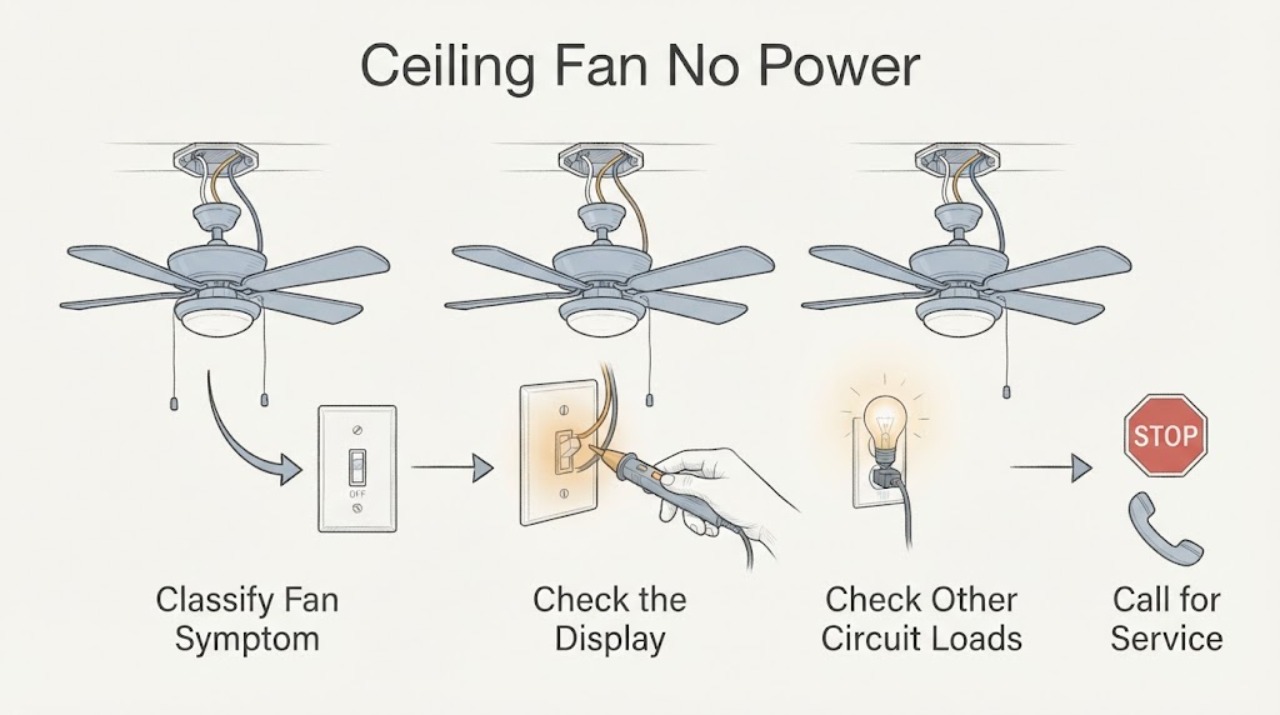
Work through in order
Diagnostic checks
Use only checks that match the exact appliance or system and its official guide.
-
Check 1
From the floor and without touching the fan assembly, note whether the fan, light kit, wall control, remote, and pull chain respond. Record whether the symptom began after an outage, control change, installation, moisture event, or unusual sound.
Expected result: Both fan and light are dead, only the motor is dead, only the light is dead, the wall control is dark or loose, the remote is ignored, or another unusual event preceded the failure.
Next step: Use the matching branch below and keep the fan off if any heat, odor, sound, movement, or visible damage is present. Do not remove a cover to identify the fault.
Stop if: Stop immediately for smoke, a burning odor, sparks, crackling, an arcing sound, a hot or discolored control, a loose hanging fan, or exposed wiring.
Why this matters
Why: Shared loss points toward the supply or common wiring path, while one-function loss points toward that function's control or receiver. A recent installation or control change increases the need for an electrician to verify compatibility and connections.
-
Check 2
Operate the existing wall switch normally once, then try the installed remote with fresh, correctly oriented batteries if the remote compartment is ordinary user access. If the fan has pull chains, set the speed chain to a running position and leave the reversing switch unchanged; do not remove the switch housing.
Expected result: The fan responds to one control but not another, the light responds separately, the remote indicator works but the fan does not, or no control produces any response.
Next step: Use only the pairing or control sequence in the exact model instructions. Do not substitute a dimmer or another wall control by appearance; arrange electrical service if compatibility or wiring is uncertain.
Stop if: Stop if the switch is hot, loose, discolored, buzzing, smells unusual, shocks the user, or the fan starts and stops erratically.
Why this matters
Why: Separate response suggests a control, pairing, receiver, or setting issue rather than proof that the ceiling wiring is dead. No response from all controls keeps the supply and shared wiring in scope.
-
Check 3
Without touching the fan or opening any box, check whether ordinary lights or outlets that are known to share the same circuit are also off. Compare only from dry, stable locations and do not use a new appliance as a test load.
Expected result: Only the ceiling fan is off, several nearby devices are off, or other devices flicker, dim, buzz, or behave abnormally when the switch is used.
Next step: Record the affected rooms or devices and move to a qualified electrician when more than the fan is affected or behavior changes with the switch. Do not overload the circuit or use an extension cord as a workaround.
Stop if: Stop for any heat, odor, crackling, visible damage, moisture, or electrical symptom that changes when the control is operated.
Why this matters
Why: A broader outage points toward the circuit, breaker, GFCI, or upstream connection; an isolated fan outage points more toward its control, ceiling connection, receiver, or internal wiring. Flicker or noise is a warning, not a reason to keep testing.
-
Check 4
From a dry position, look at the known breaker or GFCI that serves the fan and note whether it is visibly tripped. If there is no heat, odor, water, or damage and the user can safely identify the correct device, perform one normal reset; do not remove the panel cover or touch wiring.
Expected result: The protective device was tripped and stays on, it trips again when the fan is selected, or it was not tripped and the fan remains without power.
Next step: If it trips again, leave it off and call a qualified electrician. If it stays on but the fan remains dead, continue only with non-contact control observations and arrange service; never test voltage or bypass protection.
Stop if: Do not reset a wet, hot, sparking, smoking, or repeatedly tripping circuit, and do not open the service panel or perform live testing.
Why this matters
Why: A one-time reset may distinguish a transient circuit interruption from a persistent fault, but a repeat trip indicates a fault or overload that needs diagnosis. A normal breaker does not prove that the ceiling switch or wiring is safe.
-
Check 5
From the floor, visually record whether the fan is newly installed, recently moved, visibly loose, unusually tilted, or mounted with a control that was recently changed. Compare the installed control type with the model's instructions without removing the canopy or switch plate.
Expected result: The fan has installation history, a changed switch or remote, a loose or moving mount, visible gap or damage, or no recent change and a stable mount.
Next step: Keep a loose or damaged fan off and arrange an electrician to inspect the fan-rated box, support, control, and wiring using the model instructions. Do not tighten overhead or electrical parts from a ladder as a troubleshooting step.
Stop if: Stop if the fan rocks, sags, contacts the ceiling, has exposed conductors, damaged blades, falling hardware, or requires climbing or removing covers.
Why this matters
Why: A new installation or changed control raises a compatibility, support, or connection question; a loose or moving overhead assembly adds a falling hazard. A stable, long-used fan with isolated no power can still have an internal control or wiring fault.
-
Check 6
Before requesting service, write down the fan make and model if safely visible, control type, which functions fail, breaker or GFCI behavior, recent installation or moisture history, and any sound, heat, odor, or flicker. Photograph only stable, external labels or the control from a safe position.
Expected result: The electrician receives a repeatable symptom and a clear boundary: isolated fan failure, circuit interruption, control-only failure, mounting concern, or an active safety warning.
Next step: Leave the fan off until the appropriate electrician evaluates the switch, wiring, fan-rated box, receiver or controls, and internal connection as applicable.
Stop if: Do not continue diagnostics if any warning sign appears, and do not open the switch box, canopy, motor housing, or breaker panel.
Why this matters
Why: This separates switch or circuit diagnosis from fan-internal or support work and reduces the temptation to guess at wiring or parts. A control that does not match the fan may need replacement, but compatibility must be verified by the professional and model instructions.
Use your observations
Decision map
Find the observation that best matches what you see, then follow the next safe action.
-
PATH 01Next step
What you see
The switch is hot, loose, discolored, buzzing, odorous, sparking, or the circuit trips again.
Do this next
Stop operating the fan, leave the circuit off when safe, keep clear, and arrange qualified electrician service.
-
PATH 02Next step
What you see
Other known devices on the same circuit are also off or abnormal.
Do this next
Treat the issue as a circuit or upstream supply problem and have an electrician diagnose it; do not add a test load or use an extension cord.
-
PATH 03Next step
What you see
The circuit is stable and one control responds while the wall switch, remote, or pull chain does not.
Do this next
Use only the exact model control or pairing guidance; a control replacement or compatibility check belongs with the electrician.
-
PATH 04Next step
What you see
The known circuit appears normal, all user controls fail, and there is no visible hazard.
Do this next
Leave the fan off and arrange electrician service for the ceiling connection, receiver, internal wiring, or motor-side fault without opening the fan.
-
PATH 05Next step
What you see
The fan is loose, tilted, newly installed, exposed to moisture, or has visible support or housing damage.
Do this next
Keep people clear and request an electrician to assess the fan-rated support, wiring, and environment before operation.
Helpful context
Understand the symptom
Separate a control problem from a dead circuit
No power can mean the blades do not move, the light kit is also dark, the wall control has no response, or a remote command is being ignored. Begin by noting which functions are affected. A working light with a stopped motor suggests a control, receiver, speed setting, or motor-side issue; a dark light and fan suggest shared supply or circuit symptoms. A fan that is newly installed, has a changed wall control, or has loose visible trim needs the model instructions and a professional installation check rather than guessed wiring colors.
Controls are not interchangeable by appearance
ENERGY STAR describes pull chains, wall controls, and remotes as common control methods and advises matching a wall control to the fan's electrical and speed requirements. A conventional dimmer is not automatically a fan control. If a control was recently replaced or the remote was paired to another receiver, record that history and stop before opening the box; compatibility and wiring belong with the product instructions and a qualified electrician.
Treat the ceiling mount and wiring as electrical work
ENERGY STAR says a ceiling fan should use an appropriate listed electrical box marked for ceiling-fan use and that consumers should understand the manufacturer's instructions before installation. The fan's moving load and overhead location make an apparently simple wiring check a safety issue. Do not remove the canopy, switch plate, blades, or motor cover as a no-power test, and do not use a bypass, adapter, or improvised connection.
Safety boundary
Stop conditions
- Stop and leave the fan off for smoke, burning odor, sparks, arcing, crackling, a hot or discolored switch, or a repeated breaker or GFCI trip.
- Stop for water or dampness near the switch, ceiling box, fan, or electrical equipment; do not touch wet electrical parts.
- Stop and keep people clear for a loose, sagging, tilted, wobbling, damaged, or falling-risk fan or support.
- Do not open a switch box, canopy, motor housing, or breaker panel; do not test live voltage, bypass protection, or use an improvised adapter or extension cord.
When checks do not resolve it
Need a professional?
Request qualified electrician service for persistent no power, a dead fan on a sound circuit, control or wiring uncertainty, any repeat trip, or a loose or damaged ceiling installation.
Have this ready
- Provide the fan make and model if safely visible, fan and light response, wall or remote control type, affected rooms, known breaker or GFCI behavior, exact switch warning signs, recent installation or control changes, moisture history, and safe external photos.
Common questions
FAQ
Why does my ceiling fan have no power but the light still works?
The light and motor may use separate controls or receiver paths. Confirm the motor's wall control, remote, or pull-chain setting from ordinary user access, then use the exact model instructions. If the motor remains dead on a stable circuit, arrange electrician service rather than opening the housing.
Can I reset the breaker for a ceiling fan with no power?
Only consider one normal reset from a dry, safe position when there is no heat, odor, moisture, smoke, sparking, or visible damage and you can identify the correct protective device. If it trips again, leave it off and call a qualified electrician; never bypass protection or perform live testing.
Could the wall switch be incompatible with my ceiling fan?
Yes. ENERGY STAR notes that fans may use pull chains, wall controls, or remotes and that controls should match the fan's requirements; a conventional dimmer is not automatically a fan control. Record any recent control change and have compatibility and wiring checked professionally.
What should I do if the ceiling fan switch is hot or buzzing?
Stop operating the fan and do not touch or open the switch box. A hot, discolored, loose, buzzing, odorous, or repeatedly tripping switch is an electrical warning sign. Keep the circuit off when safe and arrange qualified electrician inspection.
Should I remove the ceiling fan canopy to check for no power?
No. A ceiling fan has overhead support and electrical connections that should be assessed with the appropriate de-energized procedure. ENERGY STAR says to understand the manufacturer's instructions and use a fan-rated electrical box; leave canopy, switch-box, and motor wiring work to a qualified electrician.
Read the exact guide
Official sources
- Ceiling Fan Installation and Usage TipsENERGY STAR · Official U.S. ENERGY STAR consumer guidance for ceiling-fan installation and use; the installed fan manual controls model-specific requirements.
- Ceiling Fan Accessories and Purchasing ChoicesENERGY STAR · Official ENERGY STAR consumer guidance for common ceiling-fan controls; the fan and control documentation determines compatibility.
- Spring Cleaning and DIY Project Safety Tips from ESFIElectrical Safety Foundation International · Official ESFI home electrical-safety guidance covering ceiling-fan or dimmer projects and limits of do-it-yourself electrical work.
- Switch to SafetyElectrical Safety Foundation International · Official ESFI residential electrical-safety guidance for switch and lighting control warning signs.
Community feedback
Share a repair observation
Share a plain-text repair observation. Accepted observations are published automatically; this page may take a moment to update.