
On this page
Start here
Quick answer
A doorbell buzz can come from the chime or button being held in its energized state, a doorbell transformer or chime that is vibrating normally but audibly, incompatible or overloaded connected equipment, or a wiring or component fault. First identify where the sound comes from and whether it continues after the button is released. Check only external, dry, unpowered-looking conditions: a button that is physically stuck, a chime cover or visible object touching moving parts, and the transformer's readable label if it is already safely visible. Do not open a transformer, chime wiring, electrical panel, or wall box; do not touch wires or measure voltage. Stop for heat, discoloration, burning odor, crackling, smoke, sparking, shock, or a tripped breaker and have a qualified electrician inspect it. A persistent transformer buzz, a buzz that began after a new wired or smart doorbell was installed, or an unknown transformer rating also warrants professional service.
Before you begin
Safety first
- This article permits only safe listening and external observation, plus a clearly manual-authorized dry cover or button observation with power safely isolated. It does not authorize transformer or chime disassembly, wiring changes, live measurements, button shorting, bypassing, repeated resets, or transformer replacement by guesswork.
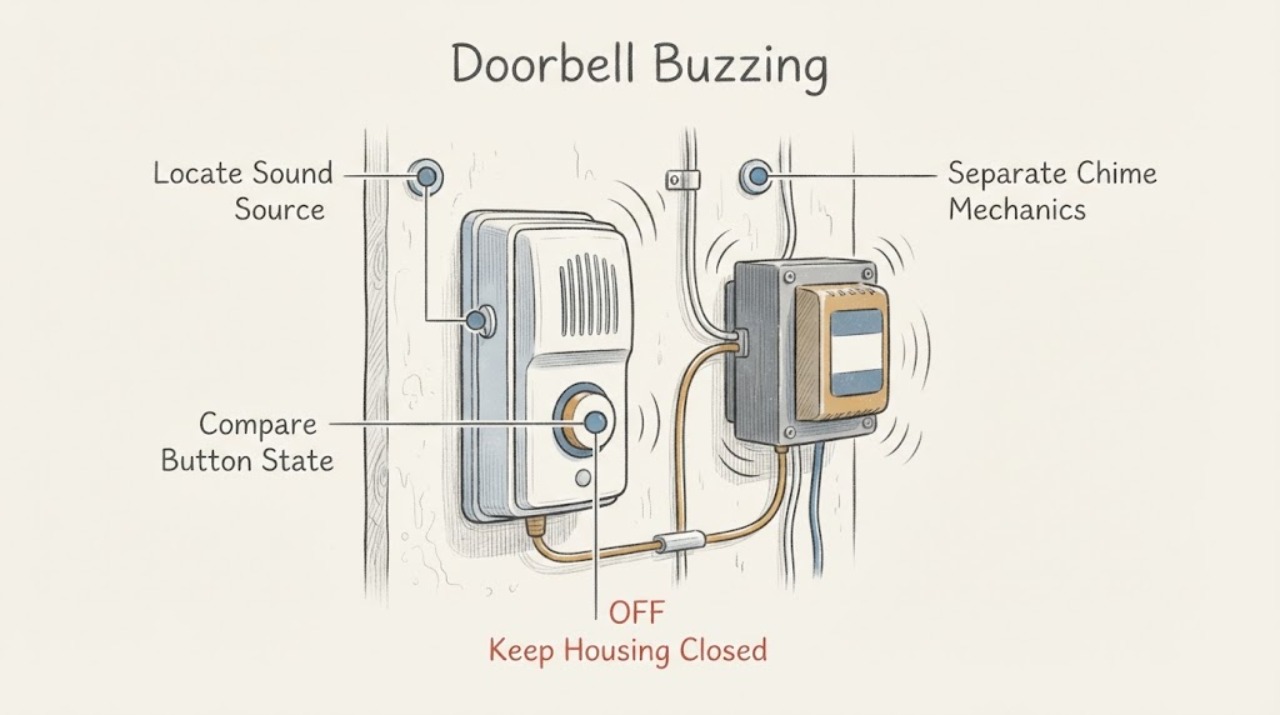
Work through in order
Diagnostic checks
Use only checks that match the exact appliance or system and its official guide.
-
Check 1
From a dry, safe position, listen at the indoor chime, the exterior button, and the transformer only if the transformer is already visible without opening a panel or enclosure. Do not touch any part. Note the loudest location and whether the sound is a steady hum, an intermittent buzz, a mechanical rattle, or crackling.
Expected result: The sound is clearly at the chime, at the button, at the transformer, or is accompanied by crackling, smoke, heat, or an electrical smell.
Next step: Record the source and timing, then follow the matching branch. Stop and arrange electrical emergency help for smoke, fire, shock, or arcing; otherwise leave suspected electrical equipment alone and call a qualified electrician if the buzz persists.
Stop if: Stop immediately for burning odor, smoke, sparks, arcing, shock, a hot or discolored transformer/chime, exposed conductors, or a breaker that trips.
Why this matters
Why: A chime or button sound can result from a held circuit or moving-part interference; a transformer may have normal magnetic hum or excessive vibration. Crackling, heat, smoke, or odor is an electrical hazard rather than a normal operating sound.
-
Check 2
Without removing the button or touching its terminals, observe whether the exterior button moves back freely and whether the buzz begins only during a press or continues after everyone stops pressing it. If there are multiple buttons, note which one was used, without repeatedly pressing them to test.
Expected result: The buzz ends when the button is released, continues when no one is pressing it, or the button appears jammed, sunken, damaged, wet, or obstructed.
Next step: If the button is visibly obstructed and can be released without tools or force, stop using it and observe whether the sound ends. If it remains stuck, wet, damaged, or the buzz continues, leave the system unused and arrange electrician service.
Stop if: Do not pry the button, remove its plate, short contacts, touch wires, or continue if there is heat, odor, water, sparking, shock, or smoke.
Why this matters
Why: A buzz that follows a press may involve the chime's energized mechanism or a button that is not releasing. A continuous buzz without a press can indicate a stuck button, wiring, chime connector, connected smart doorbell, transformer loading, or another fault; the observation does not select a repair part.
-
Check 3
If the chime cover is designed for ordinary user removal and the system is safely de-energized according to its exact manual, inspect only for a visible cover, connector, or wire obstructing a mechanical striker. Do not handle terminals or wiring; if the cover is not clearly user-removable, skip this check.
Expected result: The sound is a mechanical rattle at the chime, a visible object touches a moving part, the chime is electronic with no moving striker, or the buzz remains with no visible obstruction.
Next step: Only reposition a loose cover or visible non-electrical obstruction as the exact manual permits and with power safely off; otherwise close the cover, leave the wiring unchanged, and call service. Do not use a cover-off test if the sound or wiring is unsafe.
Stop if: Stop for exposed conductors, a wet or damaged chime, heat, discoloration, odor, crackling, smoke, sparks, or any need to touch terminals or loosen connections.
Why this matters
Why: Google notes that chime connectors or wires can interfere with mechanical chime movement. A clear mechanical chime or an electronic chime with a persistent buzz shifts attention to configuration, transformer loading, or professional wiring diagnosis.
-
Check 4
Review the symptom history: note whether the buzz began after installing a wired smart doorbell, changing the chime, adding a second button, or changing a chime connector. Identify whether the system is mechanical, electronic, wired, or battery-powered from its visible product documentation or app, without opening the wiring.
Expected result: The buzz began after a new wired device or chime was added, a connector was omitted or changed, the transformer label is unknown, or no installation change preceded it.
Next step: Use the exact doorbell and chime manual or have a qualified electrician verify the configuration, transformer rating, and load. Do not copy another model's wiring diagram or install a guessed transformer.
Stop if: Do not remove the chime connector, swap transformer leads, bypass the chime, or continue near heat, odor, smoke, sparks, shock, exposed wiring, or a tripped breaker.
Why this matters
Why: Google documents that an absent or incorrectly configured chime connector can cause buzzing or unexpected chimes and that wired doorbells have model-specific transformer requirements. An unknown history does not prove a transformer failure, but it strengthens the compatibility and wiring service branch.
-
Check 5
Only if a transformer label is already readable from a safe, dry location without removing a cover, record its voltage and power markings, installation date if shown, and whether it is visibly loose, damaged, hot, or discolored. Do not expose the transformer or use a meter.
Expected result: The label is missing or unreadable, the rating may not match the connected doorbell's manual, the enclosure is loose or damaged, or the label appears compatible and the enclosure is cool and intact.
Next step: Give the label and installation history to a qualified electrician or the doorbell manufacturer. Leave the circuit alone if the rating is uncertain or the transformer is noisy, hot, damaged, or persistently buzzing.
Stop if: Do not remove the transformer, open an enclosure, touch line-voltage terminals, measure voltage, or continue after heat, odor, discoloration, smoke, sparks, shock, or breaker operation.
Why this matters
Why: Transformer compatibility is model- and load-dependent; an unreadable label or a new smart doorbell installation needs professional verification rather than a guessed replacement. A cool, intact label does not rule out a winding, mounting, load, or wiring fault.
-
Check 6
From a safe distance, look for a warm or discolored wall plate, transformer cover, chime box, or nearby electrical control; listen for crackling; and note flickering, a recent breaker trip, shock, smoke, or burning odor. Do not touch a suspected hot surface to test it.
Expected result: There is no visible warning and the sound is a faint steady hum, or there is heat, discoloration, odor, crackling, flicker, smoke, sparking, shock, or repeated tripping.
Next step: For a quiet, intact system, document the sound and request routine electrician assessment if it is new or bothersome. For any warning sign, stop using the doorbell and call a qualified electrician; use emergency response for smoke, fire, shock, or immediate danger.
Stop if: Do not touch, open, tighten, silence, reset, or repeatedly energize buzzing equipment when any warning sign is present.
Why this matters
Why: A faint steady transformer hum can be normal for some transformers, while unusual sound with heat or electrical warning signs can indicate an overload, loose connection, or failing equipment. The warning signs cannot be safely diagnosed by a homeowner.
-
Check 7
Prepare a service note with the sound location, whether it follows a button press, chime type, number of buttons, wired or battery doorbell, smart-doorbell or chime-connector changes, transformer label if safely visible, and all heat, odor, flicker, smoke, spark, shock, or breaker observations.
Expected result: The note shows a button-linked buzz, continuous chime or transformer buzz, post-installation configuration change, unknown rating, or an electrical warning.
Next step: Leave the system unused when the buzz is persistent or any stop condition occurred and arrange a qualified electrician to de-energize and inspect it. Ask the professional to verify the transformer, chime, buttons, wiring, and connected doorbell as one system.
Stop if: Do not open panels, touch wiring, measure live voltage, bypass the chime or transformer, replace a transformer by guesswork, or keep operating after heat, odor, smoke, arcing, shock, or breaker trips.
Why this matters
Why: These distinctions help an electrician separate chime mechanics, a stuck control, transformer loading or mounting, compatibility, wiring, and hazardous electrical conditions without asking the homeowner to reproduce the fault.
Use your observations
Decision map
Find the observation that best matches what you see, then follow the next safe action.
-
PATH 01Safety boundary
What you see
The buzz occurs only while a button is pressed or the button visibly sticks, sinks, or fails to return.
Do this next
Stop using the button, release only a clearly external obstruction without tools or force, and call an electrician if the button remains stuck or the buzz continues.
Why this path and its safety boundary
Why it matters: A held button or the chime's energized mechanism may be keeping current on the low-voltage circuit; this does not prove the transformer is defective.
Safety stop: Do not remove the button, short its contacts, touch terminals, or continue for heat, odor, water, smoke, sparks, shock, or a tripped breaker.
-
PATH 02Safety boundary
What you see
The loudest sound is at a mechanical chime and a cover, connector, or visible wire appears to interfere with a striker, or buzzing began after a wired smart-doorbell installation.
Do this next
Follow the exact device manual only for a safe, de-energized visible inspection; otherwise have a qualified electrician verify the chime connector, transformer, and wiring.
Why this path and its safety boundary
Why it matters: A chime connector or wiring arrangement can affect the chime, and Google documents model-specific connector and transformer compatibility requirements.
Safety stop: Do not bypass or remove a connector, change terminals, or touch exposed conductors; stop for heat, odor, smoke, sparks, shock, or water.
-
PATH 03Safety boundary
What you see
The transformer is the loudest source and produces a faint, steady hum with no visible heat, discoloration, odor, or other warning.
Do this next
Do not try to quiet or remount the transformer yourself. Record the sound and have an electrician assess mounting, load, compatibility, and condition if it persists or changed.
Why this path and its safety boundary
Why it matters: Some transformers have normal operating hum, and the sound can be amplified by mounting or nearby surfaces. A new, worsening, or objectionable buzz still needs assessment; sound alone does not prove a replacement is needed.
Safety stop: Stop using the doorbell for heat, odor, discoloration, crackling, smoke, sparks, shock, damage, or a breaker trip.
-
PATH 04Safety boundary
What you see
The buzz started after adding a wired or smart doorbell, changing a chime, adding another button, or when the transformer label is absent or does not clearly match the device documentation.
Do this next
Provide the device models and safely visible label to a qualified electrician or the manufacturer and have the complete low-voltage system verified.
Why this path and its safety boundary
Why it matters: The transformer may not provide the required power for that configuration, or the chime connector and wiring may be incompatible. Do not infer a universal voltage or part fit from another installation.
Safety stop: Do not install a guessed transformer, alter wiring, bypass the chime, measure live voltage, or keep operating a hot or damaged system.
-
PATH 05Safety boundary
What you see
Buzzing is accompanied by heat, discoloration, burning odor, crackling, flicker, smoke, sparks, shock, exposed wiring, or repeated breaker trips.
Do this next
Stop using the system and move away. If safe without approaching the hazard, use the appropriate remote shutoff; call a licensed electrician, and call emergency responders for smoke, fire, shock, or immediate danger.
Why this path and its safety boundary
Why it matters: These are electrical warning signs, not a doorbell nuisance to troubleshoot by repeated testing. The circuit may require immediate isolation and professional inspection.
Safety stop: Do not touch the equipment, open a panel, reset repeatedly, use water, or attempt to locate a fault while energized.
Helpful context
Understand the symptom
Locate the buzz before blaming the transformer
A sound at the indoor chime, button, or transformer does not identify the failed part. A mechanical chime can vibrate when a circuit is held on, while a transformer can produce a normal low hum that becomes objectionable when its mounting or surroundings resonate. Note whether the sound starts only when the button is pressed, continues after release, changes when a smart doorbell or chime connector was installed, or is accompanied by a hot or discolored enclosure.
Use configuration evidence, not live electrical tests
Doorbell systems may have a low-voltage transformer, a mechanical or electronic chime, one or more push buttons, and a wired smart doorbell. Google documents that a wired smart doorbell may require a compatible transformer and a correctly installed chime connector; Honeywell labels transformer and push-button connections separately and recommends a qualified electrician for transformer work. Read an already exposed label only from a safe position and leave wiring checks to a professional.
Treat electrical warning signs as a stop condition
Buzzing becomes an electrical safety concern when it is new, loud, irregular, or paired with heat, discoloration, smell, crackling, flicker, sparks, shock, smoke, or a breaker trip. Do not silence the sound by loosening or tightening energized hardware, bypassing the chime, changing transformer connections, or repeatedly resetting power. A qualified electrician can de-energize the circuit, verify the transformer, wiring, chime load, and connected doorbell, and select compatible equipment.
Safety boundary
Stop conditions
- Stop immediately for burning odor, smoke, fire, sparks, arcing, crackling, shock, a hot or discolored transformer/chime/button plate, exposed wiring, water, or a breaker that trips again.
- Do not open the transformer, chime, electrical panel, wall box, or doorbell wiring; do not touch terminals, take live voltage measurements, short the button, bypass the chime, or swap transformer leads.
- Do not repeatedly press the button, repeatedly reset a breaker, energize a suspected hot or damaged transformer, or try to quiet transformer vibration by loosening or tightening energized hardware.
- Arrange qualified electrician service for a persistent or worsening transformer buzz, an unknown or potentially incompatible rating, a buzz that began after a wired or smart-doorbell change, or any need to inspect wiring, load, mounting, or transformer condition.
When checks do not resolve it
Need a professional?
Arrange qualified electrician service when the buzzing persists after the safe external observations, comes from the transformer, began after a doorbell or chime change, occurs with an unknown transformer rating, or requires wiring, load, compatibility, mounting, or transformer diagnosis. Stop immediately and use emergency response for smoke, fire, arcing, shock, or immediate danger; do not keep operating equipment that is hot, discolored, crackling, or emitting a burning odor.
Safety scope: This article permits only safe listening and external observation, plus a clearly manual-authorized dry cover or button observation with power safely isolated. It does not authorize transformer or chime disassembly, wiring changes, live measurements, button shorting, bypassing, repeated resets, or transformer replacement by guesswork.
Common questions
FAQ
Is a faint transformer hum always dangerous?
No. Some transformers have normal operating hum, and mounting or nearby hard surfaces can make it more noticeable. A new, worsening, loud, irregular, or hot buzz—or any buzz with odor, discoloration, crackling, smoke, sparks, shock, or a tripped breaker—needs the system left alone and professionally inspected.
Why does my doorbell buzz after installing a wired smart doorbell?
The connected device, chime connector, transformer rating, chime type, and wiring must be compatible. Google documents that a missing or incorrectly configured chime connector can cause buzzing or unexpected chimes for supported Nest systems. Use the exact device manual or a qualified electrician; do not copy another model's wiring.
Can I open the chime or transformer to stop the buzz?
No. Do not open the transformer, electrical panel, wall box, or chime wiring, touch terminals, measure live voltage, bypass the chime, or change transformer connections. A professional can de-energize the circuit and verify the complete doorbell system safely.
What should I do if the doorbell button seems stuck and the chime is buzzing?
Stop using the button and observe only from the outside. If a clearly external obstruction can be released without tools or force, do that once; if the button remains stuck, wet, damaged, or the buzz continues after release, leave the system unused and call a qualified electrician.
Read the exact guide
Official sources
- When Should I Replace a Switch?Leviton Product Support · Leviton safety guidance used for general residential electrical warning signs; it is not a doorbell-specific repair procedure.
- Troubleshoot Nest doorbell chime issuesGoogle Home and Nest Help · Google Nest-specific chime guidance used for the distinction between mechanical chime interference and electronic configuration; exact system manuals govern other doorbells.
- My Transformer is very noisy. Can anything be done to quiet the sound level?Schneider Electric USA · Schneider transformer guidance used for general transformer-noise context; doorbell transformer construction and allowable sound are model-specific.
- I have a transformer. Which connector should I use to connect the wires?Honeywell Home · Honeywell wired-doorbell installation guidance used to show that transformer and push-button connections are distinct and that transformer connection and operation checks are electrician work.
- Check Google Nest doorbell compatibilityGoogle Home and Nest Help · Google Nest-specific documentation used for general configuration principles and the explicit warning about buzzing without a required chime connector; exact doorbell model manuals govern other systems.
Community feedback
Share a repair observation
Share a plain-text repair observation. Accepted observations are published automatically; this page may take a moment to update.