
On this page
Start here
Quick answer
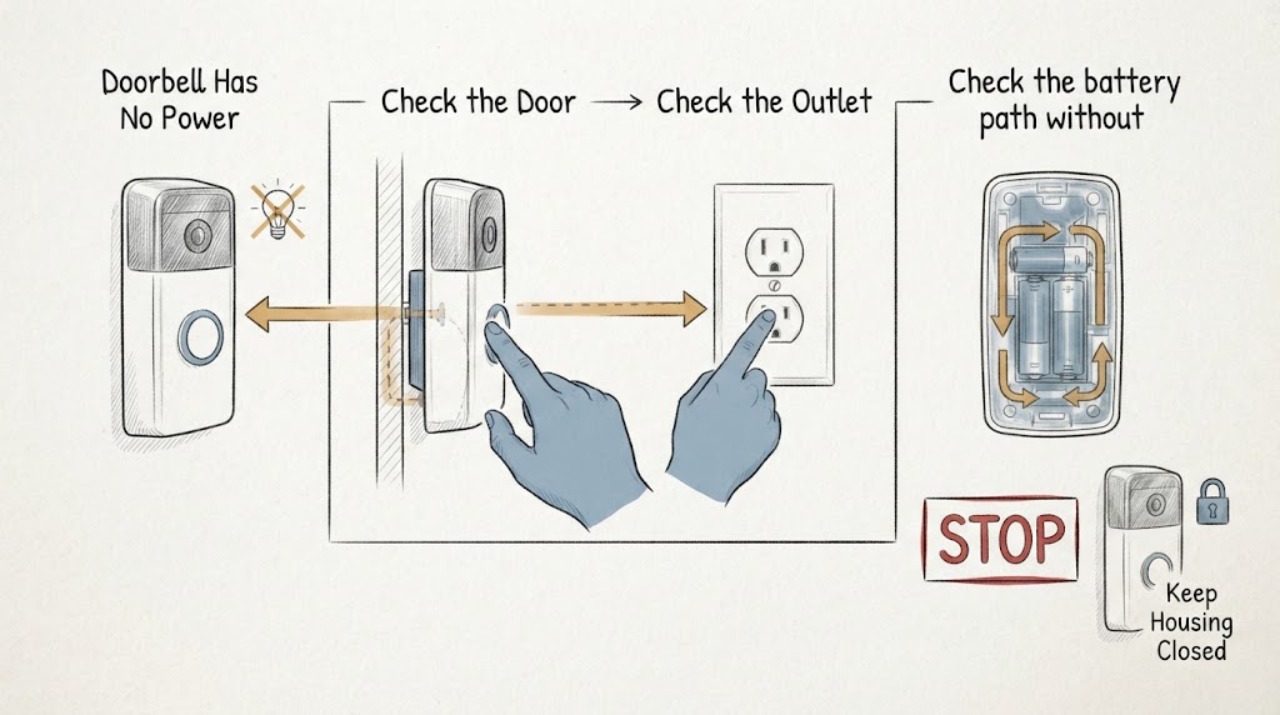
First distinguish a dead doorbell from a silent indoor chime: check the doorbell's status light or app, whether any other doorbell or chime function works, and whether the system is wired or battery-powered. For a wired system, verify only the external breaker, switch, outlet, or plug-in adapter that supplies it, and inspect visible equipment for damage without opening an electrical panel or probing wires. A battery model may simply need its manufacturer-specified charge, while a wired model may have a tripped supply, loose low-voltage connection, failed transformer, chime connector, or doorbell fault. Do not measure live wires, replace a transformer, expose mains terminals, or work on wet or damaged equipment; a licensed electrician or qualified doorbell installer should handle wiring, transformer, and panel work.
Work through in order
Diagnostic checks
Use only checks that match the exact appliance or system and its official guide.
-
Classify the doorbell's actual power symptom
From a dry, safe position, observe the doorbell's status light, screen, sound, app connection, and any indoor-chime response. Note whether the unit is wired to existing doorbell conductors or is a battery model, using the installation history or manufacturer app rather than pulling it off the mount.
Expected result: The device is dark and offline, the device is online but the indoor chime is silent, the status light changes but the doorbell will not complete setup, or only the battery indicator is low.
Next step: Record the exact light or app state and continue only with checks that match the wired or battery configuration. Do not open the housing or change wiring to test a theory.
Stop if: Stop for heat, smoke, burning odor, sparking, water ingress, a loose mount, exposed conductors, or any unexpected electrical noise.
Why this matters
Why: Dark and offline points toward a power, battery, wiring, or device fault. Online operation with a silent chime points more toward chime settings, connector, or chime wiring. A low battery points toward charging or battery condition rather than a household supply failure.
-
Check the external breaker, outlet, or adapter
For a wired or plug-in system, verify from outside the equipment that the labeled breaker or switch is on, the plug-in adapter is seated, and the outlet is not controlled by a switched-off wall switch. Reset a tripped breaker only once when the area is dry and there is no sign of damage; do not remove a panel cover or reset a breaker that trips again.
Expected result: The supply is off, the outlet or adapter is dead, the breaker trips again, the supply appears normal but the doorbell stays dark, or the system is battery-powered and has no external supply to check.
Next step: Record what changed and stop repeated resets. If the external supply is normal but the wired doorbell remains dead, have an electrician or qualified installer test the system; use the model's charging procedure for a battery unit.
Stop if: Do not open the service panel, touch transformer terminals, use a test probe on unknown wires, continue after a second trip, or work near water or damaged insulation.
Why this matters
Why: An off breaker, switched outlet, or failed adapter can explain a wired system's lack of power. A repeat trip can indicate a fault and is not a prompt to keep resetting. Normal external supply shifts the investigation toward the transformer, low-voltage wiring, chime connector, device, or battery path.
-
Check the battery path without using an unapproved charger
If the doorbell is a battery model, read its app or status indicator and use only the charging cable, removable battery procedure, and temperature limits specified by its manufacturer. Check that the approved cable or adapter is fully seated and that the charging area is dry; do not substitute a power supply or open the battery enclosure.
Expected result: The app reports a depleted battery, charging does not begin, the battery is cold-soaked or outside its allowed temperature range, the approved adapter works on another compatible device, or the unit remains dark after a documented charge.
Next step: Follow the model's normal charge and restart procedure once, then record the result. If the battery cannot charge, is swollen, hot, leaking, or damaged, stop using it and arrange qualified service or replacement guidance.
Stop if: Do not puncture, open, squeeze, freeze, heat, bypass, or recharge a swollen, wet, hot, leaking, or physically damaged battery, and do not use an improvised charger.
Why this matters
Why: A depleted battery or temperature protection can make a battery doorbell appear unpowered. A charge that does not begin with the approved equipment can indicate a cable, adapter, battery, or device fault. A persistent dead unit after a safe charge needs manufacturer or professional service.
-
Inspect only visible chime and mounting condition
From a safe position, look for a loose doorbell body, pulled or frayed exterior cable, water entry, corrosion, or a chime cover that is visibly displaced. If a chime box is already open and power has been positively isolated according to the model instructions, observe without touching whether wires or a connector obstruct moving parts; otherwise leave it closed for a professional.
Expected result: A wire is loose, frayed, corroded, or exposed; the chime connector or wires interfere with moving parts; the doorbell mount is damaged; water is present; or no visible defect is found.
Next step: Photograph the condition without touching it and arrange qualified electrical or doorbell service for wiring, transformer, chime, or mount repairs. Do not use a visible chime symptom to justify live testing.
Stop if: Do not touch bare wire, tighten terminals, remove the doorbell from its plate, move a chime connector, expose a transformer, or continue in a wet or energized area.
Why this matters
Why: A damaged or loose connection can interrupt power or mute a mechanical chime, while a connector touching moving parts can affect chime operation. Water, exposed conductors, or uncertainty about isolation creates an electrical hazard. No visible defect does not clear the transformer or wiring.
-
Compare the wired system with the model's documented requirements
Use the doorbell's exact model and installation documentation to identify whether it requires a transformer, chime connector, indoor adapter, or battery. Record the transformer label only if it is plainly readable without removing covers or entering a hazardous location; do not infer compatibility from a similar-looking transformer or install a replacement yourself.
Expected result: The transformer label is missing or does not match the model documentation, the system uses a complex or unlabeled chime, the doorbell has no transformer or compatible adapter, or the documented power path appears correct but the device remains dead.
Next step: Give the installer the model, power-path observations, label information, app state, and any photos. Request a licensed electrician or qualified installer to measure and repair the circuit rather than opening the panel or rewiring it.
Stop if: Do not measure live voltage, swap transformer leads, bypass a chime connector, connect the doorbell directly to household power, or work inside the electrical panel.
Why this matters
Why: A missing, incompatible, or complex power path can prevent a wired smart doorbell from starting. A correct-looking label does not prove voltage under load or wiring integrity; measuring and changing the transformer are professional tasks. A documented correct path with no power indication raises the likelihood of a device, wire, or connector fault.
Use your observations
Decision map
Find the observation that best matches what you see, then follow the next safe action.
-
PATH 01Safety boundary
What you see
The doorbell is battery-powered and reports a low battery, charging interruption, or a temperature-related charge stop.
Do this next
Use only the manufacturer's approved charging method in a dry, normal-temperature area, then record whether the status returns; arrange service if the battery remains dead or damaged.
Why this path and its safety boundary
Safety stop: Do not use an improvised charger or handle a swollen, leaking, hot, wet, or physically damaged battery.
-
PATH 02Safety boundary
What you see
A wired doorbell's breaker, switched outlet, plug-in adapter, or visible cord is off or failed, or the breaker trips again.
Do this next
Restore an obviously switched-off external supply only once when dry and undamaged; if it fails again, leave it off and call a licensed electrician or qualified installer.
Why this path and its safety boundary
Safety stop: Do not open the panel, repeatedly reset a breaker, or work near water, heat damage, smoke, or exposed conductors.
-
PATH 03Safety boundary
What you see
External supply appears normal but a wired doorbell remains dark, the transformer label is missing or incompatible, wiring is damaged, or the chime connector or configuration is uncertain.
Do this next
Leave the wiring untouched and request professional measurement and repair of the transformer, low-voltage conductors, chime connector, and doorbell device as needed.
Why this path and its safety boundary
Safety stop: Do not measure live wires, replace the transformer, bypass the chime connector, expose terminals, or connect the device to household line voltage.
-
PATH 04Safety boundary
What you see
The doorbell remains online or shows a normal power indication, but the indoor chime does not sound or sounds weak.
Do this next
Check the model's chime-enabled, quiet-time, and chime-type settings without changing wiring; have a professional handle a connector, complex chime, or wire fault that remains.
Why this path and its safety boundary
Safety stop: Do not infer no power from a silent chime, move energized connectors, or modify chime wiring without verified isolation and the model instructions.
-
PATH 05Safety boundary
What you see
The device is still dark or offline after safe external and battery checks, or there is heat, smoke, arcing, water, repeated tripping, or physical damage.
Do this next
Stop using the system, isolate the supply only if it can be done safely from an accessible control, keep clear of the equipment, and call a licensed electrician or qualified installer.
Why this path and its safety boundary
Safety stop: Do not open housings or panels, probe conductors, improvise power, or continue troubleshooting in a wet, hot, smoking, or damaged installation.
Helpful context
Understand the symptom
Separate no power from no indoor chime
A dark or offline doorbell is different from a doorbell that sends app events but does not make the indoor chime sound. Wired systems typically use a low-voltage transformer and doorbell wires; battery models use a rechargeable or replaceable battery and may still have separate chime settings. Start with the device status and app before touching any wiring, because a chime setting or connector can mute the sound without removing power from the doorbell.
Check the outside of the power path only
You can verify a labeled breaker, switched outlet, plug-in adapter, or visible power cord from a dry standing position if there is no sign of heat, water, arcing, or damage. Do not remove an electrical-panel cover, expose transformer terminals, pull a doorbell from its mounting plate, or use a meter on doorbell wires unless you are trained for that work. A wired doorbell's transformer may be near a chime, electrical panel, attic, garage, basement, or crawl space, so an unseen transformer is a reason to call an electrician rather than to search unsafely.
Treat outdoor and low-voltage wiring as electrical work
Doorbell wires are lower voltage than household branch circuits, but the transformer and its supply still connect to the home's electrical system. A professional should diagnose voltage, replace a transformer, correct complex chime wiring, or repair damaged conductors. Stop immediately for a burning smell, buzzing from a panel or transformer, exposed copper, water ingress, a hot component, repeated breaker trips, or a doorbell that is loose or physically damaged.
Only after diagnosis
Potential parts
- doorbell system transformer
Consider this category only if a licensed electrician or qualified installer confirms that the existing transformer is failed or incompatible with the exact wired doorbell and chime load.
Confirm the model's documented electrical requirements, wiring configuration, enclosure, and local installation requirements; no fit or homeowner installation is assumed. - doorbell battery or approved charging accessory
Consider this category only when the exact battery-model documentation and diagnostic result identify a depleted or failed battery or charging accessory.
Use only the exact model-approved battery or charging method and follow manufacturer instructions; do not substitute an unverified adapter or cell.
When checks do not resolve it
Need a professional?
Request a licensed electrician or qualified doorbell installer when a wired doorbell stays dark after safe external checks, the transformer or chime configuration is unknown, voltage needs measuring, wiring is damaged, the breaker trips again, or a battery unit will not charge after the approved procedure. Seek urgent electrical help for smoke, arcing, burning odor, heat, water near wiring, exposed conductors, or a damaged panel or transformer.
Common questions
FAQ
Why does my doorbell have no power?
A wired model may have an interrupted external supply, failed transformer, loose low-voltage wiring, chime connector issue, or device fault. A battery model may have a depleted battery or temperature-related charging protection. Identify the power type and status first; do not probe or rewire the system yourself.
How can I tell whether a wired doorbell transformer is bad?
A dark doorbell with a normal external supply can point toward the transformer, wiring, connector, or device, but a label or visual check cannot prove output under load. Have a licensed electrician or qualified installer measure the circuit and replace the transformer if the model requirements and test results support it.
My doorbell is online but the indoor chime does not ring. Is it unpowered?
Not necessarily. An online device can have power while the indoor chime is disabled, in quiet time, set to the wrong chime type, or affected by a connector or chime-wire issue. Check documented settings first and leave energized chime wiring for a professional.
Can I test doorbell wires with a multimeter?
Voltage testing is an electrical task, and doorbell wiring may be connected to a household-powered transformer. If you are not trained and equipped for electrical testing, do not remove the doorbell or touch the wires; have a licensed electrician or qualified installer test the system.
Read the exact guide
Official sources
- Check Google Nest doorbell compatibilityGoogle Home and Nest Help · Supports checking the documented power path, recognizing unlabeled or incompatible transformers and complex chimes, and referring voltage measurement or transformer work to a professional.
- Upgrade your transformer for Nest Doorbell (wired, 2nd gen or 3rd gen)Google Home and Nest Help · Supports recording a visible transformer label, recognizing common transformer locations, and leaving transformer installation or replacement to a licensed electrician.
- Troubleshoot Nest doorbell chime issuesGoogle Home and Nest Help · Supports distinguishing wired and battery symptoms, checking external power, battery condition, chime settings and connectors, and professional escalation for transformer or wiring issues.
Community feedback
Share a repair observation
Share a plain-text repair observation. Accepted observations are published automatically; this page may take a moment to update.