
On this page
Start here
Quick answer
A doorbell with no power may have a depleted battery, an incorrect app state, a tripped household circuit, a switched-off or failed transformer, a disconnected low-voltage path, or a failed button, chime, or smart-doorbell device. First identify whether the doorbell is battery-powered, plug-in, or wired to a transformer, then check only the visible device indicator, app status if applicable, button response, and clearly labeled power status. Record whether the indoor chime is also dead and whether the problem began after an installation or outage. Do not remove a transformer or chime cover, touch wiring or terminals, bridge conductors, test voltage, or replace a fuse. Stop for smoke, burning odor, heat, arcing, discoloration, moisture, shock, or repeated protective-device trips and arrange qualified electrical service.
Before you begin
Safety first
- Keep the system unused for heat, discoloration, smoke, burning odor, arcing, moisture, shock, exposed damage, or repeated trips. Do not remove covers, touch wiring, bridge terminals, test output, or perform energized work.
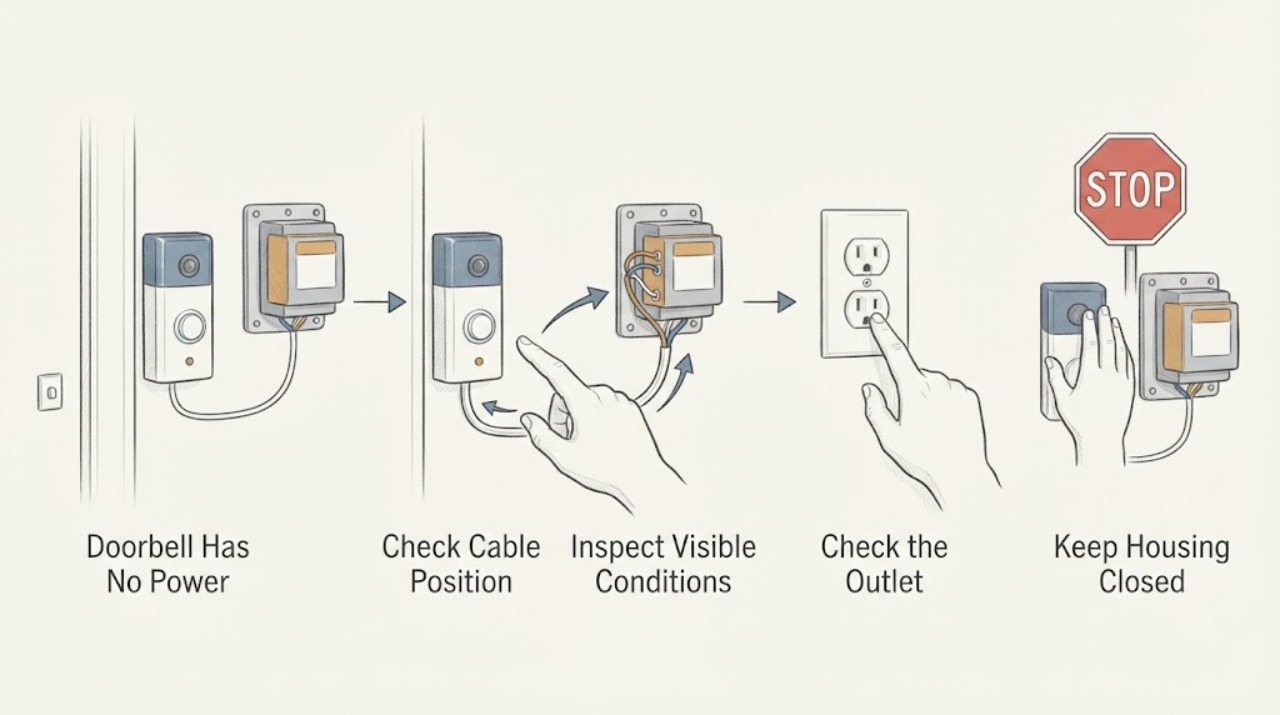
Work through in order
Diagnostic checks
Use only checks that match the exact appliance or system and its official guide.
-
Check 1
Identify the doorbell's arrangement from an exterior label, app, manual, or previously known installation: battery-powered, plug-in, wired to an indoor chime, or wired directly to a transformer. Do not remove a cover or pull a device from its mounting plate to identify it.
Expected result: The system is battery-powered, plug-in, transformer-wired, a smart doorbell with a chime, or the arrangement is unknown.
Next step: Follow only the exact model's user instructions for battery or adapter status. If the wiring arrangement cannot be identified from outside, leave it unchanged and request qualified electrical service.
Why this matters
Why: A battery or plug-in device has a different power path from a transformer-wired doorbell. If the arrangement is unknown, assuming a transformer fault can lead to unsafe access to a mains-connected enclosure.
-
Check 2
Observe the exterior doorbell indicator and the indoor chime or receiver without touching wiring. If the device uses an app, check only whether it reports online, offline, low power, or a device fault. Press the button once only if it is cool, dry, intact, and has no electrical warning sign.
Expected result: The exterior indicator is dark, the chime is silent, the app is offline, the app reports low power, or one part still responds.
Next step: Record the combination and stop repeated button presses. Use the exact manufacturer's app or manual for a battery or chime setting check; do not bridge terminals or open the transformer.
Why this matters
Why: A dark device and silent chime suggest a shared power path or separate power failures. An online device with no chime points toward chime configuration or the chime path; an offline device can have power, network, or device issues. One responding part narrows but does not prove the failed component.
-
Check 3
For a battery-powered device only, inspect the user-accessible battery indicator or battery compartment as the manual permits, without contacting any wall wiring. For a plug-in adapter, confirm from a safe dry position that its plug is seated and that its outlet is not visibly damaged; do not use an extension arrangement or open the adapter.
Expected result: The battery is reported low, the device recovers after the manual's normal battery procedure, the adapter is not powered, or the battery/adapter path appears normal.
Next step: Use only the model's documented battery or adapter action and make one normal test. If the device remains dead, leave it unused and request qualified service rather than adapting the wiring.
Why this matters
Why: A low battery or unplugged approved adapter can explain no power without involving a transformer. If those paths are normal, a device, chime, transformer, circuit, or wiring branch remains possible.
-
Check 4
From a safe, dry standing position, look for a clearly labeled doorbell or chime circuit device at the household panel or an accessible indoor service switch. Do not open the panel, touch a fuse, operate a suspect device, or reset a device that is hot, wet, damaged, odorous, or has opened before.
Expected result: The protective device or indoor switch appears on, appears off, has opened repeatedly, or cannot be safely identified.
Next step: Leave a repeated or unsafe trip off and request qualified electrical service. If the manual and local rules allow one safe user-level reset and it opens again, stop; do not replace protection or investigate behind the panel.
Why this matters
Why: A circuit interruption can remove power from the transformer or chime. A repeated trip can indicate a fault in the transformer, wiring, chime, button, or household supply and is not evidence that the transformer alone needs replacement.
-
Check 5
Look at the transformer location only from outside its enclosure. Record any visible rating label, indicator, heat, discoloration, moisture, smoke, or odor without touching it. Do not remove the transformer or chime cover, loosen a terminal, or use a meter to check output.
Expected result: The transformer area is cool and dry with no visible damage, or it is hot, discolored, wet, smoking, or odorous.
Next step: For any warning sign, stop using the doorbell and isolate power only from a safe dry location if possible. Obtain emergency help for smoke or arcing and qualified electrical service for other hazards.
Why this matters
Why: A normal exterior cannot prove transformer output or compatibility. Heat, discoloration, moisture, smoke, or odor is an electrical hazard involving the transformer or its supply until a professional establishes otherwise.
-
Check 6
If the doorbell is smart or connected to an indoor chime, review only the model's app status and chime-type setting while the hardware remains closed. Record whether the chime is mechanical, electronic, bypassed, or absent and whether a recent installation or configuration change preceded the outage.
Expected result: The chime setting does not match the actual chime, the chime is disabled or bypassed, a power warning appears, or the configuration already matches.
Next step: Apply only a model-documented software setting and perform one normal test. If there is no recovery, request service with the exact models; do not add a power module or bypass the chime yourself.
Why this matters
Why: A mismatched setting or incompatible power arrangement can make a connected doorbell appear dead or prevent an indoor chime from responding. A matching setting does not rule out the transformer, wiring, switch, or device.
-
Check 7
Prepare a service note with the doorbell arrangement, device and chime models, indicator and app state, button response, indoor chime response, visible circuit state, transformer label, recent outage or installation change, and any heat, odor, moisture, smoke, arcing, or shock. Photograph only closed equipment from a safe, dry position.
Expected result: No power remains after the safe external checks, or the transformer and low-voltage path cannot be separated without opening equipment.
Next step: Request a qualified electrician or doorbell technician and provide the complete sequence. Ask for system diagnosis before approving a transformer or other component.
Why this matters
Why: The remaining diagnosis requires controlled inspection of the transformer supply and output, chime, button or switch, low-voltage wiring, approved adapter or power module, and connected device.
Use your observations
Decision map
Find the observation that best matches what you see, then follow the next safe action.
-
PATH 01Next step
What you see
The system is battery-powered or uses a plug-in adapter and reports low power or no input.
Do this next
Follow only the exact model's battery or adapter instructions once. If the device remains dead, request qualified service and do not alter wall wiring.
Why this path and its safety boundary
Why it matters: The no-power path may be the battery or approved adapter rather than the transformer.
-
PATH 02Next step
What you see
A transformer-wired doorbell and its indoor chime are both dead, with no app or indicator response.
Do this next
Record the visible circuit state and transformer-area condition, leave covers closed, and request qualified electrical service.
Why this path and its safety boundary
Why it matters: A shared circuit, transformer, common low-voltage connection, chime, or device fault is possible; the transformer is not proven defective.
-
PATH 03Next step
What you see
The doorbell indicator or app remains active but the indoor chime is silent.
Do this next
Check only the model-specific chime type and enabled state, then request service if one normal test fails. Do not bypass or rewire the chime.
Why this path and its safety boundary
Why it matters: The doorbell may have power while the chime setting, chime, power module, or chime wiring path is unavailable.
-
PATH 04Next step
What you see
The transformer area is hot, discolored, wet, smoking, odorous, or associated with a shock or repeated trip.
Do this next
Stop using the system and keep clear. Isolate power only from a safe dry location if possible; use emergency help for smoke or active arcing and qualified electrical service for other hazards.
Why this path and its safety boundary
Why it matters: This is an electrical hazard, not a routine transformer replacement decision.
-
PATH 05Next step
What you see
The no-power symptom started after a new doorbell, chime, adapter, or transformer was installed.
Do this next
Give the installer or electrician the old and new model details and the timing. Do not copy another product's wiring diagram or install an unapproved accessory.
Why this path and its safety boundary
Why it matters: Compatibility, power rating, chime configuration, or installation connection becomes more plausible, but the exact model determines the remedy.
-
PATH 06Next step
What you see
The device arrangement, circuit status, and transformer condition cannot be identified safely from outside closed equipment.
Do this next
Leave the system unchanged and request qualified electrical service. Do not remove panels, touch wiring, or test output.
Why this path and its safety boundary
Why it matters: A mains-side and low-voltage fault cannot be separated by a homeowner observation.
Helpful context
Understand the symptom
Identify the power arrangement first
A doorbell can be battery-powered, powered by a plug-in adapter, or wired through a transformer to an indoor chime. A battery device with a flat cell is a different path from a wired doorbell whose indicator is dark. A chime kit can contain a push button, chime, and low-voltage transformer, while the transformer itself may connect to household mains. Do not open an enclosure to determine which arrangement you have; use the exterior label, installation paperwork, app, or a qualified technician.
Use visible response to separate the fault
Note whether the exterior indicator, indoor chime, and app or receiver all fail, or whether one still works. If a wired doorbell is dark but the indoor chime behaves normally, the button or doorbell device may be involved. If both are dead, shared power, the transformer, a circuit, an approved adapter, or a common connection is more plausible. These observations narrow the service request but do not authorize a live electrical test.
Keep the transformer side professional
Some doorbell transformers are mounted near a panel, in a utility area, or inside a chime enclosure. The doorbell side may be low voltage, but the supply side can still be hazardous. Ring instructs users to disconnect power before installation work, and ESFI and the CPSC treat heat, odor, buzzing, arcing, discoloration, and shocks as warning signs. Keep covers closed and have an electrician inspect the transformer, supply, and low-voltage circuit.
Safety boundary
Stop conditions
- Stop immediately for smoke, burning odor, visible arcing, a hot or discolored transformer or switch enclosure, moisture near electrical equipment, a shock or tingle, or a repeated protective-device trip. Keep clear and obtain emergency or qualified electrical help as appropriate.
- Stop using the doorbell when both the device and chime are dead after a visible power interruption, when the transformer area is abnormal, or when the no-power state persists after one safe user-level check. Do not keep resetting or repeatedly pressing the button.
- Do not remove the transformer, chime, or button cover; touch wiring or terminals; bridge conductors; test output; replace a fuse; bypass a chime or safety device; or substitute a transformer, adapter, diode, or power module without exact model-specific professional guidance.
- Do not infer transformer failure from a dark doorbell alone. Battery, adapter, circuit, chime, button, device, wiring, compatibility, and transformer paths can share the same symptom.
Only after diagnosis
Potential parts
- doorbell transformer
Consider this only if qualified testing confirms that the transformer or its supply is failed or incompatible after the circuit, chime, button, adapter, and device are evaluated.
Voltage, VA capacity, frequency, enclosure, and local installation rules must be matched by a qualified installer; no rating or fit can be inferred from a dark doorbell. - doorbell push button
Consider this only if the device has power but qualified inspection confirms that the button contact or mechanism is open or failing.
Contact arrangement, weather rating, mounting, and system voltage must be confirmed for the exact installation; no button replacement should expose live wiring. - indoor chime or approved power module
Consider this only when the device or transformer has the correct power and professional diagnosis identifies the chime or approved module as the failed path.
Mechanical versus electronic chime type and the manufacturer's approved module or adapter must be confirmed before replacement. - doorbell battery or approved plug-in adapter
Consider this only for a battery or plug-in arrangement when the exact model reports low power or the approved adapter has failed, and no transformer-wired system is involved.
Use only the model's documented battery or adapter specification; do not adapt a mains or low-voltage connection.
When checks do not resolve it
Need a professional?
Call after recording the device arrangement and visible responses, or immediately for a dark or hot transformer area, repeated trip, moisture, smoke, odor, arcing, shock, or exposed damage.
Safety scope: Keep the system unused for heat, discoloration, smoke, burning odor, arcing, moisture, shock, exposed damage, or repeated trips. Do not remove covers, touch wiring, bridge terminals, test output, or perform energized work.
Common questions
FAQ
Does a dark doorbell prove that the transformer has failed?
No. A dead battery, unplugged adapter, tripped circuit, switched-off supply, chime or button fault, low-voltage wiring issue, device failure, compatibility problem, or transformer fault can all produce no power. Identify the arrangement and record which parts respond before requesting service.
Can I test the transformer output myself?
Do not open the transformer or chime, touch terminals, or use a meter as a homeowner check. The transformer may connect to household mains, and a low-voltage-looking enclosure is not proof that every side is safe. Ask a qualified electrician to test the system.
Why is the indoor chime dead but the doorbell indicator still works?
The device may have power while the chime is disabled, mismatched in the app, incompatible, or disconnected in its power path. Check only the model-specific chime setting and perform one normal test; do not bypass or rewire the chime.
What if the no-power problem began after installing a smart doorbell?
The new device may require a particular transformer range, chime type, or approved power module. Use the exact installation and compatibility instructions for that model and have a qualified installer review the system if power does not return. Do not copy another product's wiring arrangement.
When is a no-power doorbell an electrical emergency?
Treat smoke, visible arcing, a burning odor, a hot or discolored enclosure, moisture near electrical equipment, a shock or tingle, or a repeatedly opening protective device as an immediate stop condition. Keep clear, isolate power only from a safe dry location if possible, and use emergency help for smoke or active arcing.
Read the exact guide
Official sources
- 209185-06A English.pdfHeath/Zenith · Notifi Elite-specific owner manual; its ratings and module instructions do not establish compatibility for other models.
- Door Chime Contractor KitResideo · Product-specific information used only to establish that a wired kit can include a chime, push buttons, and a low-voltage transformer.
- CPSC Guide to Home Wiring HazardsU.S. Consumer Product Safety Commission · General U.S. home-wiring safety guidance; it is not a transformer replacement procedure.
- Troubleshooting power for hardwired doorbellsRing · Ring-specific hardwired-doorbell guidance; other systems require their own model instructions.
- Configuring and troubleshooting your in-home chimeRing · Ring-specific guidance; use the exact product manual for another doorbell or chime.
- Home Electrical SafetyElectrical Safety Foundation International · General residential electrical-safety guidance; local emergency and code requirements also apply.
- Electrical Fire Safety ChecklistElectrical Safety Foundation International · General residential safety checklist; it is not a doorbell repair procedure.
Community feedback
Share a repair observation
Share a plain-text repair observation. Accepted observations are published automatically; this page may take a moment to update.