
On this page
Start here
Quick answer
A doorbell that has no power may have a drained battery, a switched-off or failed transformer, a tripped protective device, a broken low-voltage connection, a wet or damaged button, or an incompatible power supply. First identify whether the doorbell is battery-powered, hardwired, or part of a smart system, then observe the device, chime, transformer label, and visible breaker or GFCI status from a dry, safe position. Do not remove the chime or transformer cover, touch wiring, measure voltage, or connect a replacement supply by guesswork. If there is a burnt smell, heat, buzzing, arcing, water intrusion, exposed wire, shock, or a breaker that trips again, leave the circuit alone and arrange qualified electrical service.
Before you begin
Safety first
- This article supports dry, ordinary-access observation only. A qualified electrician must isolate circuits and handle household-voltage wiring, transformer replacement, concealed splices, live or dead testing, and any damaged or wet equipment.
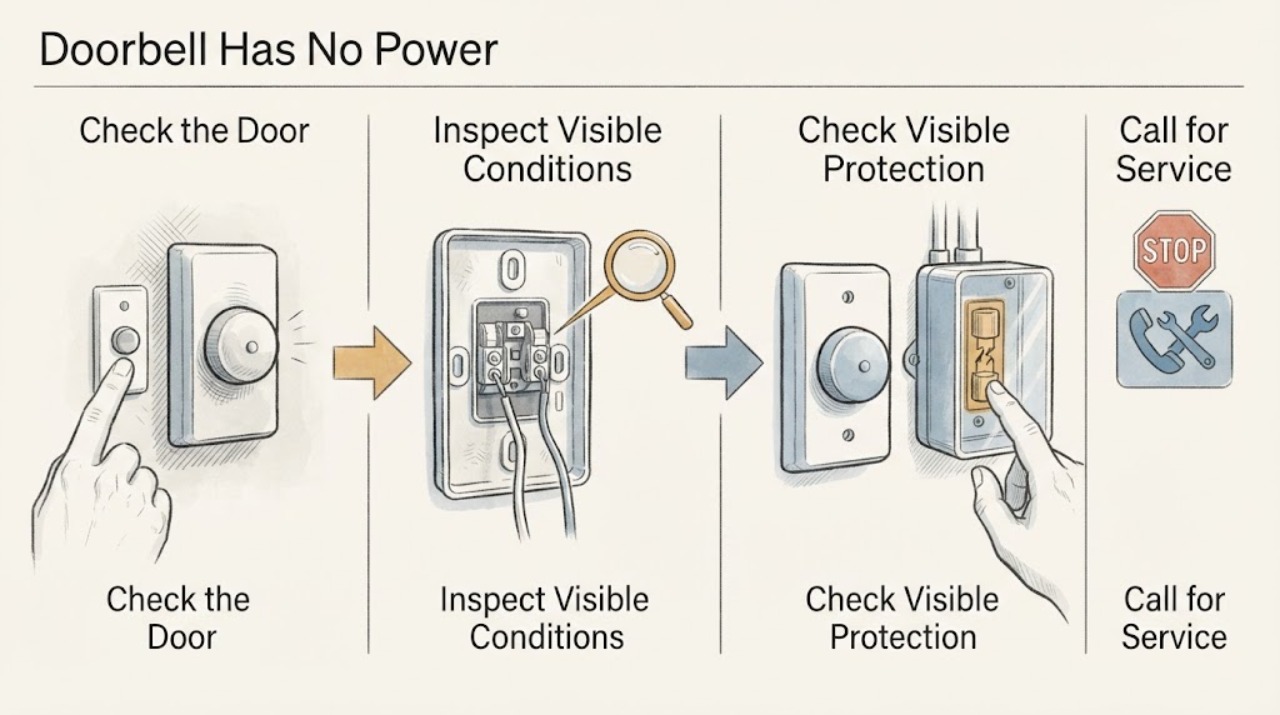
Work through in order
Diagnostic checks
Use only checks that match the exact appliance or system and its official guide.
-
Check 1
From a dry, stable position, identify whether the doorbell is battery-powered, plug-in, wired to an indoor chime, or a smart doorbell with an app; record the make, model, status light, chime response, and whether the battery or adapter is visibly present without removing the device or touching terminals.
Expected result: The device is clearly battery-powered, has a visible indoor adapter, appears hardwired, has a chime but no camera response, or its power method cannot be identified.
Next step: Use only the exact product manual for ordinary battery or app checks. If the power method or model is unclear, photograph exterior labels and arrange qualified electrical or manufacturer support rather than opening the chime or transformer.
Stop if: Stop for heat, smoke, burning odor, water, a damaged device, exposed conductor, shock, or any need to remove a cover or touch wiring.
Why this matters
Why: A battery or adapter path needs a product-specific charge or adapter check. A wired system adds a transformer, chime, button, and wiring path; an unidentified system cannot safely be assigned a voltage, reset, or replacement part.
-
Check 2
With no immediate hazard, press the doorbell button once in the normal way and observe the button light, indoor chime, camera or app status, and any brief click or hum; do not hold the button down or repeat the press to force a response.
Expected result: The button has no light, the chime rings but the smart device is offline, the camera or status light works but the chime is silent, the system works intermittently, or there is buzzing, heat, or arcing.
Next step: Record the exact response and timing, then use the product-specific support path. Leave the system unpowered and request an electrician for hazardous, intermittent, or unresolved wiring symptoms.
Stop if: Stop immediately for a spark, arc, smoke, burning smell, hot button or chime, shock, or a breaker or GFCI trip.
Why this matters
Why: A response in one part of the system narrows the fault to the button, chime, device, app, or their connection rather than proving the transformer or wiring failed. Intermittent operation can reflect a weak battery, marginal supply, loose or damaged connection, or a model-specific load issue. Buzzing, heat, and arcing are safety symptoms.
-
Check 3
From a dry position, observe the household breaker, fuse indicator, or GFCI reset status that may serve the doorbell area, and note whether nearby porch lights or the indoor chime also lost power; do not remove a panel cover or repeatedly cycle a protective device.
Expected result: A breaker or GFCI appears tripped, the protective device will not remain reset, nearby loads are also dead, or the visible protection appears normal.
Next step: If the protective device trips again or will not hold, leave it off and call a qualified electrician. If it appears normal, continue only with exterior observations and provide the result to the electrician or manufacturer.
Stop if: Do not install a larger fuse or breaker, repeatedly reset protection, open the service panel, touch wiring, or reset a wet GFCI or wet device.
Why this matters
Why: A tripped device can explain a no-power symptom, but a repeat trip or a wider loss of power may indicate a fault or wet condition. A normal visible position does not prove the low-voltage transformer or doorbell wiring is energized.
-
Check 4
Inspect only the exterior doorbell, button, visible cable entry, chime cover, and nearby wall for water intrusion, corrosion, loose cover, crushed cable, or damage; do not remove the button, chime cover, transformer cover, or wall plate.
Expected result: The exterior path is dry and intact, the button or cable entry is wet or corroded, the chime or transformer area is damaged, or the route disappears into the wall.
Next step: Keep a wet or damaged system out of service, avoid touching it, and arrange electrical service. For a dry intact system, record photographs and continue to the non-invasive power-source documentation step.
Stop if: Stop for wet equipment, exposed conductor, corrosion reaching a connection, loose hardware, a cracked enclosure, or any need to pull cable or open a box.
Why this matters
Why: Water or physical damage can interrupt low-voltage operation and create a shock or equipment hazard. A concealed route or intact exterior does not rule out a transformer, splice, or connection fault.
-
Check 5
If the transformer label is plainly visible without opening an enclosure or reaching near household-voltage wiring, record its voltage and VA markings and compare them only with the exact doorbell and chime documentation; otherwise record that the label is unavailable.
Expected result: The label is visible and appears compatible, the label is missing or unreadable, the system has a different supply type, or the wiring and device requirements do not match.
Next step: Give the label, model, chime type, and symptom record to a qualified electrician or the manufacturer. Do not open the transformer box, measure voltage, or replace it as a trial.
Stop if: Stop if the label requires opening an enclosure, the transformer is hot or damaged, wires are exposed, or the source type is uncertain.
Why this matters
Why: Doorbell power requirements vary by model, and an apparently similar transformer can still be incompatible. An unknown or mismatched source is a service decision, not permission to connect a different transformer or power adapter.
-
Check 6
Prepare the make and model, battery or adapter state, button and chime response, app or status-light behavior, visible breaker or GFCI history, transformer label if safely visible, and photographs of any exterior damage without touching wiring.
Expected result: The record points to a battery or adapter issue, a button or chime-only issue, a transformer or wiring path, a protective-device event, water damage, or an unresolved fault.
Next step: Keep the doorbell out of service when the cause is hazardous, wet, damaged, repeatedly tripping, or unresolved, and schedule qualified electrical service for wiring or transformer diagnosis.
Stop if: Do not continue testing after smoke, arcing, heat, burning odor, water intrusion, shock, or a protective-device trip.
Why this matters
Why: This separates ordinary product support from electrical service and helps a professional avoid assuming that a no-light symptom proves a wiring failure or that a breaker position proves low-voltage power.
Use your observations
Decision map
Find the observation that best matches what you see, then follow the next safe action.
-
PATH 01Safety boundary
What you see
There is smoke, fire, arcing, burning odor, a hot enclosure, shock, exposed wiring, water on electrical equipment, or a breaker or GFCI trips again.
Do this next
Stop using the doorbell, keep people away, and contact emergency or qualified electrical service from a safe position as appropriate. Do not re-energize or retest.
Why this path and its safety boundary
Why it matters: This is an electrical safety event, not a doorbell troubleshooting step.
Safety stop: Do not touch wet or hot equipment, open a panel, repeatedly reset protection, or use water on an electrical fire.
-
PATH 02Safety boundary
What you see
The doorbell is battery-powered or uses a visible plug-in adapter, and there is no hazardous symptom.
Do this next
Follow only the exact product instructions for charging, app status, and an indoor adapter; do not use an outdoor or incompatible adapter or route cable through a wall without appropriate professional and building-safety guidance.
Why this path and its safety boundary
Why it matters: The no-power path may be a depleted battery, adapter connection, indoor outlet, or model-specific power requirement rather than in-wall wiring.
Safety stop: Stop for a wet, damaged, hot, or swollen battery or adapter, or if the adapter or outlet is not the product-approved type.
-
PATH 03Safety boundary
What you see
A wired doorbell has no light or response, the visible protection appears normal, and no water or damage is present.
Do this next
Provide the model and safe observations to a qualified electrician or manufacturer. Do not remove the chime, transformer, button, or wall plate to test continuity or voltage.
Why this path and its safety boundary
Why it matters: The fault can be at the transformer, chime, button, low-voltage wiring, device, or compatibility boundary; the visible breaker position does not identify the failed part.
Safety stop: Stop if the wiring does not resemble the exact instructions, the source type is unknown, or any heat, odor, buzzing, or damage appears.
-
PATH 04Safety boundary
What you see
The chime rings but the smart doorbell is blank, or the camera/status light works while the indoor chime is silent.
Do this next
Record which component responds and use the exact model's chime and power guidance. Request service when the symptom is intermittent, wiring is damaged, or product guidance does not resolve it.
Why this path and its safety boundary
Why it matters: Power reaches some part of the system, so the problem may be a battery, chime compatibility, device setting, button path, or a partial connection rather than a complete loss of power.
Safety stop: Do not bypass the chime, splice conductors, or connect an alternate transformer as a test.
-
PATH 05Safety boundary
What you see
The button, device, chime, transformer area, cable entry, or wall is wet, corroded, cracked, or physically damaged.
Do this next
Keep the system out of service and obtain qualified electrical assessment; arrange building or weatherproofing repair after the electrical condition is safe.
Why this path and its safety boundary
Why it matters: Water or damage can create both a no-power symptom and an electrical shock or equipment hazard.
Safety stop: Do not dry with heat, touch the device or wires while wet, or restore power to prove that it works.
Helpful context
Understand the symptom
A no-power doorbell is not always a wiring failure
Battery, plug-in, wired mechanical, and smart doorbells have different power paths. A blank status light on a smart device can mean a depleted battery or an adapter problem, while a silent mechanical chime can also be caused by a button, chime, transformer, or low-voltage connection. Keep the exact make and model for product-specific requirements; one brand's transformer range or reset behavior is not a universal value for every doorbell.
Start with visible symptoms and the power boundary
Record whether the button, chime, camera, status light, and app respond, and whether the failure affects one doorbell or the entire system. Look only at plainly visible breaker or GFCI status from a dry position. A doorbell transformer may be near a chime, utility area, garage, attic, or another electrical enclosure, but locating it is not permission to open a box or handle household-voltage wiring.
Keep low-voltage wiring separate from mains work
The small wires at a doorbell are not automatically safe to touch, and the transformer is connected to household power on its other side. Manufacturer instructions require power isolation before wiring work and professional help when wiring does not match the instructions or is damaged. A GFCI or breaker near a wet entry area may interrupt power for a safety reason; do not repeatedly reset it or bypass protection.
Safety boundary
Stop conditions
- Stop immediately for smoke, fire, arcing, burning odor, heat, shock, exposed conductor, water intrusion, or a breaker or GFCI that trips again.
- Do not open a service panel, chime, transformer, junction box, or wall plate; do not touch wiring or perform live voltage or continuity testing.
- Do not repeatedly reset a breaker or GFCI, install a larger protective device, bypass a chime or safety device, or connect a replacement power source by guesswork.
- Do not use an incompatible transformer, mains supply, lighting transformer, or outdoor adapter; follow the exact doorbell and chime documentation.
- Do not restore power to wet or damaged equipment, route cable through a wall without checking for hidden wiring and plumbing, or continue a test that produces buzzing, heat, or intermittent failure.
Only after diagnosis
Potential parts
- compatible doorbell transformer
Consider this category only if a qualified electrician confirms the transformer is defective or inadequate for the identified doorbell and chime.
Confirm the exact doorbell model, AC or DC requirement, voltage, VA rating, enclosure, local code, and installation method before ordering. - doorbell button or chime
Consider this category only if the response pattern and model-specific diagnosis identify the button or chime as the failed component.
Confirm the wiring arrangement, power requirements, smart-device compatibility, and manufacturer fit information; do not bypass the chime as a test. - low-voltage doorbell cable
Consider this category only when a qualified electrician confirms an accessible cable fault and designs a code-compliant replacement route.
Confirm conductor requirements, weather exposure, concealed-route constraints, and local electrical rules with the electrician before selecting cable.
When checks do not resolve it
Need a professional?
Arrange qualified electrical service when a doorbell has no power after safe identification and visible checks, when a wired source or transformer is unknown or mismatched, when the chime or device is intermittent, or when any wiring is damaged. Use emergency service for smoke, fire, arcing, shock, or dangerous heat. The electrician determines whether the transformer, chime, button, low-voltage wiring, protective device, or doorbell is at fault.
Safety scope: This article supports dry, ordinary-access observation only. A qualified electrician must isolate circuits and handle household-voltage wiring, transformer replacement, concealed splices, live or dead testing, and any damaged or wet equipment.
Common questions
FAQ
Is a doorbell with no light always a wiring problem?
No. It may be a depleted battery, adapter, button, chime, transformer, low-voltage connection, compatibility issue, or protective-device event. Identify the power type and record which parts respond before a professional handles wiring.
Can I connect a different transformer to test the doorbell?
No. Transformer requirements vary by model, and an incompatible source can damage the device or create shock risk. Give the exact model and visible transformer label to a qualified electrician or the manufacturer.
What if the doorbell wiring is wet?
Keep the system out of service and do not touch the wet device, adapter, chime, transformer, or wires. Do not dry it with heat or restore power to test it; obtain qualified electrical assessment, using emergency service for smoke, fire, arcing, or shock.
Read the exact guide
Official sources
- Safety and compliance information for Ring Video Doorbell WiredRing · Ring wired doorbell power-source compatibility, electrical shock warnings, water exposure, and qualified electrician boundaries
- GFCI Fact SheetU.S. Consumer Product Safety Commission · CPSC guidance on ground-fault protection near water and qualified electrical service
- Install Nest doorbell with an indoor power adapterGoogle Home and Nest Help · Google Nest doorbell wired and adapter power paths, indoor adapter safety, and exterior-wall wiring precautions
Community feedback
Share a repair observation
Share a plain-text repair observation. Accepted observations are published automatically; this page may take a moment to update.