
On this page
Start here
Quick answer
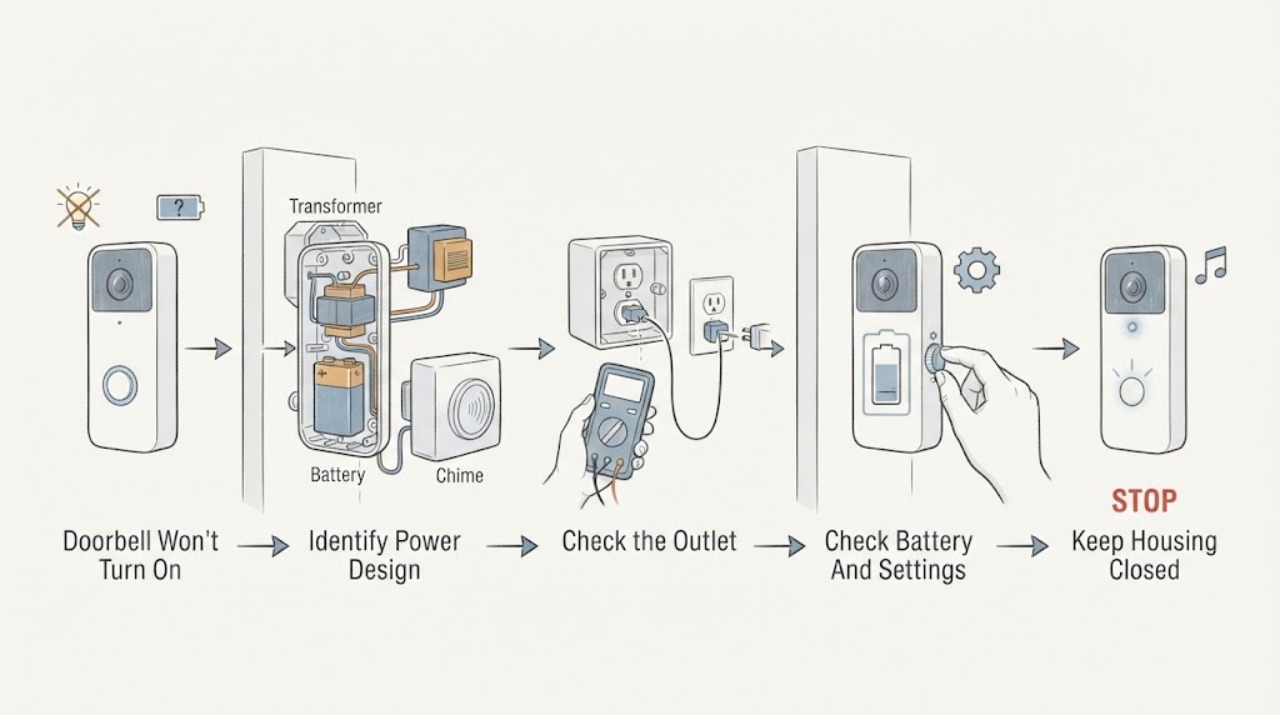
First identify whether the doorbell is battery-powered, fed by an indoor power adapter, or connected to a wired chime and transformer. Check only user-accessible battery charge, app or chime settings, and a known-working indoor outlet when applicable; observe whether the doorbell has any status light, sound, or response. A wired doorbell that remains dark may have a supply, transformer, chime-connector, wiring, or device fault, and a battery doorbell may simply have a depleted battery or pairing issue. Do not remove the doorbell from its wires, open a chime or electrical box, probe terminals, bypass a transformer, or repeatedly reset it. Arrange a qualified installer or electrician when safe checks do not restore power, the transformer or wiring is uncertain, or there is heat, odor, moisture, sparking, or damage.
Before you begin
Safety first
- This article is limited to normal user battery and app checks, a safe indoor-outlet observation for an approved adapter, and non-contact external observation. Do not remove the doorbell from its wires, open a chime, transformer, adapter, outlet, or electrical box, probe terminals, measure voltage, bypass a connector or transformer, repeatedly reset a breaker, or use an unapproved power supply.
Work through in order
Diagnostic checks
Use only checks that match the exact appliance or system and its official guide.
-
Check 1
From a safe position, identify whether the doorbell uses a removable or rechargeable battery, an indoor plug-in adapter, or wires leading to an indoor chime and transformer. Record whether the doorbell has a status light, sound, app presence, or any response when the button is pressed normally.
Expected result: The unit is battery-powered, powered by an indoor adapter, wired to a chime, or the power path is unknown; the doorbell is dark, intermittently responsive, or visible in the app but not ringing.
Next step: Continue only with the check for the identified design. If the power path cannot be identified without opening a box, removing the doorbell, or tracing inaccessible wiring, stop and arrange qualified service.
Stop if: Do not remove the doorbell from its mounting plate, disconnect wires, open a chime or transformer enclosure, or climb or reach into an unsafe area to identify the power source.
Why this matters
Why: Each design has a different first check. Honeywell starts with the doorbell and push-button batteries and pairing, while Google distinguishes battery and wired systems and notes that wired compatibility and available power matter. A dark device and a silent chime are not automatically the same fault.
-
Check 2
For a battery-powered doorbell, check the charge or replaceable batteries only through the manufacturer's normal user access, following the exact model instructions. Also check the app's device status, pairing, and chime or quiet settings without changing wiring.
Expected result: The doorbell battery is low or depleted, the push-button battery is depleted, the app reports the device offline, pairing is missing, or a quiet or disabled chime setting is active; alternatively, the battery and settings appear normal but the doorbell remains dark.
Next step: Charge or replace the battery only as the exact manual directs, restore the intended app or chime setting, and allow the device to complete its normal startup. If it remains unresponsive, stop repeated resets and contact the manufacturer or qualified service.
Stop if: Do not use an unapproved battery or adapter, bypass the battery protection, open the device housing, or continue if the battery is swollen, hot, leaking, damaged, or wet.
Why this matters
Why: A depleted battery or pairing/quiet setting can explain a doorbell that appears not to turn on or does not produce an indoor ring. Normal charge and settings shift attention to the device, button, wireless connection, or a model-specific fault rather than just the battery.
-
Check 3
For a doorbell using an indoor power adapter, inspect the adapter, plug, cord, and indoor outlet from a dry position without opening the adapter or touching exposed conductors. If the outlet is already safely accessible, use an ordinary known-working device to confirm the outlet has power, then stop.
Expected result: The outlet is dead, the adapter or cord is damaged, the plug is loose, the device works only on another approved outlet, or the outlet and adapter appear normal but the doorbell remains dark.
Next step: Do not use a damaged adapter or cord. Follow the exact manufacturer's adapter guidance or arrange qualified service for adapter, outlet, and doorbell compatibility; do not substitute a random power supply.
Stop if: Stop for heat, a burning odor, smoke, sparking, water, damaged insulation, a loose receptacle, or any need to open an outlet, adapter, junction box, or wall.
Why this matters
Why: A dead outlet or damaged adapter can remove power before it reaches the doorbell. A normal outlet and adapter do not prove the adapter output, doorbell input, or device electronics are sound; those require model-specific or qualified diagnosis.
-
Check 4
For a wired doorbell, observe only the external doorbell, chime, and any plainly visible status indicator or app message. Record whether the chime has power, whether the doorbell light is absent, whether the symptom began after installation or a transformer or chime change, and whether the system has complex or unlabeled wiring.
Expected result: The doorbell is dark and the chime is also inactive, the chime works but the doorbell is dark, the app reports insufficient power, the system was recently changed, or the wiring and transformer identity are uncertain.
Next step: Keep the doorbell out of service and give the professional the symptom split, installation history, model information, and safe photos. Have a qualified installer or electrician check the low-voltage supply, transformer, chime connector, wiring, and device compatibility.
Stop if: Do not remove the doorbell, loosen terminal screws, open the chime, measure wires, reset a breaker repeatedly, replace a transformer, or bridge or bypass any connection.
Why this matters
Why: A dark doorbell with a dead chime can involve the upstream adapter, breaker-protected outlet, transformer, or wiring. A working chime with a dark doorbell narrows the symptom toward the doorbell branch, connector, or device, but no external observation proves which conductor or component has failed. Google advises professional help when transformer compatibility or wire voltage is uncertain.
-
Check 5
Prepare a service record with the doorbell model, power design, battery or adapter status, app or chime message, external damage or moisture, and the date of any installation or wiring change. Ask whether the exact manufacturer's troubleshooting path has been exhausted without opening the system.
Expected result: The issue remains after the safe user checks, the doorbell is intermittently powered, the transformer or adapter is not identified, the wiring is complex, or a safety warning is present; alternatively, the device returns to normal operation.
Next step: For heat, odor, smoke, sparking, exposed conductors, or water, keep clear and obtain urgent electrical help. Otherwise arrange qualified installer or electrician service and do not continue terminal tests or repeated resets.
Stop if: Do not open electrical enclosures, probe wiring, bypass the transformer or chime connector, alter protective devices, or install an unverified power supply.
Why this matters
Why: An unresolved or intermittent power fault can damage the device or hide a transformer, wiring, outlet, or compatibility issue. A temporary return to service does not prove a loose or failing connection is fixed.
Use your observations
Decision map
Find the observation that best matches what you see, then follow the next safe action.
-
PATH 01Next step
What you see
The doorbell is battery-powered and the battery is depleted, the push-button battery is depleted, the app shows it offline, or pairing or quiet settings are wrong.
Do this next
Charge or replace batteries through normal user access, restore the intended pairing or chime setting in the exact app, and call manufacturer or qualified service if it remains dark or unresponsive.
-
PATH 02Next step
What you see
An indoor power adapter is used and the outlet is dead or the adapter, cord, plug, or receptacle is damaged or hot.
Do this next
Stop using the damaged equipment, keep it dry, and arrange qualified electrical or manufacturer service. Do not open the adapter or outlet or substitute an unapproved power supply.
-
PATH 03Next step
What you see
A wired doorbell and its chime are both inactive, or the system has no visible power after safe external checks.
Do this next
Keep the system out of service and have a qualified installer or electrician check the adapter, outlet, transformer, chime, wiring, and device compatibility; do not remove the doorbell or measure terminals yourself.
-
PATH 04Next step
What you see
The chime works but the wired doorbell is dark, the app reports insufficient power, the system was recently changed, or the transformer and wiring are uncertain.
Do this next
Request model-specific professional diagnosis of the doorbell branch, chime connector, transformer, wiring, and compatibility. Do not assume a new transformer or connector fits the system.
-
PATH 05Next step
What you see
There is sparking, smoke, a burning odor, heat, exposed conductors, water, damaged insulation, or a repeatedly tripping protective device.
Do this next
Stop immediately, keep people away, and obtain urgent electrical or emergency help. Do not touch the equipment, reset the protective device repeatedly, or continue troubleshooting.
-
PATH 06Next step
What you see
The doorbell returns to operation after a battery, setting, or approved adapter check but the cause is uncertain or the symptom was intermittent.
Do this next
Document what changed and monitor without altering wiring. Arrange service if the no-power symptom recurs, becomes intermittent, or follows a new installation or weather event.
Helpful context
Understand the symptom
The power path depends on the doorbell design
Battery doorbells can stop responding when the doorbell battery or push-button battery is depleted, and smart models can also appear unavailable because of pairing or app settings. Wired models depend on a power adapter or a low-voltage doorbell system, often through a chime and transformer. Google notes that some wired systems cannot deliver enough power or are incompatible, so a dark unit is not proof that the doorbell itself has failed.
Separate no power from no chime
A doorbell may have power while the indoor chime is muted, configured incorrectly, obstructed, or unable to receive enough power. Look for status lights or app availability on the doorbell, then treat the chime as a separate symptom. Do not open the chime, handle bare conductors, or use a meter unless a qualified person is performing the electrical diagnosis.
Stop at the low-voltage wiring boundary
Doorbell wiring is usually lower voltage than household branch wiring, but it still connects to a transformer or adapter and can be unsafe when damaged, wet, overheated, or incorrectly installed. CPSC advises not touching electrical equipment when arcing or sparking is present. Keep the system out of service and call a qualified installer or electrician for wiring, transformer, adapter, chime-connector, or compatibility work.
Only after diagnosis
Potential parts
- doorbell battery
Consider this only when the exact battery-powered doorbell manual identifies a depleted or failed user-replaceable battery as the cause; a dark wired unit does not call for a battery.
Match the exact model, battery chemistry, connector, charging method, and manufacturer requirements; do not use a swollen, damaged, wet, or unapproved battery. - doorbell indoor power adapter
Consider this only when the exact doorbell model supports an indoor adapter and a qualified or manufacturer-guided check identifies the existing adapter as failed or incompatible.
Confirm the exact input and output requirements, polarity, connector, indoor placement, and weather restrictions from the model documentation; never substitute a random adapter. - doorbell transformer
Consider this only after a qualified installer or electrician confirms that the wired system's transformer cannot provide the required power or is faulty. A doorbell that is dark may instead have a chime, wiring, outlet, or device issue.
Match the exact doorbell and chime requirements, system configuration, local electrical rules, and installation method; transformer replacement is professional electrical work.
When checks do not resolve it
Need a professional?
Arrange qualified installer or electrician service when safe battery, app, chime-setting, or approved-adapter checks do not restore the doorbell; when a wired unit has no visible power, the transformer or wiring is unknown, the system was recently changed, or the symptom is intermittent. Seek urgent electrical or emergency help for heat, burning odor, smoke, sparking, exposed conductors, water, damaged insulation, or repeated protective-device trips.
Safety scope: This article is limited to normal user battery and app checks, a safe indoor-outlet observation for an approved adapter, and non-contact external observation. Do not remove the doorbell from its wires, open a chime, transformer, adapter, outlet, or electrical box, probe terminals, measure voltage, bypass a connector or transformer, repeatedly reset a breaker, or use an unapproved power supply.
Have this ready
- Doorbell brand and model from the existing device, manual, or app
- Whether it is battery-powered, adapter-powered, or wired to a chime and transformer
- Battery or adapter status, app messages, status-light behavior, and whether the chime works
- The date of installation, wiring, transformer, chime, or adapter changes
- Safe photos of the mounted device, chime exterior, adapter, and any visible damage or moisture
Common questions
FAQ
Why won't my doorbell turn on?
The cause depends on whether it is battery-powered, adapter-powered, or wired to a chime and transformer. Check only the user-accessible battery, app or chime settings, and an approved indoor outlet when applicable. If a wired unit remains dark, have a qualified installer or electrician assess the transformer, wiring, chime, and compatibility.
How do I know whether the doorbell or chime has lost power?
Look for the doorbell's status light or app presence and separately note whether the indoor chime responds. A dark doorbell and inactive chime can indicate an upstream power issue, while a working chime with a dark doorbell can involve the doorbell branch or device. Do not open the chime or test terminals yourself.
Can I check the doorbell transformer myself?
Do not open electrical boxes, remove the doorbell, measure wires, or replace the transformer as a homeowner test. If the wired system has no power, insufficient-power messages, complex wiring, or an unknown transformer, arrange qualified installer or electrician service.
What if replacing the battery does not turn on a wireless doorbell?
Confirm that the exact model's approved battery or charging method was used, then check pairing and app status. If the unit remains dark, the battery is hot, swollen, wet, or damaged, or the device repeatedly resets, stop using it and contact the manufacturer or qualified service.
When is a doorbell power problem an electrical emergency?
Treat smoke, sparking, a burning odor, heat, exposed conductors, water, damaged insulation, or repeated protective-device trips as urgent. Keep clear and obtain electrical or emergency help; do not touch the equipment or continue resets and wiring checks.
Read the exact guide
Official sources
- Guide to Home Wiring HazardsU.S. Consumer Product Safety Commission · Supports the stop boundary for arcing, sparking, overheating, odors, damaged electrical equipment, and suspected service hazards around a doorbell power system.
- Troubleshoot Nest doorbell chime issuesGoogle Home and Nest Help · Used for the distinction between doorbell power and chime behavior and for safe user-accessible battery, outlet, and setting checks; model-specific wiring steps are not reproduced.
- Check Google Nest doorbell compatibilityGoogle Home and Nest Help · Used as a model-specific example that wired and battery doorbells have different power paths and that transformer compatibility or wire checks may require a professional; no Nest-specific requirement is assumed for another doorbell.
- Why isn't my doorbell working?Honeywell Home · Used as a manufacturer example for battery-powered doorbell troubleshooting; it does not establish the power design or battery type of an unspecified doorbell.
Community feedback
Share a repair observation
Share a plain-text repair observation. Accepted observations are published automatically; this page may take a moment to update.