
On this page
Start here
Quick answer
A wired doorbell that will not turn on may have no household power reaching its transformer, an incompatible or failed transformer, a low-voltage path problem, or a failed doorbell or chime. A wireless doorbell may simply have a depleted battery and may not use the transformer at all. First identify the power type and whether the doorbell, chime, nearby outlet, or porch light is also dead. Check only the visible state of the correct breaker or GFCI and the outside of an accessible transformer or adapter; do not remove a transformer or chime cover, touch doorbell wires, open the panel, make an energized measurement, or repeatedly reset protection. If the transformer is hot, damaged, unlabeled, wet, or incompatible, or if a breaker or GFCI opens again, leave the system out of use and call a licensed electrician or qualified doorbell installer.
Before you begin
Safety first
- Keep the system out of use for heat, smoke, odor, arcing, water, exposed wiring, a damaged power device, or repeated breaker or GFCI operation. Do not open covers or bypass protection.
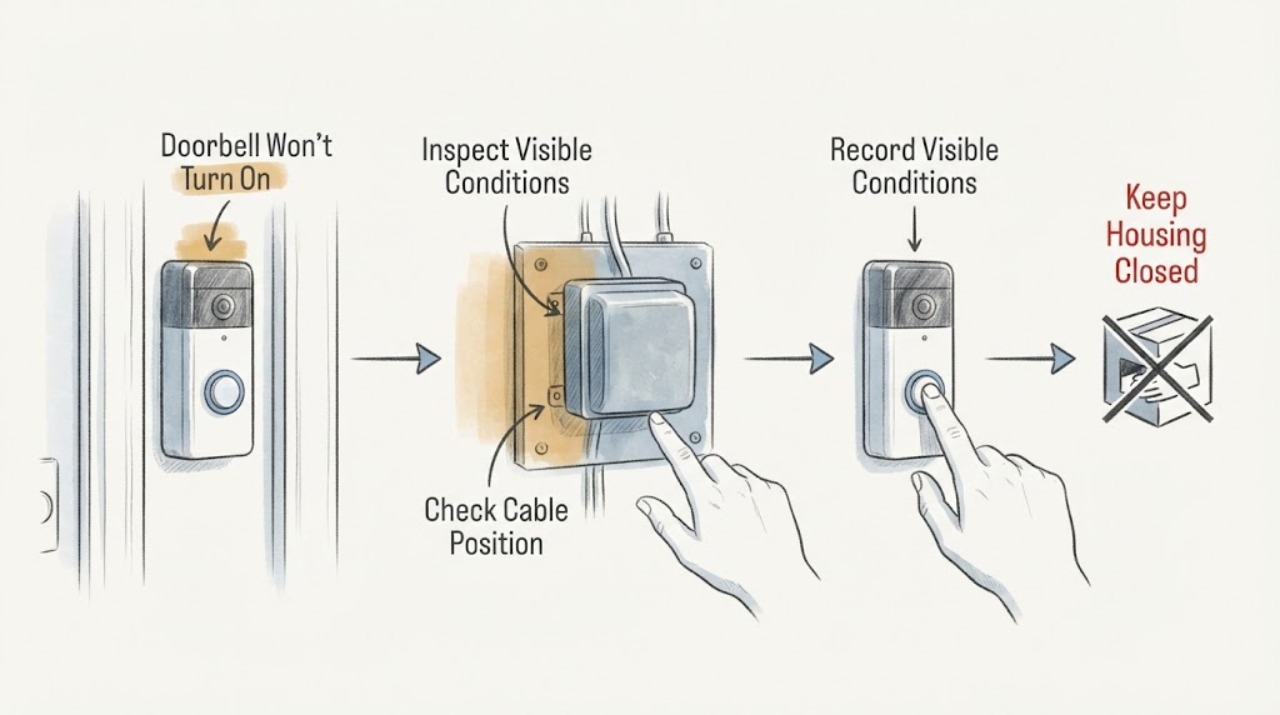
Work through in order
Diagnostic checks
Use only checks that match the exact appliance or system and its official guide.
-
Check 1
From a dry, safe position, look for smoke, burning or melted-plastic odor, a hot or discolored outlet or transformer, buzzing, water, exposed conductors, a damaged cord, or a breaker or GFCI that opens immediately; do not approach damaged or wet equipment.
Expected result: Any warning sign is present, or the transformer and doorbell area cannot be reached without touching damaged equipment or standing in water.
Next step: Stop using the doorbell circuit, keep people away, and contact emergency help for smoke or fire. From a safe dry location, arrange a licensed electrician; do not reset protection again or inspect inside a cover.
Stop if: Stop immediately for smoke, fire, arcing, burning odor, heat, water, exposed wiring, shock, or an immediate repeat trip.
Why this matters
Why: This may be an electrical shock, arcing, fire, or water event rather than an ordinary transformer or battery fault.
-
Check 2
Identify whether the doorbell is wireless with a removable or internal battery, hardwired through an indoor chime and transformer, or powered by an indoor adapter; note whether the doorbell, chime, receiver, app, and status light are all inactive or only one is affected, without removing the device or chime cover.
Expected result: Only a battery doorbell is inactive, a hardwired doorbell and chime are both dead, the chime works but the doorbell is dark, or an adapter-powered device is offline.
Next step: Use the exact device manual for a battery or app state check. For a hardwired system, continue with visible breaker, GFCI, nearby circuit, and transformer-label observations; keep all covers closed.
Stop if: Stop if identification would require removing a cover, loosening a terminal, touching doorbell wires, or entering a wet or restricted area.
Why this matters
Why: Battery, adapter, transformer, chime, low-voltage, device, and network faults follow different paths. A hardwired system with both ends dead makes supply or transformer investigation more relevant, but does not prove the transformer failed.
-
Check 3
Check whether the porch light, nearby outlet, indoor chime outlet or adapter, and other points on the same labeled household circuit work; record whether the loss affects only the doorbell, several points, or the whole property, and do not remove any outlet or fixture plate.
Expected result: Only the doorbell is dark, the chime or adapter outlet is dead, several nearby points are dead, or the whole property has lost power.
Next step: Record the affected points and check the utility outage status remotely if the loss is broad. If the doorbell circuit is the only affected circuit or the nearby outlet is dead, arrange electrical service without opening the wiring.
Stop if: Stop for a damaged outlet, water, heat, smoke, a service-entry issue, or any request to access a concealed or shared circuit.
Why this matters
Why: A single dead doorbell suggests the transformer, low-voltage path, chime, button, device, or battery. Several dead points make an open breaker, GFCI, or branch-circuit issue more plausible; a whole-property outage may be a utility or service condition.
-
Check 4
Without opening the enclosure, read the visible label and handle position of the breaker feeding the transformer or adapter and check for a plainly accessible GFCI indicator or reset state; do not open the panel, handle a fuse, or touch wiring.
Expected result: The breaker is clearly open, the GFCI shows a tripped state, protection appears normal, or the responsible circuit cannot be identified safely.
Next step: If the device or circuit is unclear, leave the doorbell out of use and call a licensed electrician. If the area is dry and undamaged and the device is a clearly accessible resettable breaker or GFCI, one normal reset may be attempted according to its labeling; stop if it opens again.
Stop if: Stop for an open fuse, damaged panel, heat, odor, buzzing, moisture, exposed parts, or uncertainty about the correct protective device.
Why this matters
Why: An open protective device can remove power from the transformer or adapter, but it may have operated because of an overload, moisture, equipment fault, or wiring problem. A normal-looking device does not rule out a transformer fault.
-
Check 5
If the transformer is plainly visible without moving equipment, read its exterior label and note its location, markings, heat, noise, or damage; common locations include near the chime, breaker or fuse box, basement, crawl space, attic, or closet. Do not remove, open, unplug, or touch its terminals.
Expected result: The label is present and matches the device manual, the label is missing or unclear, the transformer is hot or noisy, or the transformer cannot be reached safely.
Next step: Record the label and location for an electrician or qualified doorbell installer. Do not replace the transformer by appearance or connect an alternate supply until the model and installation are confirmed.
Stop if: Stop for heat, humming, smell, water, corrosion, a damaged enclosure, an unlabeled unit, or any need to remove a cover or expose household-power wiring.
Why this matters
Why: A readable compatible label supports the correct power-source type but does not prove output or wiring continuity. An unknown, hot, noisy, or inaccessible transformer requires professional evaluation.
-
Check 6
For a wireless or adapter-powered doorbell, use the exact manual or app to check battery state and status; confirm only that an indoor adapter is firmly seated in a dry outlet and that its outside cord is cool and undamaged, without changing the supply or opening the device.
Expected result: The battery is low, the adapter or outlet is disconnected, the adapter is hot or damaged, the app reports insufficient power, or the supply appears normal but the device remains dark.
Next step: Charge the battery or reconnect only a cool, dry, undamaged plug as the manual permits. For a hot, damaged, incompatible, or persistently dead adapter or device, leave it off and arrange qualified service.
Stop if: Stop for a swollen or hot battery, wet adapter, damaged cord, burning odor, smoke, or any need to open the doorbell or change wiring.
Why this matters
Why: A depleted battery or loose adapter can mimic a transformer failure. Heat, damage, incompatible power, or a persistent dark device points to a service issue rather than a repeated reset.
-
Check 7
After a safe visible correction such as a charged battery, a firmly seated cool adapter, or one labeled breaker or GFCI reset, make one normal doorbell press or app status check and observe whether the device, chime, and receiver recover; do not keep pressing or cycling protection.
Expected result: The doorbell returns fully, only the chime returns, the app or status light remains offline, protection opens again, or nothing changes.
Next step: If recovery is incomplete or protection opens again, leave the system off and arrange qualified service. Provide the power type, transformer label, affected devices, visible protection state, and recovery result rather than replacing the transformer yourself.
Stop if: Stop for any repeat trip, heat, odor, smoke, water, buzzing, exposed wiring, or abnormal chime behavior.
Why this matters
Why: A full recovery supports a temporary battery, adapter, or protection state. Partial recovery points to a chime, transformer, low-voltage path, device, or network issue; a repeat trip indicates an unresolved electrical condition.
-
Check 8
Prepare a service note with the doorbell and chime models, wired or wireless type, battery or adapter status, transformer location and label, breaker or GFCI result, nearby circuit impact, affected functions, recent installation or storm, and any heat, odor, water, buzzing, or damage; leave transformer and wiring diagnosis to a licensed electrician.
Expected result: The no-power symptom persists, returns after one safe recovery check, affects a hardwired system, or involves the named transformer component.
Next step: Keep the affected circuit or doorbell out of use and request qualified electrical or doorbell service. Ask the professional to verify the protective device, transformer, power path, and compatibility before selecting a replacement.
Stop if: Stop all user diagnosis if it would require opening a panel or transformer, handling a fuse, touching wiring, or altering a fixed circuit.
Why this matters
Why: The remaining fault may be a household protective device, transformer, adapter, low-voltage conductor, chime, button, device, or incompatible power source.
Use your observations
Decision map
Find the observation that best matches what you see, then follow the next safe action.
-
PATH 01Next step
What you see
The doorbell is wireless and runs from an internal or removable battery.
Do this next
Charge or replace the user-accessible battery as the exact manual specifies and check the receiver or app. Call service for a hot, swollen, damaged, or persistently dead device.
Why this path and its safety boundary
Why it matters: The transformer may not be part of the operating path; the likely first branch is battery charge, device state, receiver, or network.
-
PATH 02Next step
What you see
The doorbell uses an indoor plug-in adapter and the adapter or outlet is disconnected, dead, hot, or damaged.
Do this next
Reconnect only a cool, dry, undamaged plug as the manual permits. Arrange electrician service for a dead outlet, damaged adapter, or repeat GFCI operation.
Why this path and its safety boundary
Why it matters: The adapter or its outlet may be interrupting power, and the device should not be supplied by an unapproved alternate source.
-
PATH 03Next step
What you see
The breaker or GFCI feeding the transformer or adapter is open, or opens again after one safe labeled reset.
Do this next
Stop resetting, leave the circuit out of use, and arrange licensed electrician service. Do not open the panel or substitute a different protective device.
Why this path and its safety boundary
Why it matters: An overload, moisture event, transformer, adapter, or wiring fault may remain.
-
PATH 04Next step
What you see
A hardwired doorbell and indoor chime or status indicator are both inactive while nearby household points may still work.
Do this next
Record the visible protection and transformer-label state and request qualified service. Do not remove the chime or transformer cover or touch terminals.
Why this path and its safety boundary
Why it matters: The transformer, its household supply, low-voltage path, or chime connection may have failed.
-
PATH 05Next step
What you see
The transformer is unlabeled, hot, noisy, damaged, inaccessible, or does not match the exact doorbell manual.
Do this next
Leave the system off and have a licensed electrician or qualified installer identify, verify, and repair or replace the transformer as appropriate.
Why this path and its safety boundary
Why it matters: The power source and household-power connection cannot be confirmed safely from appearance.
-
PATH 06Next step
What you see
The chime works but the doorbell is dark, or the doorbell status returns while the chime is silent.
Do this next
Use the exact device app or manual for status and compatibility checks and arrange qualified doorbell service for a persistent wired-path issue. Do not remove the device or touch its terminals.
Why this path and its safety boundary
Why it matters: A device, chime compatibility, local low-voltage connection, battery, adapter, or network problem is more likely than a whole-house breaker fault.
-
PATH 07Next step
What you see
A nearby porch light, outlet, or other point on the same household circuit is also dead.
Do this next
Record the scope and use only visible labeled controls. Arrange electrician service if power does not return or the cause is unclear; do not remove a fixture or outlet cover.
Why this path and its safety boundary
Why it matters: An open breaker or GFCI, upstream connection, utility issue, or branch-circuit fault may be removing transformer supply.
-
PATH 08Next step
What you see
The doorbell remains dark while visible protection, nearby power, battery or adapter, and the exterior transformer label appear normal.
Do this next
Stop testing and request qualified electrical or doorbell diagnosis. Provide the power type, model, transformer label, visible protection state, and which functions still work.
Why this path and its safety boundary
Why it matters: A transformer output, low-voltage conductor, chime, button, device, or internal fault remains possible.
Helpful context
Understand the symptom
A transformer is only one part of the power path
In a typical hardwired system, household power feeds a doorbell transformer, the transformer feeds low-voltage conductors, and those conductors connect the button, chime, and doorbell. A fault at any point can leave the doorbell dark. A battery or plug-in system follows a different path, so do not assume a dark doorbell means the household transformer is defective.
Use the breaker as a clue, not a diagnosis
The transformer may be on a circuit shared with lights or outlets. If those points are also dead, a breaker or GFCI may have opened. If everything else works, the transformer, low-voltage path, chime, button, or doorbell may be the problem. A breaker that looks normal cannot prove the transformer or wiring is safe.
Why transformer labels matter
Smart and conventional doorbells do not all use the same power requirements. A label that is missing, unreadable, or outside the exact doorbell manual's range is a service issue. Do not substitute a lighting supply, a random adapter, or a higher-output transformer, and do not open the transformer to inspect its household-power terminals.
Safety boundary
Stop conditions
- Stop immediately for smoke, fire, visible arcing, burning odor, a hot or discolored outlet or transformer, buzzing with heat, water, shock, exposed wiring, or a damaged cord.
- Do not open the breaker panel, remove a transformer or chime cover, handle or replace a fuse, touch doorbell wires, make an energized measurement, change a protective-device rating, or bypass protection.
- Stop after one safe labeled breaker or GFCI reset if it opens again, will not stay set, makes noise, or fails to restore the nearby circuit.
- Keep the system out of use when the transformer is hot, damaged, unlabeled, inaccessible, or suspected to be incompatible, and arrange qualified service.
Only after diagnosis
Potential parts
- doorbell transformer or compatible power adapter
Consider this only after a qualified person confirms that the household supply is safe and the transformer or adapter is defective, underpowered, damaged, or incompatible.
Power type and requirements vary between wired, battery-assisted, smart, and chime configurations. Confirm the exact model and installation rules before selection. - circuit breaker or GFCI device
Consider a protective-device replacement only when a licensed electrician confirms that the device itself has failed rather than responding to a downstream fault, moisture, or overload.
Panel, circuit, interrupt rating, GFCI type, and local code determine compatibility. Never substitute a different rating or bypass protection. - doorbell chime, button, or low-voltage conductor
Consider this category only when service diagnosis isolates the dead chime, button, conductor, or device after the supply and transformer are verified.
Chime compatibility, conductor routing, and device requirements vary by system. Do not select a component by appearance or alter fixed wiring without qualified installation.
When checks do not resolve it
Need a professional?
A breaker or GFCI opens again, or the responsible circuit cannot be identified safely., A hardwired doorbell and chime are both dead while visible household power appears normal., The transformer is hot, noisy, damaged, unlabeled, inaccessible, or suspected to be incompatible., A nearby outlet or porch light is also dead, or the loss affects multiple rooms or the property., The doorbell remains dark after a safe battery, adapter, visible protection, and exterior transformer-label check., Diagnosis would require opening a panel or enclosure, touching low-voltage or household wiring, or replacing a transformer or fixed device.
Safety scope: Keep the system out of use for heat, smoke, odor, arcing, water, exposed wiring, a damaged power device, or repeated breaker or GFCI operation. Do not open covers or bypass protection.
Common questions
FAQ
What does the transformer do in a wired doorbell system?
It supplies the doorbell system through the low-voltage path from the household circuit. A dark doorbell can still be caused by the breaker, transformer, adapter, chime, button, low-voltage conductors, or device, so the transformer should not be replaced from the symptom alone.
Where is a doorbell transformer usually located?
It may be near or inside the indoor chime, near the breaker or fuse box, or in a basement, crawl space, attic, or closet. Read only an accessible exterior label and have a professional handle an unknown or enclosed transformer.
Can a tripped breaker make a doorbell stop working?
Yes, if that household circuit supplies the transformer or adapter. Check only the visible labeled breaker or GFCI state and nearby circuit impact; one safe reset is the limit, and a repeat trip needs a licensed electrician.
How can I tell if my wireless doorbell needs the transformer?
Check the device manual and physical setup. A battery-powered doorbell can run from its internal battery, while a hardwired doorbell uses a transformer or compatible adapter. Charge the battery as directed before investigating household power.
Should I replace a doorbell transformer myself?
Do not replace it based on a dark device alone. The transformer has a household-power side, and its output must match the exact doorbell and chime. Have a licensed electrician or qualified installer verify the circuit, transformer, and low-voltage path first.
When is a doorbell transformer problem unsafe?
Stop for smoke, burning odor, heat, buzzing, water, exposed wiring, arcing, shock, a damaged power device, or a breaker or GFCI that opens again. Keep the system out of use and arrange emergency or licensed electrical help.
Read the exact guide
Official sources
- Electrical wiring in your homeWorkSafe New Zealand · General household electrical-safety guidance; local licensing, code, and equipment details can differ.
- Get professional help to upgrade the doorbell system transformerGoogle Home and Nest Help · Google Nest wired-doorbell guidance; requirements and installation differ by model, region, and doorbell system.
- Troubleshooting power for hardwired doorbellsRing · Ring hardwired-doorbell guidance; exact power requirements and chime behavior vary by Ring model and installation.
- Install Nest doorbell with an indoor power adapter - AndroidGoogle Home and Nest Help · Google Nest adapter guidance; adapter use and installation differ by model and location.
- Troubleshoot low battery issues for Nest cameras and doorbellsGoogle Home and Nest Help · Google Nest battery and wired-doorbell guidance; other products may use different batteries, adapters, or wiring.
Community feedback
Share a repair observation
Share a plain-text repair observation. Accepted observations are published automatically; this page may take a moment to update.