
On this page
Start here
Quick answer
An Eaton breaker that will not reset after branch wiring was installed or changed should be treated as a fault or compatibility problem, not as a handle problem. Eaton's residential instructions say that immediate tripping on reset indicates a fault and that breakers must be installed and serviced by a qualified electrician. From a safe position, identify the exact Eaton breaker and panel, note whether it trips immediately or will not stay engaged, disconnect only ordinary accessible loads with no hazard, and record any visible AFCI, GFCI, or dual-function indication. Do not open the panel, remove the dead front, move conductors, tighten terminals, test energized wiring, install a larger breaker, or bypass protection. Leave the circuit off and arrange licensed electrical service, especially when the symptom began after new branch wiring, a receptacle or fixture change, moisture, or a breaker replacement.
Before you begin
Safety first
- This article permits only dry external observation, identification, and safe disconnection of ordinary accessible loads when no hazard is present. A licensed electrician must access the panel, isolate branch wiring, perform electrical tests, verify protection and compatibility, and replace or rewire any component.
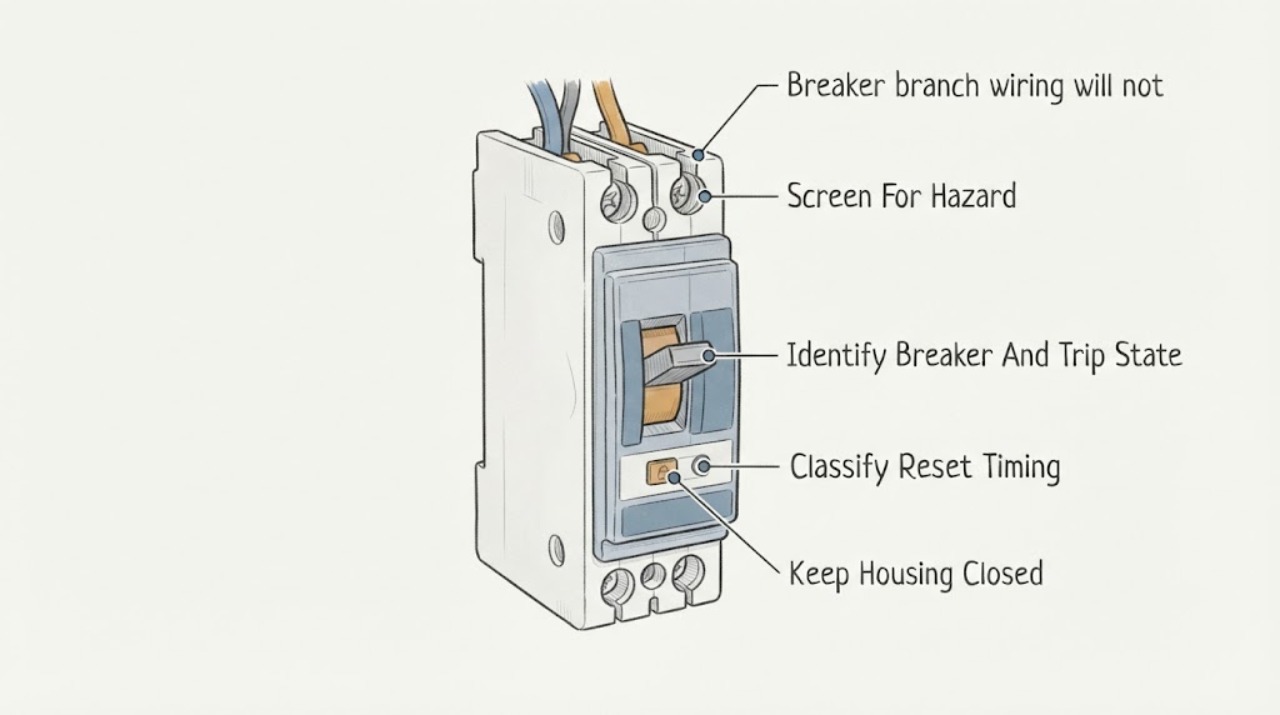
Work through in order
Diagnostic checks
Use only checks that match the exact appliance or system and its official guide.
-
Check 1
From a dry, stable position, look at the affected room, accessible receptacles, switches, fixtures, cords, and the closed panel area for smoke, burning odor, heat, discoloration, buzzing, sparks, shock, water, or damaged insulation.
Expected result: Record whether the circuit only lacks power or whether any hot plate, smell, sound, visible arc, damaged cord, moisture, or other electrical warning sign is present.
Next step: Keep people away and arrange urgent licensed electrical evaluation for any warning sign; follow local emergency guidance for smoke or fire.
Stop if: Do not touch hot or wet electrical parts, operate a sparking or smoking circuit, cover a damaged plate, or open the panel to investigate.
Why this matters
Why: A warning sign can indicate overheating, arcing, leakage, damaged branch wiring, or a fault that must remain de-energized. A normal-looking exterior does not make panel access or energized testing safe.
-
Check 2
Read the Eaton label, visible catalog or family marking, pole count, protection marking, and branch label from outside the closed panel; note whether the handle is in the middle, OFF, or will not move to a stable ON position without forcing it.
Expected result: Classify the device as standard, AFCI, GFCI, or dual-function AF/GF if the marking is visible, and record whether the no-reset symptom began after new branch wiring, a panel change, a breaker replacement, or a connected-load change.
Next step: Photograph the visible information and leave the breaker off while arranging a licensed electrician, particularly when the symptom followed branch wiring or panel work.
Stop if: Do not remove the dead front, pull the breaker, expose terminals, force the handle, or select a replacement from the handle position alone.
Why this matters
Why: The exact Eaton device and recent work determine which compatibility and fault paths a technician must check. A handle that will not latch is not proof of a worn breaker; an AFCI, GFCI, or AF/GF device may be responding to a detected fault.
-
Check 3
Record whether the breaker trips immediately when it is restored, refuses to engage without a trip sound, stays on briefly and then trips, or only trips when a particular branch load operates; do not repeatedly restore it to reproduce the event.
Expected result: Write down the last wiring or load change, approximate time to trip, affected rooms and outlets, whether the branch was ever stable, and any visible Eaton LED or trip indication.
Next step: Give the timeline, work history, load pattern, and indication to the electrician; keep the breaker off if it will not remain engaged or the pattern repeats.
Stop if: Do not reset again after a repeat trip, ignore a diagnostic indication, or keep a handle held in the ON position.
Why this matters
Why: Immediate tripping after branch work suggests a fault remains present. A delayed or load-specific trip can point toward an overload, connected appliance, damaged cord, moisture, or a fault that appears under operation. A no-load or persistent trip needs circuit and breaker diagnosis.
-
Check 4
Only when there is no hazard, unplug or switch off ordinary accessible appliances and portable loads served by the branch, including any device added or moved during the wiring work; leave hard-wired fixtures and any hot, wet, smoking, or damaged device untouched.
Expected result: Record whether all accessible loads are disconnected, whether one device or cord has heat, odor, moisture, noise, or damage, and whether the breaker still will not reset with ordinary plug-in loads removed.
Next step: Leave a suspect device disconnected and arrange appliance or electrical service. Do not transfer it to another circuit with an extension cord to bypass the protection.
Stop if: Do not reconnect a device with heat, odor, sparks, moisture, damaged insulation, or a repeat trip.
Why this matters
Why: A stable branch after accessible loads are removed makes a connected appliance, cord, or portable load a plausible contributor. Continued no-reset behavior points toward branch wiring, a hard-wired load, protection configuration, or the breaker, not a simple plug-in overload.
-
Check 5
From outside the closed panel, photograph the Eaton breaker face and record any diagnostic LED or trip pattern, protection label, and visible test or reset markings without pressing hidden controls or opening the enclosure.
Expected result: Record no indicator, a repeating indicator, an AFCI or arc-fault marking, a GFCI or ground-fault marking, a dual-function AF/GF marking, or a pattern described by the exact Eaton instructions for that device.
Next step: Provide the exact marking, photograph, trip timing, recent branch work, and load-isolation result to a licensed electrician.
Stop if: Do not press a test button to force a trip, remove the dead front, disconnect branch or neutral conductors, probe terminals, or alter the device.
Why this matters
Why: Eaton's AF/GF instructions use trip patterns to identify protection events, while a standard breaker may give no code. The indication helps a professional separate possible arc, ground, overload, short-circuit, or device conditions, but it does not authorize conductor changes.
-
Check 6
Compile the branch label, Eaton model marking, panel and circuit type, the work performed, affected outlets or fixtures, trip timing, indicator pattern, connected loads, and any recent moisture or renovation before the electrician arrives.
Expected result: The symptom began immediately after branch wiring, persists with accessible loads removed, affects one hard-wired fixture, affects several outlets, or cannot be tied to a particular load or event.
Next step: Keep the affected breaker off and arrange licensed electrical diagnosis. Ask the electrician to verify branch conductors, neutral and grounding arrangement, protection type, panel compatibility, connected loads, and the breaker before re-energizing.
Stop if: Do not open the panel, redo the wiring, tighten terminals, swap breakers, increase the rating, or repeatedly energize a branch that will not reset.
Why this matters
Why: The work-timing and pattern help distinguish a new installation or connection problem from a connected load or breaker issue. Persistence with loads removed is a circuit-level stop condition, not evidence that the breaker should be replaced or upsized.
Use your observations
Decision map
Find the observation that best matches what you see, then follow the next safe action.
-
PATH 01Safety boundary
What you see
The Eaton breaker stopped resetting immediately after new branch wiring, a receptacle or fixture change, a panel alteration, or a breaker replacement.
Do this next
Leave the breaker off, preserve the work history and photos, and arrange a licensed electrician to verify the complete branch and protective device.
Why this path and its safety boundary
Why it matters: A connection, conductor, neutral or grounding arrangement, protection configuration, panel compatibility, or connected-load fault is plausible. Eaton requires qualified installation and service, so the timing is evidence for the electrician rather than a DIY rewiring clue.
Safety stop: Do not reopen the panel, move conductors, tighten terminals, or keep attempting resets.
-
PATH 02Safety boundary
What you see
The branch remains stable only when one plug-in load is disconnected, or it trips when one appliance, cord, light, or hard-wired fixture operates.
Do this next
Keep the suspect load out of service and arrange qualified appliance or electrical evaluation; do not bypass the branch with an extension cord.
Why this path and its safety boundary
Why it matters: The connected load, its cord, moisture exposure, or interaction with the breaker protection is more likely than a simple handle fault, but timing alone does not prove the load is safe or defective.
Safety stop: Do not reconnect a load with heat, odor, moisture, sparks, damaged insulation, or repeat tripping.
-
PATH 03Safety boundary
What you see
The Eaton breaker will not reset or trips immediately even after ordinary accessible plug-in loads are removed and no visible hazard is present.
Do this next
Keep the breaker off and arrange licensed electrical service; provide the exact Eaton model, recent wiring history, and no-load result.
Why this path and its safety boundary
Why it matters: A hard-wired load, branch wiring fault, protection mismatch, panel compatibility issue, or breaker fault remains possible. The circuit needs professional isolation and testing.
Safety stop: Do not disconnect branch conductors, remove the breaker, test energized parts, or substitute a different breaker.
-
PATH 04Safety boundary
What you see
An Eaton AFCI, GFCI, or dual-function AF/GF breaker shows a diagnostic pattern or trips with no obvious load pattern.
Do this next
Record the visible indication and leave the branch off if the trip recurs; arrange licensed diagnosis of the load, branch, protective device, and panel compatibility.
Why this path and its safety boundary
Why it matters: Arc fault, ground fault, short circuit, overload, moisture, neutral arrangement, connected device, or protection-device conditions remain possible. Eaton's exact instructions and professional testing are needed.
Safety stop: Do not bypass the protection, alter neutral or grounding conductors, press hidden test controls, or use a standard breaker as a workaround.
-
PATH 05Safety boundary
What you see
The branch has heat, discoloration, buzzing or sizzling, sparks, smoke, burning odor, damaged insulation, water, shock, or affects several outlets after recent work.
Do this next
Keep people away, avoid the affected circuit, follow local emergency guidance for smoke or fire, and arrange urgent licensed electrical inspection.
Why this path and its safety boundary
Why it matters: This is an electrical safety or installation condition rather than a reset problem. ESFI and CPSC recommend qualified inspection for these warning signs and warn against overrated protective devices.
Safety stop: Do not touch, dry, cover, splice, tighten, or re-energize the affected wiring or panel yourself.
Helpful context
Understand the symptom
A no-reset symptom after branch work is a stop point
A breaker can refuse to stay on because a short circuit, ground fault, arc fault, overload, misconfiguration, damaged load, or incompatibility remains on the branch. If the problem started immediately after wiring, a receptacle or fixture change, or a breaker replacement, the timing is important evidence, but it is not permission to reopen the panel and check connections. Eaton's instructions reserve breaker installation and service for a qualified electrician.
Identify the protective device without disturbing the panel
Eaton residential products include standard, AFCI, GFCI, and dual-function AF/GF breakers. Their protection functions and diagnostic indications differ. Record the visible catalog or family marking, pole arrangement, panel label, and any LED pattern from outside the enclosure. An indication can help a technician choose a test path, but it cannot establish which conductor, load, or component is safe to change.
Do not solve a branch fault by changing the protection rating
CPSC explains that a branch-circuit protective device must interrupt current before the wiring is exposed to dangerous overload. Installing a larger breaker can allow more current through conductors that were not designed for it. ESFI lists frequent trips, heat, unusual sounds, sparks, shocks, damaged insulation, and an overrated panel as warning signs that call for licensed inspection.
Safety boundary
Stop conditions
- Do not open the panel, remove the dead front, disconnect branch or neutral conductors, tighten terminals, probe live parts, or replace the breaker as a homeowner troubleshooting step.
- Do not install a larger ampere breaker, bypass AFCI/GFCI protection, alter neutral or grounding conductors, or use an extension cord to hide a no-reset condition.
- Stop immediately for smoke, fire, burning odor, sparks, buzzing or sizzling, hot or discolored plates, exposed insulation, water, shock, or a breaker that trips again.
- Do not hold the handle on, repeatedly reset the device, press hidden test controls, or keep energizing a breaker that will not latch after branch wiring work.
- Leave the branch off and arrange licensed electrical service when the no-reset symptom began after wiring, persists with accessible loads removed, has a diagnostic indication, or cannot be explained by one safe load isolation.
Only after diagnosis
Potential parts
- Eaton branch-circuit breaker
Consider this category only if a licensed electrician confirms the Eaton breaker is defective or incompatible after the branch wiring and connected-load fault are addressed.
Confirm the exact Eaton family, catalog number, pole arrangement, interrupting rating, loadcenter compatibility, and protection function; never choose a replacement from the no-reset symptom alone. - Eaton AFCI, GFCI, or dual-function protective breaker
Consider this category only when the exact Eaton device is failed or the required protection type is confirmed by a licensed electrician after branch wiring, neutral, ground, moisture, and load causes are evaluated.
Confirm the exact panel, breaker family, circuit conductors, neutral arrangement, and required protection before qualified installation. - receptacle, switch, or fixture connection component
Consider this category only if an electrician confirms that a particular connected receptacle, switch, fixture, or its connection is damaged and is the cause of the trip.
Confirm the exact device, rating, enclosure, location, and applicable code requirements; do not replace a device to bypass a protective trip.
When checks do not resolve it
Need a professional?
Arrange licensed electrical service whenever an Eaton breaker will not stay reset, trips immediately, or stopped resetting after branch wiring, a receptacle or fixture change, panel work, or breaker replacement. Service is also required for a no-load trip, AFCI/GFCI or AF/GF indication, suspected neutral or grounding issue, panel compatibility question, or any heat, odor, buzzing, sparks, water, shock, smoke, damaged insulation, or repeated protective trip. Never increase the breaker rating or alter wiring to keep the branch energized.
Safety scope: This article permits only dry external observation, identification, and safe disconnection of ordinary accessible loads when no hazard is present. A licensed electrician must access the panel, isolate branch wiring, perform electrical tests, verify protection and compatibility, and replace or rewire any component.
Common questions
FAQ
Why will my Eaton breaker not reset after branch wiring work?
A short, overload, arc or ground fault, incorrect connection, neutral or grounding arrangement, incompatible protective device, damaged load, moisture, or breaker fault may remain. Eaton says immediate tripping indicates a fault, so leave the circuit off and have a qualified electrician evaluate the branch and breaker.
Can I keep trying to reset an Eaton breaker that will not latch?
No. At most, one ordinary reset is appropriate only when there is no hazard, accessible loads have been isolated, and the exact device instructions allow it. If the breaker trips or will not stay engaged, leave it off and arrange licensed electrical service.
Should I remove the Eaton breaker to check the branch wiring?
No. Eaton's residential instructions reserve breaker installation and service for a qualified electrician. Do not remove the dead front, disconnect conductors, tighten terminals, or test energized wiring as a homeowner check.
What if the breaker resets with plug-in loads disconnected?
A connected appliance, cord, or portable load may be contributing, but the timing does not prove which part is defective. Leave a suspect device disconnected, do not bypass the branch with an extension cord, and arrange appliance or electrical evaluation if the trip returns.
What does an Eaton AFCI or GFCI indication mean when the breaker will not reset?
It indicates that the protective device may have detected an arc, ground fault, overcurrent, short circuit, moisture condition, or another fault, depending on the exact Eaton model. Record the visible pattern and have a licensed electrician diagnose the branch and protection device.
Is it safe to replace a no-reset Eaton breaker with a larger one?
No. CPSC warns that an overrated protective device can expose branch wiring to dangerous overload. An electrician must verify conductors, load, panel compatibility, and required protection before selecting any replacement.
Read the exact guide
Official sources
- CPSC Guide to Home Wiring HazardsU.S. Consumer Product Safety Commission · Supports leaving a persistent no-reset branch off, avoiding overrated protection, isolating a load only when safe, and using qualified electrical service.
- Residential Circuit Breakers | BR Circuit Breakers | EatonEaton · Supports identifying the visible Eaton protection family and preserving exact breaker, panel, and protection compatibility for professional evaluation.
- BR (1-inch), CL (1-inch), CH (3/4-inch), and QB (bolt-on) pigtail and plug-on-neutral, AFCI, GFCI (5 mA), equipment protection (30 mA) and dual function AF/GF instructionsEaton · Supports the qualified-electrician boundary, immediate-trip meaning, Eaton protection types, diagnostic indications, and the prohibition on homeowner conductor changes.
- Home Wiring Safety TipsElectrical Safety Foundation International · Supports urgent stop conditions for frequent trips, heat, discoloration, buzzing, sparks, shocks, damaged insulation, and overrated protective devices.
- Circuit breakers fundamentalsEaton · Supports explaining why a branch breaker may interrupt power and distinguishing overload, short circuit, and specialty fault categories.
Community feedback
Share a repair observation
Share a plain-text repair observation. Accepted observations are published automatically; this page may take a moment to update.