
On this page
Start here
Quick answer
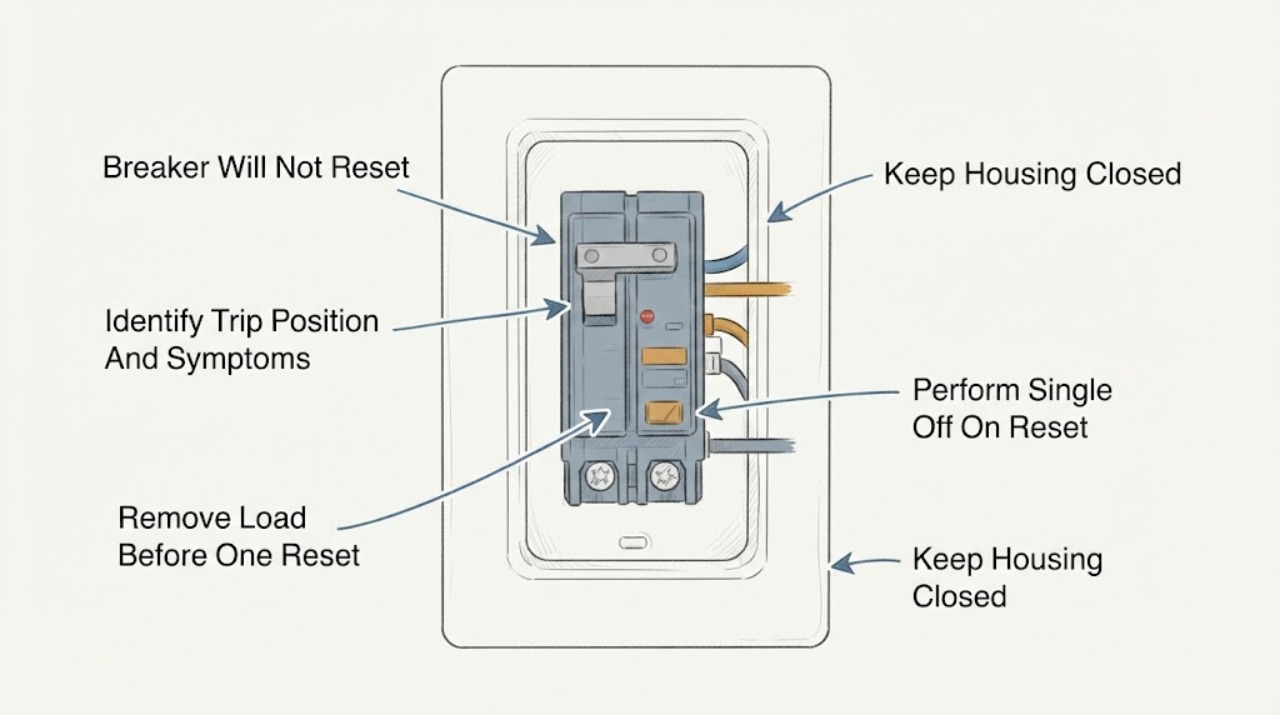
If an Eaton breaker will not reset, first treat the failed reset as a sign that the circuit may still have an overload, short circuit, ground fault, or an equipment problem. With the panel cover closed and your hands dry, turn off or unplug the loads on that circuit, then move the tripped handle fully to OFF and once to ON only if it moves normally. Eaton says a tripped handle may sit between ON and OFF, and the U.S. Consumer Product Safety Commission describes the same OFF-then-ON reset sequence after the problem has been eliminated. If the handle immediately trips again, will not latch, feels hot or loose, makes noise, smells burnt, shows scorching, or the circuit's AFCI or GFCI indication remains active, leave it off and have a qualified electrician diagnose it. Do not remove the panel deadfront, touch wiring, measure live voltage, install a larger breaker, or keep forcing the handle.
Before you begin
Safety first
- The electrician should determine whether the cause is a connected appliance or cord, overload, short or ground fault, arc-fault protection, fixed wiring, panel connection, protective breaker, or breaker mechanism before selecting a repair.
Work through in order
Diagnostic checks
Use only checks that match the exact appliance or system and its official guide.
-
Check 1
From a dry, stable position with the panel cover closed, look at the Eaton handle, its ON/OFF markings, any trip flag or indicator, and the surrounding panel without touching wiring or removing the cover.
Expected result: The handle is fully OFF, sits between ON and OFF, appears ON but the circuit is dead, or the panel shows heat, scorching, moisture, buzzing, or a burning smell.
Next step: Record the handle and indicator position. Leave the breaker off and arrange qualified electrical service for damage, odor, noise, heat, moisture, or an unclear status.
Stop if: Do not touch the panel interior, remove the deadfront, or continue if the enclosure or breaker appears damaged or energized conditions are uncertain.
Why this matters
Why: An intermediate or OFF handle can indicate a trip; an apparently ON handle with no power may indicate a different supply, protective-device, or breaker problem. Heat, damage, moisture, noise, or odor makes this an electrical safety issue rather than a routine reset.
-
Check 2
Turn off or unplug accessible appliances, power strips, lights, and other loads served by the affected circuit, without handling wet or damaged equipment; keep suspicious equipment disconnected.
Expected result: The circuit has many recently used loads, one appliance or cord is hot or damaged, no obvious loads are connected, or loads cannot be disconnected safely.
Next step: Leave any suspicious load disconnected. If the panel and area are otherwise safe, proceed to one normal handle reset; if equipment is wet or damaged, stop and arrange electrical service.
Stop if: Do not move or reconnect wet, scorched, smoking, sparking, or damaged equipment, and do not open an appliance or receptacle to find the fault.
Why this matters
Why: Several loads can overload a branch circuit, while a hot, damaged, wet, or unusual appliance or cord can be the immediate fault source. No visible load does not rule out fixed wiring or another connected device.
-
Check 3
With loads turned off or unplugged and the panel cover closed, move the Eaton handle fully to OFF and then once to ON using normal gentle movement; do not force a handle that will not move or latch.
Expected result: The handle resets and stays ON, remains loose or will not latch, or it trips immediately back to OFF or the middle position.
Next step: If it trips, leave it OFF and do not repeat the reset. Reconnect no suspicious load; arrange a qualified electrician to diagnose the circuit and breaker.
Stop if: Do not force, tape, wedge, bypass, or repeatedly cycle the breaker, and do not remove the panel cover to make it latch.
Why this matters
Why: A handle that stays ON after loads are removed may have cleared a temporary overload, but it does not prove the circuit or every appliance is safe. A handle that will not latch or trips immediately keeps a fault, protective-device trip, wiring problem, or breaker defect in focus.
-
Check 4
If the Eaton breaker has an AFCI, GFCI, dual-function, smart, trip-code, test, or status indicator, record the visible label or indicator state and consult the exact model instructions without opening the panel or changing wiring.
Expected result: A trip flag, fault indicator, test or status light, repeated protective trip, or no clear indicator is present.
Next step: Keep the breaker off after a repeated or unexplained protective trip and give the model and indicator record to a qualified electrician; do not attempt internal testing.
Stop if: Do not press a test button repeatedly, defeat a protective function, alter wiring, or substitute a standard breaker for a protective model.
Why this matters
Why: The protective function may be identifying an arc, ground, overload, short-circuit, wiring, or device condition rather than a simple handle position. Indicator behavior is model-specific, so absence of a visible code does not clear the circuit.
-
Check 5
Note which rooms, receptacles, lights, and equipment lost power and whether the failure began after a new load, storm, water exposure, repair, or appliance change; do not probe outlets or remove covers.
Expected result: Only one appliance or receptacle is involved, several points on the branch are dead, the problem follows one load, or the circuit remains dead while the handle appears ON.
Next step: Keep suspect loads disconnected, document the sequence, and arrange electrical diagnosis for persistent loss, multiple dead points, or an ON-but-dead condition.
Stop if: Do not use a meter or tester on live wiring unless you are a qualified professional, and do not remove receptacle plates or panel parts.
Why this matters
Why: A problem that follows one load keeps that equipment or cord in focus. Several points or a dead circuit with an ON handle can involve fixed wiring, a receptacle, an upstream protective device, or the breaker, and cannot be safely localized by casual probing.
-
Check 6
Photograph the closed panel label, Eaton breaker face and model marking, handle position, indicators, affected circuit, disconnected loads, and any heat, moisture, odor, noise, or visible damage for the electrician.
Expected result: The exact model is known, only the Eaton brand is known, the breaker or panel is damaged, or the cause remains unclear after the single safe reset attempt.
Next step: Leave the breaker off when the reset failed or the cause is unclear and arrange qualified electrical service; seek urgent help for smoke, active arcing, burning odor, heat, water, or uncontrolled electrical damage.
Stop if: Do not order or install a breaker from appearance alone, open the panel, or re-energize a circuit showing damage or an unresolved protective trip.
Why this matters
Why: Model and panel information determine which Eaton instructions and breaker family apply. Brand-only identification cannot establish a replacement, and unresolved symptoms require circuit diagnosis rather than repeated reset attempts.
Use your observations
Decision map
Find the observation that best matches what you see, then follow the next safe action.
-
PATH 01Next step
What you see
After accessible loads are turned off or unplugged, the handle moves normally from OFF to ON and stays on with no heat, odor, damage, or protective indication.
Do this next
Keep suspicious loads disconnected, reconnect only known-safe equipment one at a time if no warning signs return, and stop for any repeat trip or abnormal symptom.
Why this path and its safety boundary
Why it matters: A temporary overload or connected-load issue becomes more plausible, but the reset alone does not prove every appliance or cord is safe.
-
PATH 02Next step
What you see
The breaker trips immediately or will not latch after loads are disconnected and one normal OFF-then-ON attempt.
Do this next
Leave the breaker OFF and arrange qualified electrical diagnosis, especially if the same circuit has repeated trips or serves a critical load.
Why this path and its safety boundary
Why it matters: A continuing overload, short circuit, ground or arc fault, fixed-wiring problem, protective-device trip, or breaker failure remains possible; the handle should not be forced or repeatedly cycled.
-
PATH 03Next step
What you see
The trip began after one appliance, power strip, light, cord, moisture event, or new load was used, and that item is hot, wet, damaged, or otherwise abnormal.
Do this next
Keep the item disconnected and have it assessed by a qualified repair professional or electrician; do not use a different breaker rating to keep it operating.
Why this path and its safety boundary
Why it matters: The equipment or cord is a stronger suspect than a harmless handle-position problem, and reconnecting it could recreate the fault or increase shock or fire risk.
-
PATH 04Next step
What you see
An AFCI, GFCI, dual-function, smart, trip-code, or status indicator remains active, or the breaker has a test or trip indication that does not clear.
Do this next
Keep the breaker off after a repeated or unexplained indication and provide the model, indicator state, and affected loads to a qualified electrician.
Why this path and its safety boundary
Why it matters: The breaker may be reporting a protective trip or model-specific condition rather than a simple overload. The indication must be interpreted from the exact Eaton model documentation and circuit context.
-
PATH 05Next step
What you see
The panel or breaker is hot, wet, scorched, loose, noisy, or burning-smelling; the handle appears ON while the circuit is dead; or the cause cannot be identified safely.
Do this next
Do not touch or re-energize the circuit. Keep clear of smoke, arcing, water, and electrical equipment, and obtain urgent qualified electrical help when active danger is present.
Why this path and its safety boundary
Why it matters: An unsafe panel condition, connection, wiring fault, upstream device, or breaker defect cannot be distinguished by a reset and may worsen when energized.
Helpful context
Understand the symptom
A failed reset is a diagnostic result, not a command to push harder
A residential breaker can trip to OFF or to a position between ON and OFF. If it will not latch after a single normal OFF-then-ON attempt, assume the circuit has not been made safe yet. An overload may remain connected, a cord or appliance may be faulty, or an AFCI or GFCI function may still detect a fault. A hot, damaged, noisy, or burning-smelling panel requires the circuit to remain off and professional attention.
Separate a connected-load problem from a breaker or wiring problem
Turn off or unplug accessible loads served by the affected circuit before the one reset attempt. If the handle stays on with loads disconnected, reconnect nothing that is hot, wet, damaged, or suspicious; one device or its cord may be the trigger. If the handle trips with normal loads disconnected, the fault may be in fixed wiring, a receptacle, a protective breaker function, or the breaker itself. Do not open the panel or remove receptacles to pursue that distinction.
Use the exact Eaton model information
Eaton sells residential breaker families with different indicators and protective functions. Photograph the closed panel label, the breaker face, handle position, indicator or trip flag, and the circuit's affected room or equipment. The model and panel information let an electrician use the correct Eaton instructions and confirm whether the part is an AFCI, GFCI, dual-function, or standard breaker.
Safety boundary
Stop conditions
- Stop and leave the breaker off for an immediate repeat trip, a handle that will not latch, heat, burning odor, buzzing, smoke, scorching, moisture, sparks, or visible damage.
- Do not remove the panel deadfront, touch internal wiring, probe live parts, measure live voltage, remove receptacle covers, or open an appliance as an ordinary-user troubleshooting step.
- Do not force, tape, wedge, bypass, or repeatedly cycle a breaker, and do not defeat an AFCI, GFCI, dual-function, or other protective feature.
- Do not install a larger-rated breaker or order a replacement by appearance alone; the Eaton model, panel, circuit, and protective function must be confirmed by a qualified professional.
- Arrange qualified electrical service for a persistent or unexplained trip, an ON-but-dead circuit, a protective indicator that remains active, suspected fixed-wiring trouble, or any condition that cannot be checked safely.
Only after diagnosis
Potential parts
- Eaton replacement circuit breaker
Consider this category only if a qualified electrician confirms that the breaker mechanism has failed and identifies the exact Eaton model, panel, circuit rating, pole arrangement, and protective function.
Do not select by appearance, handle color, or rating alone; confirm the Eaton model and listed panel compatibility through manufacturer information and local code requirements.
When checks do not resolve it
Need a professional?
Use prompt service for any failed or repeated reset, suspected overload that returns, an AFCI or GFCI indication, an ON-but-dead circuit, or a breaker or panel that is damaged, hot, noisy, wet, or discolored. Treat smoke, arcing, burning odor, sparks, or water near energized equipment as urgent.
Safety scope: The electrician should determine whether the cause is a connected appliance or cord, overload, short or ground fault, arc-fault protection, fixed wiring, panel connection, protective breaker, or breaker mechanism before selecting a repair.
Have this ready
- Photos of the closed panel label, Eaton breaker face, model marking, handle position, trip flag or indicator, and affected circuit
- Which rooms, receptacles, lights, and appliances lost power and whether the event followed a new load, storm, water exposure, repair, or appliance change
- Whether accessible loads were turned off or unplugged and whether the breaker stayed on or tripped again after one normal reset attempt
- Any AFCI, GFCI, dual-function, smart, test, status, or trip-code indication visible without opening the panel
- Any heat, odor, buzzing, moisture, scorching, smoke, sparks, loose hardware, or visible damage and whether the circuit remains isolated
Common questions
FAQ
Why will my Eaton breaker not reset?
The circuit may still have an overload, short circuit, ground or arc fault, faulty appliance or cord, protective-device trip, wiring issue, or failed breaker mechanism. Turn off or unplug accessible loads and make one normal OFF-then-ON attempt only when the panel is safe; an immediate repeat trip means leave it off and call an electrician.
Should an Eaton breaker be moved fully OFF before ON?
Yes, a tripped handle may sit between ON and OFF, and the normal reset sequence is fully OFF followed once by ON after the underlying problem is addressed. Do not force a handle or repeat the sequence if it will not latch or trips again.
What should I unplug before resetting the breaker?
Turn off or unplug accessible appliances, power strips, lights, and other loads served by the affected circuit. Leave anything hot, wet, scorched, smoking, sparking, or damaged disconnected and do not handle it as part of a reset check.
What if the Eaton breaker trips again immediately?
Leave it OFF and stop resetting it. An immediate repeat trip with loads disconnected can indicate a continuing overload, short, ground or arc fault, fixed-wiring issue, protective trip, or breaker problem that requires qualified electrical diagnosis.
Can I replace the Eaton breaker with a larger one?
No. A larger breaker is not a safe troubleshooting substitute and can remove protection from the wiring. The exact Eaton model, panel, circuit, pole arrangement, and protective function must be confirmed by a qualified professional before any replacement.
When should I call an electrician for an Eaton breaker that will not reset?
Call when it will not latch after one safe reset attempt, trips again with loads disconnected, leaves the circuit dead while appearing ON, shows an AFCI or GFCI indication, or the cause is unclear. Seek urgent help for smoke, arcing, burning odor, heat, sparks, moisture, or visible panel damage.
Read the exact guide
Official sources
- Circuit breakers fundamentalsEaton · The opened Eaton fundamentals page explains the residential over-toggle mechanism and that a tripped handle can sit between ON and OFF.
- Understanding Your Home Electrical SystemElectrical Safety Foundation International · The opened ESFI guidance recommends turning off or unplugging appliances before resetting a tripped breaker and contacting an electrician when the problem continues.
- Circuit breakers | Residential circuit breakers | EatonEaton · The Eaton residential breaker page is the manufacturer product-family reference for confirming the installed breaker family before any part decision.
- CPSC Guide to Home Wiring HazardsU.S. Consumer Product Safety Commission · The opened CPSC home-wiring guide explains why breakers trip, distinguishes handle positions, and states that the underlying problem should be eliminated before reset.
- Residential Circuit Breakers | CH Circuit Breakers | EatonEaton · The opened Eaton CH page describes CH and CHF residential breaker trip behavior and identifies AFCI, GFCI, and dual-function options.
- AbleEdge Smart Breaker | FAQ | EatonEaton · The opened Eaton FAQ gives the AbleEdge handle reset sequence and explains that some thermal-magnetic trips cannot be remotely closed, with model-specific fault indications.
Community feedback
Share a repair observation
Share a plain-text repair observation. Accepted observations are published automatically; this page may take a moment to update.