
On this page
Start here
Quick answer
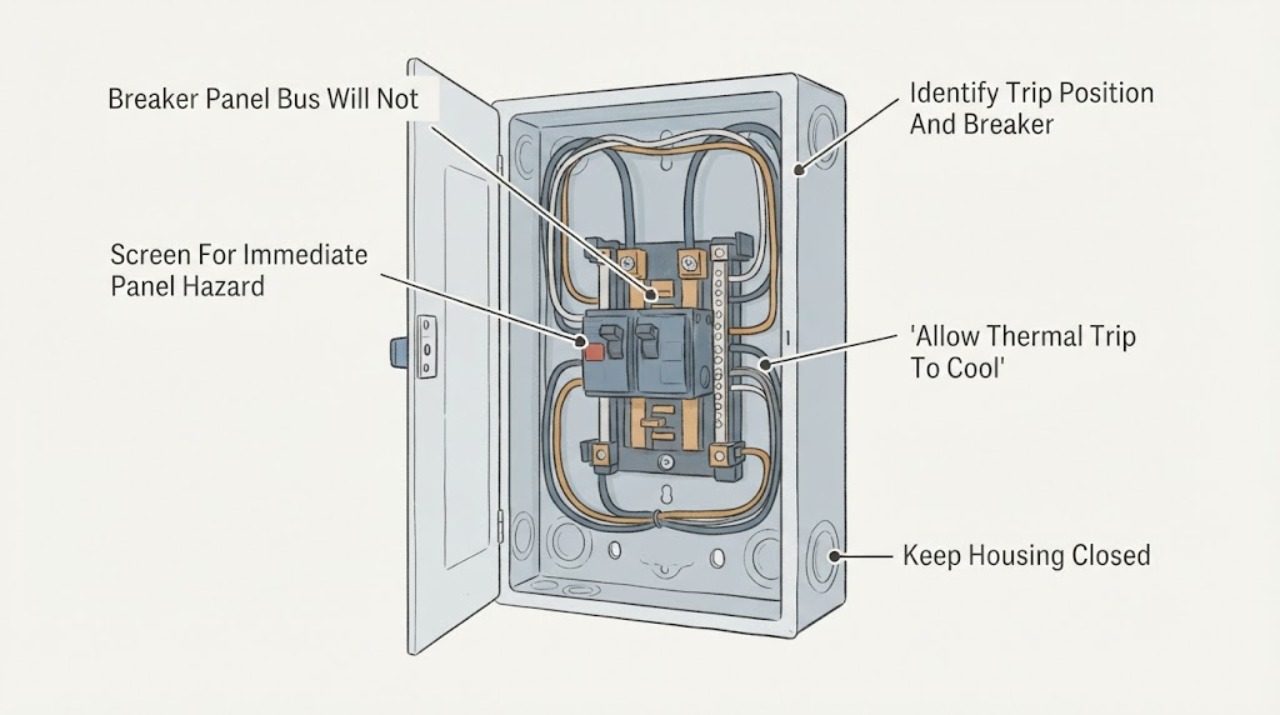
The panel bus itself is not normally reset; the Eaton breaker mounted on the bus may be tripped, held off by a fault or interlock, too warm after a thermal trip, mechanically damaged, or not correctly seated. If the handle is in a middle or trip position and there is no smoke, burning odor, heat, water, arcing, or other danger, use the exact Eaton model instructions for one deliberate move to the full OFF position and then to ON. If it immediately trips, will not reach the reset position, will not stay on, or the handle feels loose or binds, leave it off and have a licensed electrician diagnose the connected load, breaker, bus connection, and panel. Do not keep cycling it, hold it on, remove the deadfront, reseat a breaker, tighten bus or terminal hardware, or substitute a higher-rated breaker. Eaton explains that a trip unit opens a breaker for overloads, short circuits, and certain specialty faults; its residential CH information distinguishes the trip state and common-pole operation, while its instructions warn that energized equipment can cause severe injury or death. A smart or diagnostic Eaton breaker may also show a ground-fault, overvoltage, phase, or self-test indication that needs the model-specific procedure.
Work through in order
Diagnostic checks
Use only checks that match the exact appliance or system and its official guide.
-
Check 1
Without opening the panel, look and listen from a safe position for smoke, a burning smell, crackling, visible arcing, a hot or discolored cover, water intrusion, melting, or a shock. Keep people away from a damaged enclosure. Do not touch the panel, breaker, or bus area to judge temperature.
Expected result: There is smoke, active arcing, a strong burning odor, water, heat or discoloration, a shock, or none of those signs.
Next step: For smoke, arcing, a strong burning odor, shock, or water contacting the enclosure, keep clear and use local emergency or utility guidance as appropriate. Otherwise continue only with the closed-panel identification and one model-approved reset attempt.
Stop if: Do not remove the deadfront, touch exposed parts, spray or dry the panel, or approach a hot, wet, smoking, or arcing enclosure.
Why this matters
Why: These signs indicate an active electrical or environmental hazard, not a routine reset. A quiet exterior does not prove that the internal bus, breaker, or connected circuit is safe; it only means no obvious external emergency was observed.
-
Check 2
With the panel closed, photograph the breaker face and record the Eaton family or catalog marking, pole count, ampere marking, trip flag, test button, and handle position. Note whether this is a standard thermal-magnetic breaker, AFCI/GFCI or dual-function device, smart breaker, or a larger equipment breaker. Do not infer the model from shape alone.
Expected result: The handle is midway or shows a trip flag; it is fully OFF but will not go ON; a trip LED or code is present; or the breaker type and position cannot be identified.
Next step: Use the exact Eaton manual or product documentation to interpret the handle and indicator. If the family, rating, or position is not clear without opening the enclosure, leave the breaker off and have an electrician identify it.
Stop if: Do not remove a breaker, take off the cover, press a test button repeatedly, bypass a lock or interlock, or use a breaker from another family as a comparison.
Why this matters
Why: A mid-position or trip indicator can mean the breaker opened for a fault and needs the model's reset sequence. A fully OFF handle that will not latch, a code, or an uncertain breaker type changes the next step because smart, AFCI/GFCI, two-pole, and other devices have model-specific behavior. The bus and breaker cannot be evaluated safely from a front label alone.
-
Check 3
If there is no immediate hazard and the breaker appears thermally tripped, leave the connected equipment off and allow the breaker to cool for the interval specified by its Eaton instructions. Then, only if the instructions permit a user reset, move the handle firmly to the extreme OFF position and make one attempt to move it to ON. Do not hold it in place or repeatedly cycle it.
Expected result: The handle resets and stays ON; it immediately trips; it will not move fully OFF or latch; or the breaker remains unresponsive after cooling.
Next step: If it stays on, reconnect loads only cautiously and have an electrician investigate the original trip before adding demand. If it trips, binds, or will not latch, leave it off and arrange qualified electrical diagnosis of the circuit, breaker, bus, and panel.
Stop if: Do not reset a breaker that is hot, wet, damaged, smoking, arcing, or associated with a burning odor; do not repeatedly reset it or force the handle past resistance.
Why this matters
Why: A breaker that stays on after cooling may have responded to a temporary overload, but the connected equipment still needs review. An immediate trip indicates the fault remains or the breaker detects a specialty condition. A handle that binds, will not latch, or remains unresponsive raises a mechanical, interlock, breaker, or bus-connection concern.
-
Check 4
Make a list of what the affected circuit supplies and what was running when it tripped: heaters, motors, kitchen equipment, outdoor equipment, tools, receptacles, or electronic loads. Record whether the trip happens at startup, after several minutes, when a particular device is connected, or even with loads unplugged. Do not open receptacles or disconnect panel conductors to isolate the load.
Expected result: The trip follows one appliance or tool; several loads overlap; it occurs at motor startup; it occurs with nothing connected; or the pattern is unknown.
Next step: Leave the suspected device disconnected and have an electrician test the branch circuit and breaker with appropriate equipment. Give the electrician the load list and timing; do not substitute a larger breaker to keep the device operating.
Stop if: Do not open appliances, disconnect fixed wiring, bypass a GFCI/AFCI function, use extension cords as a permanent workaround, or keep reconnecting a device that causes an immediate trip.
Why this matters
Why: A repeatable device or startup pattern makes a load, cord, motor, or appliance fault more likely. A trip with loads disconnected shifts attention toward fixed wiring, moisture, a breaker, bus connection, or an internal panel condition. A pattern that cannot be reproduced safely should not be chased by repeated resets.
-
Check 5
Read any visible Eaton trip code, LED blink pattern, test-button result already shown by the device, or smart-app status without entering service mode. Note whether nearby circuits are also off, whether the main breaker or another upstream device is tripped, and whether recent panel work or a power event preceded the failure. Do not open the panel or inspect bus stabs.
Expected result: The indicator identifies ground fault, arc fault, overvoltage, phase, self-test, or another condition; multiple circuits are affected; an upstream device is open; or no diagnostic information is available.
Next step: Record the exact wording or blink pattern and give it to a licensed electrician. Leave the affected breaker off for a recurring or safety-related indication; have the electrician verify the circuit, breaker, bus interface, upstream supply, and panel installation with power safely isolated.
Stop if: Do not clear a fault code by repeated resets, enter technician mode, probe energized equipment, tighten bus hardware, or re-energize a circuit with a known fault.
Why this matters
Why: Eaton diagnostic indicators can narrow the fault class, but they do not authorize homeowner wiring repairs. Multiple affected circuits or an open upstream device points beyond one branch breaker. No code does not rule out a short, overload, mechanical failure, loose connection, or bus problem.
Use your observations
Decision map
Find the observation that best matches what you see, then follow the next safe action.
-
PATH 01Next step
What you see
There is no visible hazard, the breaker has cooled, it reaches full OFF, and one model-approved reset leaves it on without an immediate trip.
Do this next
Keep a record of what was running and have an electrician review a recurring or unexplained trip before adding load. If the same equipment trips again, leave it disconnected and stop resetting.
Why this path and its safety boundary
Why it matters: A temporary overload or heat-related trip is possible, but the original cause has not been proven absent.
-
PATH 02Next step
What you see
The Eaton breaker trips immediately or will not stay on after the handle is moved fully OFF and then ON once.
Do this next
Leave the breaker off, disconnect only portable equipment without opening fixed wiring, and arrange qualified electrical diagnosis. Do not increase the breaker rating or keep cycling it.
Why this path and its safety boundary
Why it matters: An active overload, short circuit, ground or arc fault, miswiring, wet load, or breaker fault is more likely than an incorrect handle position.
-
PATH 03Next step
What you see
The handle will not reach the reset/off position, feels mechanically bound, will not latch, or remains unresponsive after the breaker has cooled.
Do this next
Leave the device off and have a licensed electrician inspect the breaker and bus with the equipment safely de-energized and verified. Replace only with a correctly listed part after diagnosis.
Why this path and its safety boundary
Why it matters: A mechanical breaker failure, interlock, actuator, mounting, or bus-interface issue is possible. The cause cannot be distinguished safely from the front of the panel.
-
PATH 04Next step
What you see
A smart or diagnostic Eaton breaker reports a ground fault, arc fault, overvoltage, phase fault, self-test failure, or another recurring indication.
Do this next
Record the exact code or LED pattern and have an electrician test the load and wiring. Do not clear the indication by repeated resets or replace the breaker without confirming compatibility and the fault cause.
Why this path and its safety boundary
Why it matters: The protective device has identified a specific fault class or cannot complete its self-test; the indicator is not a nuisance message to suppress.
-
PATH 05Next step
What you see
The breaker will not reset and the panel has heat, discoloration, buzzing, crackling, burning odor, water intrusion, visible damage, or more than one affected circuit.
Do this next
Keep clear and obtain urgent qualified electrical service or local emergency/utility help as appropriate. Do not open the enclosure or attempt to reseat the breaker or repair the bus.
Why this path and its safety boundary
Why it matters: A bus, feeder, connection, upstream device, or panel condition may be involved and could create shock, fire, or equipment damage risk.
Helpful context
Understand the symptom
A breaker trip is different from a bus failure
A breaker mounted on a panel bus opens its own contacts when its trip unit detects an overload, short circuit, or specialty fault. The handle may sit between ON and OFF, or a trip flag or indicator may distinguish a trip from a manual OFF state. The bus is the energized connection inside the enclosure; a homeowner should not diagnose its clips, stabs, discoloration, or torque by removing the deadfront. A breaker that will not remain on is evidence to investigate the circuit and equipment, not permission to force the handle.
Why a single reset attempt matters
A thermal trip may need time to cool before it can reset. Once cool, the exact model's instructions may call for moving the handle fully to OFF and then ON. If the breaker trips immediately again, refuses to latch, or shows a fault indication, the result is diagnostic: an overload, short circuit, ground or arc fault, overvoltage, miswiring, an interlock, a damaged mechanism, or a bus/connection issue remains possible. Repeated resets can re-energize a fault and should be left to qualified service.
Only after diagnosis
Potential parts
- Eaton listed branch circuit breaker
Consider this only after an electrician confirms that the breaker mechanism or trip unit has failed and the circuit fault, bus condition, and load have been evaluated.
Breaker family, pole count, ampere rating, interrupt rating, protection type, and loadcenter listing are model-specific. A breaker that physically fits is not automatically an approved replacement. - Eaton AFCI, GFCI, or dual-function breaker
Consider this category only when the exact circuit protection requirement and a diagnostic result support replacement after the connected load and wiring are tested.
Neutral arrangement, breaker family, trip technology, interrupt rating, and loadcenter compatibility must be verified from Eaton documentation and local requirements by a qualified electrician. - Eaton loadcenter or bus-related assembly
Consider this only when a qualified inspection finds damage, a failed bus connection, or a panel assembly that cannot safely support the listed breaker configuration.
Bus parts and loadcenter assemblies are not generic repair pieces; identification, de-energization, inspection, listing, and installation require qualified electrical service.
When checks do not resolve it
Need a professional?
Have a licensed electrician diagnose an Eaton breaker that immediately re-trips, will not latch after a safe model-approved reset, binds, shows a recurring fault indication, or affects more than one circuit. Ask the electrician to check the connected load, fixed wiring, breaker protection type, bus interface, mounting, upstream supply, and panel condition with safe de-energization and verification. Treat smoke, arcing, burning odor, a hot or discolored enclosure, water intrusion, or shock as an urgent electrical condition. Do not open the deadfront, reseat a breaker, tighten bus or terminal hardware, bypass an AFCI/GFCI function, upsize a breaker, or repeatedly reset a device to restore power.
Common questions
FAQ
Why will my Eaton breaker not reset after it trips?
It may still be hot after a thermal trip, may not have been moved fully to OFF, or may be detecting an unresolved overload, short circuit, ground or arc fault. A binding or non-latching handle can also indicate a breaker, interlock, mounting, or bus issue. Make one model-approved reset attempt only when there is no hazard; leave it off if it trips or binds.
How do I reset an Eaton breaker that is in the middle position?
If the panel is cool, dry, intact, and free of smoke or burning odor, follow the exact Eaton instructions for that model: move the handle firmly to the full OFF or reset position, then make one attempt to move it to ON. If it immediately trips or will not latch, leave it off and call an electrician. Do not force it or repeat the cycle.
What does an immediate Eaton breaker trip after reset mean?
An immediate re-trip usually means the protective device still sees an overload, short circuit, ground or arc fault, overvoltage, miswiring, or another abnormal condition. Disconnect only portable loads without opening wiring, leave the breaker off, record any indicator or code, and have the circuit tested by a qualified electrician.
Could the Eaton panel bus be the reason a breaker will not reset?
It is possible, but a bus or breaker connection cannot be diagnosed safely from the front of a closed panel. A breaker that binds or will not latch, especially with heat, discoloration, buzzing, or more than one affected circuit, needs the enclosure and bus checked by a licensed electrician after safe de-energization and verification. Do not reseat the breaker yourself.
When should I stop trying to reset an Eaton breaker?
Stop after one safe model-approved attempt if it re-trips, will not latch, feels mechanically bound, or shows a recurring diagnostic code. Stop immediately for smoke, arcing, burning odor, a hot or discolored enclosure, water intrusion, or shock. Keep clear and obtain qualified electrical or emergency help as appropriate.
Read the exact guide
Official sources
- F-frame circuit breakersEaton · Eaton circuit-breaker reset position, thermal-trip cooling, mechanical operation, inspection warnings, and service boundaries
- Installation tips for BR & CH plug-on neutral productsEaton · Eaton BR and CH residential loadcenter and breaker installation, bus-stab and neutral-bar connection, and installation safety
- AbleEdge Smart Breaker | FAQEaton · Eaton AbleEdge smart-breaker reset behavior, trip types, compatibility, and diagnostic indications
- Circuit breakers fundamentalsEaton · Eaton circuit-breaker operating mechanisms, trip units, overload and short-circuit protection, and circuit-breaker states
- Circuit breaker LED blink codesEaton · Eaton BR two-pole ground-fault breaker diagnostic indications and fault categories
- CH Circuit BreakersEaton · Eaton residential CH breaker trip indication, overload and short-circuit response, common-pole operation, and AFCI/GFCI protection
Community feedback
Share a repair observation
Share a plain-text repair observation. Accepted observations are published automatically; this page may take a moment to update.