
On this page
Start here
Quick answer
A Siemens breaker that will not reset may still be in its tripped middle position, may be too warm after a thermal trip, may be responding to an overload or short/ground/arc fault, or may have a damaged mechanism. If the panel is dry and intact, there is no smell, heat, smoke, arcing, or exposed metal, and you can identify a recent overload, switch off or unplug the obvious loads without touching wiring, then move the handle firmly all the way to OFF/reset and back to ON once. Some Siemens breaker models require this full OFF/reset movement before ON, and a thermal trip may need time to cool. If it will not latch, trips immediately or again, has an AFCI/GFCI indicator, or the cause is not clearly an isolated overload, leave it OFF and call a qualified electrician. Never force the handle, hold it in ON, install a higher-rated breaker, remove the panel cover, or repeatedly reclose it. For burning odor, smoke, buzzing, visible damage, water, or arcing, keep away from the panel and contact emergency help or an electrician from a safe location.
Before you begin
Safety first
- Do not force or hold the breaker ON, repeatedly reclose it, remove the panel cover, touch terminals or bus bars, probe voltage, tighten lugs, replace the breaker, install a higher rating, alter neutral or ground wiring, or bypass AFCI/GFCI protection. For smoke, arcing, burning odor, heat, melting, water, or exposed metal, keep away and contact emergency help or an electrician from a safe location.
Work through in order
Diagnostic checks
Use only checks that match the exact appliance or system and its official guide.
-
Check 1
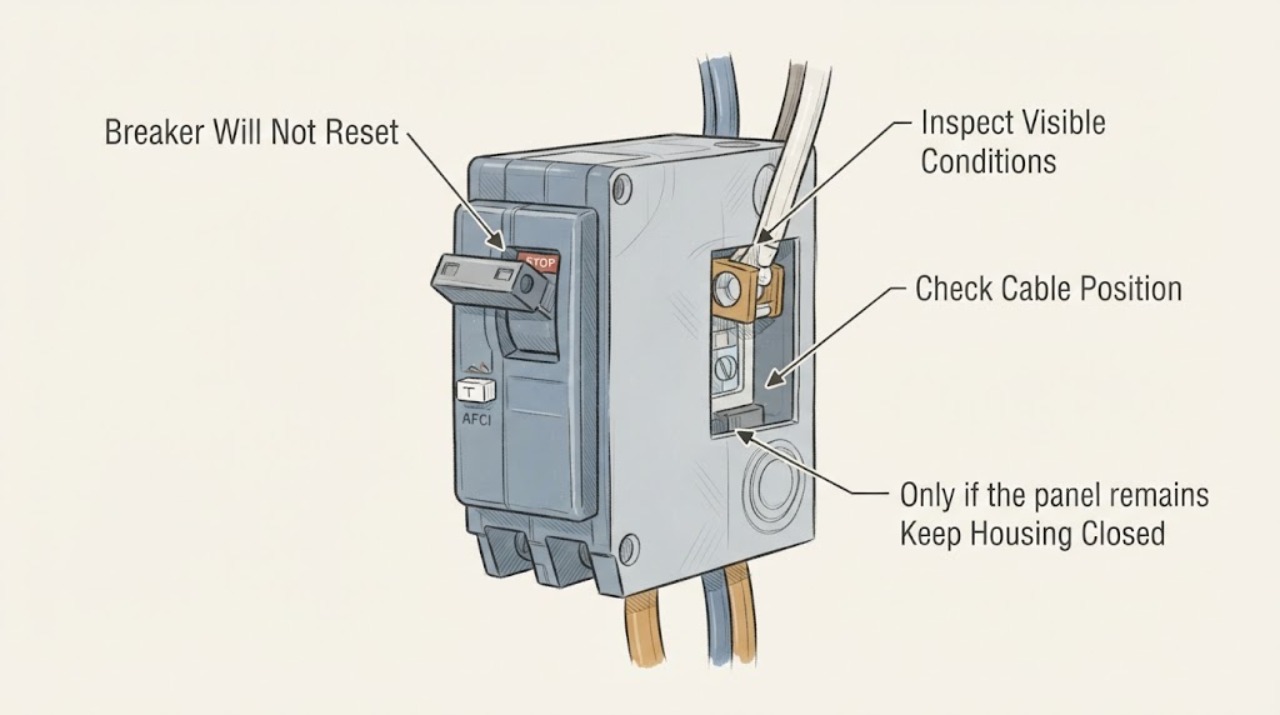
Look at the Siemens handle without opening the panel or touching anything except the molded handle. Identify whether it is fully OFF, fully ON, or in a middle/tripped position, and record the circuit label and whether it is a single-pole, multi-pole, AFCI, or GFCI-style breaker if those markings are visible. Do not force a stiff handle or hold it against the ON position.
Expected result: The handle is in the middle/tripped position; it is fully OFF; it looks fully ON but the circuit is dead; or the handle or face has a crack, melting, discoloration, or other damage.
Next step: If there is damage, heat, odor, moisture, buzzing, or arcing, leave the breaker alone and arrange qualified electrical service. If the mechanism is visibly tripped and the panel is otherwise normal, continue by identifying whether a recent isolated overload can be safely disconnected.
Stop if: Stop immediately for smoke, burning smell, buzzing or crackling, visible arcing, water, a hot panel, exposed metal, melting, or a cracked breaker.
Why this matters
Why: A middle position can require a full OFF/reset movement before ON. A fully OFF handle may simply be switched off, while a fully ON handle with no power can indicate an upstream, downstream, or breaker problem. Physical damage changes the issue from a reset question to a replacement and panel-safety assessment.
-
Check 2
From outside the closed panel, list appliances, power strips, tools, or portable heaters recently used on the affected circuit. Switch off or unplug only accessible plug-in loads, without opening boxes, moving fixed wiring, or handling a wet or damaged device. Do not disconnect a hard-wired appliance or remove a receptacle cover.
Expected result: Several high-demand plug-in loads were operating; one appliance always coincides with the trip; no obvious load explains the trip; or a load, cord, receptacle, or area is hot, wet, damaged, or smells burned.
Next step: Leave suspicious or damaged loads disconnected and do not reconnect them for testing. If the circuit is dry and intact and the overload is clearly isolated, a single external reset attempt may be reasonable; otherwise leave the breaker OFF and call a qualified electrician.
Stop if: Stop handling the circuit for a hot, wet, damaged, smoking, sparking, or burned appliance, cord, receptacle, or panel area.
Why this matters
Why: A recent group of loads can support an isolated overload explanation, while one repeat offender suggests a faulty appliance or branch-circuit issue. No obvious overload or any heat, moisture, damage, or odor makes a wiring or equipment fault more likely and raises the safety priority.
-
Check 3
Only if the panel remains closed, dry, cool, and undamaged and a recent plug-in overload has been isolated, make one reset attempt following the position shown on the breaker: move a tripped or middle-position handle fully to OFF/reset, then move it to ON. Use a normal firm hand motion; do not use a tool, force the handle, or stand in front of a damaged panel. If the breaker is a multi-pole device, follow its exact Siemens instructions rather than moving one pole independently.
Expected result: The breaker latches and stays on; it will not latch; it trips immediately; or it trips again when a previously disconnected load is reconnected.
Next step: If it does not latch or trips again, leave it OFF and arrange qualified electrical diagnosis. Do not repeat the reset, hold the breaker on, substitute a larger rating, or reconnect loads to find the limit.
Stop if: Stop and move away from the panel for any spark, sound, odor, heat, smoke, or visible movement or damage during the attempt.
Why this matters
Why: A breaker that latches after a verified overload may have responded as intended, but the load and circuit still need monitoring. Failure to latch or immediate retripping suggests an active fault, thermal condition, incompatible reset procedure, or failed mechanism. A trip tied to one load makes that load or its circuit a prime suspect.
-
Check 4
If the breaker has AFCI or GFCI markings, a TEST button, or status lights, record the labels and visible indicator pattern without pressing test controls repeatedly or opening the panel. Note whether the trip occurs immediately, only when a particular device is used, or after the circuit has been carrying load. Check the exact model instructions rather than applying another breaker family’s button sequence.
Expected result: An arc, ground, overload, or fault indication is shown; the breaker trips immediately on ON; it trips only under one device or load; or no diagnostic indication is visible.
Next step: Give the indicator pattern, timing, breaker catalog or model marking, and affected load list to a qualified electrician. Do not substitute a different breaker, alter neutral or ground wiring, or attempt a panel-side test.
Why this matters
Why: AFCI/GFCI indications can narrow the fault category but do not identify the damaged wire or device. Immediate tripping can reflect short, ground, arc, incorrect wiring, or an active load fault; delayed tripping can reflect overload or heat. No indicator does not clear a standard thermal-magnetic breaker or downstream fault.
-
Check 5
Check the circuit outcome from normal room controls after the breaker has been left OFF: note whether only one room or appliance lost power, whether other circuits remain normal, and whether any outlet or appliance has heat, discoloration, buzzing, or a burning smell. Do not remove outlet covers, test with exposed probes, or use a damaged appliance to see whether power returns.
Expected result: Only the labeled branch is dead; several unrelated circuits are affected; a particular outlet or appliance shows damage; or the breaker appears ON but the circuit remains dead.
Next step: Leave the affected circuit off and arrange a qualified electrician when the breaker will not latch, the branch remains dead, multiple circuits are affected, or any outlet or appliance is damaged. Do not open the panel to trace the supply.
Stop if: Stop for heat, smoke, buzzing, crackling, discoloration, melting, water, or any sign of energized damage.
Why this matters
Why: A single dead branch is consistent with a local breaker, load, or branch-wiring problem. Multiple affected circuits can involve a feeder, main, or service issue. A breaker that appears ON but leaves the branch dead may have failed mechanically, lost an upstream supply, or be misidentified.
-
Check 6
Prepare the service handoff without touching panel internals: photograph the closed-panel breaker label and handle position, record the Siemens catalog or model marking if readable, list disconnected loads, and note whether the trip was immediate, delayed, or load-specific. Include weather, moisture, renovation, or appliance changes that preceded the trip. Do not remove the cover to obtain a better photo.
Expected result: The breaker remains OFF; it reset once but the cause is uncertain; it resets only with a load removed; or visible damage prevents further observation.
Next step: Keep the circuit OFF when the cause is uncertain or any warning sign is present, and provide the record to a qualified electrician. Do not reset again while waiting or replace the breaker yourself.
Why this matters
Why: A precise load and timing history helps distinguish overload, short or ground fault, AFCI/GFCI response, thermal trip, upstream loss, and mechanical breaker failure. A one-time reset without a verified cause should not be treated as proof that the circuit is safe.
Use your observations
Decision map
Find the observation that best matches what you see, then follow the next safe action.
-
PATH 01Next step
What you see
The breaker is visibly tripped, the panel and circuit are cool, dry, and undamaged, and several accessible plug-in loads were operating together with no repeat fault or warning sign.
Do this next
Leave the obvious loads disconnected and, following the exact Siemens handle instructions, make no more than one external reset attempt. If it will not latch, trips again, or the cause is uncertain, leave it OFF and call a qualified electrician.
Why this path and its safety boundary
Why it matters: An overload is plausible, and the breaker may be protecting the branch as designed. It is not proof that the branch wiring or every load is healthy.
-
PATH 02Next step
What you see
The breaker trips when one appliance is connected, trips immediately on ON, or will not reset even after accessible loads are disconnected.
Do this next
Leave the breaker OFF and keep the repeat-offending load disconnected. Have a qualified electrician diagnose the appliance and branch; do not test by repeatedly reconnecting or forcing the breaker on.
Why this path and its safety boundary
Why it matters: A defective appliance, short circuit, ground fault, arc fault, downstream wiring fault, thermal condition, or breaker failure is more likely than a simple reset-position mistake.
-
PATH 03Next step
What you see
The Siemens device has AFCI/GFCI markings, a test button, or status lights, and it reports an arc, ground, overload, or other protective trip or trips again after reset.
Do this next
Record the exact model and indicator pattern and call a qualified electrician. Do not alter neutral or ground connections, substitute a different breaker, or continue pressing test/reset controls to clear the indication.
Why this path and its safety boundary
Why it matters: The protective device has detected a category of abnormal current or wiring condition, but the visible indication does not identify which conductor, outlet, or appliance is at fault.
-
PATH 04Next step
What you see
The handle remains in a trip position after a heavy load, will not latch after cooling and one permitted reset attempt, or feels mechanically blocked; the breaker face may also show cracking or discoloration.
Do this next
Leave the breaker OFF and arrange qualified electrical service to identify the cause and assess the breaker, bus, and terminations. Do not remove the breaker, open the panel, or lubricate or modify the handle.
Why this path and its safety boundary
Why it matters: A thermal element may not yet be ready, or the breaker mechanism may be damaged or binding. The breaker instructions state that a breaker that cannot be turned on during inspection should be replaced, but replacement is panel work for a qualified person.
-
PATH 05Next step
What you see
The panel or circuit has smoke, arcing, crackling, strong burning odor, visible melting or discoloration, water, exposed metal, or a hot enclosure.
Do this next
Keep away from the panel, do not touch the handle, and contact emergency help or a qualified electrician from a safe location. If there is smoke or fire, follow local emergency procedures; do not use water on energized equipment.
Why this path and its safety boundary
Why it matters: The situation may involve an arc, overheating, energized damage, or water-electrical contact. A reset attempt could reenergize a dangerous fault.
Helpful context
Understand the symptom
A handle that will not stay on is a symptom, not a bad setting
A Siemens breaker may appear to be on, off, or somewhere between the two after a trip. The exact reset motion varies by breaker family, but a tripped mechanism generally must be fully reset before it can latch on. Thermal protection may also need to cool. If the handle still will not latch, the breaker may be detecting an active overload, short circuit, ground fault, or arc fault, or the breaker itself may be damaged. Do not treat resistance as a reason to push harder.
Separate an isolated overload from a fault in the wiring or breaker
An overload caused by several recently used appliances can be different from a breaker that trips whenever one appliance starts, whenever a circuit is loaded, or even with the branch loads disconnected. AFCI or GFCI-equipped Siemens breakers can also provide an indicator or button that points to a protective trip category. These observations help an electrician, but they do not make panel wiring or breaker replacement a homeowner repair.
The panel-cover boundary matters
The user-safe side of this problem is the closed panel's handle, the circuit label, and unplugging or switching off accessible loads. The inside of a panel can remain energized even when one branch breaker is off. Do not remove the dead-front cover, touch terminals, probe voltage, tighten lugs, replace the breaker, or use a tool to force the handle. A warm, discolored, wet, buzzing, or arcing panel needs immediate professional attention.
Only after diagnosis
Potential parts
- Siemens replacement circuit breaker
Consider this category only after a qualified electrician confirms the breaker mechanism is damaged or cannot latch and separately evaluates the overload, short, ground, arc, or wiring cause.
Match the exact Siemens breaker family, catalog number, pole arrangement, rating, load center listing, and protective function. Do not substitute a higher rating or install the breaker yourself. - Siemens AFCI or GFCI protective breaker
Consider this category only when the exact protective device is confirmed failed after qualified testing and the downstream arc, ground, overload, and wiring causes have been addressed.
Confirm the exact Siemens load center, breaker type, pole count, neutral arrangement, rating, and local code requirements with a qualified electrician. - branch-circuit receptacle or wiring repair
Consider this category only when a qualified electrician traces a repeat trip to a damaged receptacle, appliance connection, conductor, or junction in the affected branch.
The repair must match the existing circuit design, enclosure, conductor, protective device, and local electrical requirements. Do not open boxes or alter wiring as a homeowner reset step.
When checks do not resolve it
Need a professional?
Stop and arrange qualified electrical service if the Siemens breaker will not latch after the exact handle reset position is followed, trips immediately or again, the circuit is dead while the handle appears ON, an AFCI/GFCI indicator reports a fault, or the cause is not a verified isolated overload. Keep it OFF for repeated trips, unknown faults, heat, buzzing, crackling, burning odor, smoke, arcing, melting, water, or exposed metal. Do not remove the panel cover, touch internal parts, probe voltage, force the handle, repeatedly reclose the circuit, install a higher-rated breaker, or replace the breaker yourself.
Safety scope: Do not force or hold the breaker ON, repeatedly reclose it, remove the panel cover, touch terminals or bus bars, probe voltage, tighten lugs, replace the breaker, install a higher rating, alter neutral or ground wiring, or bypass AFCI/GFCI protection. For smoke, arcing, burning odor, heat, melting, water, or exposed metal, keep away and contact emergency help or an electrician from a safe location.
Common questions
FAQ
Why will my Siemens breaker not reset?
It may still be in the tripped middle position, may be thermally warm, or may be detecting an overload, short circuit, ground fault, arc fault, or damaged mechanism. If the closed panel is dry, cool, and undamaged and a recent plug-in overload is clear, disconnect the accessible loads and follow the exact Siemens OFF/reset-then-ON motion once. If it will not latch or trips again, leave it OFF and call a qualified electrician.
Do I need to move a tripped Siemens breaker fully OFF before ON?
Many Siemens breaker instructions show a trip or middle position that must be moved to the reset/OFF position before the handle can be moved to ON. The exact mechanism varies by breaker family, so use the manual for the catalog number on the device. Do not force the handle or repeat the attempt if it resists, sparks, heats, or trips.
How long should I wait before resetting a Siemens breaker?
Siemens states that a thermal trip cannot be reset until the thermal element cools, but the required time depends on the device and conditions. Do not use a guessed waiting period to justify repeated resets. Once the device is cool and the circuit is safe, an isolated overload may justify one external reset attempt; a failed or repeat trip needs electrical diagnosis.
What if the Siemens breaker trips again immediately?
Leave it OFF. Immediate retripping can indicate a short, ground fault, arc fault, active appliance fault, wiring problem, or a failed breaker. Disconnect accessible plug-in loads without touching wiring and report what was connected, but do not keep reconnecting devices, hold the breaker ON, alter wiring, or substitute another breaker.
Is it safe to reset a Siemens breaker if I smell burning or see damage?
No. Burning odor, smoke, buzzing, crackling, arcing, heat, melting, discoloration, water, or exposed metal is a stop condition. Keep away from the panel, do not touch the breaker, and contact emergency help or a qualified electrician from a safe location. A reset could reenergize a dangerous fault.
Read the exact guide
Official sources
- Instructions for Installation of the Combination Arc Fault Circuit Interrupter (AFCI) & Circuit BreakerSiemens Industry, Inc. · Official Siemens instructions for Siemens combination AFCI circuit breakers; only applicable when the installed breaker is an AFCI model with the described controls or indicators
- CPSC Guide to Home Wiring HazardsU.S. Consumer Product Safety Commission · Government homeowner guidance for recognizing a tripped residential breaker and treating overloads and repeat trips as electrical safety issues
- Qualifications for resetting circuits or replacing fuses; electrical enclosures must be approved.Occupational Safety and Health Administration · OSHA electrical-safety interpretation used for the article's conservative stop boundary; residential users should not treat workplace qualification language as permission to open a panel
- 75823A00.p65Siemens Energy & Automation, Inc. · Official Siemens installation and inspection instructions for the documented ED-frame current-limiting breaker family; model-specific behavior should be confirmed against the exact breaker manual
Community feedback
Share a repair observation
Share a plain-text repair observation. Accepted observations are published automatically; this page may take a moment to update.