
On this page
Start here
Quick answer
A Hunter ceiling fan that will not spin may have no power, an off wall switch or pull chain, a remote or receiver issue, a reverse switch left between positions, a mechanical obstruction, a failed capacitor or wiring harness, or a motor problem. Start with the controls and breaker from safe access, then check whether the light works and whether the blades have a visible obstruction or loose mounting. If the breaker trips again, wiring or burn marks are visible, the fan is loose, the motor hums without turning, or the light works but the blades remain stopped after control checks, leave the fan off and arrange qualified electrical or Hunter service. Do not remove the canopy, open the switch housing, reach into the fan, or test live wiring as a homeowner shortcut.
Before you begin
Safety first
- This article supports ordinary control checks, a front-of-panel breaker observation, and a visual check with the fan stopped. A qualified electrician or fan technician must handle wiring, switch boxes, canopy access, receiver, capacitor, motor, breaker, and ceiling-mount work.
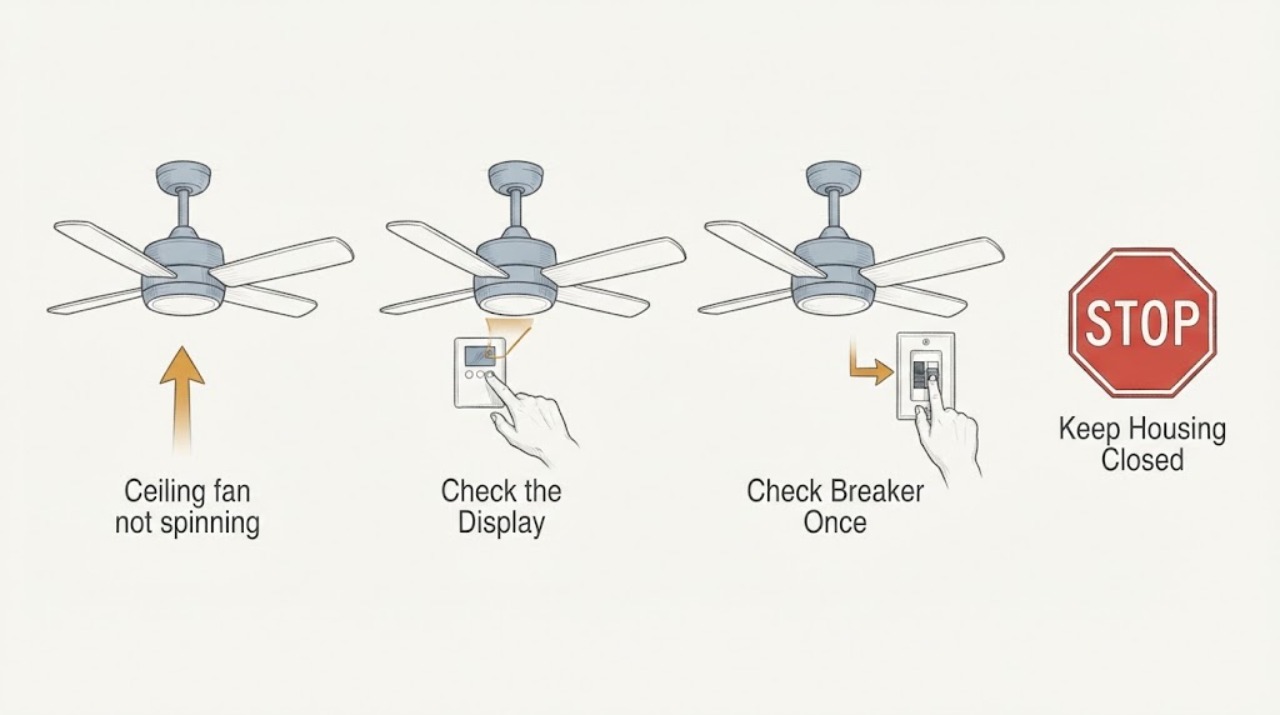
Work through in order
Diagnostic checks
Use only checks that match the exact appliance or system and its official guide.
-
Check 1
From ordinary room access, turn the Hunter fan wall switch on, use the pull chain or remote's on control as applicable, and check the remote batteries; do not climb or open the fan to reach a control.
Expected result: Record whether the light responds, the remote has an indicator or fresh batteries, the pull chain changes state, and the fan remains completely inactive or responds partially.
Next step: Use the exact model manual for remote pairing or pull-chain operation; continue to a breaker check only if the panel is safe to access and no warning signs are present.
Stop if: Stop for heat, smoke, burning odor, sparks, crackling, exposed wiring, a loose ceiling mount, or any need to open the fan or switch housing.
Why this matters
Why: No light and no blade movement keeps power, wall switch, remote, and breaker in focus. A working light with stopped blades points more toward the fan controls, receiver, capacitor, harness, or motor.
-
Check 2
Look at the labeled circuit breaker from the front of the closed panel; if it is clearly tripped and the panel is dry and intact, move it fully to OFF and then fully to ON once, without removing the cover.
Expected result: The breaker may be fully ON, visibly tripped, fully OFF, or it may trip again immediately when the fan is selected.
Next step: If it stays ON, retry the fan controls once; if it trips again or the handle will not move normally, leave it OFF and arrange qualified electrical service.
Stop if: Do not repeatedly reset the breaker, change its rating, remove the panel cover, or touch anything behind the cover.
Why this matters
Why: A tripped breaker can explain a fan with no power, but a repeat trip indicates an unresolved load, wiring, or equipment fault rather than a switch-setting problem.
-
Check 3
Turn the fan off, let the blades stop, and inspect from the floor for a visible obstruction, loose blade or holder, severe wobble, cracked housing, or a fan that appears loose at the ceiling; use only stable access explicitly allowed by the model manual.
Expected result: Note whether the blades are blocked, visibly misaligned, loose, or free of obvious obstruction, and whether the fixture moves at its ceiling mount when operating; do not reach toward moving blades.
Next step: If the manual permits a simple adjustment from safe, stable access, follow it with power off; otherwise keep the fan off and arrange fan service for overhead mounting or blade work.
Stop if: Do not use an unstable ladder, grab the fan, remove the canopy, force a blade, or operate a fan that is loose, cracked, or severely wobbling.
Why this matters
Why: Hunter associates wobble with blade screws, alignment, balance, mounting hardware, or installation, while a blocked or loose blade can prevent normal rotation. A mechanically sound appearance does not rule out an internal motor or control fault.
-
Check 4
With the fan off and blades stopped, check whether the housing direction switch is fully to one side rather than in the middle, then use the intended remote or wall control at each permitted speed without changing wiring.
Expected result: The fan may remain stopped, start on one speed only, respond after the direction switch is fully engaged, or respond to the light but not the blades.
Next step: Follow the model manual for remote pairing or control settings; if the fan remains stopped or only one speed works, record the pattern and arrange qualified service.
Stop if: Do not move the direction switch while running, open the receiver, replace a capacitor, or bypass a speed control.
Why this matters
Why: A direction switch between positions, remote or wall-control issue, capacitor problem, receiver, or wiring harness can create a no-spin or one-speed symptom. A control response does not prove the motor or capacitor is healthy.
-
Check 5
After the external checks, document whether the light works, whether the motor hums, whether the blades can move only with assistance, whether the breaker trips, and whether any control or wiring warning sign is present; do not open the canopy or test energized conductors.
Expected result: Classify the result as no power, light on but blades stopped, hum without rotation, one-speed operation, mechanical looseness, repeat breaker trip, or smoke, odor, heat, or visible damage.
Next step: Leave the fan and light off when the fault repeats or the cause is uncertain, and give a qualified electrician or Hunter technician the model number and symptom pattern.
Stop if: Do not remove the canopy or switch housing, measure voltage, disconnect wires, touch a hot motor, or keep cycling a faulty fan.
Why this matters
Why: Light-on and no-spin symptoms can involve the harness, capacitor, receiver, internal controls, or motor; a hum can also be control-related. A repeat breaker trip or warning sign raises the electrical urgency and cannot be solved by a replacement part chosen from the symptom alone.
Use your observations
Decision map
Find the observation that best matches what you see, then follow the next safe action.
-
PATH 01Safety boundary
What you see
The light and blades are both inactive, the wall switch or remote does not respond, and the breaker is OFF or tripped.
Do this next
Use the model control instructions and make one safe breaker reset if the panel is closed, dry, and intact; leave the circuit OFF if it trips again.
Why this path and its safety boundary
Why it matters: A power, switch, remote, or breaker state is more likely than a motor-only failure.
Safety stop: Do not repeatedly reset the breaker, change its rating, or open the panel.
-
PATH 02Safety boundary
What you see
The Hunter light works but the blades do not spin after the wall control, remote, and direction switch checks.
Do this next
Leave the fan off if it hums, heats, or smells unusual and arrange qualified diagnosis with the model number available.
Why this path and its safety boundary
Why it matters: The receiver, wiring harness, capacitor, internal control, or motor is more likely than a whole-fixture power loss.
Safety stop: Do not open the canopy, remove the receiver, replace a capacitor, or test live wiring as a homeowner procedure.
-
PATH 03Safety boundary
What you see
The fan starts only on one speed, responds inconsistently to a remote or wall control, or changes behavior when the direction switch is moved fully into position.
Do this next
Follow the exact manual for pairing and control settings; request service if the symptom remains or the fan needs internal access.
Why this path and its safety boundary
Why it matters: Hunter identifies the remote, wall control, reverse switch, capacitor, and wiring harness as possible causes of speed-control problems.
Safety stop: Do not bypass the control, move the direction switch while running, or substitute a receiver or capacitor by appearance.
-
PATH 04Safety boundary
What you see
The blades are blocked, a blade or holder is visibly loose, the fan wobbles severely, or the ceiling mount appears loose.
Do this next
Keep the fan off and arrange safe, stable adjustment or qualified fan service; use the model manual for any accessible hardware check.
Why this path and its safety boundary
Why it matters: A mechanical or installation issue is more likely than an electronic control problem and can make operation unsafe.
Safety stop: Do not grab the fan, force blades, remove the canopy, or operate a loose or cracked fixture.
-
PATH 05Safety boundary
What you see
The breaker trips again when the fan is selected, or the fan has no power after a repeat trip with accessible loads unchanged.
Do this next
Leave the breaker OFF, keep the fan off, and arrange certified electrical diagnosis.
Why this path and its safety boundary
Why it matters: An overload, short, wiring issue, control fault, or equipment problem remains; continued resets can re-energize the hazard.
Safety stop: Do not hold the breaker ON, reset it repeatedly, remove covers, or disconnect fan wires.
-
PATH 06Safety boundary
What you see
The fan or controls crackle, spark, smoke, smell burned, become hot, show burn marks, or have exposed or wet wiring.
Do this next
Turn the fan and light off from a safe control if possible, keep clear, and arrange prompt qualified electrical service; use emergency procedures for active smoke or fire.
Why this path and its safety boundary
Why it matters: This is an electrical stop condition requiring prompt professional attention, not a remote, blade, or battery adjustment.
Safety stop: Do not touch, spray, open, test, or continue operating the equipment.
Helpful context
Understand the symptom
Use the light and control behavior to narrow the fault
A fan with no light and no blade movement first needs a power, wall-switch, pull-chain, remote, or breaker check. If the light works but the blades do not, power reaches at least part of the fixture and the receiver, wiring harness, capacitor, internal control, or motor becomes more relevant. If the fan runs on one speed only, Hunter identifies the remote, wall control, reverse switch, capacitor, or wiring harness as possible causes. These observations narrow the next safe step; they do not identify a replaceable part by themselves.
The reverse switch must be fully engaged, not left between positions
On models with a housing direction switch, Hunter says to turn the fan off, let the blades stop, and move the switch fully to one side or the other. Do not move a direction switch while the fan is running. Remote-controlled models may not have a physical switch, so use the model-specific manual rather than assuming the same control path.
Wiring, canopy, receiver, capacitor, and motor work need qualified access
Hunter's guide points to the wiring harness, capacitor, receiver, and internal controls when the motor has power but the blades will not spin, and it directs wiring concerns to a certified electrician. A visual check from the room is reasonable; opening the canopy or switch housing, measuring voltage, replacing a capacitor, or changing a receiver is not an ordinary-access test.
Stop for a loose fan or electrical warning sign
If the fan is loose at the ceiling, wobbles severely, smells burned, crackles, sparks, shows burn marks, or trips the breaker again, keep it off and arrange qualified service. Hunter says to call a licensed electrician for loose wiring, burn marks, no power at the switch, or discomfort with electrical components. A reset that briefly restores motion does not make a damaged or unstable fan safe.
Safety boundary
Stop conditions
- Do not remove the canopy, switch housing, receiver, or light kit, disconnect wires, measure live voltage, or replace a capacitor as a routine homeowner check.
- Do not touch moving blades, use an unstable ladder, grab a loose fan, force the direction switch, or operate a severely wobbling or cracked fixture.
- Do not repeatedly reset a tripping breaker, hold it ON, change its rating, or bypass a remote, receiver, speed control, or safety feature.
- Turn the fan and light off and arrange prompt service for smoke, sparks, crackling, burning odor, heat, wet wiring, burn marks, or a loose ceiling mount.
- Arrange qualified electrical or Hunter service when the light works but blades remain stopped, the fan hums without spinning, only one speed works, or safe external checks do not restore operation.
Only after diagnosis
Potential parts
- Hunter compatible remote or wall control
Consider this only when the exact fan model and control arrangement are identified and a diagnosis links the no-spin symptom to the control.
Confirm model-specific pairing, receiver, wiring, and speed-control compatibility; do not substitute a control by appearance. - Hunter receiver or wiring harness
Consider this only after qualified diagnosis identifies a failed or damaged receiver or harness in the exact fan model.
Match the model, connector arrangement, control system, and installation instructions; internal access should be performed by a qualified person. - Hunter capacitor
Consider this only when a qualified diagnosis or model manual identifies a capacitor issue, especially for one-speed or no-spin behavior.
Match the exact fan model and electrical specification; do not open the housing or replace a capacitor while energized.
When checks do not resolve it
Need a professional?
Arrange qualified electrical or Hunter service when the light works but the blades remain stopped after control checks, the fan runs on only one speed, the motor hums without rotation, the breaker trips again, the fan is loose or severely wobbling, or the wiring, receiver, capacitor, or motor may need access. Turn the fan and light off and escalate promptly for smoke, sparks, crackling, burning odor, heat, wet wiring, burn marks, or visible damage.
Safety scope: This article supports ordinary control checks, a front-of-panel breaker observation, and a visual check with the fan stopped. A qualified electrician or fan technician must handle wiring, switch boxes, canopy access, receiver, capacitor, motor, breaker, and ceiling-mount work.
Common questions
FAQ
Why is my Hunter ceiling fan not spinning?
Possible causes include an off switch or pull chain, remote or breaker issue, reverse switch between positions, blocked or loose blades, a receiver, wiring harness, capacitor, internal control, or motor problem. Use the light and control behavior to narrow the next safe check.
What should I check first when my Hunter fan will not turn on?
Check the wall switch, pull chain or remote, remote batteries, and the labeled breaker from safe access. If the breaker is tripped and the panel is closed, dry, and intact, make one full OFF-to-ON reset; leave it OFF if it trips again.
Why do the Hunter fan lights work but the blades do not spin?
Power reaches at least part of the fixture, so the receiver, wiring harness, capacitor, internal control, or motor becomes more relevant. Do not open the canopy or test wiring; record the model and arrange qualified diagnosis if control checks do not restore rotation.
Can the reverse switch stop a Hunter ceiling fan from spinning?
On models with a physical direction switch, Hunter says to turn the fan off, let the blades stop, and move the switch fully to one side or the other rather than leaving it in the middle. Remote models may use a different procedure, so follow the model manual.
When should I call an electrician for a Hunter fan that is not spinning?
Call when the breaker trips again, the fan is loose or severely wobbling, the light works but the blades remain stopped, the motor hums without rotating, or wiring, a receiver, capacitor, or motor may need access. Escalate promptly for smoke, sparks, crackling, burning odor, heat, wet wiring, or burn marks.
Read the exact guide
Official sources
- CPSC Guide to Home Wiring HazardsU.S. Consumer Product Safety Commission · General U.S. consumer electrical-safety guidance; the installed fan instructions and local electrical requirements also apply.
- How to Fix a Ceiling Fan That Won't Turn On, Wobbles, or Makes NoiseHunter Fan · Hunter's supplemental general guidance; the exact Hunter model manual controls the installed fan and a licensed electrician handles wiring and electrical repairs.
- Why is my fan wobbling?Hunter Fan Team · Hunter support information for installed Hunter fans; overhead access and mounting repairs require safe access and qualified service when uncertain.
- Why is my fan humming?Hunter Fan Team · Hunter support information about fan speed-control electronics; it does not replace the model manual or qualified diagnosis.
Community feedback
Share a repair observation
Share a plain-text repair observation. Accepted observations are published automatically; this page may take a moment to update.