
On this page
Start here
Quick answer
A small amount of ceiling-fan movement can be normal, but a new or worsening wobble usually comes from uneven blade alignment or weight, loose blade or downrod hardware, an unstable mounting bracket, dust buildup, a warped blade, or an installation issue. Turn the fan off before inspecting it, keep the blades clear of nearby objects, and check only hardware you can safely reach from a stable position. Clean uneven dust, confirm the visible blade and light-kit screws are secure, and use the Hunter balancing kit according to the model instructions if the fan and mount are stable. If the ceiling plate or junction box moves, the fan hangs lower, a blade is cracked or warped, the wobble is severe, or the fan remains unstable after balancing, stop using it and arrange qualified electrician or fan service. Do not work on ceiling wiring, support a hanging fan from an unsafe ladder, or keep running a fan that could fall.
Before you begin
Safety first
- This article supports turning the fan off, checking clearance, dusting accessible blades, observing visible hardware from a stable position, and using the manufacturer-supplied balance kit only on a stable intact fan. It does not authorize overhead wiring, junction-box or canopy work, fan removal, structural support repair, improvised weights, or operation of an unstable fan.
Work through in order
Diagnostic checks
Use only checks that match the exact appliance or system and its official guide.
-
Check 1
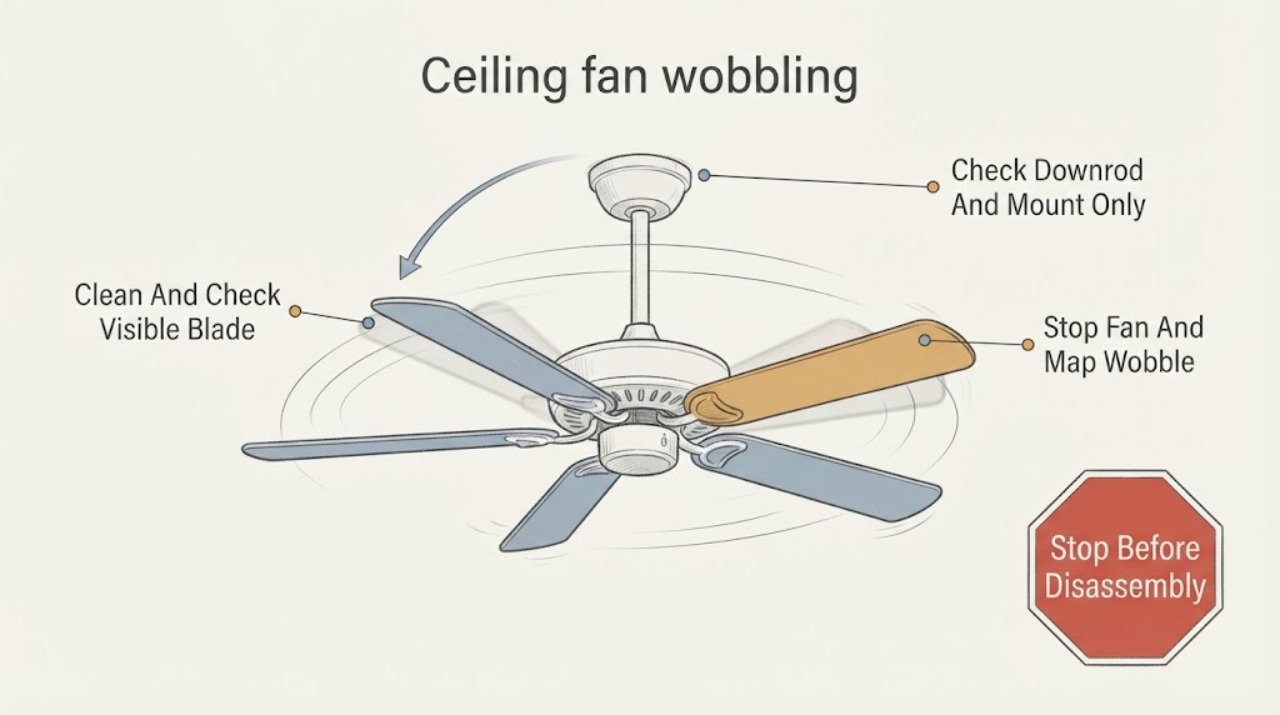
Turn the fan off and let all blades stop. From the floor or a stable, appropriate step position, note whether the whole fan swings, the blades rise and fall, the light kit or glass vibrates, or the wobble appears only at one speed. Check that blade tips have clear space from walls, cabinets, curtains, and other objects without reaching toward the blades.
Expected result: Record slight movement versus a large orbit, a wobble that changes with speed, blade-tip height differences, a shaking light kit, a scraping sound, or a clearance obstruction. Note whether the fan is flush-mounted or uses a downrod.
Next step: Use the blade-balance branch when the support is still and the blade tips differ. Use the unstable-mount branch when the ceiling or bracket moves, and leave the fan off.
Stop if: Do not run the fan to reproduce severe wobble, stand directly under a fan that appears loose, or continue if a blade, light, canopy, or mounting part could fall.
Why this matters
Why: Blade-level or speed-dependent movement makes imbalance, dust, blade hardware, or a warped blade more likely. A whole-fan swing or movement at the ceiling makes the mount, downrod, hanger, junction box, or support structure more likely. Contact with an object can imitate or amplify wobble.
-
Check 2
With power off and the fan fully stopped, remove uneven dust from the accessible blade surfaces with a soft cloth or duster. Check visible screws securing the blades, blade irons, and light kit or glass for looseness, tightening only fasteners you can reach safely while supporting the parts as the model manual directs.
Expected result: Look for one blade with heavier dust, a loose blade or light-kit screw, a cracked or warped blade, missing hardware, or a wobble that changes after cleaning and tightening. Do not infer that a tight blade screw proves the ceiling mount is secure.
Next step: If the blades and support remain stable, proceed to the model-approved balance-kit check. If a blade is damaged, hardware is missing, or the fan support moves, keep it off and arrange service.
Stop if: Do not climb onto an unstable chair, hold a moving blade, use force on seized hardware, tape or glue a cracked blade, or open electrical covers.
Why this matters
Why: Uneven dust or loose blade and light hardware can alter the rotating balance. A cracked, bowed, or twisted blade cannot be balanced reliably and needs a model-matched replacement or service. Persistent whole-fan movement after these checks points away from simple blade balance.
-
Check 3
Without exposing wiring, inspect the visible canopy, downrod connection, set-screw area, and ceiling plate from a stable position. If the model manual permits a homeowner check and the fan is securely supported, verify that the visible hardware is seated and tight; otherwise leave the canopy closed and have a professional inspect the mount.
Expected result: Note a downrod that twists, a set-screw area that is visibly loose, a canopy touching the ceiling, a ceiling plate that shifts, a gap at the junction box, or movement of the ceiling or fan body independent of the blades.
Next step: If any support component moves or the fan is not safely supported, turn off the circuit and arrange an electrician or qualified fan technician. If the mount is stable, continue with balancing rather than altering wiring.
Stop if: Do not remove the canopy, touch wire connections, loosen mounting screws while the fan is unsupported, or continue from an unsafe ladder or overhead position.
Why this matters
Why: Downrod or set-screw looseness can let the fan sway, while a moving ceiling plate, junction box, or support is a fall hazard and cannot be corrected by blade weights. A canopy or wire-related rattle also needs model-specific access.
-
Check 4
Only if the fan is firmly mounted, the blades and light kit are intact, and the model instructions allow it, use the Hunter balance kit. With the fan stopped, attach the plastic clip to one blade as directed, run the fan briefly from a safe position, stop it, and repeat on each blade to find the position that produces the least movement. Attach the supplied weight at the identified position and remove the clip according to the instructions.
Expected result: Record whether one blade and clip position consistently reduces the wobble, whether no position changes it, or whether the wobble becomes worse, the clip or weight shifts, or the fan support moves.
Next step: Run one final brief check only after the weight is secure and the fan remains stable. If the wobble persists, remove the fan from service and arrange qualified inspection rather than adding arbitrary weights.
Stop if: Do not attach weights to damaged blades, reach near rotating blades, use loose or improvised weights, perform the test under a moving fan, or continue if the mount moves.
Why this matters
Why: Improvement at one blade position supports a modest blade-balance issue. No improvement makes a warped blade, unequal blade level, downrod, mount, or support problem more likely. A shifting clip or worsening movement is a stop signal.
-
Check 5
Leave the fan off and arrange qualified electrician or fan service when the ceiling support moves, the fan hangs or shifts, a blade is cracked or warped, hardware is missing, the balance kit does not resolve the wobble, or the fan makes a new mechanical or electrical noise.
Expected result: Give the technician the fan model, mount type, wobble pattern, speed at which it is worst, blade and hardware findings, balance-kit result, light-kit behavior, and any change after cleaning. Do not open the canopy to gather more information.
Next step: Have the professional verify the support, fasteners, blade geometry, electrical connections, motor, and any light-kit hardware, then confirm stable operation before the fan is used again.
Stop if: Do not brace, shim, rewire, remove, or reinstall an overhead fan without the required support and electrical expertise, and do not keep operating it while unstable.
Why this matters
Why: The remaining possibilities include an unsuitable or loose fan-rated box, bracket or downrod issue, bent blade iron, damaged blade, motor or bearing problem, light-kit imbalance, or an electrical or structural installation fault. Wobble alone cannot identify a replacement part.
Use your observations
Decision map
Find the observation that best matches what you see, then follow the next safe action.
-
PATH 01Safety boundary
What you see
The ceiling plate and fan body remain still, blade hardware is secure, the blades are intact, and cleaning or one Hunter balance-kit position reduces the blade-tip wobble.
Do this next
Secure the manufacturer-supplied balance weight as directed, confirm the light kit is stable, and monitor the fan at normal speeds. Stop if the wobble returns or worsens.
Why this path and its safety boundary
Why it matters: Uneven dust, blade weight, blade level, or minor imbalance is more likely than a structural or electrical fault.
Safety stop: Do not add arbitrary weights or continue balancing a blade that is cracked, warped, or loose.
-
PATH 02Safety boundary
What you see
The fan body, canopy, downrod, ceiling plate, junction-box area, or ceiling moves independently of the blade rotation, or the fan appears to hang lower or shift.
Do this next
Turn off the fan and its circuit if safe to do so, keep people clear, and arrange qualified electrician or fan service to inspect the support and wiring.
Why this path and its safety boundary
Why it matters: An unstable mount, support, bracket, hanger, or installation issue is more likely than blade imbalance and may create a fall or electrical hazard.
Safety stop: Do not tighten overhead mount hardware while the fan is unsupported, remove the canopy, or continue operation to test it.
-
PATH 03Safety boundary
What you see
A blade is cracked, bowed, twisted, or at a different level, or a blade, light-kit, downrod, or mounting fastener is missing or damaged.
Do this next
Keep the fan off and identify the exact model for a manufacturer-approved part or professional replacement. Do not operate it with a damaged blade or improvised fastener.
Why this path and its safety boundary
Why it matters: The rotating assembly cannot be assumed safe or balanceable; a damaged or missing part can worsen movement and stress the mount.
Safety stop: Do not glue, drill, straighten, mix unverified blade sets, or substitute hardware based only on appearance.
-
PATH 04Safety boundary
What you see
The fan is intact and appears mounted, but cleaning, visible tightening, and a model-approved balance-kit check do not reduce the wobble, or a new noise accompanies it.
Do this next
Leave the fan off and arrange qualified fan or electrical service for inspection; report the test results rather than adding more weights.
Why this path and its safety boundary
Why it matters: Unequal blade geometry, a bent blade iron, downrod or hanger issue, motor or bearing fault, light-kit imbalance, or a hidden installation problem is more likely.
Safety stop: Do not open the motor housing, replace electrical components, or keep running the fan to force a diagnosis.
Helpful context
Understand the symptom
Wobble is usually an alignment or mounting clue
A ceiling fan can move slightly while running, but a noticeable or worsening wobble is different from ordinary airflow movement. Uneven blade weight, dust, blade height, loose blade hardware, a downrod set screw, light-kit hardware, or a mounting bracket can all change the rotation. The safest diagnosis starts with the fan off and the support system left intact.
Balance the blades only after the fan is secure
Hunter supplies a balance kit for its fans. A clip can identify which blade position reduces the wobble, and a small weight can then be placed as directed. This procedure is appropriate only when the fan is firmly supported, all fasteners are secure, the clip and weight can be attached without reaching into a moving fan, and the model instructions permit it. A balancing kit cannot correct a bent blade or a loose ceiling support.
Treat movement at the ceiling as a stop condition
If the bracket, junction box, downrod, hanger ball, canopy, or ceiling itself moves, the issue is structural or electrical rather than a blade-balance adjustment. A ceiling fan is overhead equipment, so do not open the canopy or change wiring as a homeowner sound or wobble fix. Turn the fan off and have an electrician or qualified fan technician verify the support and installation.
Safety boundary
Stop conditions
- Turn the fan off before inspection and keep hands, tools, clothing, and ladders away from rotating blades.
- Do not continue operation when the fan body, ceiling plate, downrod, junction box, canopy, or ceiling moves, or when the fan appears loose or could fall.
- Do not open wiring compartments, alter the electrical box, remove the fan, or work on overhead electrical connections without qualified electrical expertise.
- Do not balance a cracked, warped, twisted, or loose blade, use improvised weights, or substitute unverified hardware.
- Arrange professional service when safe cleaning and a model-approved balance check do not resolve the wobble, or when noise, sparks, burning odor, or visible damage appears.
Only after diagnosis
Potential parts
- Hunter ceiling-fan blade set
Consider this category only when a blade is confirmed cracked, warped, twisted, or otherwise damaged and the exact fan model identifies a compatible replacement set.
Match the complete Hunter model, blade count, mounting pattern, size, and approved instructions; do not mix blades from visually similar fans. - ceiling-fan balancing kit
Consider this category only for a stable, intact fan whose wobble is consistent with a small blade-balance difference and whose model instructions permit balancing.
Use the kit and placement instructions for the exact fan; weights cannot correct a loose mount, bent blade, or damaged support. - Hunter ceiling-fan mounting or downrod component
Consider this category only after a qualified inspection confirms a loose, damaged, or incorrectly matched mounting or downrod component.
Confirm fan model, ceiling angle, support-box rating, downrod assembly, and electrical requirements with the manufacturer or qualified installer before replacement.
When checks do not resolve it
Need a professional?
Arrange qualified electrician or fan service when the ceiling support, junction box, bracket, downrod, or fan body moves; a blade is cracked or warped; hardware is missing; the wobble is severe; or cleaning and the Hunter balance kit do not resolve it. Stop immediately for sparks, burning odor, exposed wiring, a loose or falling component, or a fan that strikes an object. Do not diagnose overhead wiring or support by opening the canopy.
Safety scope: This article supports turning the fan off, checking clearance, dusting accessible blades, observing visible hardware from a stable position, and using the manufacturer-supplied balance kit only on a stable intact fan. It does not authorize overhead wiring, junction-box or canopy work, fan removal, structural support repair, improvised weights, or operation of an unstable fan.
Common questions
FAQ
Is a small amount of Hunter ceiling-fan wobble normal?
Some movement can occur, but a noticeable, worsening, or newly appearing wobble should be checked. Start with the fan off: inspect clearance, dust, visible blade and light-kit hardware, blade condition, and whether the ceiling support moves. A moving mount or severe wobble is a stop condition, not a balance-kit experiment.
What causes a Hunter ceiling fan to wobble?
Common causes include uneven dust or blade weight, loose screws, unequal blade level, a warped or twisted blade, a loose downrod or set screw, an unstable bracket or fan-rated box, a light kit, or an installation issue. The correct next step depends on whether the whole fan or only the blades move.
Can I fix a wobbly Hunter fan with a balance kit?
A balance kit can correct a small blade-weight difference on a stable, intact fan. Follow the Hunter instructions: test the clip position one blade at a time with the fan stopped between adjustments, then secure the weight. It cannot correct a loose mount, bent blade, damaged blade iron, or structural movement.
Should I tighten the ceiling fan bracket myself?
Only inspect or tighten visible hardware if the model manual permits it, the fan is safely supported, and you can work from a stable position with power off. If the ceiling plate, junction box, downrod, or fan body moves, do not loosen or remove the canopy; arrange qualified electrician or fan service.
When should I stop using a wobbling Hunter ceiling fan?
Stop immediately if the fan body or ceiling support moves, a blade is cracked or warped, hardware is missing, the fan strikes an object, the wobble is severe, or sparks, burning odor, or exposed wiring appears. Leave it off and arrange qualified inspection; do not keep running it to see whether another weight helps.
Read the exact guide
Official sources
- Why is my fan wobbling?Hunter Fan · Hunter consumer support guidance; exact hardware and procedures vary by fan model.
- Owner's ManualHunter Fan · Hunter model ME018-01 owner manual; other models may use different hardware and procedures.
- How to Balance a Ceiling Fan | Fix a Wobbly Fan with Simple StepsHunter Fan · Hunter's general consumer balancing guidance; follow the exact manual for the fan model and installation.
- Ceiling Fan Parts and FunctionsHunter Fan · Hunter component glossary; models can use different hardware and installation arrangements.
Community feedback
Share a repair observation
Share a plain-text repair observation. Accepted observations are published automatically; this page may take a moment to update.