
On this page
Start here
Quick answer
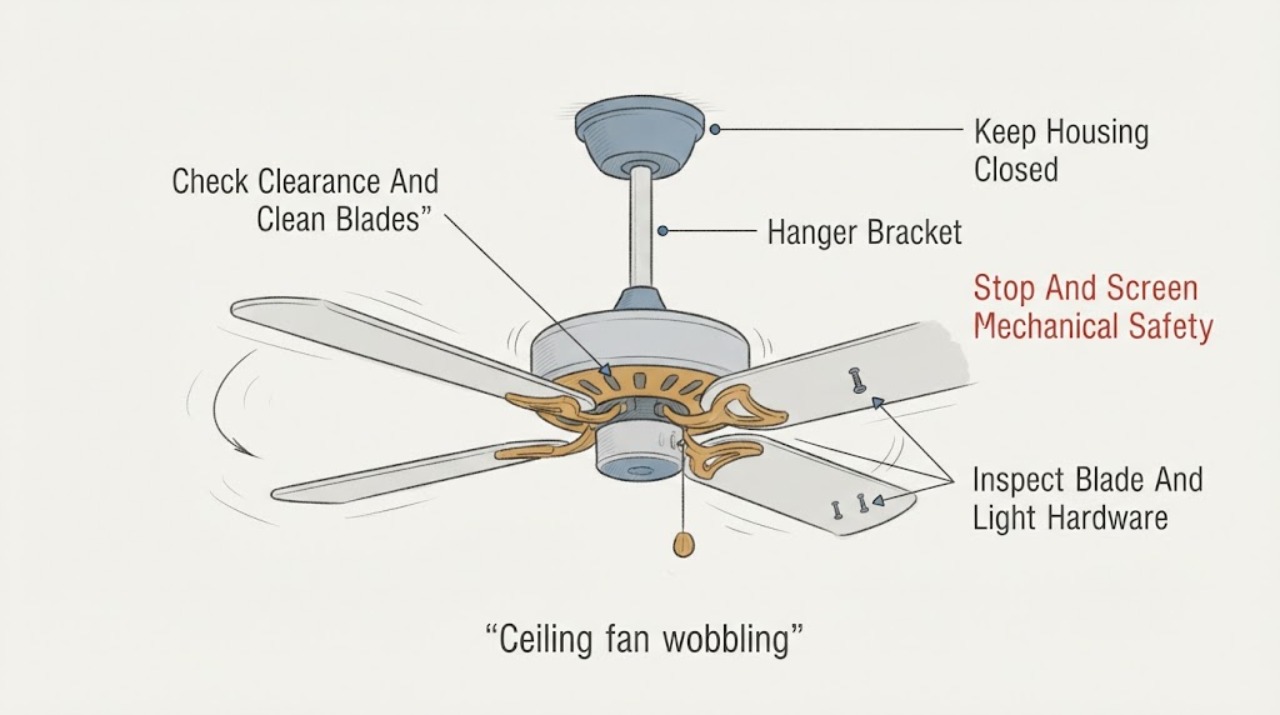
Turn the Minka Aire fan off and let the blades stop before checking anything. From the floor, look for a blade contacting an object, a fan that is swinging at the ceiling, a loose or sagging canopy, a cracked or warped blade, or unusual noise. If the fan is only mildly oscillating, clean uneven dust, then inspect the blade-holder and light-kit fasteners with power isolated and follow the exact Minka Aire manual. Minka Aire manuals identify loose blade and support hardware and uneven blade weight as different wobble paths; a balancing kit can address small weight differences, but it cannot correct a warped or damaged blade or an insecure ceiling support. Stop using the fan for a moving hanger, loose outlet-box support, cracking, contact with an object, or electrical warning, and arrange qualified service for canopy, bracket, downrod, ceiling-box, or wiring work.
Before you begin
Safety first
- This article covers stopping the fan, safe floor-level observation, dry dust removal, model identification, and a model-approved balancing-kit procedure when the support is stable. It does not authorize canopy or motor disassembly, wiring or ceiling-box work, structural repair, improvised weights, blade modification, or operation with damaged or moving support.
Work through in order
Diagnostic checks
Use only checks that match the exact appliance or system and its official guide.
-
Check 1
Turn the fan off with its normal control and wait for the blades to stop. From the floor, check whether a blade touches a wall, cabinet, light, or other object, whether the canopy or downrod visibly moves at the ceiling, and whether there is cracking, scraping, a burning smell, sparking, or a new electrical noise.
Expected result: Classify the motion as blade-only oscillation, whole-fan sway at the hanger, contact with an object, visible damage, or no safe way to observe the fan. Record whether the wobble increases with speed.
Next step: Leave the fan off and arrange qualified service for hanger movement, contact, cracking, electrical warning, or inaccessible inspection. If the support is still and no warning exists, continue with power-off blade checks.
Stop if: Do not run a fan that contacts an object, swings at the ceiling, has a cracked blade or loose support, or shows smoke, heat, sparking, or burning odor.
Why this matters
Why: Blade-only motion can be a balance, alignment, or fastener issue. Movement at the hanger, contact, cracking, or electrical warning can indicate an unsafe installation or damaged component and is not a balancing-kit problem.
-
Check 2
With the fan off, check the blade tips and nearby objects from a safe position and remove only loose, surface dust with a dry soft cloth or duster. If the blades require a ladder, overhead work, or a position that is not secure, leave the cleaning and inspection to a professional.
Expected result: Record any blade-to-object clearance problem, uneven dust buildup, blade surface damage, or a blade that sits visibly lower or twists compared with the others.
Next step: Correct only a safe, external obstruction or dust issue, then proceed to fastener and alignment checks with power isolated. For a distorted or damaged blade, keep the fan off and identify the exact model for professional replacement guidance.
Stop if: Do not bend a blade straight, sand it, add improvised weights, spray cleaner into the motor, or reach over the blades from an unstable ladder.
Why this matters
Why: A contact or uneven dust load can create apparent wobble. A blade that is bowed, twisted, cracked, or persistently lower is not corrected by adding a random weight; the blade set, blade holder, or mounting must be assessed.
-
Check 3
After switching off the fan's circuit at the breaker when any overhead or light-kit access is required, and only if the exact manual permits safe external service, inspect the blade-holder-to-motor and blade-to-holder fasteners and any light-kit hardware. Tighten only loose fasteners to the manual's instructions; do not remove the canopy.
Expected result: Record a loose blade screw, a blade holder that is not seated evenly, loose light-kit hardware, a missing fastener, stripped threads, or hardware that is already tight while the wobble remains.
Next step: If the hardware is sound and the support does not move, follow the model manual's balance-kit procedure. If hardware is damaged, cannot be tightened, or the light kit contributes to movement, keep the fan off and arrange model-specific service.
Stop if: Do not work with power on, use a longer or mismatched screw, force stripped threads, remove the canopy, or touch wiring while checking hardware.
Why this matters
Why: Minka Aire manuals call out blade attachment and support screws as wobble or noise checks. A missing, stripped, bent, or repeatedly loosening fastener is a hardware or installation fault, not proof that the blade merely needs balancing.
-
Check 4
Without loosening or removing the canopy, observe whether the ceiling plate, canopy, downrod, set-screw area, or hanger location moves independently of the ceiling while the blades are stopped. Compare the installation with the exact Minka Aire manual, including whether the fan is on a sloped ceiling and uses the specified support hardware.
Expected result: Record a stable mount, canopy movement, downrod movement, a set-screw or hanger concern visible without disassembly, ceiling movement, an unknown ceiling-box rating, or an installation on a slope without identifiable model-approved hardware.
Next step: Keep the fan off for any mount, downrod, ceiling, or support concern and arrange qualified installation or electrical service. Only a stable support with intact blade hardware should proceed to a balance-kit check.
Stop if: Do not remove the canopy, hold the fan while loosening support hardware, substitute a ceiling box or bracket, adjust a set screw by guesswork, or continue running a fan with a moving mount.
Why this matters
Why: A moving mount or downrod is a support or installation problem; a balance clip cannot correct it. Sloped ceilings, incorrect downrod length, a non-rated box, or a loose bracket can change the fan's alignment and load path.
-
Check 5
If the mount is stable, blades are intact, hardware is secure, and the exact Minka Aire manual supplies or approves a balancing kit, follow that kit's instructions. Test only with the fan clear of people and objects, stop the fan completely before moving a clip, and make one small adjustment at a time.
Expected result: Record whether one blade or one clip position noticeably reduces the wobble, whether the wobble is unchanged across blades, or whether vibration increases after an adjustment.
Next step: Keep only the manual-approved weight placement that produces a stable result. If balancing does not correct the wobble, the blades are distorted, or the fan still sways, keep the fan off and arrange qualified diagnosis.
Stop if: Do not use tape, coins, improvised weights, or a kit not confirmed for the model; never touch a rotating blade or leave a loose clip attached during operation.
Why this matters
Why: A repeatable improvement from one blade position supports a small blade-weight imbalance. No improvement across the blade set points away from simple balance and toward blade shape, blade holders, downrod, motor, or mounting support; increased vibration means the adjustment should be removed and testing stopped.
Use your observations
Decision map
Find the observation that best matches what you see, then follow the next safe action.
-
PATH 01Safety boundary
What you see
The ceiling support stays still, blade and light-kit hardware is secure, there is no contact or damage, and the oscillation is small and repeatable at the blade plane.
Do this next
Use only the exact manual's balancing-kit instructions, testing one clip or weight position at a time. If no position helps, have the blade set, holders, and motor alignment assessed.
Why this path and its safety boundary
Why it matters: A blade-weight or alignment imbalance is more likely than a loose ceiling support. Minka Aire notes that even matched wood or plastic blades can vary in density.
Safety stop: Do not add improvised weights, bend blades, or continue if vibration grows or the fan contacts anything.
-
PATH 02Safety boundary
What you see
One blade is bowed, twisted, cracked, visibly lower, or its holder does not sit in the same plane as the others after fasteners are checked.
Do this next
Keep the fan off, record the exact model and blade position, and arrange model-specific blade or holder diagnosis. Replace parts only after compatibility is confirmed.
Why this path and its safety boundary
Why it matters: A damaged or distorted blade or holder cannot be reliably corrected with a balance weight. Continuing to run it can increase vibration and load on the mounting system.
Safety stop: Do not straighten, drill, trim, sand, glue, or add weight to a damaged blade; do not run the fan to compare a cracked blade.
-
PATH 03Safety boundary
What you see
A blade screw, blade-holder screw, light-kit fastener, missing fastener, or stripped thread is found, while the ceiling support itself appears stable.
Do this next
Keep the fan off and use the exact manual and model information to obtain the correct hardware or professional repair. Do not substitute a longer screw or continue operation after a fastener loosens again.
Why this path and its safety boundary
Why it matters: The local hardware is changing blade position or adding mass movement. A balancing kit cannot compensate for a fastener that will not hold.
Safety stop: Do not force threads, drill the motor, substitute hardware, remove a light kit with power connected, or test under full speed after a failed fastener.
-
PATH 04Safety boundary
What you see
The canopy, downrod, hanger bracket, ceiling plate, or ceiling box moves with the fan, or the fan was installed on a slope without confirmed compatible support hardware.
Do this next
Stop using the fan and arrange qualified electrical or ceiling-fan installation service to inspect the rated box, bracket, hanger ball, downrod, set screw, and wiring with power isolated.
Why this path and its safety boundary
Why it matters: This is a mounting, structural-support, or installation-alignment branch. Blade weights do not make a moving hanger safe.
Safety stop: Do not hold the fan while loosening hardware, remove the canopy, reuse an unknown ceiling box, or keep running the fan to see whether the mount settles.
-
PATH 05Safety boundary
What you see
The blades and support are intact and stable, but wobble remains after the model-approved balancing-kit procedure or is strongly speed-dependent.
Do this next
Keep the fan off if the wobble is severe or worsening, and arrange qualified diagnosis with the model, blade count, speed pattern, and prior adjustments. Do not keep adding weights.
Why this path and its safety boundary
Why it matters: The remaining cause may be blade-track alignment, a bent holder, downrod or hanger alignment, motor shaft or bearing wear, or another model-specific mechanical fault rather than simple weight imbalance.
Safety stop: Stop for scraping, grinding, worsening vibration, heat, electrical odor, or any blade or support movement; do not open the motor housing.
-
PATH 06Safety boundary
What you see
A blade contacts an object, the fan has a cracked housing or support, there is smoke, burning smell, sparking, abnormal heat, or the wall control or breaker behaves abnormally.
Do this next
Leave the fan off and arrange urgent qualified electrical or appliance service; for active smoke or fire, leave the area and seek emergency help from a safe location.
Why this path and its safety boundary
Why it matters: This is a safety fault, not a balancing adjustment. Mechanical contact or electrical damage can worsen if the fan is operated.
Safety stop: Do not reset a tripping breaker, touch hot or damaged parts, run the fan, or remove covers to inspect the cause.
Helpful context
Understand the symptom
Identify whether the wobble is in the blades or at the ceiling
A blade set can oscillate while the ceiling support stays still, or the entire fan can sway at the hanger. Uneven dust, loose blade-holder screws, blade damage, and small weight differences point to a blade-balance path. A canopy, downrod, hanger bracket, or ceiling-box movement points to an installation or structural path that a balancing weight cannot safely fix.
Minka Aire blade materials and models vary
Minka Aire manuals cover different blade counts, materials, motors, and mounting systems. One manual notes that matched wood or plastic blades can still vary in density, while another provides a balancing-kit instruction. Use the manual for the exact fan rather than swapping blades, changing blade positions, or copying a weight location from another model.
Mounting and electrical support are professional boundaries
The hanger bracket and ceiling-rated electrical box carry the fan. Inspecting or tightening a canopy can expose wiring and may require a ladder or support for the fan. Manufacturer installation guidance requires power isolation before wiring and a fan-rated support; if the fan moves at the ceiling, the bracket is loose, or the box is not known to be rated, stop and use a qualified electrician or installer.
Safety boundary
Stop conditions
- Stop using the fan for a moving hanger or canopy, a blade contacting an object, a cracked or twisted blade, a loose ceiling support, or worsening vibration.
- Do not remove the canopy, bracket, light kit, or motor housing; perform wiring, ceiling-box, downrod, or support work only with power isolated and qualified help.
- Do not bend blades, use coins or improvised weights, substitute screws or brackets, or keep adding balancing weights after the model-approved procedure fails.
- Stop immediately for smoke, burning smell, sparking, abnormal heat, grinding or scraping, visible electrical damage, or a breaker that trips again.
- Keep the fan off and arrange service when the wobble remains after intact hardware and the exact Minka Aire balancing instructions have been checked.
Only after diagnosis
Potential parts
- ceiling fan balancing kit
Consider this only when the mount is stable, blades and hardware are intact, and the exact Minka Aire manual supplies or approves a balancing-kit procedure for a small weight imbalance.
Confirm the fan model, blade construction, kit instructions, clip attachment, and weight placement; do not use improvised weights. - Minka Aire replacement blade set
Consider this only when a blade is warped, cracked, twisted, or otherwise confirmed unsuitable for balancing and the exact model's replacement is available.
Match exact model, blade count, length, pitch, mounting holes, material, and rotation direction; do not mix an unverified blade with the original set. - ceiling fan blade holder or mounting hardware
Consider this only when qualified diagnosis confirms a bent holder, missing or stripped fastener, or model-specific mounting hardware fault after the fan is powered off.
Match the exact motor hub, holder geometry, fastener type, and manual torque or installation requirements; do not substitute screws. - ceiling fan downrod or hanger bracket
Consider this only when professional inspection identifies a bent, loose, incorrect, or slope-incompatible downrod or hanger component as the cause of movement at the ceiling.
Confirm exact fan model, downrod length, ceiling angle, bracket, hanger ball, ceiling-box support, and electrical installation requirements before replacement.
When checks do not resolve it
Need a professional?
Arrange qualified ceiling-fan or electrical service for any moving hanger, canopy, downrod, bracket, or ceiling support; damaged blades or blade holders; unknown or inadequate ceiling-box support; slope-mount concerns; wobble that remains after the exact manual's balancing procedure; or any canopy, wiring, motor, or structural work. Treat blade contact, smoke, burning smell, sparking, abnormal heat, and a recurring breaker trip as urgent safety issues.
Safety scope: This article covers stopping the fan, safe floor-level observation, dry dust removal, model identification, and a model-approved balancing-kit procedure when the support is stable. It does not authorize canopy or motor disassembly, wiring or ceiling-box work, structural repair, improvised weights, blade modification, or operation with damaged or moving support.
Common questions
FAQ
Why is my Minka Aire ceiling fan wobbling if the blades look matched?
Matched blades can still have small weight differences, and wobble can also come from dust, loose blade-holder hardware, a bent holder, downrod alignment, or the ceiling support. Confirm that the hanger is stable and fasteners are secure before using the exact manual's balancing-kit procedure.
Can a balancing kit fix a warped Minka Aire fan blade?
No. A balancing kit is for a small weight imbalance after the support and hardware are sound. A bowed, twisted, cracked, or persistently low blade needs model-specific blade or holder diagnosis rather than an improvised weight.
What if the whole Minka Aire fan moves at the ceiling?
Stop using it. Movement at the canopy, downrod, hanger bracket, or ceiling box indicates a mounting or support problem that blade weights cannot correct. Arrange qualified service to inspect the rated box, bracket, hanger, downrod, and wiring with power isolated.
Should I tighten Minka Aire ceiling fan screws while it is running?
No. Turn the fan off and let the blades stop; isolate power before any overhead or light-kit access. Tighten only the hardware and procedure allowed by the exact manual, and leave canopy, bracket, downrod, and wiring work to a qualified professional.
When is a wobbling Minka Aire fan unsafe to run?
Keep it off for blade contact, a cracked or twisted blade, worsening vibration, scraping or grinding, a moving hanger, loose support, smoke, burning smell, sparking, abnormal heat, or a recurring breaker trip. Arrange urgent qualified service for electrical or structural warning signs.
Read the exact guide
Official sources
- Minka-Aire Calais F544 Installation InstructionsMinka Lighting LLC / Minka-Aire · F544 fan manual; used for the electrical safety boundary, not as a universal wobble procedure.
- Hunter Ceiling Fan Balancing KitHunter Fan · Hunter balancing-kit guidance used for general method only; Minka Aire kit instructions and model compatibility control a Minka Aire fan.
- Minka-Aire F547 Installation InstructionsMinka Lighting LLC / Minka-Aire · F547 fan manual; exact blade count, hardware, and balancing method vary by Minka Aire model.
- Minka-Aire F769L Installation InstructionsMinka Lighting LLC / Minka-Aire · F769L fan manual; its wobble notes apply specifically to that model and support the general need to verify the exact Minka Aire manual.
- How to Install a Ceiling Fan: Step-by-Step DIY GuideHunter Fan · Hunter installation guidance used for general support and electrical boundaries; Minka Aire model instructions control a specific installation.
- How to Balance a Ceiling Fan | Fix a Wobbly Fan with Simple StepsHunter Fan · Hunter's general ceiling-fan guidance is used for cross-brand diagnostic mechanics; Minka Aire's exact manual controls the particular fan.
- LiteratureMinka Lighting LLC · Official Minka literature page for locating the manual for a particular Minka-Aire fan.
- Why is my fan wobbling?Hunter Fan Support · Hunter support guidance used for cross-brand wobble triage; Minka Aire manual controls exact hardware and procedures.
Community feedback
Share a repair observation
Share a plain-text repair observation. Accepted observations are published automatically; this page may take a moment to update.